mirror of
https://github.com/PlayCover/PlayCover.git
synced 2026-04-27 00:35:52 +03:00
[GH-ISSUE #318] [Bug]: Pokémon Unite IPA not running in PlayCover #137
Labels
No labels
UI
app-support
bug
bug
documentation
duplicate
enhancement
game-support
good first issue
help wanted / caution
inactive
invalid
macos-beta
pull-request
question
wontfix
No milestone
No project
No assignees
1 participant

Notifications
Due date
No due date set.
Dependencies
No dependencies set.
Reference
starred/PlayCover#137
Loading…
Add table
Add a link
Reference in a new issue
No description provided.
Delete branch "%!s()"
Deleting a branch is permanent. Although the deleted branch may continue to exist for a short time before it actually gets removed, it CANNOT be undone in most cases. Continue?
Originally created by @weirdgonzo on GitHub (Sep 8, 2022).
Original GitHub issue: https://github.com/PlayCover/PlayCover/issues/318
Describe the bug
I can t run Pokémon Unite. I've uninstalled and installed PlayCover twice, done the same with the game and it doesn't open, it just gives mi this error log. However, when I tried the same Pokémon Unite IPA in other sideloading software (sideloadly, sorry for this, your software is miles better!), it ran without any problem. I've successfully run 2 other apps in PlayCover (Genshin Impact and Marvel Snap), so I think it works just fine, just not with Pokémon Unite.
Here is the full crash log (didn't fit in the Crash log field)
Steps to reproduce
1 - Open PlayCover
2 - Click on Pokémon Unite
3 - Crash
Expected behaviour
1 - Open PlayCover
2 - Click on Pokémon Unite
3 - [Hopefully] Having a good time
Crash log
What version of PlayCover are you using?
1.1.1
What version of macOS are you using?
Monterey (macOS 12)
Issue Language
@IsaacMarovitz commented on GitHub (Sep 27, 2022):
@weirdgonzo Please try in the latest nightly/ with SIP disabled. Nintendo games likely have some form of anti-cheat.
@amirsaam commented on GitHub (Sep 27, 2022):
I've tested it while SIP is disabled and Jailbreak Bypass on, still crashes on protection.
pokemonunite-2022-09-27-043644.ips.zip
@IsaacMarovitz commented on GitHub (Sep 27, 2022):
Opened will LLDB, can confirm the crash.
@IsaacMarovitz commented on GitHub (Sep 27, 2022):
I have narrowed this down to a bug in PlayTools. Installing Pokémon Unite without PlayTools opens the game fine.
@weirdgonzo commented on GitHub (Sep 27, 2022):
@IsaacMarovitz thank you for your answer! How can I uninstall PlayTools or Install Unite without PlayTools?
@IsaacMarovitz commented on GitHub (Sep 27, 2022):
@weirdgonzo Currently, there is no in-app way to install without PlayTools. However, we are planning to add this feature for 2.0.0. There are also certain drawbacks to not installing with PlayTools, the game doesn't display entirely correctly (off centre), the sound is missing, no access to keymapping etc... I'm trying to fix the issue within PlayTools itself that's causing this crash, and I'll let you know if we come up with a solution. In the mean time, if you want to install Pokémon Unite without PlayTools you will either need to modify PlayCover source directly, or you can ping me on the Discord and I'll see what I can cook up.
@weirdgonzo commented on GitHub (Sep 28, 2022):
@IsaacMarovitz gotcha, thanks again for that thorough answer. I will wait for a fix, then, as my coding knowledge is very, very limited, so I'm afraid I can't disable PlayTools.
Have a good day! :-)
@IsaacMarovitz commented on GitHub (Oct 28, 2022):
@weirdgonzo In Pre-release 2.0.0, you can install Pokémon Unite without PlayTools, and it does run.
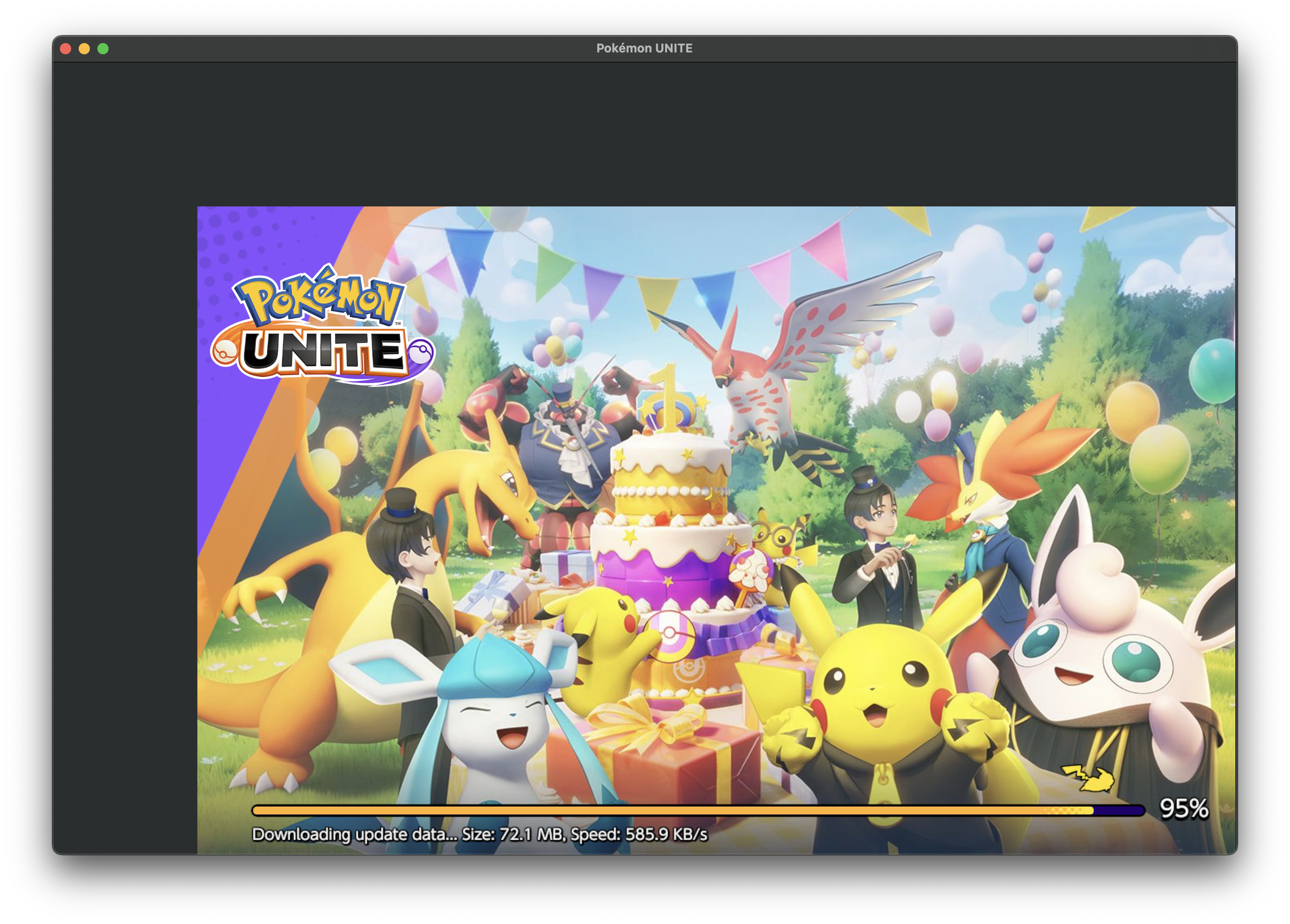
Note that the off resolution is a side-effect of not having PlayTools.
@Blueboynl commented on GitHub (Dec 9, 2022):
@IsaacMarovitz How did you get the game in that screen. I am only getting it on the left side(Not full screen)