mirror of
https://github.com/OAuthSwift/OAuthSwift.git
synced 2026-04-26 12:45:52 +03:00
[GH-ISSUE #483] Twitter OAuth request_token returns error 32 "Could not authenticate you." #317
Labels
No labels
bug
cocoapod
duplicate
enhancement
feature-request
help wanted
help wanted
invalid
pull-request
question
wontfix
No milestone
No project
No assignees
1 participant

Notifications
Due date
No due date set.
Dependencies
No dependencies set.
Reference
starred/OAuthSwift#317
Loading…
Add table
Add a link
Reference in a new issue
No description provided.
Delete branch "%!s()"
Deleting a branch is permanent. Although the deleted branch may continue to exist for a short time before it actually gets removed, it CANNOT be undone in most cases. Continue?
Originally created by @BalestraPatrick on GitHub (Aug 13, 2018).
Original GitHub issue: https://github.com/OAuthSwift/OAuthSwift/issues/483
Description:
I've been trying to fix this error for the last couple of hours but I haven't found a way to get around it. I simply trying to Sign in the user to Twitter directly from my iOS app. Here's a snippet of my code.
The HTTP response is a 401 with the following content which may be useful to debug the issue:
I have tried inserting my consumer key and secret in the demo app using Xcode 9.3 and it still doesn't work. It may have broken because of the new parameter
oauth_callbackwhich needs to be whitelisted in the Twitter developer portal since GDPR was enforced?OAuth Provider? (Twitter, Github, ..):
Twitter
OAuth Version:
OS (Please fill the version) :
Installation method:
Library version:
Xcode version:
@phimage commented on GitHub (Aug 13, 2018):
32 Could not authenticate you is a twitter response
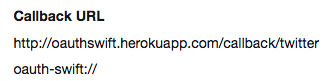
did you authorize tweetometer:// on twitter as callback url?
@phimage commented on GitHub (Aug 13, 2018):
then I do not know if twitter allow custom scheme now
but in the past only http scheme was allowed
https://github.com/OAuthSwift/OAuthSwift/wiki/API-with-only-HTTP-scheme-into-callback-URL
@BalestraPatrick commented on GitHub (Aug 13, 2018):
I authorized the scheme in my developer portal. I tried to remove it and now it works? But before it was complaining that the callback url must be present, this is what the Twitter documentation also says.
@phimage commented on GitHub (Aug 14, 2018):
https://developer.twitter.com/en/docs/basics/developer-portal/guides/callback-urls.html
it seems that custom one is authorised now, and there is specific error if not authorized
I have just tested it, and it work fine
Did you use Consumer API keys = oauth1? (not Access token & access token secret = oauth2)
@phimage commented on GitHub (Sep 12, 2018):
No response, I close