[GH-ISSUE #404] Handler not called if user presses systems "back" button when using SafariURLHandler. #256

Closed
opened 2026-03-03 16:47:08 +03:00 by kerem · 7 comments
Owner

Originally created by @noobs2ninjas on GitHub (Aug 31, 2017).
Original GitHub issue: https://github.com/OAuthSwift/OAuthSwift/issues/404

Description:

When using SafariURLHandler, the user has the ability to hit the "back" button to return to the application which doesn't trigger the handler. I don't remember when this functionality was added to iOS. Could just affect iOS 10.

glass

Having done some research the view controllers viewDidAppear doesn't get called after the application returns. So the only place that could handle it would be in the app delegate in this function below.

func applicationDidBecomeActive(_ application: UIApplication){ }

I checked documentation and the example and didn't see anything about what to put here to handle it.

The main problem here goes a bit beyond just the handler not getting called.

Lets say for a minute that you have a button on your application that creates a OAuth2Swift and then calls oauth.authorize(). If the user hits that system back button to return to your app the first handler isn't completed. Then if the user hits the authorize button again and completes the transaction both handlers will get a completion at once. This can stack indefinitely until the user completes the authorization. Which means if you are saving the result to a database in the "success" block, this may be called and executed multiple times. Even if you set the OAuth2Swift to a variable in order to remove the previous one, ALL success/fail closure will still get called.

I personally will be moving over to using an internal web view. However, I think something should be made to handle completion/fail in the event someone elses application is using the external Safari browser.

OAuth Provider (Twitter, Github, ..):

All

OAuth Version:

  • Version 1
  • Version 2

OS (Please fill the version) :

  • iOS :
  • OSX :
  • TVOS :
  • WatchOS :

Installation method:

  • Carthage
  • CocoaPods
  • Manually

Library version:

  • head
  • v1.0.0
  • v0.6
  • other: (Please fill in the version you are using.)

Xcode version:

  • 8.0 (Swift 3.0)
  • 8.0 (Swift 2.3)
  • 7.3.1
  • other: (Please fill in the version you are using.)
  • objective c
Originally created by @noobs2ninjas on GitHub (Aug 31, 2017). Original GitHub issue: https://github.com/OAuthSwift/OAuthSwift/issues/404 ### Description: When using SafariURLHandler, the user has the ability to hit the "back" button to return to the application which doesn't trigger the handler. I don't remember when this functionality was added to iOS. Could just affect iOS 10. ![glass](https://user-images.githubusercontent.com/3413855/29935269-c313a1cc-8e43-11e7-8533-a137bd79d44d.png) Having done some research the view controllers viewDidAppear doesn't get called after the application returns. So the only place that could handle it would be in the app delegate in this function below. `func applicationDidBecomeActive(_ application: UIApplication){ } ` I checked documentation and the example and didn't see anything about what to put here to handle it. The main problem here goes a bit beyond just the handler not getting called. Lets say for a minute that you have a button on your application that creates a OAuth2Swift and then calls oauth.authorize(). If the user hits that system back button to return to your app the first handler isn't completed. Then if the user hits the authorize button again and completes the transaction both handlers will get a completion at once. This can stack indefinitely until the user completes the authorization. Which means if you are saving the result to a database in the "success" block, this may be called and executed multiple times. Even if you set the OAuth2Swift to a variable in order to remove the previous one, ALL success/fail closure will still get called. I personally will be moving over to using an internal web view. However, I think something should be made to handle completion/fail in the event someone elses application is using the external Safari browser. ### OAuth Provider (Twitter, Github, ..): All ### OAuth Version: - [x] Version 1 - [x] Version 2 ### OS (Please fill the version) : - [x] iOS : - [ ] OSX : - [ ] TVOS : - [ ] WatchOS : ### Installation method: - [ ] Carthage - [ ] CocoaPods - [x] Manually ### Library version: - [x] head - [ ] v1.0.0 - [ ] v0.6 - [ ] other: (Please fill in the version you are using.) ### Xcode version: - [x] 8.0 (Swift 3.0) - [ ] 8.0 (Swift 2.3) - [ ] 7.3.1 - [ ] other: (Please fill in the version you are using.) - [ ] objective c
kerem closed this issue 2026-03-03 16:47:08 +03:00
Author
Owner

@phimage commented on GitHub (Aug 31, 2017):

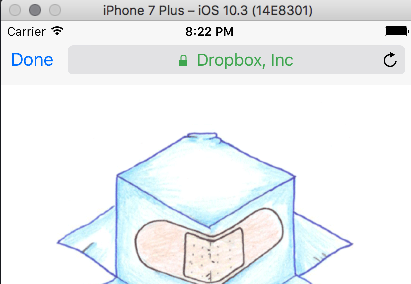
How did you achieve to have a back button in status bar?
With iphone 7 plus simulator I have a Done button
screen shot 2017-08-31 at 20 22 30

When I click safariViewControllerDidFinishfunction is called in SafariURLHandler and remove all the observers (by calling clearObservers), so no issue

<!-- gh-comment-id:326382159 --> @phimage commented on GitHub (Aug 31, 2017): How did you achieve to have a back button in status bar? With iphone 7 plus simulator I have a Done button ![screen shot 2017-08-31 at 20 22 30](https://user-images.githubusercontent.com/8875768/29938890-74c2e996-8e8a-11e7-8647-5c167e69725f.png) When I click `safariViewControllerDidFinish`function is called in `SafariURLHandler` and remove all the observers (by calling clearObservers), so no issue
Author
Owner

@phimage commented on GitHub (Aug 31, 2017):

I see I click on the button at the bottom

Then I click back. I have the safari open with Done button
I click Done and return to the previous controller, the observers are removed...

<!-- gh-comment-id:326384607 --> @phimage commented on GitHub (Aug 31, 2017): I see I click on the button at the bottom Then I click back. I have the safari open with Done button I click Done and return to the previous controller, the observers are removed...
Author
Owner

@noobs2ninjas commented on GitHub (Aug 31, 2017):

This occurs is when you use the external Safari Browser...as in iOS's safari app. In the demo select the option "Open with external web browser".

The issue is that currently there is no way to tell if the user hits this button. So you cant clear observers from anyway that I can tell. Guess one could create a singleton class that the app delegates applicationDidBecomeActive() function could call which would store the handler. However, being that this is an option that the OAuthSwift framework provides, a more permanent solution is probably required.

<!-- gh-comment-id:326397276 --> @noobs2ninjas commented on GitHub (Aug 31, 2017): This occurs is when you use the external Safari Browser...as in iOS's safari app. In the demo select the option "Open with external web browser". The issue is that currently there is no way to tell if the user hits this button. So you cant clear observers from anyway that I can tell. Guess one could create a singleton class that the app delegates applicationDidBecomeActive() function could call which would store the handler. However, being that this is an option that the OAuthSwift framework provides, a more permanent solution is probably required.
Author
Owner

@phimage commented on GitHub (Aug 31, 2017):

So nothing about SafariUrlHandler
"Open with external web browser" is an external browser(ie .safari), not recommended at all
for ios app in appstore I think it`s forbidden

<!-- gh-comment-id:326399834 --> @phimage commented on GitHub (Aug 31, 2017): So nothing about SafariUrlHandler "Open with external web browser" is an external browser(ie .safari), not recommended at all for ios app in appstore I think it`s forbidden
Author
Owner

@noobs2ninjas commented on GitHub (Sep 2, 2017):

@phimage I know. Just thought Id make @everyone aware of the issue since it is something that can be found as an option in the demo.

<!-- gh-comment-id:326722135 --> @noobs2ninjas commented on GitHub (Sep 2, 2017): @phimage I know. Just thought Id make @everyone aware of the issue since it is something that can be found as an option in the demo.
Author
Owner

@noobs2ninjas commented on GitHub (Sep 2, 2017):

I did it this way because I have a million things to do and that was the fastest way to implement. Moving over to internal safariViewController as you suggested.

<!-- gh-comment-id:326722197 --> @noobs2ninjas commented on GitHub (Sep 2, 2017): I did it this way because I have a million things to do and that was the fastest way to implement. Moving over to internal safariViewController as you suggested.
Author
Owner

@phimage commented on GitHub (Sep 2, 2017):

see readme

By default this URL is opened into the external web browser (ie. safari), but apple does not allow it for app-store iOS applications.

If you think readme it's not clear, you can propose PR

<!-- gh-comment-id:326722256 --> @phimage commented on GitHub (Sep 2, 2017): see readme ``` By default this URL is opened into the external web browser (ie. safari), but apple does not allow it for app-store iOS applications. ``` If you think readme it's not clear, you can propose PR
Sign in to join this conversation.
No milestone
No project
No assignees
1 participant
Notifications
Due date
The due date is invalid or out of range. Please use the format "yyyy-mm-dd".

No due date set.

Dependencies

No dependencies set.

Reference
starred/OAuthSwift#256
No description provided.