[GH-ISSUE #3300] [BUG] Valheim backup doesn't backup the worlds #2281

Open
opened 2026-02-27 03:01:56 +03:00 by kerem · 11 comments
Owner

Originally created by @jclc on GitHub (Feb 24, 2021).
Original GitHub issue: https://github.com/GameServerManagers/LinuxGSM/issues/3300

User Story

After doing a few backups of my server, I checked the contents of the tarballs and noticed that they don't actually contain the worlds, which are by default located in ~/.config/.

Basic info

  • Distro: Centos
  • Game: Valheim
  • Command: [Backup]
  • LinuxGSM version: [latest]

To Reproduce

Steps to reproduce the behaviour:

  1. Run ./vhserver backup
  2. Run tar -tf <backup>
  3. Notice the lack of world files

Expected behaviour

Expected for the worlds to be listed.

I assume this can be fixed by changing the save location to be inside the server files directory, but saving the worlds regardless of save directory should be the default behaviour.

Originally created by @jclc on GitHub (Feb 24, 2021). Original GitHub issue: https://github.com/GameServerManagers/LinuxGSM/issues/3300 ## User Story After doing a few backups of my server, I checked the contents of the tarballs and noticed that they don't actually contain the worlds, which are by default located in ~/.config/. ## Basic info * **Distro:** Centos * **Game:** Valheim * **Command:** [Backup] * **LinuxGSM version:** [latest] ## To Reproduce Steps to reproduce the behaviour: 1. Run `./vhserver backup` 2. Run `tar -tf <backup>` 3. Notice the lack of world files ## Expected behaviour Expected for the worlds to be listed. I assume this can be fixed by changing the save location to be inside the server files directory, but saving the worlds regardless of save directory should be the default behaviour.
Author
Owner

@mattclaw commented on GitHub (Feb 25, 2021):

Are you sure the version of the script you are running is latest? I think it'd be helpful to double check and share the exact version number in your issue.

I set up a fresh install just last night and ran a test backup. This backup contains a .config directory which, in turn, contains several nested directories which ultimately house the world files. I recommend updating lgsm and trying again.

This actually brings up a separate topic which might deserve its own issue... why does this backup script back up the installation of SteamCMD, the game, and miscellaneous support files? I can't think of a reason why I would want anything more than user-created data + configs.

This decision results in a bloated backup artifact. Default retention could be increased way beyond the current default value of 4 backups / 30 days. My world file is a mere 40MB after a week of playing with 4-7 players. I expect over time it will grow, but it will be some time before its size approaches the ~900MB of data contained within serverfiles/.

<!-- gh-comment-id:786087609 --> @mattclaw commented on GitHub (Feb 25, 2021): Are you sure the version of the script you are running is latest? I think it'd be helpful to double check and share the exact version number in your issue. I set up a fresh install just last night and ran a test backup. This backup contains a `.config` directory which, in turn, contains several nested directories which ultimately house the world files. I recommend updating lgsm and trying again. This actually brings up a separate topic which might deserve its own issue... why does this backup script back up the installation of SteamCMD, the game, and miscellaneous support files? I can't think of a reason why I would want anything more than user-created data + configs. This decision results in a bloated backup artifact. Default retention could be increased way beyond the current default value of 4 backups / 30 days. My world file is a mere 40MB after a week of playing with 4-7 players. I expect over time it will grow, but it will be some time before its size approaches the ~900MB of data contained within `serverfiles/`.
Author
Owner

@jclc commented on GitHub (Feb 25, 2021):

I set up a fresh install just last night and ran a test backup. This backup contains a .config directory which, in turn, contains several nested directories which ultimately house the world files. I recommend updating lgsm and trying again.

This is interesting, did you install the server directly in the home directory or in a subdirectory? I've installed the server in a subdirectory, not sure if that makes a difference. If it's fixed in the latest version then I suppose this issue can be closed.

Personally I ended up moving the saves into the server directory since it's better to organise everything in one place anyway. The version of script I'm running doesn't have an option for the -savedir switch but that was easy to set up too.

This actually brings up a separate topic which might deserve its own issue... why does this backup script back up the installation of SteamCMD, the game, and miscellaneous support files? I can't think of a reason why I would want anything more than user-created data + configs.

Yes, I noticed this too and it is pretty annoying. There seems to be a few open issues for adding support for blacklisting files/directories from backups, though.

<!-- gh-comment-id:786092254 --> @jclc commented on GitHub (Feb 25, 2021): > I set up a fresh install just last night and ran a test backup. This backup contains a .config directory which, in turn, contains several nested directories which ultimately house the world files. I recommend updating lgsm and trying again. This is interesting, did you install the server directly in the home directory or in a subdirectory? I've installed the server in a subdirectory, not sure if that makes a difference. If it's fixed in the latest version then I suppose this issue can be closed. Personally I ended up moving the saves into the server directory since it's better to organise everything in one place anyway. The version of script I'm running doesn't have an option for the `-savedir` switch but that was easy to set up too. > This actually brings up a separate topic which might deserve its own issue... why does this backup script back up the installation of SteamCMD, the game, and miscellaneous support files? I can't think of a reason why I would want anything more than user-created data + configs. Yes, I noticed this too and it is pretty annoying. There seems to be a few open issues for adding support for blacklisting files/directories from backups, though.
Author
Owner

@mattclaw commented on GitHub (Feb 25, 2021):

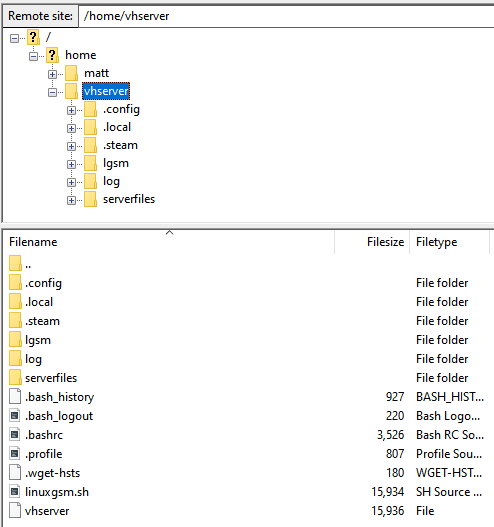
My install is bog standard; didn't deviate from the documented instructions, so yeah, there's a vhserver user and everything is installed directory into that user's home directory:
image

I am very new to this project, but I spent some time glancing at the scripts last night when I was trying to audit how lgsm works and how configurations work. If you're using a nonstandard file structure, perhaps you can override one of the config variables in your vhserver.cfg. I know there is a serverfiles variable which is widely used, but I'm not 100% sure that a config variable will solve your problem in the first place :/

<!-- gh-comment-id:786106219 --> @mattclaw commented on GitHub (Feb 25, 2021): My install is bog standard; didn't deviate from the documented instructions, so yeah, there's a vhserver user and everything is installed directory into that user's home directory: ![image](https://user-images.githubusercontent.com/693494/109198310-12c4e900-776c-11eb-8f04-4cc73ecd6271.png) I am very new to this project, but I spent some time glancing at the scripts last night when I was trying to audit how lgsm works and how configurations work. If you're using a nonstandard file structure, perhaps you can override one of the config variables in your `vhserver.cfg`. I know there is a `serverfiles` variable which is widely used, but I'm not 100% sure that a config variable will solve your problem in the first place :/
Author
Owner

@jclc commented on GitHub (Feb 25, 2021):

I'm not using a nonstandard file structure, I've just installed the directory in a subdirectory rather than directly in $HOME. If the script looks for the default save directory relative to the installation directory, that is not acceptable.

<!-- gh-comment-id:786236243 --> @jclc commented on GitHub (Feb 25, 2021): I'm not using a nonstandard file structure, I've just installed the directory in a subdirectory rather than directly in $HOME. If the script looks for the default save directory relative to the installation directory, that is not acceptable.
Author
Owner

@netstx commented on GitHub (Mar 2, 2021):

You can look into the code and check if it does that.

<!-- gh-comment-id:788938406 --> @netstx commented on GitHub (Mar 2, 2021): You can look into the code and check if it does that.
Author
Owner

@Xalorous commented on GitHub (Mar 3, 2021):

If the script looks for the default save directory relative to the installation directory, that is not acceptable.

The way the installation works, you can install ANYWHERE and the location you choose is the installroot. All of the other locations are relative to that location. Hardcoding $HOME/$USER as the installroot is restrictive. Suggesting $HOME/$USER is a great way to allow new admins or new linux users to stick to a standard configuration.

I do this stuff (Senior Linux Admin and DevSecOps) for a living, my serveradmin for valheim is vhserver, my install path is /home/vhserver.

[vhserver@sv-valheim backup]$ ll -a /home/vhserver
total 56
drwx------. 11 vhserver vhserver   261 Feb 13 17:04 .
drwxr-xr-x.  4 root     root        35 Feb 11 20:51 ..
-rw-------.  1 vhserver vhserver   597 Feb 19 15:23 .bash_history
-rw-r--r--.  1 vhserver vhserver    18 Mar 31  2020 .bash_logout
-rw-r--r--.  1 vhserver vhserver   193 Mar 31  2020 .bash_profile
-rw-r--r--.  1 vhserver vhserver   231 Mar 31  2020 .bashrc
drwxrwxr-x.  3 vhserver vhserver    18 Feb 11 20:51 .cache
drwxrwxr-x.  4 vhserver vhserver    33 Feb 11 20:57 .config
drwxrwxr-x.  9 vhserver vhserver   113 Feb 17 14:07 lgsm
-rwxrwxr-x.  1 vhserver vhserver 15934 Feb 11 20:52 linuxgsm.sh
drwxrwxr-x.  3 vhserver vhserver    19 Feb 11 20:54 .local
drwxrwxr-x.  4 vhserver vhserver    49 Feb 11 20:53 log
drwxr-xr-x.  4 vhserver vhserver    39 Jan  6  2019 .mozilla
drwxrw----.  3 vhserver vhserver    19 Feb 11 20:52 .pki
drwxrwxr-x.  6 vhserver vhserver  4096 Mar  2 05:03 serverfiles
drwxrwxr-x.  5 vhserver vhserver    93 Mar  2 23:01 .steam
-rwxrwxr-x.  1 vhserver vhserver 15936 Feb 11 20:52 vhserver
-rw-------.  1 vhserver vhserver  1158 Feb 11 21:18 .viminfo
<!-- gh-comment-id:789414686 --> @Xalorous commented on GitHub (Mar 3, 2021): > If the script looks for the default save directory relative to the installation directory, that is not acceptable. The way the installation works, you can install ANYWHERE and the location you choose is the installroot. All of the other locations are relative to that location. Hardcoding $HOME/$USER as the installroot is restrictive. Suggesting $HOME/$USER is a great way to allow new admins or new linux users to stick to a standard configuration. I do this stuff (Senior Linux Admin and DevSecOps) for a living, my serveradmin for valheim is vhserver, my install path is /home/vhserver. ``` [vhserver@sv-valheim backup]$ ll -a /home/vhserver total 56 drwx------. 11 vhserver vhserver 261 Feb 13 17:04 . drwxr-xr-x. 4 root root 35 Feb 11 20:51 .. -rw-------. 1 vhserver vhserver 597 Feb 19 15:23 .bash_history -rw-r--r--. 1 vhserver vhserver 18 Mar 31 2020 .bash_logout -rw-r--r--. 1 vhserver vhserver 193 Mar 31 2020 .bash_profile -rw-r--r--. 1 vhserver vhserver 231 Mar 31 2020 .bashrc drwxrwxr-x. 3 vhserver vhserver 18 Feb 11 20:51 .cache drwxrwxr-x. 4 vhserver vhserver 33 Feb 11 20:57 .config drwxrwxr-x. 9 vhserver vhserver 113 Feb 17 14:07 lgsm -rwxrwxr-x. 1 vhserver vhserver 15934 Feb 11 20:52 linuxgsm.sh drwxrwxr-x. 3 vhserver vhserver 19 Feb 11 20:54 .local drwxrwxr-x. 4 vhserver vhserver 49 Feb 11 20:53 log drwxr-xr-x. 4 vhserver vhserver 39 Jan 6 2019 .mozilla drwxrw----. 3 vhserver vhserver 19 Feb 11 20:52 .pki drwxrwxr-x. 6 vhserver vhserver 4096 Mar 2 05:03 serverfiles drwxrwxr-x. 5 vhserver vhserver 93 Mar 2 23:01 .steam -rwxrwxr-x. 1 vhserver vhserver 15936 Feb 11 20:52 vhserver -rw-------. 1 vhserver vhserver 1158 Feb 11 21:18 .viminfo ```
Author
Owner

@foozmeat commented on GitHub (Mar 9, 2021):

I just discovered this deficiency this morning while looking at moving my server to a new container. I installed lgsm into /opt/LinuxGSM and my backups are a good copy of that folder however they don't contain the contents of ~/.config/unity3d/IronGate/Valheim.

One workaround would be to move the Valheim folder to inside of the LinuxGSM install folder and then symlink it back to the original location.

Another workaround would be to add the following to common.cfg to override the save dir

savedir=/opt/LinuxGSM/gamedata/vhserver
startparameters="-name '${servername}' -password ${serverpassword} -port ${port} -world ${gameworld} -public ${public}"

I think the second one is better as it matches the design pattern of lgsm.

<!-- gh-comment-id:793186572 --> @foozmeat commented on GitHub (Mar 9, 2021): I just discovered this deficiency this morning while looking at moving my server to a new container. I installed lgsm into `/opt/LinuxGSM` and my backups are a good copy of that folder however they don't contain the contents of `~/.config/unity3d/IronGate/Valheim`. One workaround would be to move the Valheim folder to inside of the LinuxGSM install folder and then symlink it back to the original location. Another workaround would be to add the following to common.cfg to override the save dir savedir=/opt/LinuxGSM/gamedata/vhserver startparameters="-name '${servername}' -password ${serverpassword} -port ${port} -world ${gameworld} -public ${public}" I think the second one is better as it matches the design pattern of lgsm.
Author
Owner

@netstx commented on GitHub (Mar 9, 2021):

This actually brings up a separate topic which might deserve its own issue... why does this backup script back up the installation of SteamCMD, the game, and miscellaneous support files? I can't think of a reason why I would want anything more than user-created data + configs.

This decision results in a bloated backup artifact. Default retention could be increased way beyond the current default value of 4 backups / 30 days. My world file is a mere 40MB after a week of playing with 4-7 players. I expect over time it will grow, but it will be some time before its size approaches the ~900MB of data contained within serverfiles/.

@mattclaw I think this is worthy of a new issue. I personally do container backups, but I agree the vhserver script backup should only save user generated data and configs. This makes for a lot smaller backups so you can keep many more versions without using tons of space.

<!-- gh-comment-id:793195772 --> @netstx commented on GitHub (Mar 9, 2021): > This actually brings up a separate topic which might deserve its own issue... why does this backup script back up the installation of SteamCMD, the game, and miscellaneous support files? I can't think of a reason why I would want anything more than user-created data + configs. > > This decision results in a bloated backup artifact. Default retention could be increased way beyond the current default value of 4 backups / 30 days. My world file is a mere 40MB after a week of playing with 4-7 players. I expect over time it will grow, but it will be some time before its size approaches the ~900MB of data contained within `serverfiles/`. @mattclaw I think this is worthy of a new issue. I personally do container backups, but I agree the vhserver script backup should only save user generated data and configs. This makes for a lot smaller backups so you can keep many more versions without using tons of space.
Author
Owner

@jclc commented on GitHub (Mar 9, 2021):

Since apparently you cannot blacklist the Mono runtime from being added to the backup (https://github.com/GameServerManagers/LinuxGSM/issues/3298), I ended up writing a short backup script for myself as a workaround anyway.
It assumes -savedir "<server dir>/savedir". Resulting archive takes up less than a tenth of the space LGSM's backup uses. Feel free to use it if you like. https://gist.github.com/jclc/6b8a75af0c6f5233331afb4f0ae58e89

<!-- gh-comment-id:793197720 --> @jclc commented on GitHub (Mar 9, 2021): Since apparently you cannot blacklist the Mono runtime from being added to the backup (https://github.com/GameServerManagers/LinuxGSM/issues/3298), I ended up writing a short backup script for myself as a workaround anyway. It assumes `-savedir "<server dir>/savedir"`. Resulting archive takes up less than a tenth of the space LGSM's backup uses. Feel free to use it if you like. https://gist.github.com/jclc/6b8a75af0c6f5233331afb4f0ae58e89
Author
Owner

@mattclaw commented on GitHub (Mar 9, 2021):

@mattclaw I think this is worthy of a new issue. I personally do container backups, but I agree the vhserver script backup should only save user generated data and configs. This makes for a lot smaller backups so you can keep many more versions without using tons of space.

I realized after making this comment that one reason for this behavior would be to preserve a mod setup. I have no idea whether this is actually the case, but I'm not sure if saves from modded servers can be guaranteed to be backwards-compatible with vanilla saves. Perhaps having the exact server binaries backed up is beneficial in the case you need to rebuild a modded server at a particular version? Even still, I'd argue that would be better as opt-in behavior rather than default.

That's just my 2c as a newcomer to this project. If backing up all miscellaneous binaries and assets is an LGSM convention, it'd be inconsistent to make this change just to Valheim.

I ended up writing a short backup script for myself as a workaround anyway.

Going to yoink this, thanks so much.

<!-- gh-comment-id:793352360 --> @mattclaw commented on GitHub (Mar 9, 2021): > @mattclaw I think this is worthy of a new issue. I personally do container backups, but I agree the vhserver script backup should only save user generated data and configs. This makes for a lot smaller backups so you can keep many more versions without using tons of space. I realized after making this comment that _one_ reason for this behavior would be to preserve a mod setup. I have no idea whether this is actually the case, but I'm not sure if saves from modded servers can be guaranteed to be backwards-compatible with vanilla saves. Perhaps having the exact server binaries backed up is beneficial in the case you need to rebuild a modded server at a particular version? Even still, I'd argue that would be better as opt-in behavior rather than default. That's just my 2c as a newcomer to this project. If backing up all miscellaneous binaries and assets is an LGSM convention, it'd be inconsistent to make this change just to Valheim. >I ended up writing a short backup script for myself as a workaround anyway. Going to yoink this, thanks so much.
Author
Owner

@jclc commented on GitHub (Mar 9, 2021):

Going to yoink this, thanks so much.

Remember to close the server first if you're going to schedule it. I made a bash script that first closes the server, runs the script and then starts the server again and put that on crontab.

<!-- gh-comment-id:793355037 --> @jclc commented on GitHub (Mar 9, 2021): > Going to yoink this, thanks so much. Remember to close the server first if you're going to schedule it. I made a bash script that first closes the server, runs the script and then starts the server again and put that on crontab.
Sign in to join this conversation.
No labels
Atomic
Epic
cannot reproduce
command: backup
command: console
command: debug
command: details
command: fast-dl
command: install
command: mods
command: monitor
command: post-details
command: restart
command: send
command: start
command: stop
command: update
command: update-lgsm
command: validate
command: wipe
distro: AlmaLinux
distro: Arch Linux
distro: CentOS
distro: Debian
distro: Fedora
distro: RedHat
distro: Rocky Linux
distro: Ubuntu
distro: openSUSE
engine: goldsrc
engine: source
game: 7 Days to Die
game: ARMA 3
game: Ark: Survival Evolved
game: Assetto Corsa
game: Avorion
game: BATTALION: Legacy
game: Barotrauma
game: Battalion 1944
game: Battlefield 1942
game: Black Mesa: Deathmatch
game: Blade Symphony
game: Call of Duty 2
game: Call of Duty 4
game: Call of Duty: United Offensive
game: Counter-Strike 1.6
game: Counter-Strike 2
game: Counter-Strike: Global Offensive
game: Counter-Strike: Source
game: Day of Infamy
game: Dayz
game: Death Match Classic
game: Don't Starve Together
game: ET: Legacy
game: Eco
game: Factorio
game: Factorio
game: Garry's Mod
game: Half-Life
game: Hurtword
game: Insurgecy
game: Insurgecy
game: Insurgency: Sandstorm
game: Just Cause 3
game: Killing Floor
game: Killing Floor 2
game: Left 4 Dead 2
game: Minecraft
game: Minecraft Bedrock
game: Mordhau
game: Multi Theft Auto
game: Mumble
game: Natural Selection 2
game: No More Room in Hell
game: Pavlov VR
game: Post Scriptum
game: Project Zomboid
game: Quake 3
game: QuakeWorld
game: Red Orchestra: Ostfront 41-45
game: Return to Castle Wolfenstein
game: Rising World
game: Rust
game: San Andreas Multiplayer
game: Satisfactory
game: Soldat
game: Soldier of Fortune 2
game: Squad
game: Squad 44
game: Starbound
game: Stationeers
game: Sven Co-op
game: Team Fortress 2
game: Teamspeak 3
game: Teeworlds
game: Terraria
game: The Front
game: Unreal Tournament 2004
game: Unreal Tournament 3
game: Unreal Tournament 99
game: Unturned
game: Valheim
game: Wurm Unlimited
game: Zombie Master Reborn
game: label missing
good first issue
help wanted
info: alerts
info: dependency
info: docker
info: docs
info: email
info: query
info: steamcmd
info: systemd
info: tmux
info: website
info: website
needs more info
outcome: duplicate
outcome: issue resolved
outcome: issue unresolved
outcome: pr accepted
outcome: pr rejected
outcome: unconfirmed
outcome: wontfix
outcome: wrong forum
potential-duplicate
priority
pull-request
type: bug
type: feature
type: feature
type: feature request
type: game server request
type: refactor
waiting response
No milestone
No project
No assignees
1 participant
Notifications
Due date
The due date is invalid or out of range. Please use the format "yyyy-mm-dd".

No due date set.

Dependencies

No dependencies set.

Reference
starred/LinuxGSM#2281
No description provided.