[GH-ISSUE #2896] Unable to install Rust beta branch #2072

Closed
opened 2026-02-27 03:00:41 +03:00 by kerem · 7 comments
Owner

Originally created by @cliph on GitHub (May 20, 2020).
Original GitHub issue: https://github.com/GameServerManagers/LinuxGSM/issues/2896

User Story

As a server administrator, I want install a specific branch of the Rust server from Steam.

Basic info

  • Distro: Debian 10
  • Game: Rust
  • Command: Upgrade
  • LinuxGSM version: [v20.1.3]

Further Information

A new beta branch of the Rust server software is available and is identified with the branch title "aux01" and developer docs stating to specify branch "-beta aux01"

Following the instructions here: https://docs.linuxgsm.com/steamcmd/branch to specific a new branch does not appear to work with the required branch name of "-beta aux01"

Specifically the developer gave the advice:

"Server owners will be able to host servers as normal by using the following parameters: "app_update 258550 -beta aux01""

Here's an example of a failing upgrade:

[  OK  ] Updating rustserver: Checking for update: SteamCMD

Update available
* Local build: 5043165
* Remote build: 5055726
https://steamdb.info/app/258550/

Redirecting stderr to '/home/rust/.local/share/Steam/logs/stderr.txt'
[  0%] Checking for available updates...
[----] Verifying installation...
Steam Console Client (c) Valve Corporation
-- type 'quit' to exit --
Loading Steam API...Warning: failed to init SDL thread priority manager: SDL not found
OK.

Connecting anonymously to Steam Public...Logged in OK
Waiting for user info...OK
Success! App '258550' already up to date.

To Reproduce

Steps to reproduce the behaviour:

  1. Update branch to branch="-beta aux01"
  2. Issue upgrade command
  3. Witness upgrade failing as in example above

Expected behaviour

Updating the branch configuration and running upgrade will cause the specific branch to be installed.

Originally created by @cliph on GitHub (May 20, 2020). Original GitHub issue: https://github.com/GameServerManagers/LinuxGSM/issues/2896 ## User Story As a server administrator, I want install a specific branch of the Rust server from Steam. ## Basic info * **Distro:** Debian 10 * **Game:** Rust * **Command:** Upgrade * **LinuxGSM version:** [v20.1.3] ## Further Information A new beta branch of the Rust server software is available and is identified with the branch title "aux01" and developer docs stating to specify branch "-beta aux01" Following the instructions here: https://docs.linuxgsm.com/steamcmd/branch to specific a new branch does not appear to work with the required branch name of "-beta aux01" Specifically the developer gave the advice: > "Server owners will be able to host servers as normal by using the following parameters: "app_update 258550 -beta aux01"" Here's an example of a failing upgrade: ```$ ./rustserver u [ OK ] Updating rustserver: Checking for update: SteamCMD Update available * Local build: 5043165 * Remote build: 5055726 https://steamdb.info/app/258550/ Redirecting stderr to '/home/rust/.local/share/Steam/logs/stderr.txt' [ 0%] Checking for available updates... [----] Verifying installation... Steam Console Client (c) Valve Corporation -- type 'quit' to exit -- Loading Steam API...Warning: failed to init SDL thread priority manager: SDL not found OK. Connecting anonymously to Steam Public...Logged in OK Waiting for user info...OK Success! App '258550' already up to date. ``` ## To Reproduce Steps to reproduce the behaviour: 1. Update branch to `branch="-beta aux01"` 2. Issue upgrade command 3. Witness upgrade failing as in example above ## Expected behaviour Updating the branch configuration and running upgrade will cause the specific branch to be installed.
Author
Owner

@akariley commented on GitHub (May 20, 2020):

I have the same issue. I've attached my debug.log during the attempted update.
zsdfgzadfg.txt

<!-- gh-comment-id:631760010 --> @akariley commented on GitHub (May 20, 2020): I have the same issue. I've attached my debug.log during the attempted update. [zsdfgzadfg.txt](https://github.com/GameServerManagers/LinuxGSM/files/4659569/zsdfgzadfg.txt)
Author
Owner

@akariley commented on GitHub (May 20, 2020):

Slight update, when branch is set to just 'aux01', this is the result.

[rust-staging@gameserver rust]$ ./rustserver u
[  OK  ] Updating rustserver: Checking for update: SteamCMD

No update available
* Local build: 5043165
* Remote build: 5043165
https://steamdb.info/app/258550/


core_exit.sh exiting with code: 0

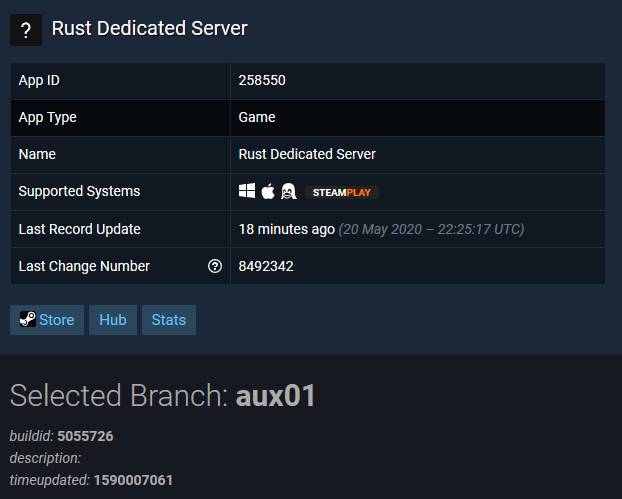
As of this post, here's the status of the public branch:
image

and with branch set to '-beta aux01' we get this:

[rust-staging@gameserver rust]$ ./rustserver u
[  OK  ] Updating rustserver: Checking for update: SteamCMD

Update available
* Local build: 5043165
* Remote build: 5055726
https://steamdb.info/app/258550/

Redirecting stderr to '/home/rust-staging/.local/share/Steam/logs/stderr.txt'
[  0%] Checking for available updates...
[----] Verifying installation...
Steam Console Client (c) Valve Corporation
-- type 'quit' to exit --
Loading Steam API...Warning: failed to init SDL thread priority manager: SDL not found
OK.

Connecting anonymously to Steam Public...Logged in OK
Waiting for user info...OK
Success! App '258550' already up to date.

core_exit.sh exiting with code: 0

which is the expected aux01 number:
image

Hope this helps! :)

<!-- gh-comment-id:631767955 --> @akariley commented on GitHub (May 20, 2020): Slight update, when `branch` is set to just 'aux01', this is the result. ``` [rust-staging@gameserver rust]$ ./rustserver u [ OK ] Updating rustserver: Checking for update: SteamCMD No update available * Local build: 5043165 * Remote build: 5043165 https://steamdb.info/app/258550/ core_exit.sh exiting with code: 0 ``` As of this post, here's the status of the public branch: ![image](https://user-images.githubusercontent.com/19627410/82504527-3f532280-9ac1-11ea-83cc-e349fd08fdff.png) and with `branch` set to '-beta aux01' we get this: ``` [rust-staging@gameserver rust]$ ./rustserver u [ OK ] Updating rustserver: Checking for update: SteamCMD Update available * Local build: 5043165 * Remote build: 5055726 https://steamdb.info/app/258550/ Redirecting stderr to '/home/rust-staging/.local/share/Steam/logs/stderr.txt' [ 0%] Checking for available updates... [----] Verifying installation... Steam Console Client (c) Valve Corporation -- type 'quit' to exit -- Loading Steam API...Warning: failed to init SDL thread priority manager: SDL not found OK. Connecting anonymously to Steam Public...Logged in OK Waiting for user info...OK Success! App '258550' already up to date. core_exit.sh exiting with code: 0 ``` which is the expected aux01 number: ![image](https://user-images.githubusercontent.com/19627410/82504623-76293880-9ac1-11ea-9787-8855ac90ce3f.png) Hope this helps! :)
Author
Owner

@cliph commented on GitHub (May 21, 2020):

Wondering if this relates to #2670

<!-- gh-comment-id:632189517 --> @cliph commented on GitHub (May 21, 2020): Wondering if this relates to #2670
Author
Owner

@h3o66 commented on GitHub (May 24, 2020):

Not sure if you have tried it without the beta tag, like it is in the docs:
https://docs.linuxgsm.com/steamcmd/branch

in this case you add only this:
branch="aux01"

and then you do a force-update with lgsm - to be sure to apply the branch.
Pls test, thanks

Allows the selection of specific builds of a game server in SteamCMD
<!-- gh-comment-id:633205489 --> @h3o66 commented on GitHub (May 24, 2020): Not sure if you have tried it without the beta tag, like it is in the docs: https://docs.linuxgsm.com/steamcmd/branch in this case you add only this: `branch="aux01"` and then you do a **force-update** with lgsm - to be sure to apply the branch. Pls test, thanks <blockquote><img src="https://app.gitbook.com/share/space/thumbnail/-LJf1_IiU2L1vVxT7iNe.png" width="48" align="right"><div><strong><a href="https://docs.linuxgsm.com/steamcmd/branch">Branch</a></strong></div><div>Allows the selection of specific builds of a game server in SteamCMD</div></blockquote>
Author
Owner

@akariley commented on GitHub (May 24, 2020):

This appears to have worked. I swear I tried this before; perhaps the force-update fixed it.

<!-- gh-comment-id:633225672 --> @akariley commented on GitHub (May 24, 2020): This appears to have worked. I swear I tried this before; perhaps the force-update fixed it.
Author
Owner

@h3o66 commented on GitHub (May 24, 2020):

@akariley thanks for confirming this - will close the issue based on this feedback.

<!-- gh-comment-id:633225989 --> @h3o66 commented on GitHub (May 24, 2020): @akariley thanks for confirming this - will close the issue based on this feedback.
Author
Owner

@github-actions[bot] commented on GitHub (May 25, 2021):

This issue has been automatically locked since there has not been any recent activity after it was closed. Please open a new issue for related bugs.

<!-- gh-comment-id:847430998 --> @github-actions[bot] commented on GitHub (May 25, 2021): This issue has been automatically locked since there has not been any recent activity after it was closed. Please open a new issue for related bugs.
Sign in to join this conversation.
No labels
Atomic
Epic
cannot reproduce
command: backup
command: console
command: debug
command: details
command: fast-dl
command: install
command: mods
command: monitor
command: post-details
command: restart
command: send
command: start
command: stop
command: update
command: update-lgsm
command: validate
command: wipe
distro: AlmaLinux
distro: Arch Linux
distro: CentOS
distro: Debian
distro: Fedora
distro: RedHat
distro: Rocky Linux
distro: Ubuntu
distro: openSUSE
engine: goldsrc
engine: source
game: 7 Days to Die
game: ARMA 3
game: Ark: Survival Evolved
game: Assetto Corsa
game: Avorion
game: BATTALION: Legacy
game: Barotrauma
game: Battalion 1944
game: Battlefield 1942
game: Black Mesa: Deathmatch
game: Blade Symphony
game: Call of Duty 2
game: Call of Duty 4
game: Call of Duty: United Offensive
game: Counter-Strike 1.6
game: Counter-Strike 2
game: Counter-Strike: Global Offensive
game: Counter-Strike: Source
game: Day of Infamy
game: Dayz
game: Death Match Classic
game: Don't Starve Together
game: ET: Legacy
game: Eco
game: Factorio
game: Factorio
game: Garry's Mod
game: Half-Life
game: Hurtword
game: Insurgecy
game: Insurgecy
game: Insurgency: Sandstorm
game: Just Cause 3
game: Killing Floor
game: Killing Floor 2
game: Left 4 Dead 2
game: Minecraft
game: Minecraft Bedrock
game: Mordhau
game: Multi Theft Auto
game: Mumble
game: Natural Selection 2
game: No More Room in Hell
game: Pavlov VR
game: Post Scriptum
game: Project Zomboid
game: Quake 3
game: QuakeWorld
game: Red Orchestra: Ostfront 41-45
game: Return to Castle Wolfenstein
game: Rising World
game: Rust
game: San Andreas Multiplayer
game: Satisfactory
game: Soldat
game: Soldier of Fortune 2
game: Squad
game: Squad 44
game: Starbound
game: Stationeers
game: Sven Co-op
game: Team Fortress 2
game: Teamspeak 3
game: Teeworlds
game: Terraria
game: The Front
game: Unreal Tournament 2004
game: Unreal Tournament 3
game: Unreal Tournament 99
game: Unturned
game: Valheim
game: Wurm Unlimited
game: Zombie Master Reborn
game: label missing
good first issue
help wanted
info: alerts
info: dependency
info: docker
info: docs
info: email
info: query
info: steamcmd
info: systemd
info: tmux
info: website
info: website
needs more info
outcome: duplicate
outcome: issue resolved
outcome: issue unresolved
outcome: pr accepted
outcome: pr rejected
outcome: unconfirmed
outcome: wontfix
outcome: wrong forum
potential-duplicate
priority
pull-request
type: bug
type: feature
type: feature
type: feature request
type: game server request
type: refactor
waiting response
No milestone
No project
No assignees
1 participant
Notifications
Due date
The due date is invalid or out of range. Please use the format "yyyy-mm-dd".

No due date set.

Dependencies

No dependencies set.

Reference
starred/LinuxGSM#2072
No description provided.