mirror of
https://github.com/GameServerManagers/LinuxGSM.git
synced 2026-04-25 06:05:57 +03:00
[GH-ISSUE #2185] Don't Starve Together not creating configs for instances #1674
Labels
No labels
Atomic
Epic
cannot reproduce
command: backup
command: console
command: debug
command: details
command: fast-dl
command: install
command: mods
command: monitor
command: post-details
command: restart
command: send
command: start
command: stop
command: update
command: update-lgsm
command: validate
command: wipe
distro: AlmaLinux
distro: Arch Linux
distro: CentOS
distro: Debian
distro: Fedora
distro: RedHat
distro: Rocky Linux
distro: Ubuntu
distro: openSUSE
engine: goldsrc
engine: source
game: 7 Days to Die
game: ARMA 3
game: Ark: Survival Evolved
game: Assetto Corsa
game: Avorion
game: BATTALION: Legacy
game: Barotrauma
game: Battalion 1944
game: Battlefield 1942
game: Black Mesa: Deathmatch
game: Blade Symphony
game: Call of Duty 2
game: Call of Duty 4
game: Call of Duty: United Offensive
game: Counter-Strike 1.6
game: Counter-Strike 2
game: Counter-Strike: Global Offensive
game: Counter-Strike: Source
game: Day of Infamy
game: Dayz
game: Death Match Classic
game: Don't Starve Together
game: ET: Legacy
game: Eco
game: Factorio
game: Factorio
game: Garry's Mod
game: Half-Life
game: Hurtword
game: Insurgecy
game: Insurgecy
game: Insurgency: Sandstorm
game: Just Cause 3
game: Killing Floor
game: Killing Floor 2
game: Left 4 Dead 2
game: Minecraft
game: Minecraft Bedrock
game: Mordhau
game: Multi Theft Auto
game: Mumble
game: Natural Selection 2
game: No More Room in Hell
game: Pavlov VR
game: Post Scriptum
game: Project Zomboid
game: Quake 3
game: QuakeWorld
game: Red Orchestra: Ostfront 41-45
game: Return to Castle Wolfenstein
game: Rising World
game: Rust
game: San Andreas Multiplayer
game: Satisfactory
game: Soldat
game: Soldier of Fortune 2
game: Squad
game: Squad 44
game: Starbound
game: Stationeers
game: Sven Co-op
game: Team Fortress 2
game: Teamspeak 3
game: Teeworlds
game: Terraria
game: The Front
game: Unreal Tournament 2004
game: Unreal Tournament 3
game: Unreal Tournament 99
game: Unturned
game: Valheim
game: Wurm Unlimited
game: Zombie Master Reborn
game: label missing
good first issue
help wanted
info: alerts
info: dependency
info: docker
info: docs
info: email
info: query
info: steamcmd
info: systemd
info: tmux
info: website
info: website
needs more info
outcome: duplicate
outcome: issue resolved
outcome: issue resolved
outcome: issue unresolved
outcome: pr accepted
outcome: pr rejected
outcome: unconfirmed
outcome: wontfix
outcome: wrong forum
potential-duplicate
priority
pull-request
type: bug
type: feature
type: feature
type: feature request
type: game server request
type: refactor
waiting response
No milestone
No project
No assignees
1 participant

Notifications
Due date
No due date set.
Dependencies
No dependencies set.
Reference
starred/LinuxGSM#1674
Loading…
Add table
Add a link
Reference in a new issue
No description provided.
Delete branch "%!s()"
Deleting a branch is permanent. Although the deleted branch may continue to exist for a short time before it actually gets removed, it CANNOT be undone in most cases. Continue?
Originally created by @SavvySloth on GitHub (Feb 7, 2019).
Original GitHub issue: https://github.com/GameServerManagers/LinuxGSM/issues/2185
Basic info
Further Information
Steps to reproduce the behaviour:
Expected behaviour
See a new config for an instance is created. Even when you create one yourself it won't work the all instances will instead use the 'dst-server-Master.cfg'
@Ugoff85 commented on GitHub (Mar 19, 2019):
So this might be a bit long winded but I was able to get this working, perhaps someone could take this idea and run with it...
after looking around a bit I see where there is some recursive logic with the install function that overwrites config with _default.cfg and because the filename is using $[Shard] everytime it installs it rewrites and the default instance config becomes dst-server-Master.cfg. after playing around with this for awhile, i decided i couldnt fix the recursive logic without breaking a lot of other stuff... so what i decided to do was edit line 39 on the dstserver script that points to the config directory and change gameservername to servicename:
configdirserver="${configdir}/${servicename}"I then renamed the dstserver script dstserver-master
ran linuxgsm.sh dstserver to install another instance of the dstserver script edited line 39 again
and renamed this one dstserver-caves
now once you install both of these if you look in /home/dstserver/lgsm/lgsm-config you will have two directory's

each directory will still have the recursive instance dst-server-Master.cfg but you can now modify this file in either directory without worry about it getting overwritten. for example here is what my
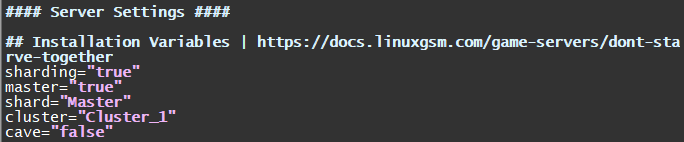
/home/dstserver/lgsm/lgsm-config/dstserver-master/dst-server-Master.cfg looks like:
And
/home/dstserver/lgsm/lgsm-config/dstserver-caves/dst-server-Master.cfg looks like:
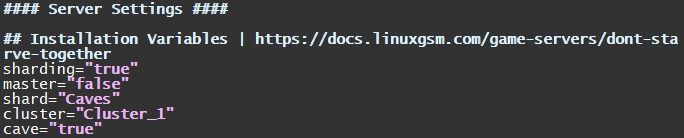
Now that you have two lgsm configs setup correctly if you run ./dstserver-caves details you should get some errors about the config missing, but it will tell you the correct directory in .klei to create
a side note, i don't know if i just missed it inside the install but it appears the lua file needed for caves to work doesnt get created, so be sure to create it inside the .klei Caves directory:
worldgenoverride.lua
@qroac commented on GitHub (Aug 30, 2019):
I used the workaround provided by @Ugoff85
Installing dstserver, modifying the script, creating a -master and a -cave script
Editing the config files,
and finally running dstserver-master install and dstserver-caves install
On my machine it created only the .klei Master directory, and overwrote the master server settings with the Caves server settings, including worldgenoverride.
I can't figure out how to make the script using the .klei Caves directory.
I don't post the instance config files because they look exactly like in the previous post.
@hehecat commented on GitHub (Oct 3, 2019):
vim ./lgsm/config-default/config-lgsm/dstserver/_default.cfg
change
to
@dgibbs64 commented on GitHub (Mar 13, 2020):
Dont starve has turned out to be one of the more confusing server for me to develop. To develop this further I will need someone who is a server admin to improve the features of this server.
@hrtrd commented on GitHub (Mar 13, 2020):
I can help and can provide all the necessary information
@dgibbs64 commented on GitHub (Mar 13, 2020):
@hrtrd What I really need is a very simple rundown of the issues and how it should work. As I don't run DST myself its very hard to understand it. Basically I need to be told what I need to do.
@hrtrd commented on GitHub (Mar 13, 2020):
First step need fix install. At the stage of creating directories and copying configs into them, the installation script tries to create the root directory / Master / and copy server.ini there.
Downloading Don't Starve Together Configs
default configs from https://github.com/GameServerManagers/Game-Server-Configs
fetching cluster.ini...OK
fetching server.ini...OK
copying cluster.ini config file.
copying server.ini config file.
'/home/dstbel/lgsm/config-default/config-game/server.ini' -> '/Master/server.ini'
cp: cannot create regular file '/Master/server.ini': Permission denied
cluster.ini is already configured.
sed: can't read /Master/server.ini: No such file or directory
sed: can't read /Master/server.ini: No such file or directory
changing shard name.
sed: can't read /Master/server.ini: No such file or directory
changing master setting.
sed: can't read /Master/server.ini: No such file or directory
@hrtrd commented on GitHub (Mar 13, 2020):
But this file need put to ~/.klei/DoNotStarveTogether/Cluster_1/Master/server.ini
@qroac commented on GitHub (Mar 13, 2020):
In meantime I switched to manage DST on my server with puppet.
I just released my puppet module for automating DST deployment and configuration.
Maybe it helps implementing DST in GSM.
https://github.com/qroac/puppet-dstserver
@dgibbs64 commented on GitHub (Mar 13, 2020):
The first issues @hrtrd will be fixed in the next release
@dgibbs64 commented on GitHub (Mar 13, 2020):
@qroac thanks that might be useful for me to take a look at :)
@Ugoff85 commented on GitHub (Mar 13, 2020):
I can run through my process again and see if I can better step by step explain the problem, it has a lot to do with the way configs are shared in the ~/.klei folder, we also need to figure out a way to create the lua file. I'll see if I can wrap my head around it again.