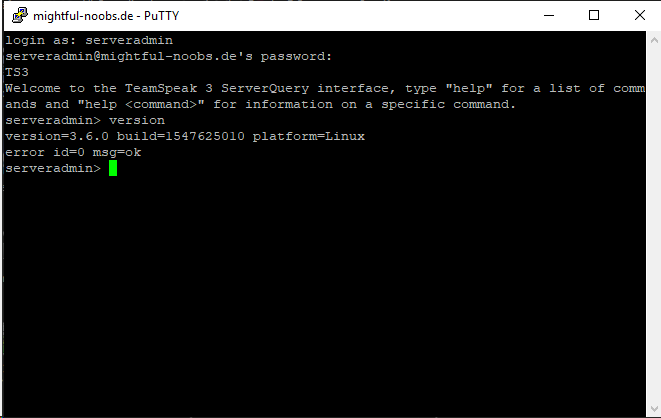
[GH-ISSUE #2182] Teamspeak 3 server update from 3.6.0 to 3.6.1 fails without errors #1669

Closed
opened 2026-02-27 02:58:25 +03:00 by kerem · 19 comments
Owner

Originally created by @kekkonenprkl on GitHub (Feb 6, 2019).
Original GitHub issue: https://github.com/GameServerManagers/LinuxGSM/issues/2182

User Story

Teamspeak 3 server update from 3.6.0 to 3.6.1 somehow fails without errors.

Basic info

  • Distro [Ubuntu 18.04]
  • Game [Teamspeak 3]
  • Feature [Update]

Further Information

LinuxGSM Ts3 server update from v3.6.0 to v3.6.1 fails every time. Updater finds there is an update available and proceeds to download the right archive, but for some reason never replaces the files during update. Server stays in version 3.6.0 after the update is "succesfully" completed. No errors or anything given and server starts up normally after the process. LinuxGSM functions were up-to-date.

I'm not personally familiar how LinuxGSM works under the hood, so i don't have any clues how to solve the problem. After multiple days of failed updating, I updated my server manually by hand, to prevent update alert spam every night. v3.5.0 to v3.6.0 update went fine about two weeks ago, if that gives any hints about possible lgsm changes within past weeks.

To Reproduce

Steps to reproduce the behaviour:

  1. Have a server running Ts3 3.6.0
  2. Update with ./ts3server update
  3. LGSM finds and downloads the right update (3.6.1)
  4. LGSM completes the update without any errors
  5. Server starts back up, but the version remained 3.6.0

Expected behaviour

Server files should be overwritten with the files from the downloaded archive

Originally created by @kekkonenprkl on GitHub (Feb 6, 2019). Original GitHub issue: https://github.com/GameServerManagers/LinuxGSM/issues/2182 ## User Story Teamspeak 3 server update from 3.6.0 to 3.6.1 somehow fails without errors. ## Basic info * Distro \[Ubuntu 18.04] * Game \[Teamspeak 3] * Feature \[Update] ## Further Information LinuxGSM Ts3 server update from v3.6.0 to v3.6.1 fails every time. Updater finds there is an update available and proceeds to download the right archive, but for some reason never replaces the files during update. Server stays in version 3.6.0 after the update is "succesfully" completed. No errors or anything given and server starts up normally after the process. LinuxGSM functions were up-to-date. I'm not personally familiar how LinuxGSM works under the hood, so i don't have any clues how to solve the problem. After multiple days of failed updating, I updated my server manually by hand, to prevent update alert spam every night. v3.5.0 to v3.6.0 update went fine about two weeks ago, if that gives any hints about possible lgsm changes within past weeks. ## To Reproduce Steps to reproduce the behaviour: 1. Have a server running Ts3 3.6.0 2. Update with ./ts3server update 3. LGSM finds and downloads the right update (3.6.1) 4. LGSM completes the update without any errors 5. Server starts back up, but the version remained 3.6.0 ## Expected behaviour Server files should be overwritten with the files from the downloaded archive
Author
Owner

@xopez commented on GitHub (Feb 7, 2019):

Can confirm it in some way.
I think something is done there. Maybe the archive itself is wrong.

The file ts3server from the the extracted archive has the same MD5 value as the one in the serverfiles.
The archive downloaded is teamspeak3-server_linux_amd64-3.6.1.tar.bz2. Timestamp and filesize is also the same.

/home/teamspeak/lgsm/tmp/teamspeak3-server_linux_amd64$ md5sum /home/teamspeak/lgsm/tmp/teamspeak3-server_linux_amd64/ts3server
8b741bac3e7be99e42b506a44ec56de6  /home/teamspeak/lgsm/tmp/teamspeak3-server_linux_amd64/ts3server
/home/teamspeak/lgsm/tmp/teamspeak3-server_linux_amd64$ md5sum /home/teamspeak/serverfiles/ts3server
8b741bac3e7be99e42b506a44ec56de6  /home/teamspeak/serverfiles/ts3server

I also deleted the archives in lgsm/tmp/ and the extracted on there teamspeak3-server_linux_amd64 with the same result. So i think the archive itself is wrong.

Don't know if sha256 is the right method for the checksum.
But i got this:

/home/teamspeak/lgsm/tmp$ sha256sum teamspeak3-server_linux_amd64-3.6.1.tar.bz2
5a0ed8229c0c8f071b85b1ac02a7176562b6386dae66babfaa553d5da26386be

From https://www.teamspeak.com/versions/server.json

{
	"macos":{
		"x86_64":{
			"version":"3.6.1",
			"checksum":"d8a7df6278fe4db5457d2633f599de238cf8eb97697bffd70a498651b0b148d1",
			"mirrors":{
				"teamspeak.com":"https:\/\/files.teamspeak-services.com\/releases\/server\/3.6.1\/teamspeak3-server_mac-3.6.1.zip"
			}
		}
	},
	"windows":{
		"x86":{
			"version":"3.6.1",
			"checksum":"a661ec38d184c0a78a96290640079a53583868ac0926b22847ea2074c8f45c6b",
			"mirrors":{
				"teamspeak.com":"https:\/\/files.teamspeak-services.com\/releases\/server\/3.6.1\/teamspeak3-server_win32-3.6.1.zip"
			}
		},
		"x86_64":{
			"version":"3.6.1",
			"checksum":"da14b5f13d3161b8d45fc5339f6502e37b244deaea62f5e3b92af00aa5ce05ac",
			"mirrors":{
				"teamspeak.com":"https:\/\/files.teamspeak-services.com\/releases\/server\/3.6.1\/teamspeak3-server_win64-3.6.1.zip"
			}
		}
	},
	"freebsd":{
		"x86":{
			"version":"3.6.1",
			"checksum":"71ba69eeaf3679c907d719e2b4bd7678550928f2b429690da364031ab752947c",
			"mirrors":{
				"teamspeak.com":"https:\/\/files.teamspeak-services.com\/releases\/server\/3.6.1\/teamspeak3-server_freebsd_x86-3.6.1.tar.bz2"
			}
		},
		"x86_64":{
			"version":"3.6.1",
			"checksum":"090f42b621d345e54503126cb99259a086ae6393d954a5424c18e3e4647ceb53",
			"mirrors":{
				"teamspeak.com":"https:\/\/files.teamspeak-services.com\/releases\/server\/3.6.1\/teamspeak3-server_freebsd_amd64-3.6.1.tar.bz2"
			}
		}
	},
	"linux":{
		"x86_64":{
			"version":"3.6.1",
			"checksum":"07c9680064ae64851269fbdbce159006e547b30bb5fa16b355230ddfdc59f671",
			"mirrors":{
				"teamspeak.com":"https:\/\/files.teamspeak-services.com\/releases\/server\/3.6.1\/teamspeak3-server_linux_amd64-3.6.1.tar.bz2"
			}
		},
		"x86":{
			"version":"3.6.1",
			"checksum":"2c6024c05169346044d6c8d4a6bcf641db766ac66ada672c31c4bf8dc90fd774",
			"mirrors":{
				"teamspeak.com":"https:\/\/files.teamspeak-services.com\/releases\/server\/3.6.1\/teamspeak3-server_linux_x86-3.6.1.tar.bz2"
			}
		}
	}
}
<!-- gh-comment-id:461453153 --> @xopez commented on GitHub (Feb 7, 2019): Can confirm it in some way. I think something is done there. Maybe the archive itself is wrong. The file `ts3server` from the the extracted archive has the same MD5 value as the one in the serverfiles. The archive downloaded is `teamspeak3-server_linux_amd64-3.6.1.tar.bz2`. Timestamp and filesize is also the same. ``` /home/teamspeak/lgsm/tmp/teamspeak3-server_linux_amd64$ md5sum /home/teamspeak/lgsm/tmp/teamspeak3-server_linux_amd64/ts3server 8b741bac3e7be99e42b506a44ec56de6 /home/teamspeak/lgsm/tmp/teamspeak3-server_linux_amd64/ts3server /home/teamspeak/lgsm/tmp/teamspeak3-server_linux_amd64$ md5sum /home/teamspeak/serverfiles/ts3server 8b741bac3e7be99e42b506a44ec56de6 /home/teamspeak/serverfiles/ts3server ``` I also deleted the archives in `lgsm/tmp/` and the extracted on there `teamspeak3-server_linux_amd64` with the same result. So i think the archive itself is wrong. Don't know if sha256 is the right method for the checksum. But i got this: ``` /home/teamspeak/lgsm/tmp$ sha256sum teamspeak3-server_linux_amd64-3.6.1.tar.bz2 5a0ed8229c0c8f071b85b1ac02a7176562b6386dae66babfaa553d5da26386be ``` From https://www.teamspeak.com/versions/server.json ``` { "macos":{ "x86_64":{ "version":"3.6.1", "checksum":"d8a7df6278fe4db5457d2633f599de238cf8eb97697bffd70a498651b0b148d1", "mirrors":{ "teamspeak.com":"https:\/\/files.teamspeak-services.com\/releases\/server\/3.6.1\/teamspeak3-server_mac-3.6.1.zip" } } }, "windows":{ "x86":{ "version":"3.6.1", "checksum":"a661ec38d184c0a78a96290640079a53583868ac0926b22847ea2074c8f45c6b", "mirrors":{ "teamspeak.com":"https:\/\/files.teamspeak-services.com\/releases\/server\/3.6.1\/teamspeak3-server_win32-3.6.1.zip" } }, "x86_64":{ "version":"3.6.1", "checksum":"da14b5f13d3161b8d45fc5339f6502e37b244deaea62f5e3b92af00aa5ce05ac", "mirrors":{ "teamspeak.com":"https:\/\/files.teamspeak-services.com\/releases\/server\/3.6.1\/teamspeak3-server_win64-3.6.1.zip" } } }, "freebsd":{ "x86":{ "version":"3.6.1", "checksum":"71ba69eeaf3679c907d719e2b4bd7678550928f2b429690da364031ab752947c", "mirrors":{ "teamspeak.com":"https:\/\/files.teamspeak-services.com\/releases\/server\/3.6.1\/teamspeak3-server_freebsd_x86-3.6.1.tar.bz2" } }, "x86_64":{ "version":"3.6.1", "checksum":"090f42b621d345e54503126cb99259a086ae6393d954a5424c18e3e4647ceb53", "mirrors":{ "teamspeak.com":"https:\/\/files.teamspeak-services.com\/releases\/server\/3.6.1\/teamspeak3-server_freebsd_amd64-3.6.1.tar.bz2" } } }, "linux":{ "x86_64":{ "version":"3.6.1", "checksum":"07c9680064ae64851269fbdbce159006e547b30bb5fa16b355230ddfdc59f671", "mirrors":{ "teamspeak.com":"https:\/\/files.teamspeak-services.com\/releases\/server\/3.6.1\/teamspeak3-server_linux_amd64-3.6.1.tar.bz2" } }, "x86":{ "version":"3.6.1", "checksum":"2c6024c05169346044d6c8d4a6bcf641db766ac66ada672c31c4bf8dc90fd774", "mirrors":{ "teamspeak.com":"https:\/\/files.teamspeak-services.com\/releases\/server\/3.6.1\/teamspeak3-server_linux_x86-3.6.1.tar.bz2" } } } } ```
Author
Owner

@gOOvER commented on GitHub (Feb 21, 2019):

can also confirm. Update to 3.6.1 not possible

<!-- gh-comment-id:466095718 --> @gOOvER commented on GitHub (Feb 21, 2019): can also confirm. Update to 3.6.1 not possible
Author
Owner

@dgibbs64 commented on GitHub (Feb 22, 2019):

can anyone confirm if they have jq installed?

<!-- gh-comment-id:466220264 --> @dgibbs64 commented on GitHub (Feb 22, 2019): can anyone confirm if they have `jq` installed?
Author
Owner

@xopez commented on GitHub (Feb 22, 2019):

On my machine it is installed.

~ # jq
jq - commandline JSON processor [version 1.5-1-a5b5cbe]
Usage: jq [options] <jq filter> [file...] 
<!-- gh-comment-id:466266812 --> @xopez commented on GitHub (Feb 22, 2019): On my machine it is installed. ``` ~ # jq jq - commandline JSON processor [version 1.5-1-a5b5cbe] Usage: jq [options] <jq filter> [file...] ```
Author
Owner

@dgibbs64 commented on GitHub (Feb 22, 2019):

I am unable to replicate this issue myself but I have done some refactoring of update_ts3server.sh so that might help. It has been pushed in to develop branch

<!-- gh-comment-id:466588383 --> @dgibbs64 commented on GitHub (Feb 22, 2019): I am unable to replicate this issue myself but I have done some refactoring of `update_ts3server.sh` so that might help. It has been pushed in to develop branch
Author
Owner

@xopez commented on GitHub (Feb 23, 2019):

I will try it later

<!-- gh-comment-id:466618312 --> @xopez commented on GitHub (Feb 23, 2019): I will try it later
Author
Owner

@ZigaZG commented on GitHub (Feb 23, 2019):

Same here can't update on 3.6.1

<!-- gh-comment-id:466637241 --> @ZigaZG commented on GitHub (Feb 23, 2019): Same here can't update on 3.6.1
Author
Owner

@xopez commented on GitHub (Feb 23, 2019):

I edited update_ts3server.sh from the develop branch. It's just the same. I leave you a screenshot here were you can see, that it's updating as the script says.
grafik
Version from Query:
grafik

<!-- gh-comment-id:466638488 --> @xopez commented on GitHub (Feb 23, 2019): I edited update_ts3server.sh from the develop branch. It's just the same. I leave you a screenshot here were you can see, that it's updating as the script says. ![grafik](https://user-images.githubusercontent.com/28950736/53285511-8c7f0200-3761-11e9-8a77-8545d2885914.png) Version from Query: ![grafik](https://user-images.githubusercontent.com/28950736/53285553-ff887880-3761-11e9-8c03-e9cc20ad74c0.png)
Author
Owner

@gOOvER commented on GitHub (Feb 23, 2019):

can confirm with jq

~# jq jq - commandline JSON processor [version 1.5-1-a5b5cbe]

<!-- gh-comment-id:466657251 --> @gOOvER commented on GitHub (Feb 23, 2019): can confirm with jq `~# jq jq - commandline JSON processor [version 1.5-1-a5b5cbe]`
Author
Owner

@dgibbs64 commented on GitHub (Feb 23, 2019):

I may need to pop on one of your systems to take a look as I can't figure out the cause. Please let me know if one of you is happy to do this.

<!-- gh-comment-id:466657519 --> @dgibbs64 commented on GitHub (Feb 23, 2019): I may need to pop on one of your systems to take a look as I can't figure out the cause. Please let me know if one of you is happy to do this.
Author
Owner

@xopez commented on GitHub (Feb 23, 2019):

I made a copy of my TeamSpeak server where you can tinker without breaking anything. I also made a new DB so it's like a new Teamspeak.
I changed the ports so you can start it. But you also see the version with the update function.
The file update_ts3.sh is also the one from the develop branch. How should I give you the login information?

<!-- gh-comment-id:466670264 --> @xopez commented on GitHub (Feb 23, 2019): I made a copy of my TeamSpeak server where you can tinker without breaking anything. I also made a new DB so it's like a new Teamspeak. I changed the ports so you can start it. But you also see the version with the update function. The file `update_ts3.sh` is also the one from the develop branch. How should I give you the login information?
Author
Owner

@dgibbs64 commented on GitHub (Feb 23, 2019):

@xopez drop me an email with the details me@danielgibbs.co.uk and I will take a look. Thanks

<!-- gh-comment-id:466697080 --> @dgibbs64 commented on GitHub (Feb 23, 2019): @xopez drop me an email with the details me@danielgibbs.co.uk and I will take a look. Thanks
Author
Owner

@xopez commented on GitHub (Feb 23, 2019):

Done :)

<!-- gh-comment-id:466697759 --> @xopez commented on GitHub (Feb 23, 2019): Done :)
Author
Owner

@dgibbs64 commented on GitHub (Feb 23, 2019):

thanks. I made another alteration to develop branch that fixed the issue. So the next release should fix the issue

<!-- gh-comment-id:466704689 --> @dgibbs64 commented on GitHub (Feb 23, 2019): thanks. I made another alteration to develop branch that fixed the issue. So the next release should fix the issue
Author
Owner

@xopez commented on GitHub (Feb 25, 2019):

I have done it over my productive TeamSpeak. It works now.

<!-- gh-comment-id:467205814 --> @xopez commented on GitHub (Feb 25, 2019): I have done it over my productive TeamSpeak. It works now.
Author
Owner

@nero82 commented on GitHub (Mar 19, 2019):

Maybe same error with update from 3.6.1 to 3.7.0. Deleting all files and folders under lgsm/tmp/ solved the problem for me. I'm running TS3 on Ubuntu 18.04.

<!-- gh-comment-id:474465810 --> @nero82 commented on GitHub (Mar 19, 2019): Maybe same error with update from 3.6.1 to 3.7.0. Deleting all files and folders under lgsm/tmp/ solved the problem for me. I'm running TS3 on Ubuntu 18.04.
Author
Owner

@kekkonenprkl commented on GitHub (Mar 20, 2019):

I've been away from keyboard for a while, so haven't been able to take part in the conversation. But i can now confirm it works like expected. At the time of the bug, i took a snapshot of the server before i manually updated the files. So i was able to test it now with the old snapshot and 3.6.0 to 3.6.1 upgrade worked flawlessly. Also my productive server upgraded fine from 3.6.1 to 3.7.0 last night.

<!-- gh-comment-id:474739680 --> @kekkonenprkl commented on GitHub (Mar 20, 2019): I've been away from keyboard for a while, so haven't been able to take part in the conversation. But i can now confirm it works like expected. At the time of the bug, i took a snapshot of the server before i manually updated the files. So i was able to test it now with the old snapshot and 3.6.0 to 3.6.1 upgrade worked flawlessly. Also my productive server upgraded fine from 3.6.1 to 3.7.0 last night.
Author
Owner

@xopez commented on GitHub (Mar 20, 2019):

Can confirm. Updated without any problems to 3.7.0

<!-- gh-comment-id:474742092 --> @xopez commented on GitHub (Mar 20, 2019): Can confirm. Updated without any problems to 3.7.0
Author
Owner

@lock[bot] commented on GitHub (Apr 2, 2020):

This thread has been automatically locked since there has not been any recent activity after it was closed. Please open a new issue for related bugs.

<!-- gh-comment-id:608147548 --> @lock[bot] commented on GitHub (Apr 2, 2020): This thread has been automatically locked since there has not been any recent activity after it was closed. Please open a new issue for related bugs.
Sign in to join this conversation.
No labels
Atomic
Epic
cannot reproduce
command: backup
command: console
command: debug
command: details
command: fast-dl
command: install
command: mods
command: monitor
command: post-details
command: restart
command: send
command: start
command: stop
command: update
command: update-lgsm
command: validate
command: wipe
distro: AlmaLinux
distro: Arch Linux
distro: CentOS
distro: Debian
distro: Fedora
distro: RedHat
distro: Rocky Linux
distro: Ubuntu
distro: openSUSE
engine: goldsrc
engine: source
game: 7 Days to Die
game: ARMA 3
game: Ark: Survival Evolved
game: Assetto Corsa
game: Avorion
game: BATTALION: Legacy
game: Barotrauma
game: Battalion 1944
game: Battlefield 1942
game: Black Mesa: Deathmatch
game: Blade Symphony
game: Call of Duty 2
game: Call of Duty 4
game: Call of Duty: United Offensive
game: Counter-Strike 1.6
game: Counter-Strike 2
game: Counter-Strike: Global Offensive
game: Counter-Strike: Source
game: Day of Infamy
game: Dayz
game: Death Match Classic
game: Don't Starve Together
game: ET: Legacy
game: Eco
game: Factorio
game: Factorio
game: Garry's Mod
game: Half-Life
game: Hurtword
game: Insurgecy
game: Insurgecy
game: Insurgency: Sandstorm
game: Just Cause 3
game: Killing Floor
game: Killing Floor 2
game: Left 4 Dead 2
game: Minecraft
game: Minecraft Bedrock
game: Mordhau
game: Multi Theft Auto
game: Mumble
game: Natural Selection 2
game: No More Room in Hell
game: Pavlov VR
game: Post Scriptum
game: Project Zomboid
game: Quake 3
game: QuakeWorld
game: Red Orchestra: Ostfront 41-45
game: Return to Castle Wolfenstein
game: Rising World
game: Rust
game: San Andreas Multiplayer
game: Satisfactory
game: Soldat
game: Soldier of Fortune 2
game: Squad
game: Squad 44
game: Starbound
game: Stationeers
game: Sven Co-op
game: Team Fortress 2
game: Teamspeak 3
game: Teeworlds
game: Terraria
game: The Front
game: Unreal Tournament 2004
game: Unreal Tournament 3
game: Unreal Tournament 99
game: Unturned
game: Valheim
game: Wurm Unlimited
game: Zombie Master Reborn
game: label missing
good first issue
help wanted
info: alerts
info: dependency
info: docker
info: docs
info: email
info: query
info: steamcmd
info: systemd
info: tmux
info: website
info: website
needs more info
outcome: duplicate
outcome: issue resolved
outcome: issue unresolved
outcome: pr accepted
outcome: pr rejected
outcome: unconfirmed
outcome: wontfix
outcome: wrong forum
potential-duplicate
priority
pull-request
type: bug
type: feature
type: feature
type: feature request
type: game server request
type: refactor
waiting response
No milestone
No project
No assignees
1 participant
Notifications
Due date
The due date is invalid or out of range. Please use the format "yyyy-mm-dd".

No due date set.

Dependencies

No dependencies set.

Reference
starred/LinuxGSM#1669
No description provided.