[GH-ISSUE #76] message authentication failed #69

Open
opened 2026-02-26 12:33:53 +03:00 by kerem · 4 comments
Owner

Originally created by @zbttl on GitHub (Nov 11, 2019).
Original GitHub issue: https://github.com/cbeuw/Cloak/issues/76

I use it by shadowsocks plugin, it can work well.
But, when I try to use the standalone mode, it can't work and I get the following error in cmd
time="xxxx" level=error msg="Failed to prepare connection to remote: cipher: message authentication failed".
Those are my cloak config files:
ckserver.json

{
  "ProxyBook": {
    "shadowsocks": [
      "tcp",
      "127.0.0.1:2310"
    ],
    "openvpn": [
      "udp",
      "127.0.0.1:8389"
    ],
    "tor": [
      "tcp",
      "127.0.0.1:9001"
    ]
  },
  "BindAddr": [
    ":2315"
  ],
  "BypassUID": [
    "UID-2"
  ],
  "RedirAddr": "204.79.197.200",
  "PrivateKey": "priv-key",
  "AdminUID": "UID-1",
  "DatabasePath": "/etc/shadowsocks-libev/userinfo.db",
  "StreamTimeout": 300
}

ckclient.json

{
    "Transport": "direct",
    "ProxyMethod": "shadowsocks",
    "EncryptionMethod": "plain",
    "UID": "UID-2",
    "PublicKey": "pub-key",
    "ServerName": "www.bing.com",
    "NumConn": 4,
    "BrowserSig": "chrome",
    "StreamTimeout": 300
  }

I start the cloak in server with ./ck-server -c ckserver.json .
And I start it in client by cmd with ck-client -s 68.183.45.38 -l 8080 -a "UID-1" -c ckclient.json.

Originally created by @zbttl on GitHub (Nov 11, 2019). Original GitHub issue: https://github.com/cbeuw/Cloak/issues/76 I use it by shadowsocks plugin, it can work well. But, when I try to use the standalone mode, it can't work and I get the following error in cmd `time="xxxx" level=error msg="Failed to prepare connection to remote: cipher: message authentication failed"`. Those are my cloak config files: ckserver.json ``` { "ProxyBook": { "shadowsocks": [ "tcp", "127.0.0.1:2310" ], "openvpn": [ "udp", "127.0.0.1:8389" ], "tor": [ "tcp", "127.0.0.1:9001" ] }, "BindAddr": [ ":2315" ], "BypassUID": [ "UID-2" ], "RedirAddr": "204.79.197.200", "PrivateKey": "priv-key", "AdminUID": "UID-1", "DatabasePath": "/etc/shadowsocks-libev/userinfo.db", "StreamTimeout": 300 } ``` ckclient.json ``` { "Transport": "direct", "ProxyMethod": "shadowsocks", "EncryptionMethod": "plain", "UID": "UID-2", "PublicKey": "pub-key", "ServerName": "www.bing.com", "NumConn": 4, "BrowserSig": "chrome", "StreamTimeout": 300 } ``` I start the cloak in server with `./ck-server -c ckserver.json `. And I start it in client by cmd with `ck-client -s 68.183.45.38 -l 8080 -a "UID-1" -c ckclient.json`.
Author
Owner

@Klaaktu commented on GitHub (Nov 15, 2019):

It seems -p 2315 is missing for ck-client, since "BindAddr" is not the default 443. (ck-client -h)
Also might wanna remove that server ip from the post...

<!-- gh-comment-id:554217652 --> @Klaaktu commented on GitHub (Nov 15, 2019): It seems `-p 2315` is missing for ck-client, since "BindAddr" is not the default 443. (`ck-client -h`) Also might wanna remove that server ip from the post...
Author
Owner

@zbttl commented on GitHub (Nov 15, 2019):

Thanks. When I add -p 2315 to ckclient it works well.
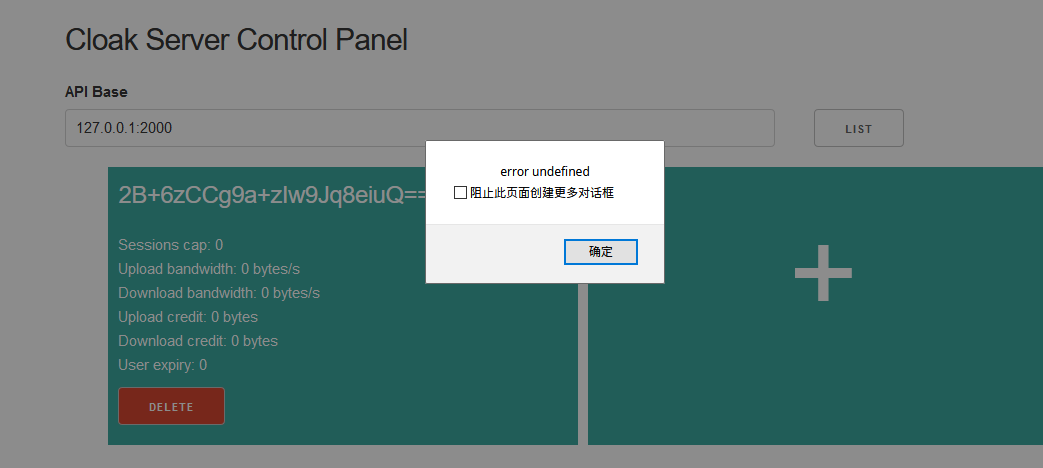
But I found another question, when I want to delete an account, an error pushed up.
image

<!-- gh-comment-id:554221305 --> @zbttl commented on GitHub (Nov 15, 2019): Thanks. When I add `-p 2315` to ckclient it works well. But I found another question, when I want to delete an account, an error pushed up. ![image](https://user-images.githubusercontent.com/22035093/68919624-be336f80-07ad-11ea-9f3d-73027506f0cc.png)
Author
Owner

@Klaaktu commented on GitHub (Nov 15, 2019):

Not sure... I was able to add an account with the same UID and delete it using my ck-client in standalone mode and the control panel. Is your ck-client up and running with additional -l 2000 -a "adminUID" when deleting?
I did run into add/delete error in the past, but that was before control panel became a thing.

<!-- gh-comment-id:554232238 --> @Klaaktu commented on GitHub (Nov 15, 2019): Not sure... I was able to add an account with the same UID and delete it using my ck-client in standalone mode and the control panel. Is your ck-client up and running with additional `-l 2000 -a "adminUID"` when deleting? I did run into add/delete error in the past, but that was before control panel became a thing.
Author
Owner

@zbttl commented on GitHub (Nov 15, 2019):

Oh, This error occurs when I using Firefox.
I try to switch to Chrome and now I can delete it.

<!-- gh-comment-id:554248953 --> @zbttl commented on GitHub (Nov 15, 2019): Oh, This error occurs when I using Firefox. I try to switch to Chrome and now I can delete it.
Sign in to join this conversation.
No labels
pull-request
No milestone
No project
No assignees
1 participant
Notifications
Due date
The due date is invalid or out of range. Please use the format "yyyy-mm-dd".

No due date set.

Dependencies

No dependencies set.

Reference
starred/Cloak#69
No description provided.