[GH-ISSUE #64] Random disconnect to server and unable connect again.(Memory usage issue?) #56

Closed
opened 2026-02-26 12:33:50 +03:00 by kerem · 21 comments
Owner

Originally created by @chenshaoju on GitHub (Sep 23, 2019).
Original GitHub issue: https://github.com/cbeuw/Cloak/issues/64

My English is poor, Sorry.

服务器版本:2.1.1
服务器操作系统:Debian 9.11 x61
客户端版本:2.1.1
客户端操作系统:Windows 7 x64
备注:由于IPv4很不稳定,使用IPv6进行连接。

我注意到一个问题,当长时间连接的情况下,ck-client可能会出现无法连接服务器的现象。

此现象似乎并非GFW或网络问题导致,当出现该现象时, ck-client 不会连接服务器,TCP连接状态来看,只有本地监听和本地应用向 ck-client 监听端口请求的TCP连接。

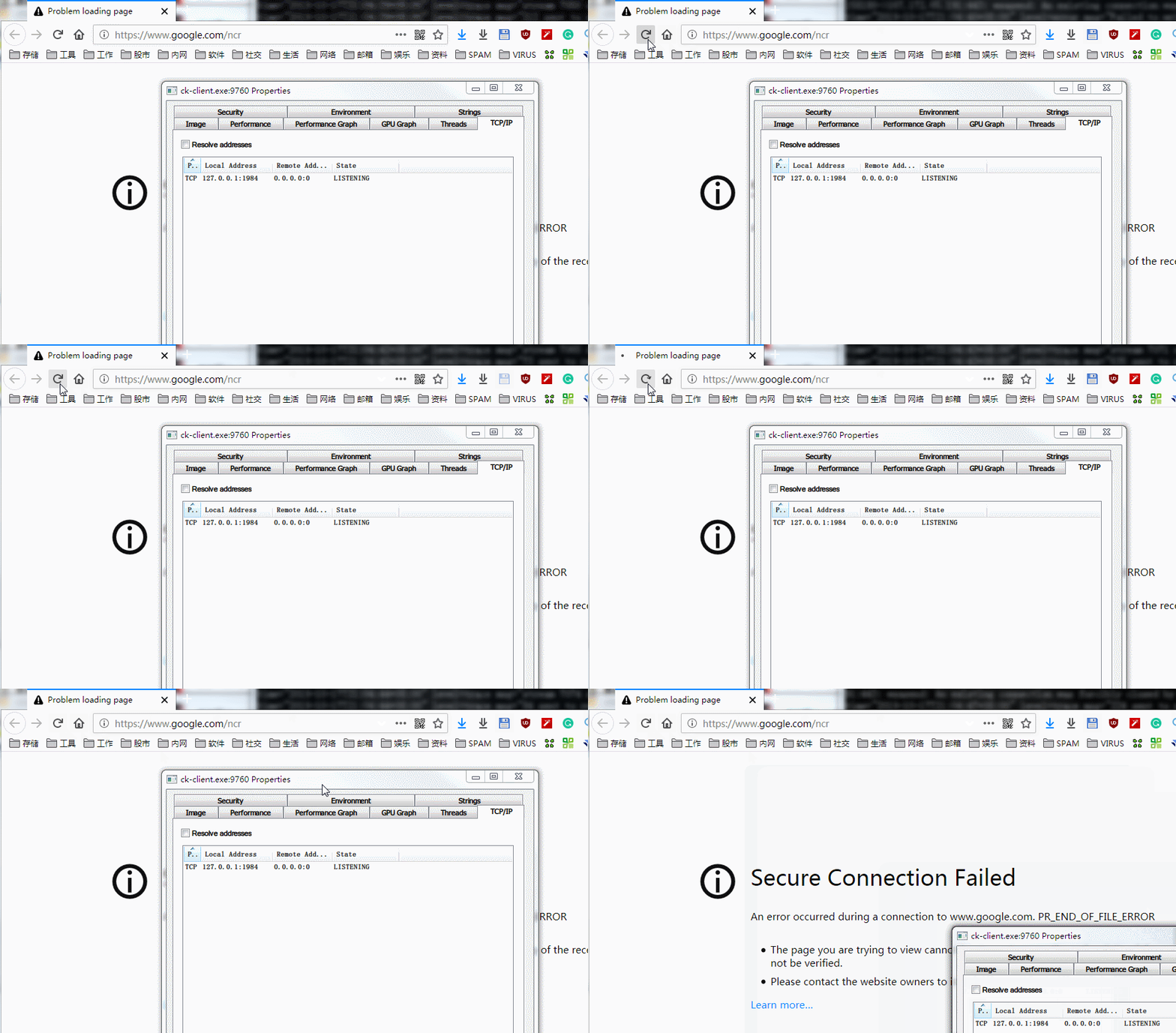
若使用Wireshark抓包,当应用发起请求时,并没有到服务器的任何连接,独立运行模式下的ck-client也没有任何日志输出(已经设置为 debug )。

GIF2

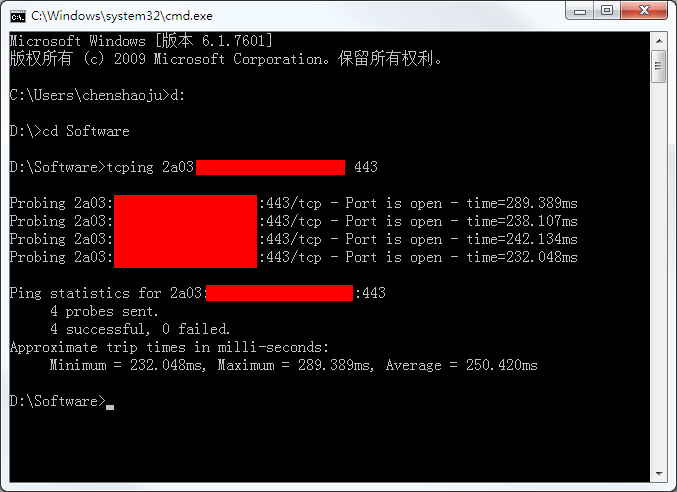
但是,从客户端到服务器的TCP连接是没有问题的:
Screenshot

而服务端的日志能提供的内容也非常有限,并未出现可能的问题提示:

Sep 22 22:51:59 debian-s-1vcpu-1gb-lon1-01 ss-server[818]: time="2019-09-22T22:51:59Z" level=warning msg="non (or malformed) ClientHello" UID= encryptionMeth
Sep 23 00:30:49 debian-s-1vcpu-1gb-lon1-01 ss-server[818]: time="2019-09-23T00:30:49Z" level=warning msg="failed to unmarshal ClientHello into authentication
Sep 23 00:32:21 debian-s-1vcpu-1gb-lon1-01 ss-server[818]: time="2019-09-23T00:32:21Z" level=warning msg="failed to unmarshal ClientHello into authentication
Sep 23 00:32:46 debian-s-1vcpu-1gb-lon1-01 ss-server[818]: time="2019-09-23T00:32:46Z" level=warning msg="failed to unmarshal ClientHello into authentication
Sep 23 00:33:13 debian-s-1vcpu-1gb-lon1-01 ss-server[818]: time="2019-09-23T00:33:13Z" level=warning msg="transport TLS in correct format but not Cloak: ciph

https://github.com/cbeuw/Cloak/issues/54 类似,这种情况下只要Ctrl+C终止 ck-client 然后马上启动,或者在 Shadowsocks-Windows 客户端中切换一下即可立刻恢复。

Originally created by @chenshaoju on GitHub (Sep 23, 2019). Original GitHub issue: https://github.com/cbeuw/Cloak/issues/64 My English is poor, Sorry. 服务器版本:2.1.1 服务器操作系统:Debian 9.11 x61 客户端版本:2.1.1 客户端操作系统:Windows 7 x64 备注:由于IPv4很不稳定,使用IPv6进行连接。 我注意到一个问题,当长时间连接的情况下,ck-client可能会出现无法连接服务器的现象。 此现象似乎并非GFW或网络问题导致,当出现该现象时, ck-client 不会连接服务器,TCP连接状态来看,只有本地监听和本地应用向 ck-client 监听端口请求的TCP连接。 若使用Wireshark抓包,当应用发起请求时,并没有到服务器的任何连接,独立运行模式下的ck-client也没有任何日志输出(已经设置为 debug )。 ![GIF2](https://user-images.githubusercontent.com/515763/65398010-22a60400-dde7-11e9-9588-3f6311033314.gif) 但是,从客户端到服务器的TCP连接是没有问题的: ![Screenshot](https://user-images.githubusercontent.com/515763/65398021-35b8d400-dde7-11e9-9f08-5f1d007cba9b.png) 而服务端的日志能提供的内容也非常有限,并未出现可能的问题提示: ``` Sep 22 22:51:59 debian-s-1vcpu-1gb-lon1-01 ss-server[818]: time="2019-09-22T22:51:59Z" level=warning msg="non (or malformed) ClientHello" UID= encryptionMeth Sep 23 00:30:49 debian-s-1vcpu-1gb-lon1-01 ss-server[818]: time="2019-09-23T00:30:49Z" level=warning msg="failed to unmarshal ClientHello into authentication Sep 23 00:32:21 debian-s-1vcpu-1gb-lon1-01 ss-server[818]: time="2019-09-23T00:32:21Z" level=warning msg="failed to unmarshal ClientHello into authentication Sep 23 00:32:46 debian-s-1vcpu-1gb-lon1-01 ss-server[818]: time="2019-09-23T00:32:46Z" level=warning msg="failed to unmarshal ClientHello into authentication Sep 23 00:33:13 debian-s-1vcpu-1gb-lon1-01 ss-server[818]: time="2019-09-23T00:33:13Z" level=warning msg="transport TLS in correct format but not Cloak: ciph ``` 和 https://github.com/cbeuw/Cloak/issues/54 类似,这种情况下只要Ctrl+C终止 ck-client 然后马上启动,或者在 Shadowsocks-Windows 客户端中切换一下即可立刻恢复。
kerem closed this issue 2026-02-26 12:33:51 +03:00
Author
Owner

@chenshaoju commented on GitHub (Sep 23, 2019):

补充信息:
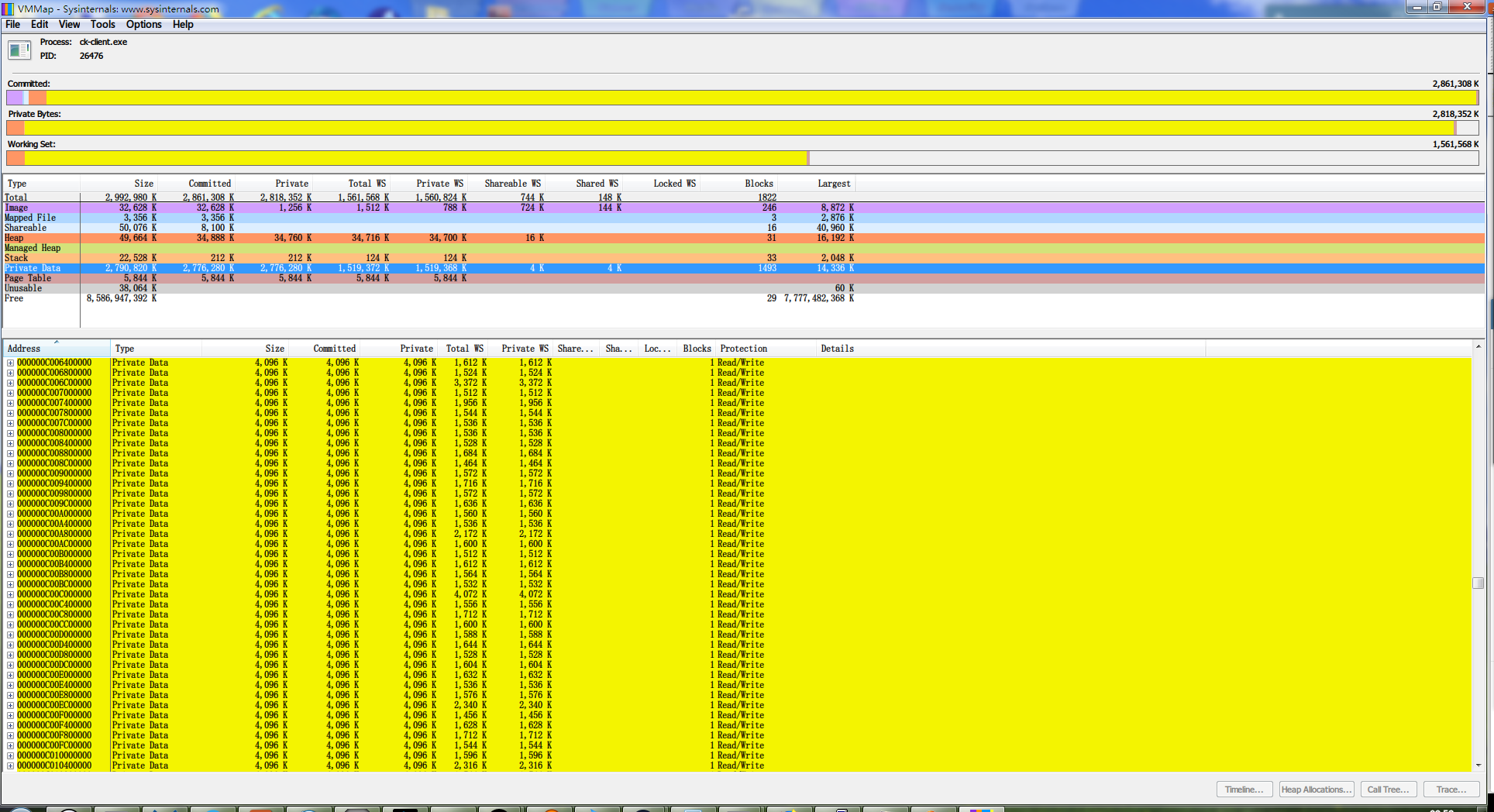
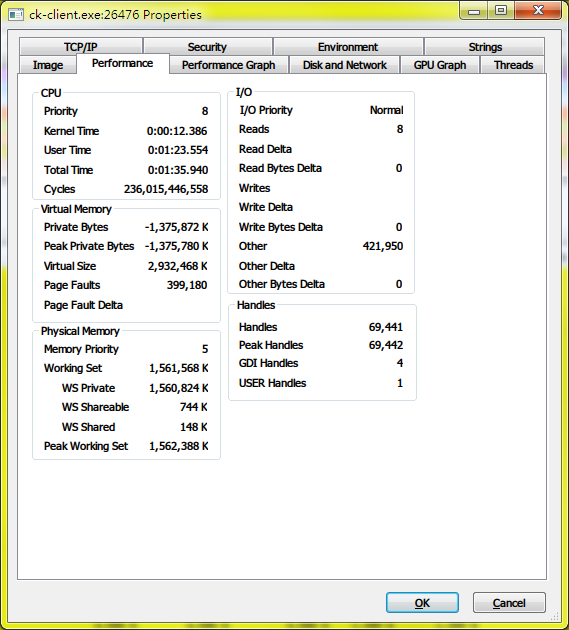
当出现该问题时, ck-client.exe 会使用相当多的内存,本次中,使用了 1.5GB 的Working Set,大部分为Private Data:
1

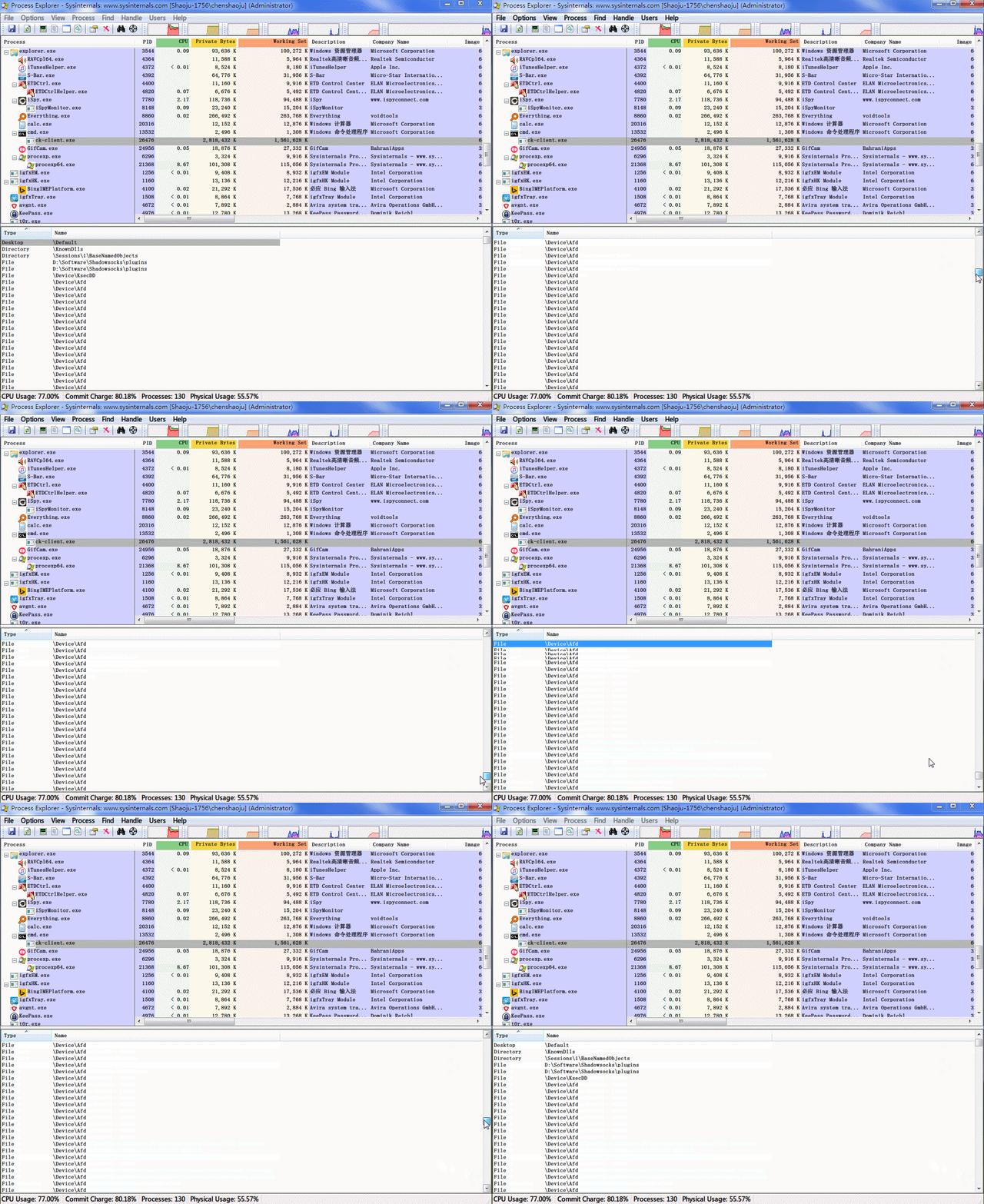
同时,会打开大量到 \Device\Afd 的句柄:
GIF

即使是在已经停止到本地 ck-client 监听端口的请求下,内存消耗也不会降低。
4

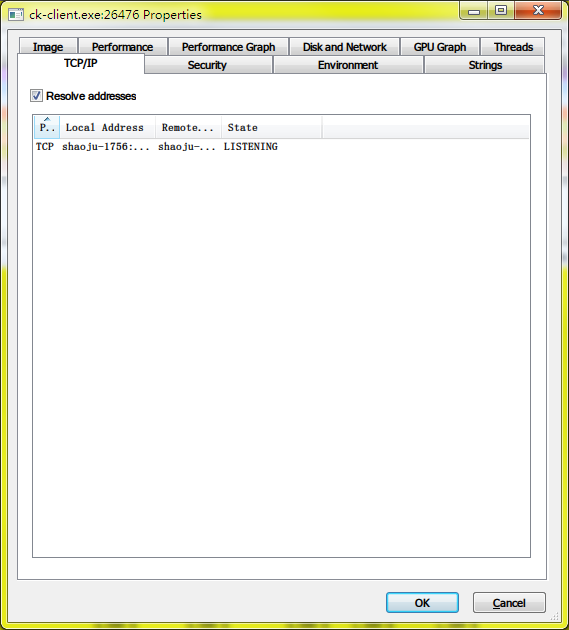
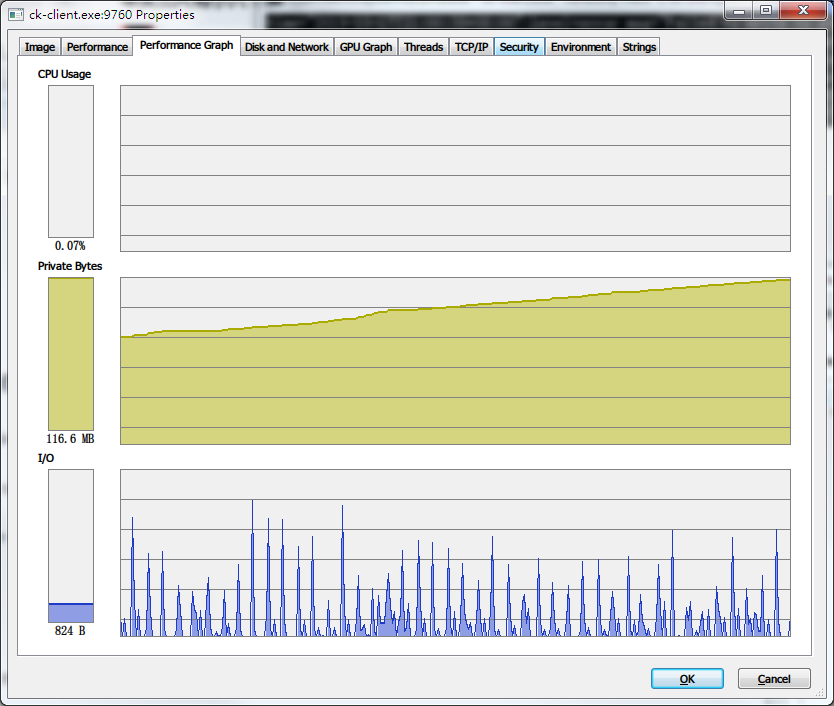
CPU/IO/内存信息:
2

PS:我创建了出现问题时 ck-client 的内存dump,但是太大了,且可能会包含私有信息,如果有需要,能否提供邮箱方便投递?

感谢。

<!-- gh-comment-id:533941571 --> @chenshaoju commented on GitHub (Sep 23, 2019): 补充信息: 当出现该问题时, ck-client.exe 会使用相当多的内存,本次中,使用了 1.5GB 的Working Set,大部分为Private Data: ![1](https://user-images.githubusercontent.com/515763/65398450-dc9e6f80-dde9-11e9-809f-db4cf7b4bfb0.png) 同时,会打开大量到 \Device\Afd 的句柄: ![GIF](https://user-images.githubusercontent.com/515763/65398453-e6c06e00-dde9-11e9-9db3-83dab085e1ae.gif) 即使是在已经停止到本地 ck-client 监听端口的请求下,内存消耗也不会降低。 ![4](https://user-images.githubusercontent.com/515763/65398475-fa6bd480-dde9-11e9-8de8-58e78cb012eb.png) CPU/IO/内存信息: ![2](https://user-images.githubusercontent.com/515763/65398487-11122b80-ddea-11e9-9ebd-3841ec9212a1.png) PS:我创建了出现问题时 ck-client 的内存dump,但是太大了,且可能会包含私有信息,如果有需要,能否提供邮箱方便投递? 感谢。
Author
Owner

@xlyu commented on GitHub (Sep 24, 2019):

+1

<!-- gh-comment-id:534480152 --> @xlyu commented on GitHub (Sep 24, 2019): +1
Author
Owner

@malikshi commented on GitHub (Sep 24, 2019):

Build cloak yourself, my server fine now. Last time am I using 2.1.1 server stopped working.

<!-- gh-comment-id:534482253 --> @malikshi commented on GitHub (Sep 24, 2019): Build cloak yourself, my server fine now. Last time am I using 2.1.1 server stopped working.
Author
Owner

@chenshaoju commented on GitHub (Sep 24, 2019):

This looks client-side issue, not server-side.

The memory usage is abnormal.

<!-- gh-comment-id:534486650 --> @chenshaoju commented on GitHub (Sep 24, 2019): This looks client-side issue, not server-side. The memory usage is abnormal.
Author
Owner

@cbeuw commented on GitHub (Oct 8, 2019):

Sorry for getting back to you so late. I've been quite busy over the past week and, although I've been using Cloak on my own computer as much as possible, I wasn't able to reproduce the issue. It does appear that ck-client hung is affecting multiple users.

Upon close scrutiny of the code, I have a feeling that this issue may be due to Session.streamsM mutex being stuck when the main loop is trying to open new streams. I made some changes in github.com/cbeuw/Cloak@c9318dc90b. If you have go compiler installed, please try this and see if the issue persists.

You can also use -verbosity trace flag when using ck-client in standalone mode to see the most verbose logging.

<!-- gh-comment-id:539727632 --> @cbeuw commented on GitHub (Oct 8, 2019): Sorry for getting back to you so late. I've been quite busy over the past week and, although I've been using Cloak on my own computer as much as possible, I wasn't able to reproduce the issue. It does appear that ck-client hung is affecting multiple users. Upon close scrutiny of the code, I have a feeling that this issue may be due to Session.streamsM mutex being stuck when the main loop is trying to open new streams. I made some changes in https://github.com/cbeuw/Cloak/commit/c9318dc90bb8054cd9f2280fd0165a51c5a8eb55. If you have go compiler installed, please try this and see if the issue persists. You can also use -verbosity trace flag when using ck-client in standalone mode to see the most verbose logging.
Author
Owner

@chenshaoju commented on GitHub (Oct 9, 2019):

Thanks for the reply and update.
I have successfully built the windows client, Test is running.
I will update after 24 hours.

👏

<!-- gh-comment-id:539818619 --> @chenshaoju commented on GitHub (Oct 9, 2019): Thanks for the reply and update. I have successfully built the windows client, Test is running. I will update after 24 hours. 👏
Author
Owner

@chenshaoju commented on GitHub (Oct 9, 2019):

差不多3小时后,此问题再次出现。

但是不同的是,出现该问题时,到服务器的TCP连接仍然保持。

内存使用有些增加,但是不明显(30MB to 60MB)。

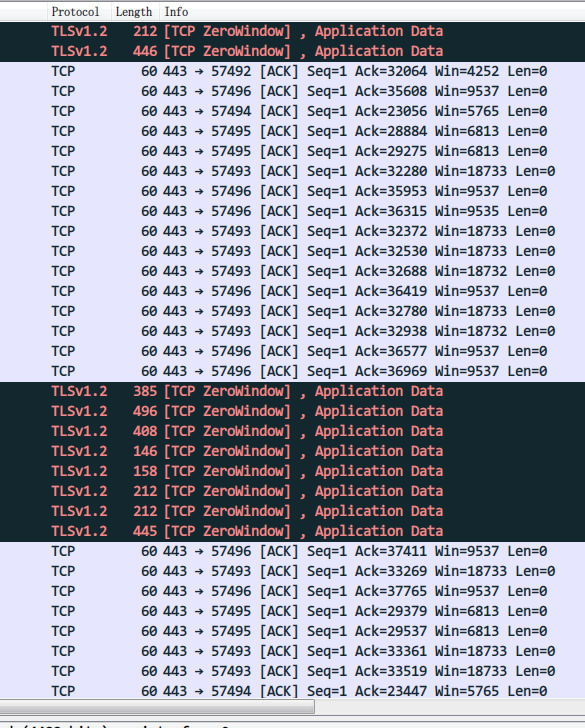
我注意到一个现象,出现问题时,如果使用Wireshark抓包,能抓到客户端和服务器的通信,但是服务器返回的数据包内容不一样,大小却是一样的,均为60字节:
screenshot

出现问题后,我抓了超过1000个数据包,因为包含服务器IP等信息,如果有需要可以发送到作者的邮箱里。

Ctrl+C后再次启动,则会立刻恢复,或者SS不再连接本地客户端(ck-client.exe)后一段时间也会恢复。

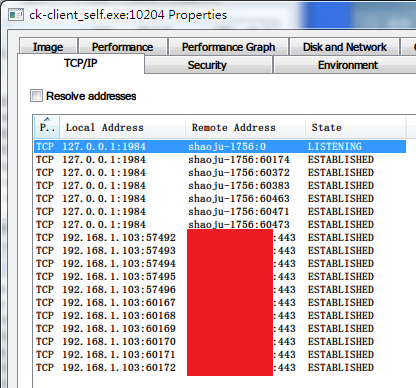
但是,如果是不再连接一段时间后再连接,之前到服务器的连接并不会切断,而是新起了一组连接(我设置了6条TCP连接)
无标题

上图中,本地 57xxx 的端口是出现问题时候残留下来的, 60xxx 是闲置一段时间后新建的TCP连接。

我猜测是不是TCP的连接状态不正确或者某个线程陷入了某种不正常的状态?

另外,当Windows出现问题的时候同一时间我在另一台Linux的客户端上并不会遭遇该问题,两台计算机位于同一个局域网(同一个公网IP出口)。

Windows客户端日志:
client-windows.txt

Debian服务端日志:
server-debian.txt

日志都看不出来什么问题,同步获取,如果需要任何补充信息,请务必告知。

<!-- gh-comment-id:539941622 --> @chenshaoju commented on GitHub (Oct 9, 2019): 差不多3小时后,此问题再次出现。 但是不同的是,出现该问题时,到服务器的TCP连接仍然保持。 内存使用有些增加,但是不明显(30MB to 60MB)。 我注意到一个现象,出现问题时,如果使用Wireshark抓包,能抓到客户端和服务器的通信,但是服务器返回的数据包内容不一样,大小却是一样的,均为60字节: ![screenshot](https://user-images.githubusercontent.com/515763/66472688-6162dc00-eac0-11e9-86fa-d49ccfd5bb02.png) 出现问题后,我抓了超过1000个数据包,因为包含服务器IP等信息,如果有需要可以发送到作者的邮箱里。 Ctrl+C后再次启动,则会立刻恢复,或者SS不再连接本地客户端(ck-client.exe)后一段时间也会恢复。 但是,如果是不再连接一段时间后再连接,之前到服务器的连接并不会切断,而是新起了一组连接(我设置了6条TCP连接) ![无标题](https://user-images.githubusercontent.com/515763/66473380-b9e6a900-eac1-11e9-8246-3f596d1f9edc.png) 上图中,本地 57xxx 的端口是出现问题时候残留下来的, 60xxx 是闲置一段时间后新建的TCP连接。 我猜测是不是TCP的连接状态不正确或者某个线程陷入了某种不正常的状态? 另外,当Windows出现问题的时候同一时间我在另一台Linux的客户端上并不会遭遇该问题,两台计算机位于同一个局域网(同一个公网IP出口)。 Windows客户端日志: [client-windows.txt](https://github.com/cbeuw/Cloak/files/3706775/client-windows.txt) Debian服务端日志: [server-debian.txt](https://github.com/cbeuw/Cloak/files/3706776/server-debian.txt) 日志都看不出来什么问题,同步获取,如果需要任何补充信息,请务必告知。
Author
Owner

@cbeuw commented on GitHub (Oct 15, 2019):

I've changed the behaviour of implicit session closing so that it no longer relies on all of its underlying streams to be individually closed. Instead the closing initiator will send a special frame to explicitly notify the remote to close the session. Hopefully this will prevent the session from getting stuck

<!-- gh-comment-id:542415122 --> @cbeuw commented on GitHub (Oct 15, 2019): I've changed the behaviour of implicit session closing so that it no longer relies on all of its underlying streams to be individually closed. Instead the closing initiator will send a special frame to explicitly notify the remote to close the session. Hopefully this will prevent the session from getting stuck
Author
Owner

@chenshaoju commented on GitHub (Oct 16, 2019):

Thanks for the hard work, I has successfully build the server and client and updated on both side. 👏

Test is running on windows and linux client now.

<!-- gh-comment-id:542484192 --> @chenshaoju commented on GitHub (Oct 16, 2019): Thanks for the hard work, I has successfully build the server and client and updated on both side. 👏 Test is running on windows and linux client now.
Author
Owner

@chenshaoju commented on GitHub (Oct 16, 2019):

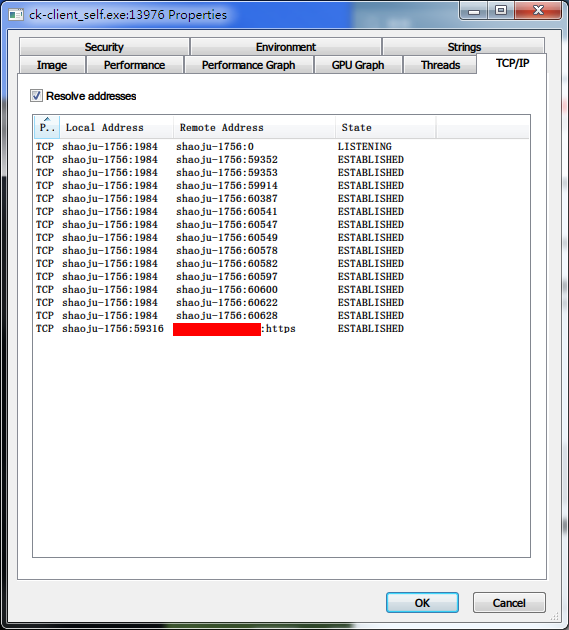
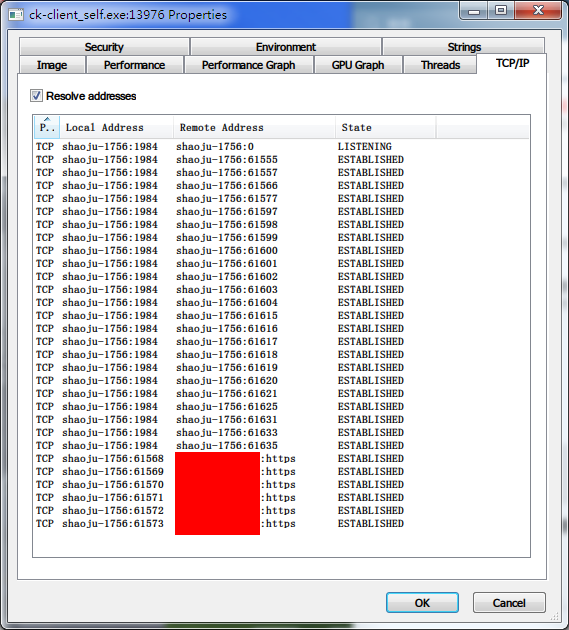
After a short test, This issue still not fully fixed, But it can auto-recovery.

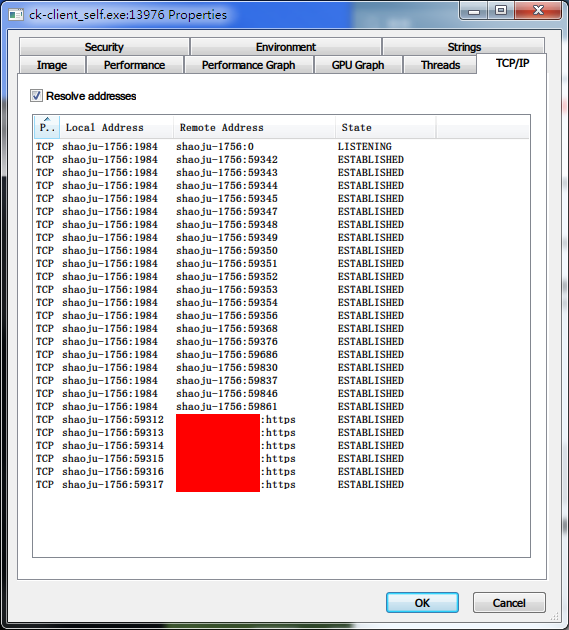
Normally, the Client connected to the server has 6 TCP connections:
10_54

When proxy gets stuck, It only has one TCP connection:
10_59

If a new proxy request coming (Maybe? In my case, I close Firefox and re-open it.), It's will auto-recovery to 6 TCP connections:
11_07

Here is a client-side log, Not the same time with the screenshot:

  1. clientlog.txt
  2. clientlog2.txt

IMHO, It's possible to detect every TCP connect status, When some TCP connection lost, Re-connect immediately or in a very short time?

Thank you.

<!-- gh-comment-id:542503140 --> @chenshaoju commented on GitHub (Oct 16, 2019): After a short test, This issue still not fully fixed, But it can auto-recovery. Normally, the Client connected to the server has 6 TCP connections: ![10_54](https://user-images.githubusercontent.com/515763/66886807-3cfc8780-f00b-11e9-9b1c-61e5e6bb5e39.png) When proxy gets stuck, It only has one TCP connection: ![10_59](https://user-images.githubusercontent.com/515763/66886851-6fa68000-f00b-11e9-84cb-ee6598e15431.png) If a new proxy request coming (Maybe? In my case, I close Firefox and re-open it.), It's will auto-recovery to 6 TCP connections: ![11_07](https://user-images.githubusercontent.com/515763/66887569-f65c5c80-f00d-11e9-9a25-4eaf037ea5ce.png) Here is a client-side log, Not the same time with the screenshot: 1. [clientlog.txt](https://github.com/cbeuw/Cloak/files/3732369/clientlog.txt) 2. [clientlog2.txt](https://github.com/cbeuw/Cloak/files/3732392/clientlog2.txt) IMHO, It's possible to detect every TCP connect status, When some TCP connection lost, Re-connect immediately or in a very short time? Thank you.
Author
Owner

@cbeuw commented on GitHub (Oct 16, 2019):

Thanks for the screenshots and logs. They are very helpful for debugging.

When some TCP connection lost, Re-connect immediately or in a very short time?

This proposal has come up before but I didn't want to implement it like that because I thought this would hide some other bugs instead of getting a chance to expose them and solve them. I was also thinking about implementing dynamic scaling of the amount of connections in the future,

However by this point it does appear that ensuring the synchronicity of all TCP connections' states is quite tricky, and it may be indeed better to close the session once any connection is dropped. I have implemented this in github.com/cbeuw/Cloak@57f0c3d20a. Hopefully now a session can be reopened immediately once a connection drops

<!-- gh-comment-id:542915352 --> @cbeuw commented on GitHub (Oct 16, 2019): Thanks for the screenshots and logs. They are very helpful for debugging. >When some TCP connection lost, Re-connect immediately or in a very short time? This proposal has come up before but I didn't want to implement it like that because I thought this would hide some other bugs instead of getting a chance to expose them and solve them. I was also thinking about implementing dynamic scaling of the amount of connections in the future, However by this point it does appear that ensuring the synchronicity of all TCP connections' states is quite tricky, and it may be indeed better to close the session once any connection is dropped. I have implemented this in https://github.com/cbeuw/Cloak/commit/57f0c3d20a2737791e24162ca35f08258e0ef6d7. Hopefully now a session can be reopened immediately once a connection drops
Author
Owner

@chenshaoju commented on GitHub (Oct 17, 2019):

Thank you!

I have successfully built both side's software.

The test is running, I will update soon. 👍

<!-- gh-comment-id:542968450 --> @chenshaoju commented on GitHub (Oct 17, 2019): Thank you! I have successfully built both side's software. The test is running, I will update soon. :+1:
Author
Owner

@chenshaoju commented on GitHub (Oct 17, 2019):

After 10 hours test, I captured this issue.

When this issue happened before, the cloak is in stuck status, 6 TCP connections still on the server, And it looks unable auto-recovery.

If continue to wait, Somehow, The cloak memory usage starts rising :
screenshot

All TCP connection has lost, include local connections and server connections, And unable connection again:
GIF

Here is log when cloak from stuck to lost all connections, And memory usage start rising :
log.txt

The TCP connectivity test from local to the server is ok.

<!-- gh-comment-id:543171221 --> @chenshaoju commented on GitHub (Oct 17, 2019): After 10 hours test, I captured this issue. When this issue happened before, the cloak is in stuck status, 6 TCP connections still on the server, And it looks unable auto-recovery. If continue to wait, Somehow, The cloak memory usage starts rising : ![screenshot](https://user-images.githubusercontent.com/515763/67011728-bb981880-f122-11e9-84a5-8cddee4f08f5.png) All TCP connection has lost, include local connections and server connections, And unable connection again: ![GIF](https://user-images.githubusercontent.com/515763/67011805-d79bba00-f122-11e9-9f8f-d971108b90a7.gif) Here is log when cloak from stuck to lost all connections, And memory usage start rising : [log.txt](https://github.com/cbeuw/Cloak/files/3739411/log.txt) The TCP connectivity test from local to the server is ok.
Author
Owner

@cbeuw commented on GitHub (Oct 20, 2019):

Thanks again for the feedback.

From the log file it looks like the fact that the TCP connection is broken was not picked up by the listening loop. I made write errors trigger session closing as well: github.com/cbeuw/Cloak@4c17923717

Hopefully this will fix it this time

<!-- gh-comment-id:544289755 --> @cbeuw commented on GitHub (Oct 20, 2019): Thanks again for the feedback. From the log file it looks like the fact that the TCP connection is broken was not picked up by the listening loop. I made write errors trigger session closing as well: https://github.com/cbeuw/Cloak/commit/4c17923717b7b1c38cf2d6271d596578d5cd5acc Hopefully this will fix it this time
Author
Owner

@chenshaoju commented on GitHub (Oct 21, 2019):

Thank you, I have successfully built both side's software.
Windows/Linux Client and Linux Server is running.
I will update soon. 👏

<!-- gh-comment-id:544316314 --> @chenshaoju commented on GitHub (Oct 21, 2019): Thank you, I have successfully built both side's software. Windows/Linux Client and Linux Server is running. I will update soon. 👏
Author
Owner

@chenshaoju commented on GitHub (Oct 21, 2019):

After 12 hours test, I triggered this issue 2 times.

There is no more memory usage issue, but it's still stuck here, need manually restart the ck-client.
log1.txt

I noticed a situation: when ck-client is stuck, The TCP Connection to the server still connected, Even I no longer connected to the local ck-client, And it has exceeded the timeout settings (300 seconds) 1 hour.

screenshot

Log with screenshot:
log2.txt

I'm using ck-client on Debian too, I noticed, If the connection is not active, The ck-client will close connection gracefully, But on my Windows, The connect aways keep active(I'm using a lot of P2P apps, Twitter client refresh every 3 minutes, etc... ), I guess this issue only can be triggered by a lot of connection or keep tunnel active.

<!-- gh-comment-id:544548555 --> @chenshaoju commented on GitHub (Oct 21, 2019): After 12 hours test, I triggered this issue 2 times. There is no more memory usage issue, but it's still stuck here, need manually restart the ck-client. [log1.txt](https://github.com/cbeuw/Cloak/files/3751369/log1.txt) I noticed a situation: when ck-client is stuck, The TCP Connection to the server still connected, Even I no longer connected to the local ck-client, And it has exceeded the timeout settings (300 seconds) 1 hour. ![screenshot](https://user-images.githubusercontent.com/515763/67215060-68d89c80-f453-11e9-9f16-c6269d789ca7.png) Log with screenshot: [log2.txt](https://github.com/cbeuw/Cloak/files/3751378/log2.txt) I'm using ck-client on Debian too, I noticed, If the connection is not active, The ck-client will close connection gracefully, But on my Windows, The connect aways keep active(I'm using a lot of P2P apps, Twitter client refresh every 3 minutes, etc... ), I guess this issue only can be triggered by a lot of connection or keep tunnel active.
Author
Owner

@zhuang00 commented on GitHub (Oct 22, 2019):

I hope to participate in this test, I also found this problem on the mac, the disconnection must be turned off and then started

<!-- gh-comment-id:544924587 --> @zhuang00 commented on GitHub (Oct 22, 2019): I hope to participate in this test, I also found this problem on the mac, the disconnection must be turned off and then started
Author
Owner

@cbeuw commented on GitHub (Nov 3, 2019):

@chenshaoju @zhuang00
Sorry for the late response. I've been quite busy for the last two weeks.
I removed a some mutex deadlocks in 9cab4670f4 and c26be98e79. See if that works?

<!-- gh-comment-id:549188890 --> @cbeuw commented on GitHub (Nov 3, 2019): @chenshaoju @zhuang00 Sorry for the late response. I've been quite busy for the last two weeks. I removed a some mutex deadlocks in 9cab4670f4b42b73d32b7a27a7f04ba11808aec2 and c26be98e79736a911935a1eae5ea4c06e2753e9b. See if that works?
Author
Owner

@chenshaoju commented on GitHub (Nov 4, 2019):

Thanks for the hard work.
I have successfully built the windows client and linux server, Test is running. 👏

<!-- gh-comment-id:549212205 --> @chenshaoju commented on GitHub (Nov 4, 2019): Thanks for the hard work. I have successfully built the windows client and linux server, Test is running. 👏
Author
Owner

@chenshaoju commented on GitHub (Nov 5, 2019):

After 24 hours test, This issue not happen again.

This issue will close.

Thank you. 👍

@zhuang00 Here is a private build by me, for security reasons, scan virus before use it.
cloak_unofficial_commits293_20191105.zip

<!-- gh-comment-id:549658549 --> @chenshaoju commented on GitHub (Nov 5, 2019): After 24 hours test, This issue not happen again. This issue will close. Thank you. :+1: @zhuang00 Here is a private build by me, for security reasons, scan virus before use it. [cloak_unofficial_commits293_20191105.zip](https://github.com/cbeuw/Cloak/files/3807317/cloak_unofficial_commits293_20191105.zip)
Author
Owner

@zhuang00 commented on GitHub (Nov 6, 2019):

Thanks,guys @chenshaoju

<!-- gh-comment-id:550126592 --> @zhuang00 commented on GitHub (Nov 6, 2019): Thanks,guys @chenshaoju
Sign in to join this conversation.
No labels
pull-request
No milestone
No project
No assignees
1 participant
Notifications
Due date
The due date is invalid or out of range. Please use the format "yyyy-mm-dd".

No due date set.

Dependencies

No dependencies set.

Reference
starred/Cloak#56
No description provided.