[GH-ISSUE #500] Keyboard shortcut for enabling clipy #319

Open
opened 2026-03-03 01:11:41 +03:00 by kerem · 6 comments
Owner

Originally created by @bindukodwaneyBF on GitHub (Feb 15, 2022).
Original GitHub issue: https://github.com/Clipy/Clipy/issues/500

Can I use Clipy entire from keyboard. When I have to paste, I first have to use my mouse, click on the Clipy icon on the toolbar and then I can use cmd1, cmd2 etc
Is there a way to enable Clipy without using the mouse. I could not find an option in Preferences to assign a hotkey

Originally created by @bindukodwaneyBF on GitHub (Feb 15, 2022). Original GitHub issue: https://github.com/Clipy/Clipy/issues/500 Can I use Clipy entire from keyboard. When I have to paste, I first have to use my mouse, click on the Clipy icon on the toolbar and then I can use cmd1, cmd2 etc Is there a way to enable Clipy without using the mouse. I could not find an option in Preferences to assign a hotkey
Author
Owner

@mrjwei commented on GitHub (Mar 8, 2022):

Hi, @bindukodwaneyBF
I think you can do that.

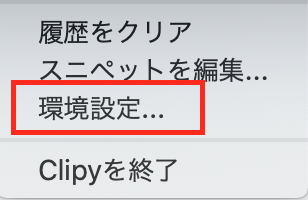
First click Settings
open-settings

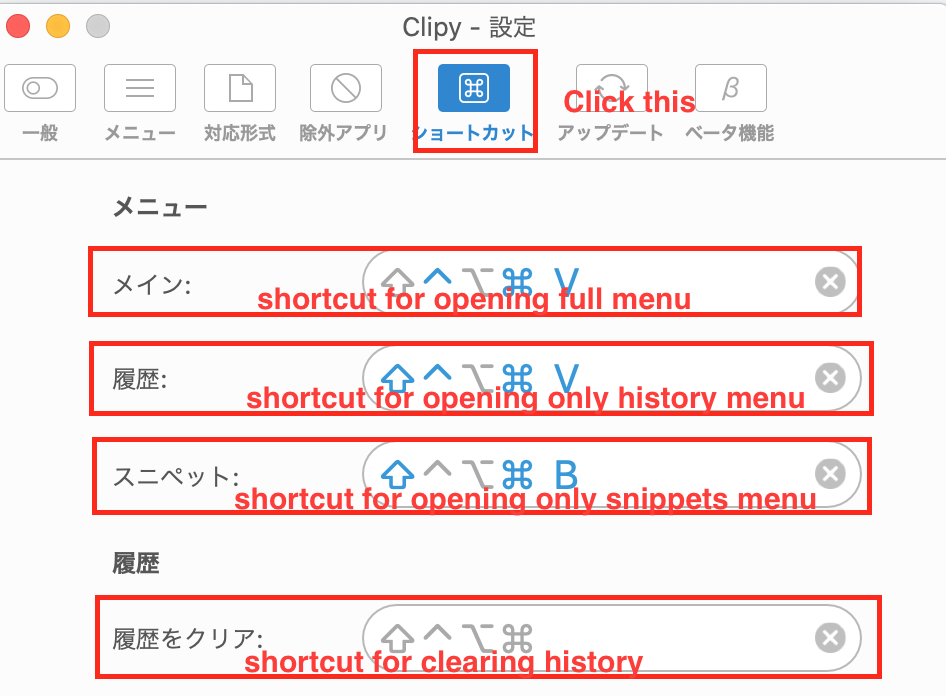
Then click Shortcuts to open settings for shortcuts.
Here, you can set shortcuts for opening menu variations and clearing history.
shortcuts

And you can use the shortcuts you set to perform actions now.

I hope this helps and good luck!

<!-- gh-comment-id:1061391524 --> @mrjwei commented on GitHub (Mar 8, 2022): Hi, @bindukodwaneyBF I think you can do that. First click **Settings** <img width="154" alt="open-settings" src="https://user-images.githubusercontent.com/77598226/157165238-aa0105bd-2f77-43fe-b009-9d0cae081c06.png"> Then click **Shortcuts** to open settings for shortcuts. Here, you can set shortcuts for opening menu variations and clearing history. <img width="473" alt="shortcuts" src="https://user-images.githubusercontent.com/77598226/157165400-45caac6c-ecba-4a33-8c36-fdd955d054db.png"> And you can use the shortcuts you set to perform actions now. I hope this helps and good luck!
Author
Owner

@bindukodwaneyBF commented on GitHub (Mar 8, 2022):

@mrjwei Thanks for the reply. There is no 'Settings' option in Clipy menu.

<!-- gh-comment-id:1061753117 --> @bindukodwaneyBF commented on GitHub (Mar 8, 2022): @mrjwei Thanks for the reply. There is no 'Settings' option in Clipy menu.
Author
Owner

@mrjwei commented on GitHub (Mar 9, 2022):

@bindukodwaneyBF
Can you please share a screenshot for your Clipy menu?

<!-- gh-comment-id:1062452808 --> @mrjwei commented on GitHub (Mar 9, 2022): > @bindukodwaneyBF Can you please share a screenshot for your Clipy menu?
Author
Owner

@bindukodwaneyBF commented on GitHub (Mar 9, 2022):

@mrjwei

Screen Shot 2022-03-08 at 7 41 33 PM
<!-- gh-comment-id:1062468611 --> @bindukodwaneyBF commented on GitHub (Mar 9, 2022): @mrjwei <img width="405" alt="Screen Shot 2022-03-08 at 7 41 33 PM" src="https://user-images.githubusercontent.com/76005788/157355845-aeb5b9f0-cd39-48f2-9862-9a21a9e9c491.png">
Author
Owner

@mrjwei commented on GitHub (Mar 9, 2022):

@bindukodwaneyBF
Hi, thank you for your image.
I guess what you're showing here is CopyClip, not Clipy?

<!-- gh-comment-id:1062916971 --> @mrjwei commented on GitHub (Mar 9, 2022): @bindukodwaneyBF Hi, thank you for your image. I guess what you're showing here is CopyClip, not Clipy?
Author
Owner

@bindukodwaneyBF commented on GitHub (Mar 9, 2022):

@mrjwei Thank you for catching that. I downloaded Clipy and do see shortcuts in Preferences.
But I am unable to use my keyboard to navigate the clipboard e.g. pressing 'shift+command + v' opens the pop-up menu but then I have to use the mouse to navigate. Is there a way to be mouse free ?

<!-- gh-comment-id:1063024304 --> @bindukodwaneyBF commented on GitHub (Mar 9, 2022): @mrjwei Thank you for catching that. I downloaded Clipy and do see shortcuts in Preferences. But I am unable to use my keyboard to navigate the clipboard e.g. pressing 'shift+command + v' opens the pop-up menu but then I have to use the mouse to navigate. Is there a way to be mouse free ?
Sign in to join this conversation.
No milestone
No project
No assignees
1 participant
Notifications
Due date
The due date is invalid or out of range. Please use the format "yyyy-mm-dd".

No due date set.

Dependencies

No dependencies set.

Reference
starred/Clipy#319
No description provided.