[GH-ISSUE #450] Clipy not starting on OS X 11.2 #277

Open
opened 2026-03-03 01:11:25 +03:00 by kerem · 15 comments
Owner

Originally created by @sldev-se on GitHub (Feb 5, 2021).
Original GitHub issue: https://github.com/Clipy/Clipy/issues/450

Sorry to say that my favourite clip manager Clipy doesn't start after upgrading to Mac OS 11.2. Tried latest version 1.2.6 and latest beta 1.2.9 beta 14.

Anyone else with the same issue and/or a solution?

Originally created by @sldev-se on GitHub (Feb 5, 2021). Original GitHub issue: https://github.com/Clipy/Clipy/issues/450 Sorry to say that my favourite clip manager Clipy doesn't start after upgrading to Mac OS 11.2. Tried latest version 1.2.6 and latest beta 1.2.9 beta 14. Anyone else with the same issue and/or a solution?
Author
Owner

@UrsVy commented on GitHub (Feb 9, 2021):

same here, unfortunatly (MacBookAir, M1, BigSur). It seem to start but can't find it running in Status Bar or anywhere else. Activity Monitors shows
image

<!-- gh-comment-id:776082718 --> @UrsVy commented on GitHub (Feb 9, 2021): same here, unfortunatly (MacBookAir, M1, BigSur). It seem to start but can't find it running in Status Bar or anywhere else. Activity Monitors shows ![image](https://user-images.githubusercontent.com/78813294/107398279-c0df5a80-6aff-11eb-85a6-505556a3be1d.png)
Author
Owner

@joedrums8a commented on GitHub (Feb 11, 2021):

I am also having the same issue. Tried uninstalling/reinstalling/etc. I click to open clipy and nothing happens.

Screen Shot 2021-02-11 at 9 18 12 AM
<!-- gh-comment-id:777495385 --> @joedrums8a commented on GitHub (Feb 11, 2021): I am also having the same issue. Tried uninstalling/reinstalling/etc. I click to open clipy and nothing happens. <img width="254" alt="Screen Shot 2021-02-11 at 9 18 12 AM" src="https://user-images.githubusercontent.com/78916267/107648768-b382b700-6c4a-11eb-8bec-4aa3bbceaefa.png">
Author
Owner

@joedrums8a commented on GitHub (Mar 16, 2021):

Has anyone found a fix for this? Clipy still will not open on my machine. I have tried uninstalling/reinstalling, giving Clipy "Full Disk Access", etc. It won't even start up and does not show up on my activity monitor when I try to.

Please help! I use this program for EVERYTHING! 🙏

<!-- gh-comment-id:800393243 --> @joedrums8a commented on GitHub (Mar 16, 2021): Has anyone found a fix for this? Clipy still will not open on my machine. I have tried uninstalling/reinstalling, giving Clipy "Full Disk Access", etc. It won't even start up and does not show up on my activity monitor when I try to. Please help! I use this program for EVERYTHING! 🙏
Author
Owner

@UrsVy commented on GitHub (Mar 16, 2021):

I have replaced Clipy with Maccy now, as I couldn't fix this. There is a free version of Maccy out there, our you can buy it via the App store. Somewhat same functionality as Clipy, especially also has a vertical list of clips (the only other one I could find with a vertical list). Works well on M1/Big Sur, also when working with LibreOffice 7.x

<!-- gh-comment-id:800443535 --> @UrsVy commented on GitHub (Mar 16, 2021): I have replaced Clipy with Maccy now, as I couldn't fix this. There is a free version of Maccy out there, our you can buy it via the App store. Somewhat same functionality as Clipy, especially also has a vertical list of clips (the only other one I could find with a vertical list). Works well on M1/Big Sur, also when working with LibreOffice 7.x
Author
Owner

@joedrums8a commented on GitHub (Mar 16, 2021):

I have replaced Clipy with Maccy now, as I couldn't fix this. There is a free version of Maccy out there, our you can buy it via the App store. Somewhat same functionality as Clipy, especially also has a vertical list of clips (the only other one I could find with a vertical list). Works well on M1/Big Sur, also when working with LibreOffice 7.x

Word. I'll try it out. I found another one called CopyClip, but it doesn't have the keyboard shortcut functionality, or the ability to save stuff like Clipy had. Does Maccy have either of those?

<!-- gh-comment-id:800454841 --> @joedrums8a commented on GitHub (Mar 16, 2021): > I have replaced Clipy with Maccy now, as I couldn't fix this. There is a free version of Maccy out there, our you can buy it via the App store. Somewhat same functionality as Clipy, especially also has a vertical list of clips (the only other one I could find with a vertical list). Works well on M1/Big Sur, also when working with LibreOffice 7.x Word. I'll try it out. I found another one called CopyClip, but it doesn't have the keyboard shortcut functionality, or the ability to save stuff like Clipy had. Does Maccy have either of those?
Author
Owner

@UrsVy commented on GitHub (Mar 16, 2021):

yes to both. ability to save clips is less fancy than with clipy, but good enough (or even better, depends on what one prefers)

<!-- gh-comment-id:800467445 --> @UrsVy commented on GitHub (Mar 16, 2021): yes to both. ability to save clips is less fancy than with clipy, but good enough (or even better, depends on what one prefers)
Author
Owner

@maffseth commented on GitHub (Mar 31, 2021):

I have the same problem as the above, and clipy doesn't start at all when I try to launch it.

I just tried Maccy and they don't seem to have the ability to store snippets, which was the feature I loved most from clipy. Does anyone know of any alternatives (or has found a fix for launching clipy)?

<!-- gh-comment-id:811190843 --> @maffseth commented on GitHub (Mar 31, 2021): I have the same problem as the above, and clipy doesn't start at all when I try to launch it. I just tried Maccy and they don't seem to have the ability to store snippets, which was the feature I loved most from clipy. Does anyone know of any alternatives (or has found a fix for launching clipy)?
Author
Owner

@UrsVy commented on GitHub (Mar 31, 2021):

Maccy has snippets, just select a copied item in Maccy's list and press ALT+P to pin/unoin. Also check Maccy's Prefs. That feature is less fancy than in Clipy, but it is there

<!-- gh-comment-id:811214617 --> @UrsVy commented on GitHub (Mar 31, 2021): Maccy has snippets, just select a copied item in Maccy's list and press ALT+P to pin/unoin. Also check Maccy's Prefs. That feature is less fancy than in Clipy, but it is there
Author
Owner

@elgandoz commented on GitHub (May 17, 2021):

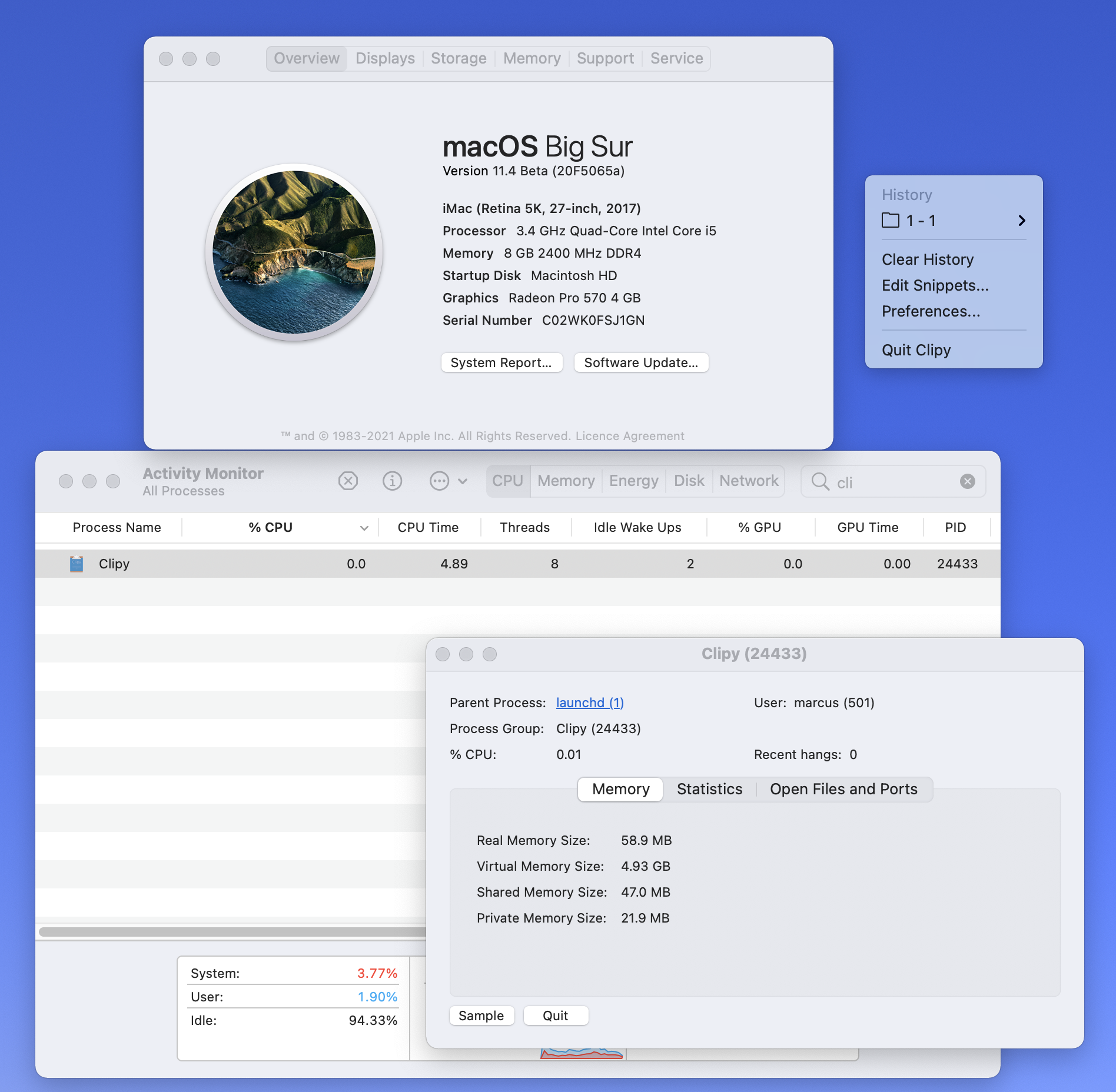
Just to let you know, I'm running BigSur beta (now v11.4) and I uninstalled Clipy completely (using AppCleaner), removing all the config files and then installed it again, and it started working, although the icon doesn't display in the tray (I can still trigger it via the shortcut Shift+Command+V). I have an Intel iMac.
Screen Shot 2021-05-17 at 14 06 56

<!-- gh-comment-id:841966032 --> @elgandoz commented on GitHub (May 17, 2021): Just to let you know, I'm running BigSur beta (now v11.4) and I uninstalled Clipy completely (using [AppCleaner](https://freemacsoft.net/appcleaner/)), removing all the config files and then installed it again, and it started working, although the icon doesn't display in the tray (I can still trigger it via the shortcut Shift+Command+V). I have an Intel iMac. <img width="948" alt="Screen Shot 2021-05-17 at 14 06 56" src="https://user-images.githubusercontent.com/5859926/118431267-408d4e80-b719-11eb-88a1-7d8137c45b63.png">
Author
Owner

@jordanius commented on GitHub (May 24, 2021):

For anyone without ready access to an "uninstaller"-type app, if you simply remove the following files/folders, Clipy should start up just fine (worked for me at least, and I was having the same problem as everyone else here - it would simply fail to launch, no error message or anything):

~/Library/Application Support/com.clipy-app.Clipy
~/Library/Caches/com.clipy-app.Clipy
~/Library/Preferences/com.clipy-app.Clipy.plist

<!-- gh-comment-id:847307432 --> @jordanius commented on GitHub (May 24, 2021): For anyone without ready access to an "uninstaller"-type app, if you simply remove the following files/folders, Clipy should start up just fine (worked for me at least, and I was having the same problem as everyone else here - it would simply fail to launch, no error message or anything): ~/Library/Application Support/com.clipy-app.Clipy ~/Library/Caches/com.clipy-app.Clipy ~/Library/Preferences/com.clipy-app.Clipy.plist
Author
Owner

@alexli0707 commented on GitHub (May 26, 2021):

Just to let you know, I'm running BigSur beta (now v11.4) and I uninstalled Clipy completely (using AppCleaner), removing all the config files and then installed it again, and it started working, although the icon doesn't display in the tray (I can still trigger it via the shortcut Shift+Command+V). I have an Intel iMac.
Screen Shot 2021-05-17 at 14 06 56

Just to let you know, I'm running BigSur beta (now v11.4) and I uninstalled Clipy completely (using AppCleaner), removing all the config files and then installed it again, and it started working, although the icon doesn't display in the tray (I can still trigger it via the shortcut Shift+Command+V). I have an Intel iMac.
Screen Shot 2021-05-17 at 14 06 56

it works and save my day.

<!-- gh-comment-id:848429607 --> @alexli0707 commented on GitHub (May 26, 2021): > Just to let you know, I'm running BigSur beta (now v11.4) and I uninstalled Clipy completely (using [AppCleaner](https://freemacsoft.net/appcleaner/)), removing all the config files and then installed it again, and it started working, although the icon doesn't display in the tray (I can still trigger it via the shortcut Shift+Command+V). I have an Intel iMac. > <img alt="Screen Shot 2021-05-17 at 14 06 56" width="948" src="https://user-images.githubusercontent.com/5859926/118431267-408d4e80-b719-11eb-88a1-7d8137c45b63.png"> > Just to let you know, I'm running BigSur beta (now v11.4) and I uninstalled Clipy completely (using [AppCleaner](https://freemacsoft.net/appcleaner/)), removing all the config files and then installed it again, and it started working, although the icon doesn't display in the tray (I can still trigger it via the shortcut Shift+Command+V). I have an Intel iMac. > <img alt="Screen Shot 2021-05-17 at 14 06 56" width="948" src="https://user-images.githubusercontent.com/5859926/118431267-408d4e80-b719-11eb-88a1-7d8137c45b63.png"> it works and save my day.
Author
Owner

@houcros commented on GitHub (Sep 8, 2021):

For anyone without ready access to an "uninstaller"-type app, if you simply remove the following files/folders, Clipy should start up just fine (worked for me at least, and I was having the same problem as everyone else here - it would simply fail to launch, no error message or anything):

~/Library/Application Support/com.clipy-app.Clipy
~/Library/Caches/com.clipy-app.Clipy
~/Library/Preferences/com.clipy-app.Clipy.plist

Sweet! This worked for me on MacBook Pro with macOS 11.4 M1 chip.

<!-- gh-comment-id:915371560 --> @houcros commented on GitHub (Sep 8, 2021): > For anyone without ready access to an "uninstaller"-type app, if you simply remove the following files/folders, Clipy should start up just fine (worked for me at least, and I was having the same problem as everyone else here - it would simply fail to launch, no error message or anything): > > ~/Library/Application Support/com.clipy-app.Clipy > ~/Library/Caches/com.clipy-app.Clipy > ~/Library/Preferences/com.clipy-app.Clipy.plist Sweet! This worked for me on MacBook Pro with macOS 11.4 M1 chip.
Author
Owner

@amibenson commented on GitHub (Jan 8, 2022):

Doesn't seem to work on M1 OS 12.1. Any update on this?

<!-- gh-comment-id:1007929996 --> @amibenson commented on GitHub (Jan 8, 2022): Doesn't seem to work on M1 OS 12.1. Any update on this?
Author
Owner

@ccabaleiro commented on GitHub (Mar 13, 2022):

I have a similar issue: Clipy brings the clipboard and snippets, but does not appear on tray nor shows up when started manually.

My machine is a MBP M1 with macOS 12.2.1.

I see Clipy is not updated for a while now, does this mean it is abandoned? No developer is interested in continue the project?

<!-- gh-comment-id:1066127150 --> @ccabaleiro commented on GitHub (Mar 13, 2022): I have a similar issue: Clipy brings the clipboard and snippets, but does not appear on tray nor shows up when started manually. My machine is a MBP M1 with macOS 12.2.1. I see Clipy is not updated for a while now, does this mean it is abandoned? No developer is interested in continue the project?
Author
Owner

@zoominGiladSher commented on GitHub (Apr 11, 2023):

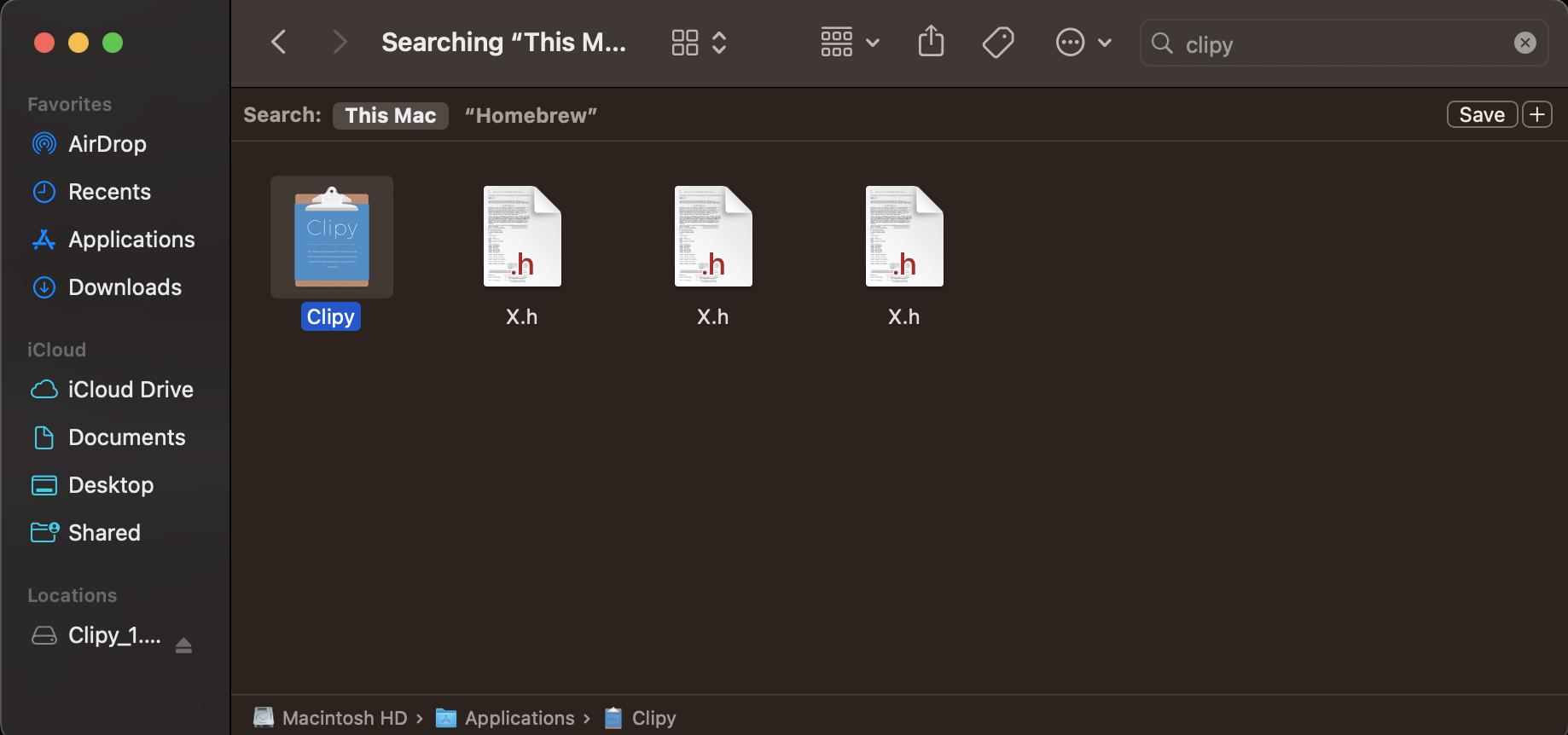
If you've downloaded clipy from brew, I had to search for it in my finder, double click on the icon of the app, it then asked me to install some library and allow permissions. Seems to be working fine after.
image

<!-- gh-comment-id:1503665751 --> @zoominGiladSher commented on GitHub (Apr 11, 2023): If you've downloaded clipy from brew, I had to search for it in my finder, double click on the icon of the app, it then asked me to install some library and allow permissions. Seems to be working fine after. <img width="919" alt="image" src="https://user-images.githubusercontent.com/56221821/231219896-afb65480-241b-4226-bed5-c32c83a62dfc.png">
Sign in to join this conversation.
No milestone
No project
No assignees
1 participant
Notifications
Due date
The due date is invalid or out of range. Please use the format "yyyy-mm-dd".

No due date set.

Dependencies

No dependencies set.

Reference
starred/Clipy#277
No description provided.