mirror of
https://github.com/Clipy/Clipy.git
synced 2026-04-25 17:15:58 +03:00
[GH-ISSUE #337] Context Menu is missing bottom section #184
Labels
No milestone
No project
No assignees
1 participant

Notifications
Due date
No due date set.
Dependencies
No dependencies set.
Reference
starred/Clipy#184
Loading…
Add table
Add a link
Reference in a new issue
No description provided.
Delete branch "%!s()"
Deleting a branch is permanent. Although the deleted branch may continue to exist for a short time before it actually gets removed, it CANNOT be undone in most cases. Continue?
Originally created by @huyz on GitHub (Jan 21, 2019).
Original GitHub issue: https://github.com/Clipy/Clipy/issues/337
I don't know what happened but the keyboard-triggered context menu only has the "History" section now. No "Clear History", "Edit Snippets...", "Preferences...", or "Quit Clipy".
I can only access these menu items by clicking the icon in the menubar.
I installed Clipy on another Macbook with the same latest 10.14.2 and the menu entries are there.
I tried nuking the
Preferencesfile and theApplication Supportdirectory but still no dice.@hackedunit commented on GitHub (Jul 30, 2019):
I'm facing the same problem. Somehow I lost the menu bar and the option to go into preferences from the menu. Now I have no idea how to access the preferences window!! I tried resetting the app and re-installing using third party uninstaller apps, but Clipy still starts again without the menubar icon or the preference option.
@hackedunit commented on GitHub (Jul 30, 2019):
Ah well...
defaults delete com.clipy-app.Clipydid the trick!@ian4hu commented on GitHub (Aug 14, 2019):
You triggered the history menu not the main menu (which contains history, snippets, preferences)
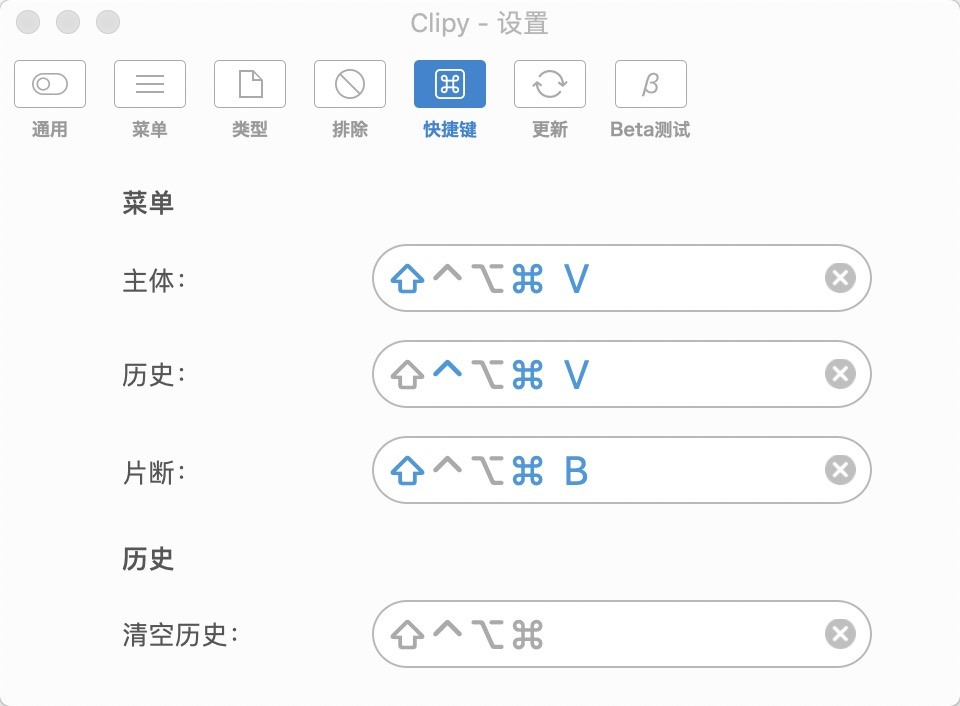
by different shortcut key.