mirror of
https://github.com/Clipy/Clipy.git
synced 2026-04-26 01:25:58 +03:00
[GH-ISSUE #219] Pasting Javascript tags doesn't work properly #111
Labels
No milestone
No project
No assignees
1 participant

Notifications
Due date
No due date set.
Dependencies
No dependencies set.
Reference
starred/Clipy#111
Loading…
Add table
Add a link
Reference in a new issue
No description provided.
Delete branch "%!s()"
Deleting a branch is permanent. Although the deleted branch may continue to exist for a short time before it actually gets removed, it CANNOT be undone in most cases. Continue?
Originally created by @phylshin on GitHub (Oct 5, 2017).
Original GitHub issue: https://github.com/Clipy/Clipy/issues/219
When using the app to copy/paste Javascript tags into excel, the paste function breaks the formatting of the tag and puts it into multiple cells instead of one with plaintext. When pasting a JS tag in non plaintext, the tag is not recognized and only pastes quotation marks:
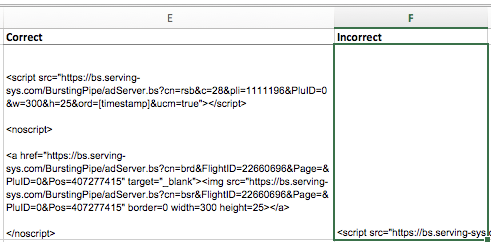
Is there any way to paste JS code without it breaking in excel?
@Econa77 commented on GitHub (Oct 18, 2017):
@phylshin Thanks report.
I would like to investigate this. Can you answer the following questions?