mirror of
https://github.com/KelvinTegelaar/CIPP.git
synced 2026-04-25 08:16:01 +03:00
[GH-ISSUE #143] Issues accessing dashboard after installation #86
Labels
No labels
API
Feature
NotABug
NotABug
Planned
Sponsor Priority
Sponsor Priority
bug
documentation
duplicate
enhancement
needs more info
no-activity
no-priority
not-assigned
pull-request
react-conversion
react-conversion
roadmap
security
stale
unconfirmed-by-user
unconfirmed-by-user
wontfix
No milestone
No project
No assignees
1 participant

Notifications
Due date
No due date set.
Dependencies
No dependencies set.
Reference
starred/CIPP#86
Loading…
Add table
Add a link
Reference in a new issue
No description provided.
Delete branch "%!s()"
Deleting a branch is permanent. Although the deleted branch may continue to exist for a short time before it actually gets removed, it CANNOT be undone in most cases. Continue?
Originally created by @AussieDumbAss on GitHub (Oct 28, 2021).
Original GitHub issue: https://github.com/KelvinTegelaar/CIPP/issues/143
Describe the bug
Upon opening the Static Web App I receive the following error message:
To Reproduce
Steps to reproduce the behavior:
Access my Static Web App in Azure
Click on the provided URL
Login with my Microsoft Identity
Expected behavior
A Dashboard will appear
Screenshots
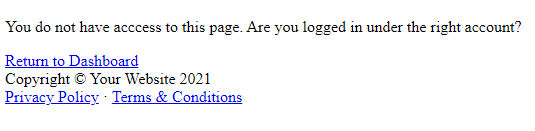
Desktop (please complete the following information):
Additional context
This happens for both my account and my Global Admin account.
Reader permissions have been assigned to cipp-swa-xyz12 for both accounts.
Function app has been restarted.
@karnophage commented on GitHub (Oct 28, 2021):
Wait a while, I had similar issues.
@KelvinTegelaar commented on GitHub (Oct 28, 2021):
This means you have not invited yourself. Please read the documentation carefully, you must invite yourself via Role Management as a "reader" not assign IAM permissions.