[PR #734] [MERGED] Add batch export folder/storage in context menu #870

Closed
opened 2026-03-03 00:23:35 +03:00 by kerem · 0 comments
Owner

📋 Pull Request Information

Original PR: https://github.com/BoostIO/BoostNote-App/pull/734
Author: @Komediruzecki
Created: 12/21/2020
Status: Merged
Merged: 5/28/2021
Merged by: @Rokt33r

Base: masterHead: feature/add-batch-export-folder-in-context-menu


📝 Commits (1)

  • 05745fc Initial batch export for PDF

📊 Changes

5 files changed (+803 additions, -46 deletions)

View changed files

📝 src/components/atoms/ProgressBar.tsx (+3 -2)
src/components/molecules/ExportProgressItem.tsx (+587 -0)
📝 src/components/molecules/FolderNavigatorItem.tsx (+108 -34)
📝 src/components/molecules/StorageNavigatorFragment.tsx (+54 -1)
📝 src/lib/exports.ts (+51 -9)

📄 Description

Initial batch export for PDF (#491)

  • Add prepare export functions in exports.ts

  • Add handling of menus for folder exports

  • Add support for non-recursive/recursive exports

  • Add export progress bar

  • Add support for storage/workspace export

  • Refactor functions for exports

  • Add component for batch export handling (state, procedure)

  • Refactor folder and storage export to use the component

  • Fix cancelation state logic

  • Add dim background on export procedure

General functionality:

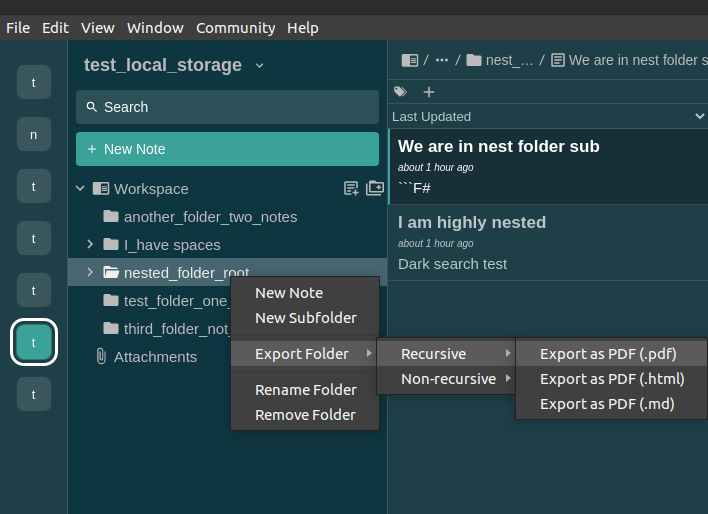
Users can export folders via the context menu.
By right-clicking on the desired folder the context menu with export options comes up:
MenuForExports_Folders

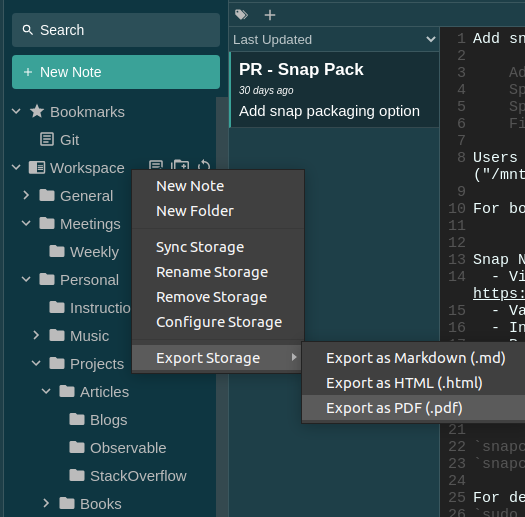
A similar context menu dialog is available for workspace/storage navigation item (for exporting whole storage)
ExportStorageContextMenu

Once the exported is selected, the file explorer comes up and offers the user to choose the save location.
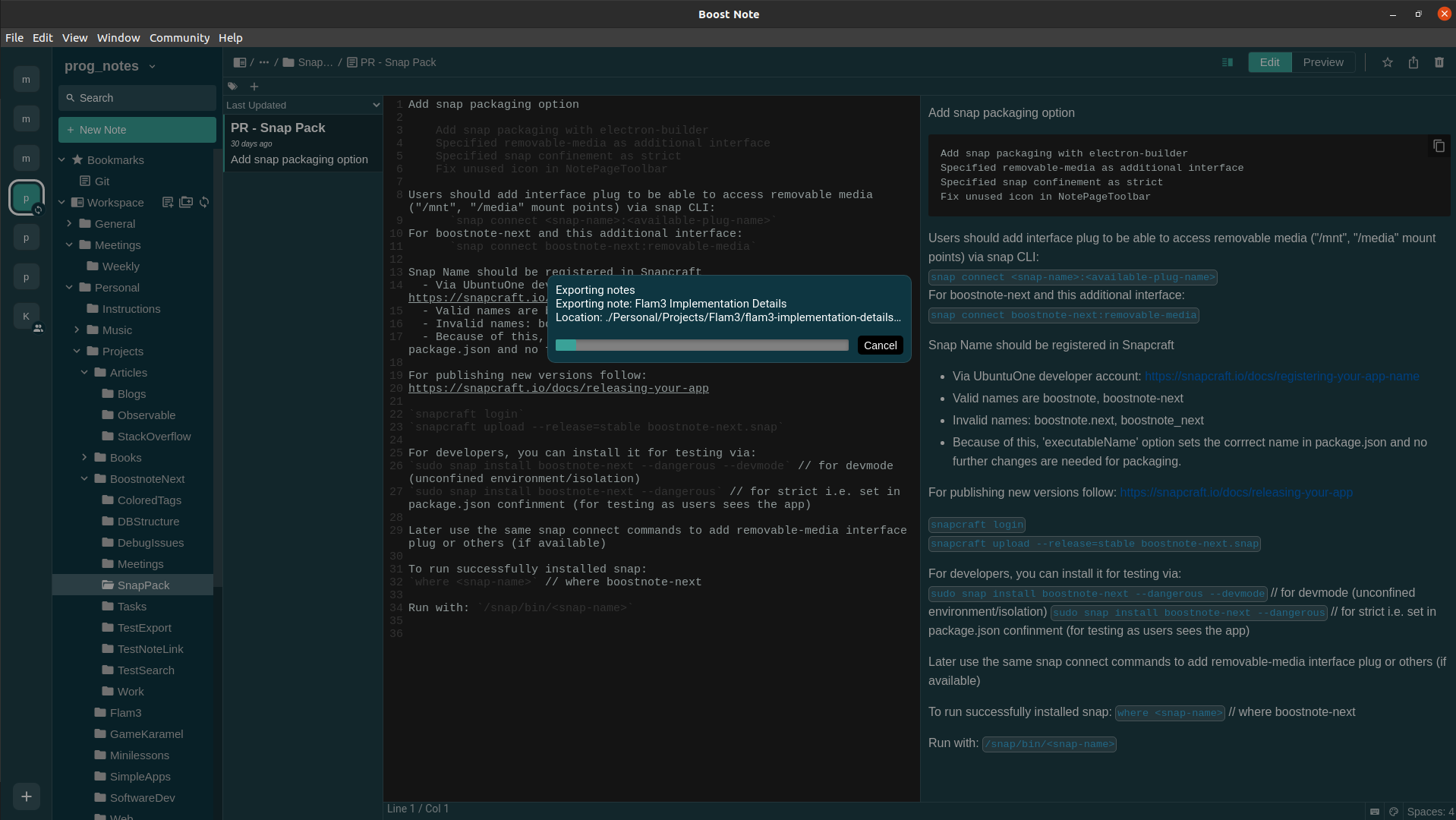
When the location is confirmed export process starts and users can see export progress:

First directories are created in the destination (depending on recursive/non-recursive and selected folder/storage)

ExportDirsTrim2

Then notes are being exported to their appropriate locations:

ExportNote_4

During export, for now, users can only cancel the export.
This stops the export, and the message of the export state is shown as a push message:

ExportCanceledPushMessage

During export, export errors generated from export functions are shown in push messages as well.
In the end, the summary is also generated, as well as any export errors.

Summary for successfully finish - push message:

ExportFinishedPushMessage

The whole procedure while exporting can be seen here:
FinalOverview

Error handling:

  • When directory creation fails, the export fails

  • When one note export fails, the export process continues

  • Any unknown error happens, it is caught and the user is notified (as well as console.warn)

  • Add options in progress bar modal

    • Export by tag
    • Include front matter
    • Auto overwrite (dirs, notes)
  • Cancelable promise API instead of useRef

  • Option to hide export dialog (send to background/status bar)

  • Status bar rendering of export, re-activate export modal

  • Handle overwrites (dirs, notes)

    • Ask yes/no
    • Overwrite always checkbox
  • Add translations for batch export strings

  • Better export modal dialog design

Test:

  • In electron Linux App (dev)
  • In electron Linux App production version (appImage)

🔄 This issue represents a GitHub Pull Request. It cannot be merged through Gitea due to API limitations.

## 📋 Pull Request Information **Original PR:** https://github.com/BoostIO/BoostNote-App/pull/734 **Author:** [@Komediruzecki](https://github.com/Komediruzecki) **Created:** 12/21/2020 **Status:** ✅ Merged **Merged:** 5/28/2021 **Merged by:** [@Rokt33r](https://github.com/Rokt33r) **Base:** `master` ← **Head:** `feature/add-batch-export-folder-in-context-menu` --- ### 📝 Commits (1) - [`05745fc`](https://github.com/BoostIO/BoostNote-App/commit/05745fc77ccf3b9d2cf2a63f04ab0ca4daae82c2) Initial batch export for PDF ### 📊 Changes **5 files changed** (+803 additions, -46 deletions) <details> <summary>View changed files</summary> 📝 `src/components/atoms/ProgressBar.tsx` (+3 -2) ➕ `src/components/molecules/ExportProgressItem.tsx` (+587 -0) 📝 `src/components/molecules/FolderNavigatorItem.tsx` (+108 -34) 📝 `src/components/molecules/StorageNavigatorFragment.tsx` (+54 -1) 📝 `src/lib/exports.ts` (+51 -9) </details> ### 📄 Description **Initial batch export for PDF** (#491) - Add prepare export functions in exports.ts - Add handling of menus for folder exports - Add support for non-recursive/recursive exports - Add export progress bar - Add support for storage/workspace export - Refactor functions for exports - Add component for batch export handling (state, procedure) - Refactor folder and storage export to use the component - Fix cancelation state logic - Add dim background on export procedure General functionality: Users can export folders via the context menu. By right-clicking on the desired folder the context menu with export options comes up: ![MenuForExports_Folders](https://user-images.githubusercontent.com/18196945/102811943-82160980-43c6-11eb-9a79-29c8951e0437.png) A similar context menu dialog is available for workspace/storage navigation item (for exporting whole storage) ![ExportStorageContextMenu](https://user-images.githubusercontent.com/18196945/102812013-a245c880-43c6-11eb-9848-caf2d8b0255a.png) Once the exported is selected, the file explorer comes up and offers the user to choose the save location. When the location is confirmed export process starts and users can see export progress: First directories are created in the destination (depending on recursive/non-recursive and selected folder/storage) ![ExportDirsTrim2](https://user-images.githubusercontent.com/18196945/102813106-8511f980-43c8-11eb-8dab-a483271faf9c.png) Then notes are being exported to their appropriate locations: ![ExportNote_4](https://user-images.githubusercontent.com/18196945/102812247-fe105180-43c6-11eb-8315-2bd69a96c2df.png) During export, for now, users can only cancel the export. This stops the export, and the message of the export state is shown as a push message: ![ExportCanceledPushMessage](https://user-images.githubusercontent.com/18196945/102812361-2b5cff80-43c7-11eb-94be-fe09f495c499.png) During export, export errors generated from export functions are shown in push messages as well. In the end, the summary is also generated, as well as any export errors. Summary for successfully finish - push message: ![ExportFinishedPushMessage](https://user-images.githubusercontent.com/18196945/102812427-462f7400-43c7-11eb-9e7e-3600cbeab122.png) The whole procedure while exporting can be seen here: ![FinalOverview](https://user-images.githubusercontent.com/18196945/102812697-c229bc00-43c7-11eb-8062-47c65e5bddba.png) **Error handling:** - When directory creation fails, the export fails - When one note export fails, the export process continues - Any unknown error happens, it is caught and the user is notified (as well as ```console.warn```) - [ ] Add options in progress bar modal - [ ] Export by tag - [ ] Include front matter - [ ] Auto overwrite (dirs, notes) - [ ] Cancelable promise API instead of useRef - [ ] Option to hide export dialog (send to background/status bar) - [ ] Status bar rendering of export, re-activate export modal - [ ] Handle overwrites (dirs, notes) - [ ] Ask yes/no - [ ] Overwrite always checkbox - [ ] Add translations for batch export strings - [ ] Better export modal dialog design Test: - In electron Linux App (dev) - In electron Linux App production version (appImage) --- <sub>🔄 This issue represents a GitHub Pull Request. It cannot be merged through Gitea due to API limitations.</sub>
kerem 2026-03-03 00:23:35 +03:00
Sign in to join this conversation.
No milestone
No project
No assignees
1 participant
Notifications
Due date
The due date is invalid or out of range. Please use the format "yyyy-mm-dd".

No due date set.

Dependencies

No dependencies set.

Reference
starred/BoostNote-App#870
No description provided.