[GH-ISSUE #1106] Can't migrate converted local notes to cloud account #460

Closed
opened 2026-03-03 00:21:21 +03:00 by kerem · 2 comments
Owner

Originally created by @dan-grayson on GitHub (Aug 24, 2021).
Original GitHub issue: https://github.com/BoostIO/BoostNote-App/issues/1106

Current behavior

I'm following the steps to migrate converted local notes to a cloud space, and all that happens is that I get logged into a cloud account, no notes migrate.

This is really bad because I now can't access my last 2 years of notes. I also tried the new local app but that just won't open, so that's a separate issue.

I'd be really happy to get this working with a cloud account.

Screen Shot 2021-08-24 at 11 06 20 AM Screen Shot 2021-08-24 at 11 07 52 AM Screen Shot 2021-08-24 at 11 08 02 AM Screen Shot 2021-08-24 at 11 08 09 AM Screen Shot 2021-08-24 at 11 12 48 AM Screen Shot 2021-08-24 at 11 08 28 AM

Expected behavior

Either the local notes would have migrated by following these steps, or from the logged in app state with a cloud account, I should be able to import an existing local space so that it migrates to my cloud account.

Steps to reproduce

  1. Have a converted local space
  2. Open the latest version of Boost Note, in which you cannot see your notes but can only see the "Local space feature has been deprecated" screen
  3. Click the "Migrate to cloud space" button
  4. Click the "Create Team Account" button
  5. Click "Sign In" - (I already created a team account when trying to do this earlier)
  6. Use the "Open Desktop App" button from the browser window that opens
  7. Click to allow opening Boost Note.app
  8. I'm now logged into a cloud account that didn't migrate my local notes and I can't find an option to do so

Environment

Desktop/Web

  • Boost Note.next version: 0.21.2
  • OS version and name: macOS Catalina 10.15.7
Originally created by @dan-grayson on GitHub (Aug 24, 2021). Original GitHub issue: https://github.com/BoostIO/BoostNote-App/issues/1106 # Current behavior I'm following the steps to migrate converted local notes to a cloud space, and all that happens is that I get logged into a cloud account, no notes migrate. This is really bad because I now can't access my last 2 years of notes. I also tried the new local app but that just won't open, so that's a separate issue. I'd be really happy to get this working with a cloud account. <img width="1191" alt="Screen Shot 2021-08-24 at 11 06 20 AM" src="https://user-images.githubusercontent.com/13227784/130668170-15014218-d37a-4de1-98fc-5e4faa355f23.png"> <img width="325" alt="Screen Shot 2021-08-24 at 11 07 52 AM" src="https://user-images.githubusercontent.com/13227784/130668191-3fc09ba1-29a4-4b05-a048-32f265efd243.png"> <img width="1115" alt="Screen Shot 2021-08-24 at 11 08 02 AM" src="https://user-images.githubusercontent.com/13227784/130668212-58b7da25-23ea-4d47-afb5-8214f20ccdf9.png"> <img width="591" alt="Screen Shot 2021-08-24 at 11 08 09 AM" src="https://user-images.githubusercontent.com/13227784/130668228-c1a9a7de-4dd4-407d-9d8d-051872511b42.png"> <img width="1174" alt="Screen Shot 2021-08-24 at 11 12 48 AM" src="https://user-images.githubusercontent.com/13227784/130668287-dda648a9-e501-452b-ae52-2accb5fd1a0c.png"> <img width="1189" alt="Screen Shot 2021-08-24 at 11 08 28 AM" src="https://user-images.githubusercontent.com/13227784/130668293-5caa54c8-4d10-476f-a986-b06595060153.png"> # Expected behavior Either the local notes would have migrated by following these steps, or from the logged in app state with a cloud account, I should be able to import an existing local space so that it migrates to my cloud account. # Steps to reproduce 1. Have a converted local space 2. Open the latest version of Boost Note, in which you cannot see your notes but can only see the "Local space feature has been deprecated" screen 3. Click the "Migrate to cloud space" button 4. Click the "Create Team Account" button 5. Click "Sign In" - (I already created a team account when trying to do this earlier) 6. Use the "Open Desktop App" button from the browser window that opens 7. Click to allow opening Boost Note.app 8. I'm now logged into a cloud account that didn't migrate my local notes and I can't find an option to do so # Environment ## Desktop/Web - Boost Note.next version: 0.21.2 - OS version and name: macOS Catalina 10.15.7
kerem 2026-03-03 00:21:21 +03:00
Author
Owner

@Komediruzecki commented on GitHub (Aug 24, 2021):

Hi,

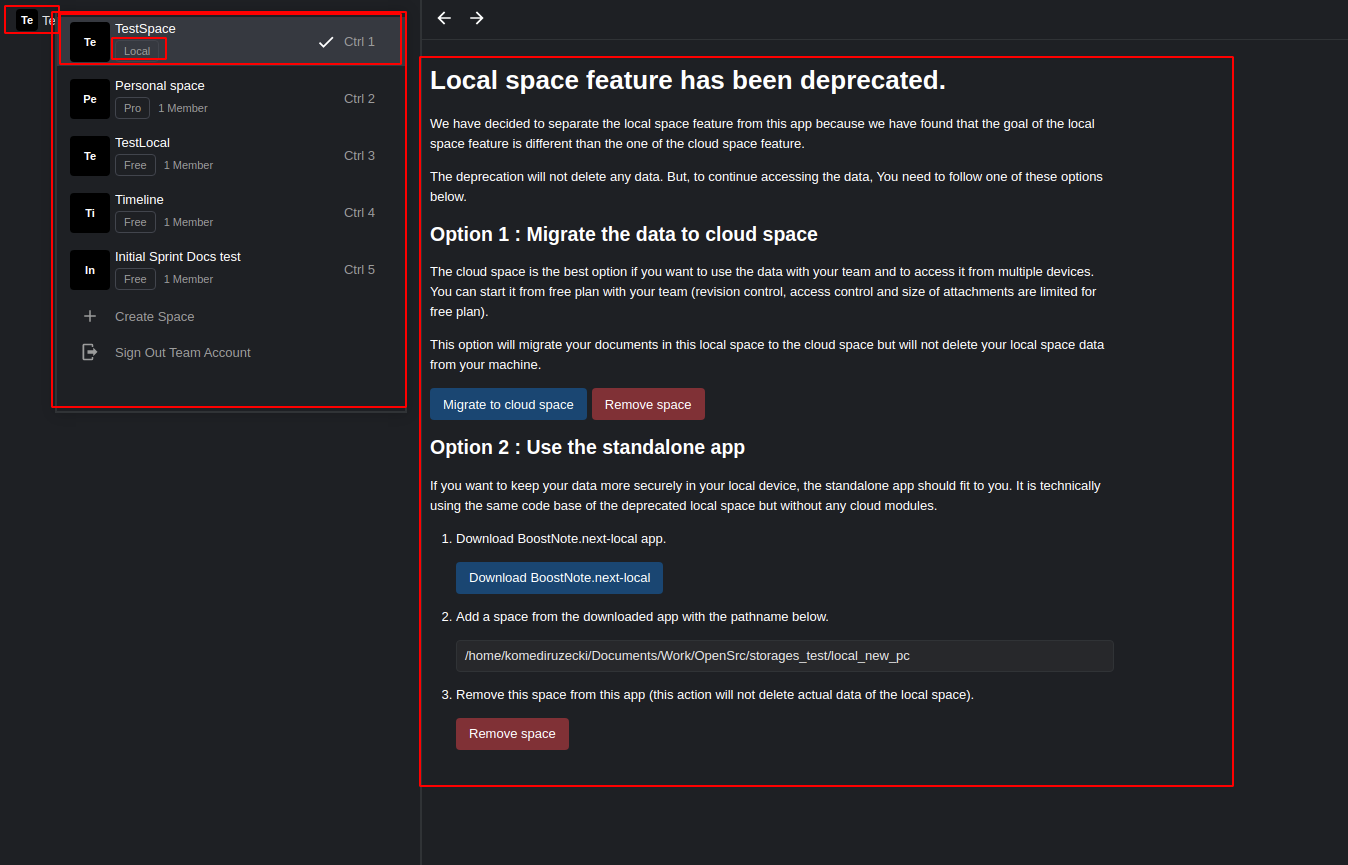
Did you try clicking on the list of storages in the top left corner?

If you select file system local storage you will get the same deprecation page and then you can migrate the notes again.

Here is a showcase:
image

Do you have your local storage loaded into the application, or was it removed somehow?

<!-- gh-comment-id:904888283 --> @Komediruzecki commented on GitHub (Aug 24, 2021): Hi, Did you try clicking on the list of storages in the top left corner? If you select file system local storage you will get the same deprecation page and then you can migrate the notes again. Here is a showcase: ![image](https://user-images.githubusercontent.com/18196945/130672763-c2e140b3-f4b5-43e8-af97-70e1967790fa.png) Do you have your local storage loaded into the application, or was it removed somehow?
Author
Owner

@Komediruzecki commented on GitHub (Aug 25, 2021):

Hi,

This issue of not showing the local space is because the cloud space navigator/selector does not show local spaces, in this case just restart the application and your space selector should show all of your spaces.

Then you can migrate your local space again.

I'm closing this, please reopen if needed.

<!-- gh-comment-id:905217216 --> @Komediruzecki commented on GitHub (Aug 25, 2021): Hi, This issue of not showing the local space is because the cloud space navigator/selector does not show local spaces, in this case just restart the application and your space selector should show all of your spaces. Then you can migrate your local space again. I'm closing this, please reopen if needed.
Sign in to join this conversation.
No milestone
No project
No assignees
1 participant
Notifications
Due date
The due date is invalid or out of range. Please use the format "yyyy-mm-dd".

No due date set.

Dependencies

No dependencies set.

Reference
starred/BoostNote-App#460
No description provided.