mirror of
https://github.com/BoostIO/BoostNote-App.git
synced 2026-04-27 05:15:56 +03:00
[GH-ISSUE #999] Table content not visible #444
Labels
No labels
android 🤖
assigned to core 🦹
bug 🐛
documentation 📚
documentation 📚
duplicate 🚫
external issue 🔼
external issue 🔼
feature request 🌟
funded on issuehunt 💵
help wanted 🆘
improvement request 🔨
improvement request 🔨
ios 🍎
mobile 📱
needs investigation 🔬
needs more info ℹ️
needs specs 📐
plugin idea 🔌
plugin idea 🔌
poll 🗳️
pull-request
question ❓
rewarded on issuehunt 🎁
security issue 🔑
won’t fix ❌
No milestone
No project
No assignees
1 participant

Notifications
Due date
No due date set.
Dependencies
No dependencies set.
Reference
starred/BoostNote-App#444
Loading…
Add table
Add a link
Reference in a new issue
No description provided.
Delete branch "%!s()"
Deleting a branch is permanent. Although the deleted branch may continue to exist for a short time before it actually gets removed, it CANNOT be undone in most cases. Continue?
Originally created by @josvo on GitHub (Jun 9, 2021).
Original GitHub issue: https://github.com/BoostIO/BoostNote-App/issues/999
Current behavior
When createing a markdown table, the previev does not show the table content. It seems to be written in white on a white background.

The text is there, you can see it when it is highlighted.
Expected behavior
Table content is visible.
Steps to reproduce
Create a new file with a markdown table (like in the picture) in a local space
Environment
Local space
Desktop/Web
@Komediruzecki commented on GitHub (Jun 9, 2021):
Hi,
You can easily modify the preview styles in the settings. Go to Preferences | Markdown and modify preview style table element then save it.
For example if you modify the table element to have default color
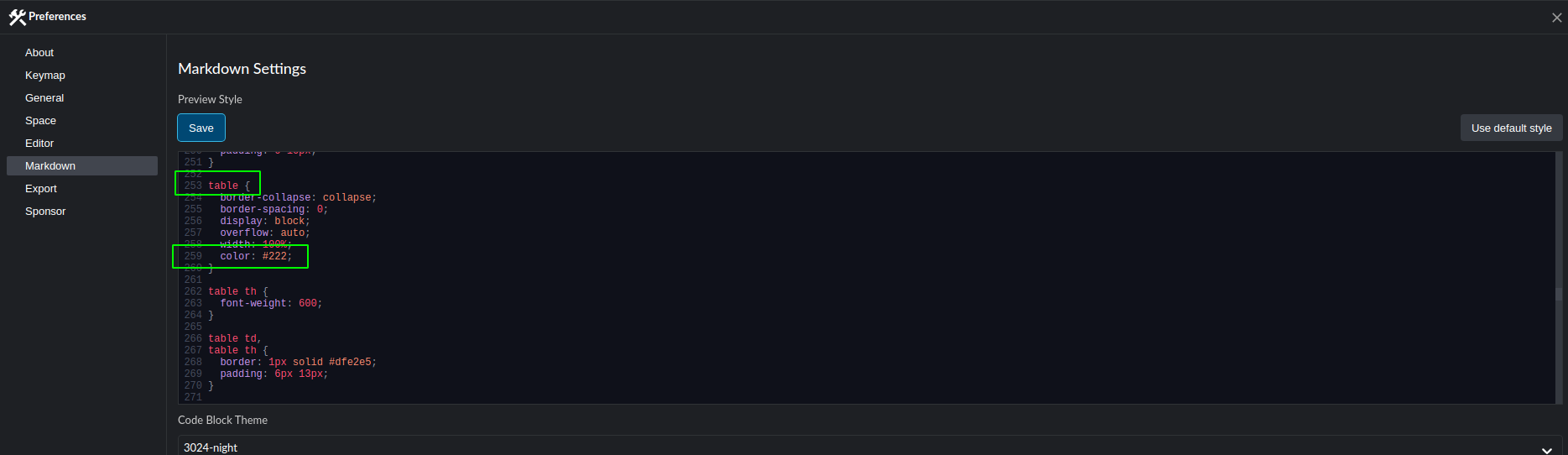
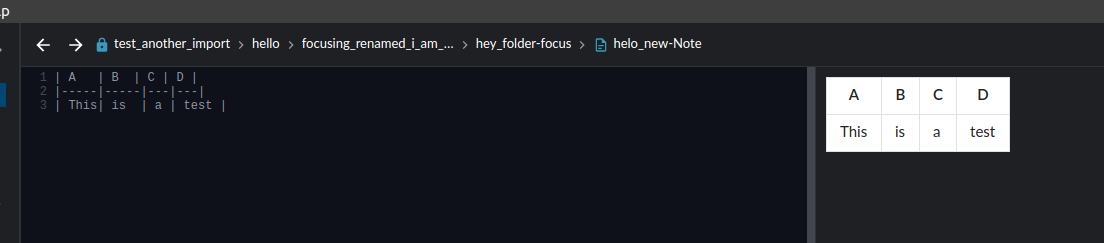
#222you can get following result:I'll investigate this further and see for a fix, so that default preview style is always correctly shown (black background white text and vice verse), I'll also try improving preview default style to include proper colors across themes!
@josvo commented on GitHub (Jun 10, 2021):
Thanks for the workaround, that worked.
It might be a good idea to adapt the default, so that new users don't run into the same issue.
@Komediruzecki commented on GitHub (Jun 10, 2021):
No problem,
I think it was working in release before the new UI, so there must of been some change which affected this, I'll look into it and fix it as soon as I can.
I'll keep the issue open and post new findings once default behaviour is fixed!
@Komediruzecki commented on GitHub (Jun 12, 2021):
Hi josvo,
There was issue when refactoring, the global style was not the same as in new shared code, so I adapted it here (https://github.com/BoostIO/BoostNote.next/pull/1004), after this is merged and released the default background colors for tables should be correct as they were before.
Please also note that, when this is released and you update the application, you should revert your workaround since it will clash with the correct colors. You can restore it to the default or just remove the added line (color).
Thank you for your patience!
@Komediruzecki commented on GitHub (Jun 25, 2021):
The new release is out, v0.19.0.
Can you try it and let me know if it works now?
If not, please reopen the issue!
@josvo commented on GitHub (Jun 25, 2021):
Tested, works. Thank you!