mirror of
https://github.com/BoostIO/BoostNote-App.git
synced 2026-04-26 21:05:55 +03:00
[GH-ISSUE #1000] Files in local space cannot be deleted #443
Labels
No labels
android 🤖
assigned to core 🦹
bug 🐛
documentation 📚
documentation 📚
duplicate 🚫
external issue 🔼
external issue 🔼
feature request 🌟
funded on issuehunt 💵
help wanted 🆘
improvement request 🔨
improvement request 🔨
ios 🍎
mobile 📱
needs investigation 🔬
needs more info ℹ️
needs specs 📐
plugin idea 🔌
plugin idea 🔌
poll 🗳️
pull-request
question ❓
rewarded on issuehunt 🎁
security issue 🔑
won’t fix ❌
No milestone
No project
No assignees
1 participant

Notifications
Due date
No due date set.
Dependencies
No dependencies set.
Reference
starred/BoostNote-App#443
Loading…
Add table
Add a link
Reference in a new issue
No description provided.
Delete branch "%!s()"
Deleting a branch is permanent. Although the deleted branch may continue to exist for a short time before it actually gets removed, it CANNOT be undone in most cases. Continue?
Originally created by @josvo on GitHub (Jun 9, 2021).
Original GitHub issue: https://github.com/BoostIO/BoostNote-App/issues/1000
Current behavior
When using the local space, files cannot be deleted. There is no option for deleting a file in context menu. Del key does not work either.
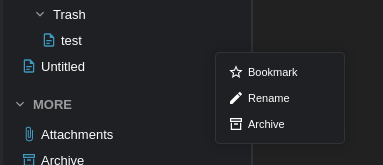
Folders, on the other hand, can be deleted just fine.
Context menu for files
Context menu for folder
Even more strange is, when deleting a folder that has some files in it, all files are moved to the root tree (so not being inside any folder) instead of being deleted.
Expected behavior
Files can be deleted
Steps to reproduce
Try to delete a file in local space either with del key or via context menu.
Environment
Desktop/Web
@Komediruzecki commented on GitHub (Jun 9, 2021):
Hi,
For the note deletion, this is new workflow for notes, the 'archive' is actually deleting the note, but it goes to archive first, to delete it completely you can then delete it from archive or from note context view (right sidebar).
As for the folder deletion, I'll look into the problem and get back to you as soon as possible, all notes from folder should be archived, not moved to workspace!
@Komediruzecki commented on GitHub (Jun 9, 2021):
Hi again,
I reproduced the issue, it seems like a small bug in rendering worksapce items (notes which were archived)
I created PR, it should be fixed in next release (should be this week)
https://github.com/BoostIO/BoostNote.next/pull/1001/files
@josvo commented on GitHub (Jun 9, 2021):
Wow - that was quick! 🚀
Thanks a lot!
@Komediruzecki commented on GitHub (Jun 9, 2021):
No problem, if you found anything else, please do not hesitate to ask.
I'll see if we can add some shortcuts for deleting/archiving the note without mouse.
For now, I'll close the issue, please reopen if needed.
@myicq commented on GitHub (Jun 11, 2021):
Note, not sure if this is noted.
The "Archive" function is smart, and notes even remember where they "belonged". Really good.
The notes DO disappear if they are inside subfolders. Only root notes do not disappear on archive. 0.18.0
@Komediruzecki commented on GitHub (Jun 11, 2021):
Hi, myicq,
This is the actual consequence of them being added to root of the workspace on archiving.
This bugfix fixes all of the issues (once released it will work as intended)