mirror of
https://github.com/BoostIO/BoostNote-App.git
synced 2026-04-27 05:15:56 +03:00
[GH-ISSUE #996] [Feature request] Manually sort the notes and folders #439
Labels
No labels
android 🤖
assigned to core 🦹
bug 🐛
documentation 📚
documentation 📚
duplicate 🚫
external issue 🔼
external issue 🔼
feature request 🌟
funded on issuehunt 💵
help wanted 🆘
improvement request 🔨
improvement request 🔨
ios 🍎
mobile 📱
needs investigation 🔬
needs more info ℹ️
needs specs 📐
plugin idea 🔌
plugin idea 🔌
poll 🗳️
pull-request
question ❓
rewarded on issuehunt 🎁
security issue 🔑
won’t fix ❌
No milestone
No project
No assignees
1 participant

Notifications
Due date
No due date set.
Dependencies
No dependencies set.
Reference
starred/BoostNote-App#439
Loading…
Add table
Add a link
Reference in a new issue
No description provided.
Delete branch "%!s()"
Deleting a branch is permanent. Although the deleted branch may continue to exist for a short time before it actually gets removed, it CANNOT be undone in most cases. Continue?
Originally created by @hannah23280 on GitHub (Jun 9, 2021).
Original GitHub issue: https://github.com/BoostIO/BoostNote-App/issues/996
Hi,
Currently, there is no way for us to manually sort the notes among themselves. Would like to request to be able to manually order the notes via click and drag. It should apply to sorting the folders as well.
@Komediruzecki commented on GitHub (Jun 9, 2021):
Hi hanct,
which version are you using, is it cloud or local space?
In any case, today there was v0.18 version release, this features moving notes and folders for local space,
for drag and drop sorting which is available in cloud spaces already (to sort notes inside a folder and folders inside the parent folder) I am currently working on it, and it will go into the next release (next week I think).
Is this what you had in mind?
@hannah23280 commented on GitHub (Jun 9, 2021):
Hi, I am referring to the cloud space. On my desktop apps, i realize i can manually sort the note. But on my browser, i can';t manually sort the notes.
Btw, how do we get the version number for desktop app and browser-based app?
@Komediruzecki commented on GitHub (Jun 9, 2021):
Hi,
It's a bit tricky, for the desktop app version you need to go to local space (or create a dummy one if needed) and go to its Preferences | About tab,
The web app should have the same version as cloud space in the desktop app, and it is not currently shown anywhere as far as I know, but you could track it in the forum I think: https://forum.boostnote.io/t/boost-note-release-v1-41-1/34
For the drag and drop, it should work in the desktop app under Drag and Drop order selection:
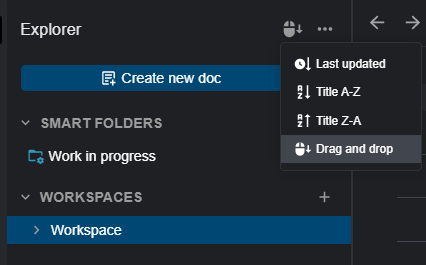
But on web app (where I didn't test it previously) it seems to throw an error for me, I'll let the guys know and we'll inspect as why this happens
@hannah23280 commented on GitHub (Jun 9, 2021):
Thanks. As i have just update my desktop, and it is showing v0.18.0 in my local space.
Just to highlight my testing:
@Komediruzecki commented on GitHub (Jun 9, 2021):
Thank you for your feedback,
It's definitely a confirmed issue, we'll keep investigating and get back as soon as possible solution is found.
@Komediruzecki commented on GitHub (Jun 10, 2021):
Hi hanct,
It seems to me that the application will throw the error if you have wrong mode selected and trying to drag and drop. It definitely needs fixing in that sense, but can you please confirm that you are in correct mode when doing the operation? It seems that Firefox might defaults to last updated mode rather than drag and drop (like in Chrome) or it was remembered as such and I didn't change it,
you can see (and change) modes you are in here:
Please select drag and drop mode if you want to reorder items, in webapp or desktop app, it should work correctly in Cloud space.
In local space, I am currently implementing it and it should be ready for next release (no web app access to local spaces anyway).
For workspace folders, you mean different workspaces in sidebar? I think this will be replaced with plain folders so they will be orderable as well. So please try to select drag and drop mode in web app (browser), and then try ordering notes/folders, let me know of any further issues and browser name and version for additional info.
Thank you for your patience!
@hannah23280 commented on GitHub (Jun 11, 2021):
Hi, yes! u r right. By selecting drag and drop mode, i can now reorder note/folder in webapp or desktop app.
For workspace folders, yes, i mean the different workspaces in sidebar. Okie, noted that this will be replaced with plain folders in future.
Thanks!
@Komediruzecki commented on GitHub (Jun 11, 2021):
Hi,
Great to hear that,
I'll close the issue, please reopen if needed.