mirror of
https://github.com/BoostIO/BoostNote-App.git
synced 2026-04-27 05:15:56 +03:00
[GH-ISSUE #906] Boost Note is Loading Data ... and does not start #431
Labels
No labels
android 🤖
assigned to core 🦹
bug 🐛
documentation 📚
documentation 📚
duplicate 🚫
external issue 🔼
external issue 🔼
feature request 🌟
funded on issuehunt 💵
help wanted 🆘
improvement request 🔨
improvement request 🔨
ios 🍎
mobile 📱
needs investigation 🔬
needs more info ℹ️
needs specs 📐
plugin idea 🔌
plugin idea 🔌
poll 🗳️
pull-request
question ❓
rewarded on issuehunt 🎁
security issue 🔑
won’t fix ❌
No milestone
No project
No assignees
1 participant

Notifications
Due date
No due date set.
Dependencies
No dependencies set.
Reference
starred/BoostNote-App#431
Loading…
Add table
Add a link
Reference in a new issue
No description provided.
Delete branch "%!s()"
Deleting a branch is permanent. Although the deleted branch may continue to exist for a short time before it actually gets removed, it CANNOT be undone in most cases. Continue?
Originally created by @matthiasgomolka on GitHub (Apr 17, 2021).
Original GitHub issue: https://github.com/BoostIO/BoostNote-App/issues/906
Current behavior
When I try to start Boost Note I only see Loading Data ... and nothing else happens:
I started Boost Note from the terminal. You can see the console output in the screenshot as well. The
'/opt/Boost Note/resources/app-update.yml'file mentioned in the console does in fact not exist.I removed and reinstalled Boost Note but that did not change anything.
Expected behavior
I expect Boost Note to open.
Steps to reproduce
It happens every time I open Boost Note.
Environment
Desktop/Web
@Komediruzecki commented on GitHub (Apr 17, 2021):
Hi, matthiasgomolka,
can you provide more info, as did it work before? Do you already have some storages and notes inside boost note?
This loading screen with error typically means, boost note found some corrupted data on disk and cannot load it.
Did you try loading boost note without a terminal?
Can you screenshot the console output for any errors?
@matthiasgomolka commented on GitHub (Apr 17, 2021):
Yes, it did work until about 1 or 2 weeks ago. I already tried installing older versions, but without success.
Yes, I created a handful of notes.
Yes, the behavior is the same.
You mean something different than the console output in the screenshot above (in the background)? If so, can you specify?
@Komediruzecki commented on GitHub (Apr 17, 2021):
For the last point, yes the same screenshot but open tab 'console' not tab 'elements' which is shown.
I see, so it might be a problem if you accidentally added some corrupted data inside the boost note.
Can you see this issues and see if it fits your problem:
https://github.com/BoostIO/BoostNote.next/issues/874,
https://github.com/BoostIO/BoostNote.next/issues/651,
https://github.com/BoostIO/BoostNote.next/issues/708,
Also, what kind of storage were you using, this is most likely due to file system note storage.
Please contact me on our slack if you want this resolved faster.
@matthiasgomolka commented on GitHub (Apr 18, 2021):
I understand. Here's the console output:
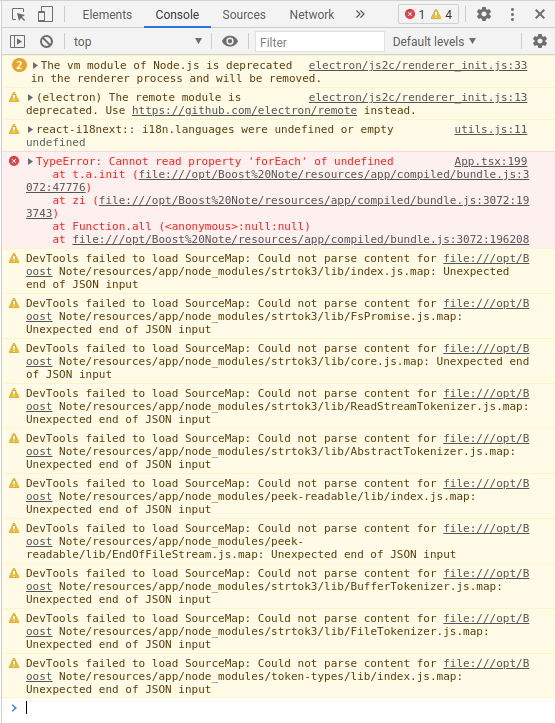
I don't think so. I deleted the complete
/home/matthias/Dokumente/BoostNotedirectory and restarted Boost Note. The folder was recreated, but Boost Note still does not start.I use the local storage.
I'm not on slack, so I'll stay here on GitHub, but thanks for offering.
@Komediruzecki commented on GitHub (Apr 18, 2021):
Umm, were there multiple storages?
Did you backup your data before deleting the Boost Note folder?
Can you send the whole console log i.e. upload the TXT file with it here? You can do this by right-clicking on messages and select save as then save it and upload it.
It definitely seems strange, you could try clearing cache/cookies. Just to be clear you were using local storage and not file system storage? those two are different:
Local storage uses PouchDB storage and stores your data in the browser directly (application local storage), the data is still on your disk but not at that location in the documents you wrote.
If you are using file system storage, then deleting that folder location should work nicely.
The file system storage uses a folder to store all your note data.
If you had multiple storages, and one of them is local storage, this could be a problem, since few releases ago legacy cloud storage alongside local storage were deprecated, in that case, I suppose you could try installing previous versions until you find the one which is loading correctly (0.14, 0.13, 0.12 even). When your data is loaded, please convert the local storage or legacy cloud storage to file system storage (choose a different location), and then try loading it in the newest version.
Are we for sure looking at boost note version update, we also have a legacy boost note application that stores the data a bit differently, and if you were in legacy boost note and tried to load it "as is" in boost note next, then this won't work, I suppose this is not the case, but I want to rule out everything? For this case, can you screenshot what boost note re-created in that documents folder? (contents of folder i.e. structure is enough).
For the terminal opening, it could have broken something so if your data is securely backed up, I suppose you could do a clean reinstall i.e. not just deinstall the boost note, but also delete all of its app data (which resides at your local OS application data directory), this way we can be sure clean install is also not working. Let me know if you decide to do this so I can assist you further if you have any questions.
@matthiasgomolka commented on GitHub (Apr 18, 2021):
There was a
notesdirectory with anothernotesdirectory in it. The structure was as follows:Yes. I removed everything from Boost Note I could find and reinstalled. Then I manually copied the notes from the
jsonfiles into the App (and now use cloud storage).From your explanations I used file system storage. As far as I understand, I only used this storage system.
So it's working again. Thanks for your efforts!
@Komediruzecki commented on GitHub (Apr 19, 2021):
Great, yes, the structure should, unfortunately, be error-free, no multiple storage locations at one directory, no corrupted/invalid files (binaries etc.), we made some progress in loading such storages, but I guess loading storage within storage still doesn't work, I'll try to see what we can do in that regard!
Thanks for your patience.