[GH-ISSUE #818] Cannot convert legacy cloud to local filesystem storage #411

Closed
opened 2026-03-03 00:20:56 +03:00 by kerem · 6 comments
Owner

Originally created by @dhjensen on GitHub (Mar 3, 2021).
Original GitHub issue: https://github.com/BoostIO/BoostNote-App/issues/818

Current behavior

Boost Note_001

I'm trying to convert my storage to local file system. It states it failed however a lot of the files have already been created.
Based on the error I suspect references to attachments?

Expected behavior

It should convert my storage. Or at least tell me what to do if it fails.

Steps to reproduce

  1. Use the convert to local file storage feature in the storage "tab"

Environment

Desktop/Web

  • Boost Note.next version: 0.13.2
  • OS version and name: Linux Mint 20.1
Originally created by @dhjensen on GitHub (Mar 3, 2021). Original GitHub issue: https://github.com/BoostIO/BoostNote-App/issues/818 # Current behavior <!-- Let us know what is currently happening. Please include some **screenshots** with the **developer tools** open (console tab) when you report a bug. If your issue is regarding the old Boostnote, please open an issue in the old repo 👉 https://github.com/BoostIO/Boostnote/issues. --> ![Boost Note_001](https://user-images.githubusercontent.com/26007707/109748304-f0522600-7bd8-11eb-9f90-d85b51a0eb99.png) I'm trying to convert my storage to local file system. It states it failed however a lot of the files have already been created. Based on the error I suspect references to attachments? # Expected behavior It should convert my storage. Or at least tell me what to do if it fails. # Steps to reproduce <!-- Please be thorough, issues we can reproduce are easier to fix! --> 1. Use the convert to local file storage feature in the storage "tab" 2. 3. # Environment ## Desktop/Web - Boost Note.next version: 0.13.2 - OS version and name: Linux Mint 20.1
kerem closed this issue 2026-03-03 00:20:56 +03:00
Author
Owner

@Komediruzecki commented on GitHub (Mar 3, 2021):

Yes, probably problem with attachments. Go to attachments section for that storage and see if you find any attachments which has no preview,
if you found those, they are missing from file system, you should be able to safely delete them by right clicking on the attachments (empty space without preview of attachment image) and chosing remove. After you have no references to invalid/missing attachments, you should be able to convert the storage.

<!-- gh-comment-id:789840397 --> @Komediruzecki commented on GitHub (Mar 3, 2021): Yes, probably problem with attachments. Go to attachments section for that storage and see if you find any attachments which has no preview, if you found those, they are missing from file system, you should be able to safely delete them by right clicking on the attachments (empty space without preview of attachment image) and chosing remove. After you have no references to invalid/missing attachments, you should be able to convert the storage.
Author
Owner

@dhjensen commented on GitHub (Mar 4, 2021):

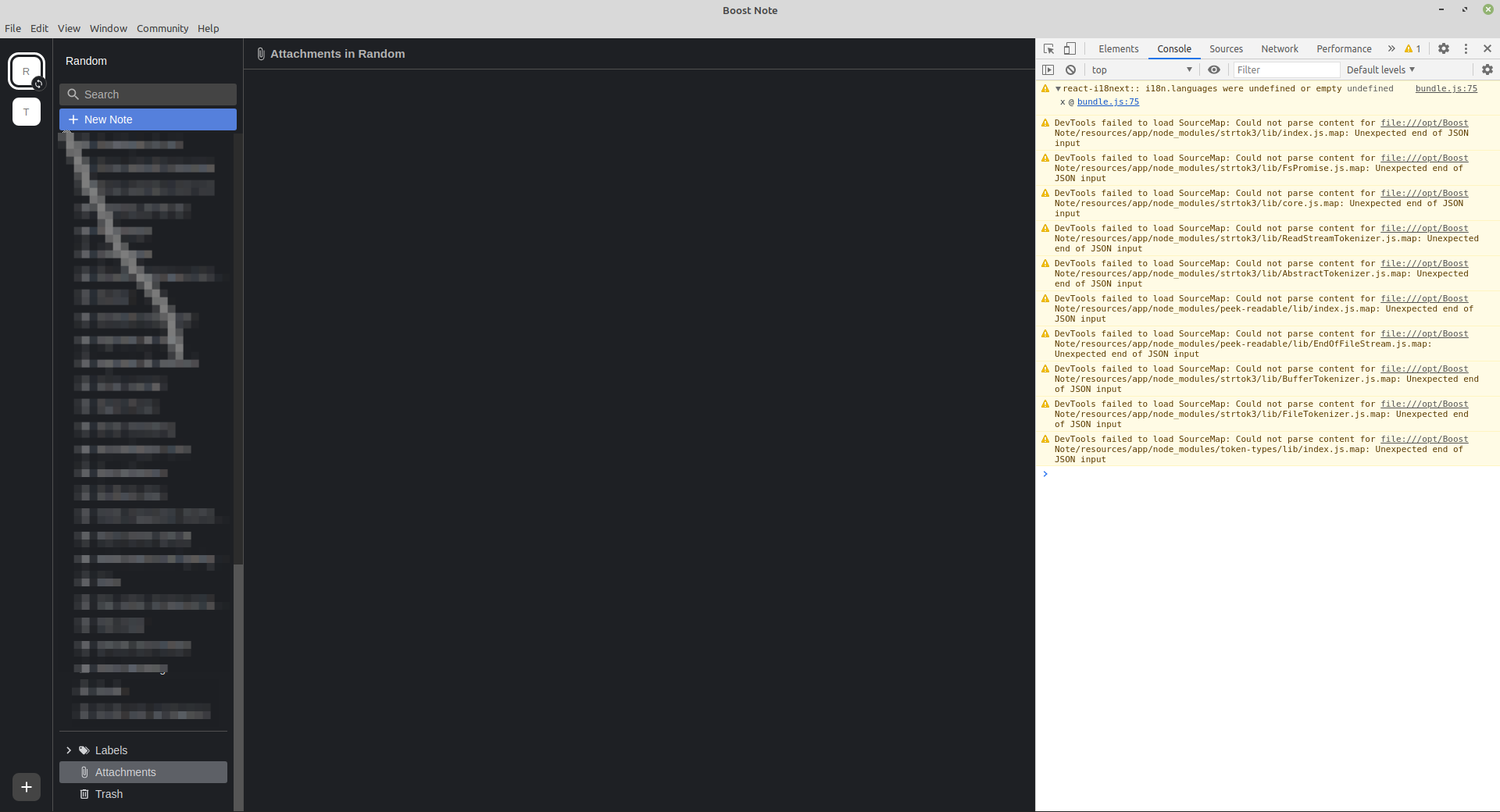
Hmm ok but when I browse the attachment folder there is no attachments. However there is some warnings in the console:
I might add that this workspace used to have attachments
Boost Note_002

<!-- gh-comment-id:790295270 --> @dhjensen commented on GitHub (Mar 4, 2021): Hmm ok but when I browse the attachment folder there is no attachments. However there is some warnings in the console: I might add that this workspace used to have attachments ![Boost Note_002](https://user-images.githubusercontent.com/26007707/109914245-d9cace00-7caf-11eb-8c22-7eee625e7911.png)
Author
Owner

@Komediruzecki commented on GitHub (Mar 5, 2021):

Yes, that is exactly the problem.

Can you try right-clicking on the empty space in that window - because the attachment navigator item would not show if there aren't any (just try right clicking with mouse over that window to see if there are one, or more attachments listed). So if you try that you should get the dialog to remove the attachment. If there aren't on file system or in storage you should be able to remove them easily and that would leave you with fixed storage which you can convert.

Also make sure you are looking at attachments from storage which you are trying to convert, in this case 'Random'?

<!-- gh-comment-id:791534249 --> @Komediruzecki commented on GitHub (Mar 5, 2021): Yes, that is exactly the problem. Can you try right-clicking on the empty space in that window - because the attachment navigator item would not show if there aren't any (just try right clicking with mouse over that window to see if there are one, or more attachments listed). So if you try that you should get the dialog to remove the attachment. If there aren't on file system or in storage you should be able to remove them easily and that would leave you with fixed storage which you can convert. Also make sure you are looking at attachments from storage which you are trying to convert, in this case 'Random'?
Author
Owner

@dhjensen commented on GitHub (Mar 8, 2021):

In addition to follow your instructions I had to remove the files and folders in the destination folder.

My problem solved. Do you consider this a bug or should I close this issue?

<!-- gh-comment-id:792923033 --> @dhjensen commented on GitHub (Mar 8, 2021): In addition to follow your instructions I had to remove the files and folders in the destination folder. My problem solved. Do you consider this a bug or should I close this issue?
Author
Owner

@Komediruzecki commented on GitHub (Mar 8, 2021):

In addition to follow your instructions I had to remove the files and folders in the destination folder.

My problem solved. Do you consider this a bug or should I close this issue?

I suppose those are some additional folders/files which are not part of what boost note reads and handles?
In that case, yes, this is not really a bug, and we are aware of a slightly intolerant convert/export procedure which will soon be updated and be much more tolerant on errors and corrupted file system data, so in that manner we can close this issue safely.

<!-- gh-comment-id:793020539 --> @Komediruzecki commented on GitHub (Mar 8, 2021): > In addition to follow your instructions I had to remove the files and folders in the destination folder. > > My problem solved. Do you consider this a bug or should I close this issue? I suppose those are some additional folders/files which are not part of what boost note reads and handles? In that case, yes, this is not really a bug, and we are aware of a slightly intolerant convert/export procedure which will soon be updated and be much more tolerant on errors and corrupted file system data, so in that manner we can close this issue safely.
Author
Owner

@dhjensen commented on GitHub (Mar 9, 2021):

I suppose those are some additional folders/files which are not part of what boost note reads and handles?

No after a failed export attempt there is leftover files that give issues after attachment cleanup.
I have to delete those manually before a successful conversion can be made.

<!-- gh-comment-id:793484404 --> @dhjensen commented on GitHub (Mar 9, 2021): > I suppose those are some additional folders/files which are not part of what boost note reads and handles? No after a failed export attempt there is leftover files that give issues after attachment cleanup. I have to delete those manually before a successful conversion can be made.
Sign in to join this conversation.
No milestone
No project
No assignees
1 participant
Notifications
Due date
The due date is invalid or out of range. Please use the format "yyyy-mm-dd".

No due date set.

Dependencies

No dependencies set.

Reference
starred/BoostNote-App#411
No description provided.