mirror of
https://github.com/BoostIO/BoostNote-App.git
synced 2026-04-26 21:05:55 +03:00
[GH-ISSUE #739] Migration tutorial is broken ? #384
Labels
No labels
android 🤖
assigned to core 🦹
bug 🐛
documentation 📚
documentation 📚
duplicate 🚫
external issue 🔼
external issue 🔼
feature request 🌟
funded on issuehunt 💵
help wanted 🆘
improvement request 🔨
improvement request 🔨
ios 🍎
mobile 📱
needs investigation 🔬
needs more info ℹ️
needs specs 📐
plugin idea 🔌
plugin idea 🔌
poll 🗳️
pull-request
question ❓
rewarded on issuehunt 🎁
security issue 🔑
won’t fix ❌
No milestone
No project
No assignees
1 participant

Notifications
Due date
No due date set.
Dependencies
No dependencies set.
Reference
starred/BoostNote-App#384
Loading…
Add table
Add a link
Reference in a new issue
No description provided.
Delete branch "%!s()"
Deleting a branch is permanent. Although the deleted branch may continue to exist for a short time before it actually gets removed, it CANNOT be undone in most cases. Continue?
Originally created by @neutrinoceros on GitHub (Dec 24, 2020).
Original GitHub issue: https://github.com/BoostIO/BoostNote-App/issues/739
Current behavior
This blogpost from a year ago is the only resource I could find that explains how to migrate from legacy boostnote to this version.
https://medium.com/boostnote/how-to-migrate-data-from-old-boostnote-efd8a5c7aa7d
However the "Import" button is not present anymore... is there a new path to follow ? should the blog post be updated ?
I've been waiting for over a year to migrate and was thrilled that the app was finally notarised for MacOs but I'm still stuck with the legacy version for now.
Environment
Desktop/Web
@Komediruzecki commented on GitHub (Dec 24, 2020):
Hi neutrinoceros,
Yes, the process seems a bit different, try going to
File->Preferences->StorageThere you can find the "import notes from legacy BoostNote" option where you can follow further instructions and choose a location of your legacy storage. Be sure to do this in file system storage in boostnote.next and import your notes.
If you find any errors or need further instructions, let me know.
I think the article should be updated, I'll see what I can do about it. (@Rokt33r, @Flexo013 can we update the article?)
@neutrinoceros commented on GitHub (Dec 25, 2020):
Hi, thanks for your prompt response !
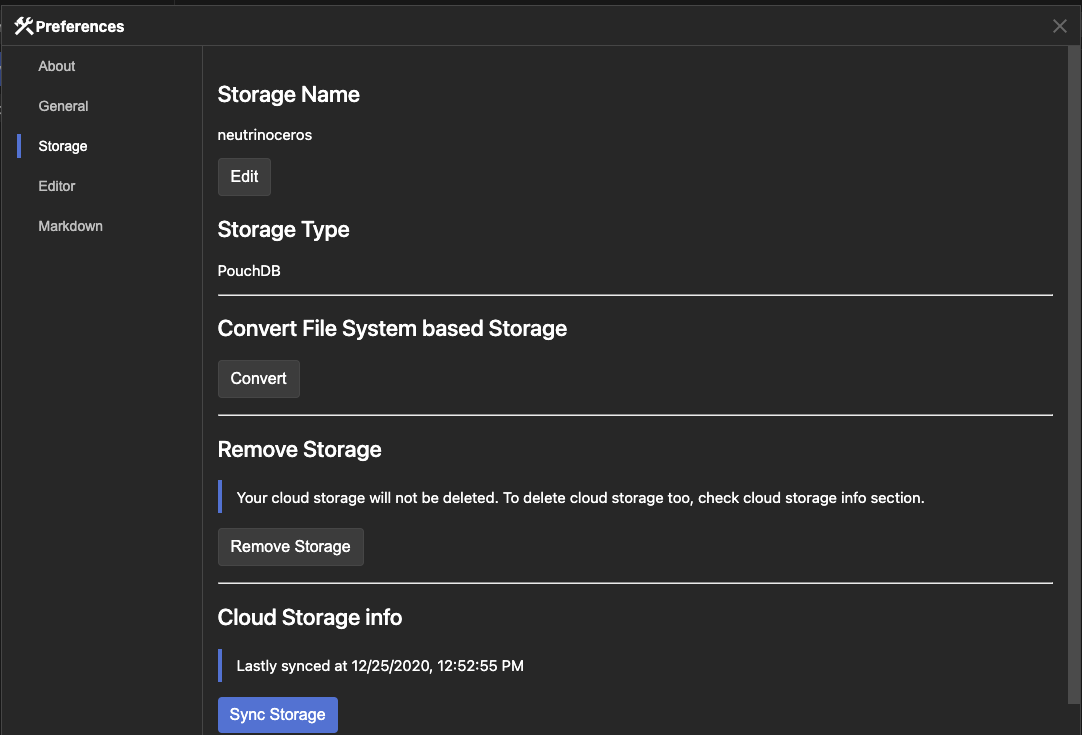
I don't see the import section in my "Preference" menu. I double checked and confirme that I'm indeed running 0.12.2, do I need to upgrade to 0.12.3 ?
@Komediruzecki commented on GitHub (Dec 25, 2020):
Hi,
In order to import the legacy storage you have to be in file system storage. PouchDB as shown in your screenshot will not have the option. Please use file system storage (as seen in my screenshot) and that will give you the desired option.
@neutrinoceros commented on GitHub (Dec 25, 2020):
Done. I was indeed able to import my notes that way. However, I don't think the converted notes are being synched on the cloud, and I can't find how to do this. Is it possible ?
@Komediruzecki commented on GitHub (Dec 26, 2020):
Great,
I don't think this is currently possible, but of course you can do it manually by copy pasting notes (now in boostnote) into cloud storage and thus be able to sync them. Since cloud will become legacy (new cloud is local workspaces) soon, I am not sure if this feature will be available.
@Rokt33r commented on GitHub (Dec 27, 2020):
@neutrinoceros
It is not possible. You could try our new cloud workspace which is supporting real-time collaboration editing. But the migration for the new cloud workspace is not ready yet. I assume it will be shipped before this February. Until then, please sync as same as how you did with the legacy app because the new app also saves your data as files.
I'll close this issue since I've updated the tutorial. If anyone wants to discuss more this, please join our slack and send a direct message to me!
@Rokt33r commented on GitHub (Dec 27, 2020):
@Komediruzecki Thanks for supporting!!
@neutrinoceros commented on GitHub (Dec 27, 2020):
Thanks @Rokt33r !