[GH-ISSUE #721] Cloud Sync of Attachments (images) fails #375

Closed
opened 2026-03-03 00:20:39 +03:00 by kerem · 4 comments
Owner

Originally created by @Komediruzecki on GitHub (Dec 14, 2020).
Original GitHub issue: https://github.com/BoostIO/BoostNote-App/issues/721

Current behavior

The syncing between the various OSes should be available for image attachments but is not.

Expected behavior

When I save attachment (image in this case) in boostnote.next and sync it to cloud, the synced attachment (image) should be retrieved in other synced locations. For example, on linux and windows.

Steps to reproduce

  • Open boostnote on linux
  • Create new note with some content before attachment.
  • Create some image and paste it as attachment to boostnote
  • Check if Boostnote on Linux shows the attachment in attachment list, renders it in markdown preview (it does)
  • Go to other machine (windows)
  • Open boostnote (same version as linux)
  • Open the note and inspect the synced image
  • Check if Boostnote on Windows shows the attachment in attachment list, renders it in markdown preview (neither works)
  • Try syncing cloud storage (force sync)
    • Throws errors - cannot sync cloud storage (this is actually another bug/issue - which is error 413 - content is too large for server to process)

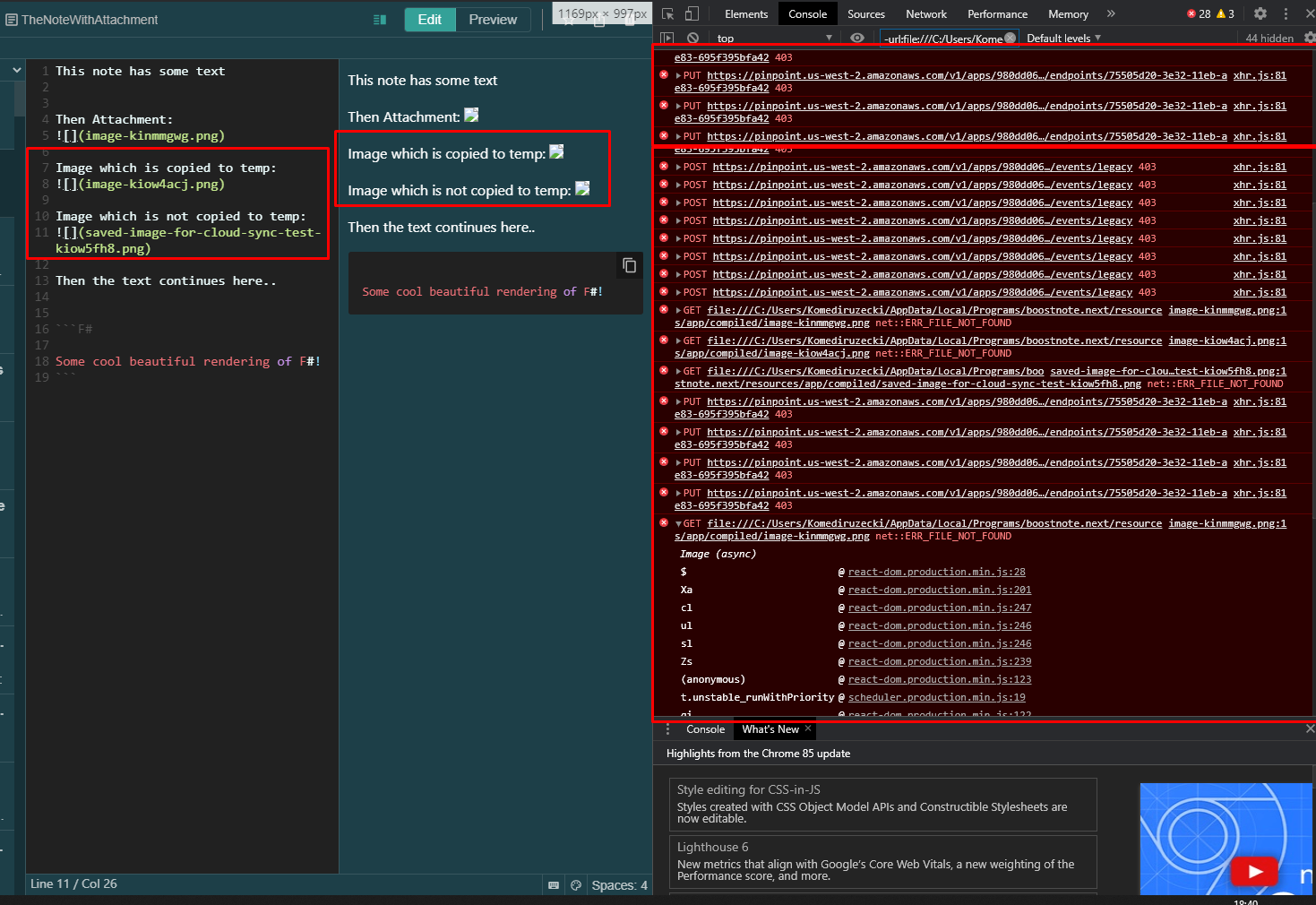
Some screenshot and logs:

Image saved on windows (don't show up in linux)
ImageSavedOnWindos

AWS pinpoint error:
LogPinpointOnWindows.txt
Error loading images from linux:
CannotSyncLogOnlyErr.txt
and it's full log:
CannotSyncLog.txt
Screenshot of the console (for the log above):
CannotSyncImagesErrNotFound

Images on Linux (don't show on Windows, see logs above):
ImagesShowOnLinux

Few other notes:

  • On third PC (also synced) it threw some kind of PushMesasage in UI - cloud sync error
  • No cloud storage export was available then
  • It started working when I removed attachments manually (even tho they don't render in attachments page - cannot retrieve them)
  • Few images regarding this is below:

CannotConvertImgSec
image

In general I think the conversion just don't work if there are attachments which cannot be read/loaded. So when I remove them, the conversion passes.

Let me know if any other info is needed, is this even a feature (syncing notes+attachements?)

Important

The attachments are correctly encoded saved and retrieved by pouchDb.putAttachment and pouchDb.getAttachment on windows and linux. But saving attachment in windows and loading on Linux does not work, similarly for Linux -> Windows.
This might be some cross-browser (or in this case chromium cross OS problem).

Tried:
Saving attachment as base64 encoded item, the attachment is retrieved on Windows as Blob and still have corrupted hash and data retrieved. This might be the case because of the "binary: true" while retrieving attachment on Windows executable, but I am not sure if this would fix the issue.

Environment

Desktop

  • Boost Note.next version: 0.11.5
  • OS version and name: Windows 10 Home and Ubuntu 20.04

Mobile

  • Similar thing is not working on mobile version, it does not show the attachments, they are not synced
Originally created by @Komediruzecki on GitHub (Dec 14, 2020). Original GitHub issue: https://github.com/BoostIO/BoostNote-App/issues/721 # Current behavior The syncing between the various OSes should be available for image attachments but is not. # Expected behavior When I save attachment (image in this case) in boostnote.next and sync it to cloud, the synced attachment (image) should be retrieved in other synced locations. For example, on linux and windows. # Steps to reproduce - Open boostnote on linux - Create new note with some content before attachment. - Create some image and paste it as attachment to boostnote - Check if Boostnote on Linux shows the attachment in attachment list, renders it in markdown preview (it does) - Go to other machine (windows) - Open boostnote (same version as linux) - Open the note and inspect the synced image - Check if Boostnote on Windows shows the attachment in attachment list, renders it in markdown preview (neither works) - Try syncing cloud storage (force sync) - Throws errors - cannot sync cloud storage (this is actually another bug/issue - which is error 413 - content is too large for server to process) Some screenshot and logs: Image saved on windows (don't show up in linux) ![ImageSavedOnWindos](https://user-images.githubusercontent.com/18196945/102122213-77e39080-3e45-11eb-8c7f-8063a2c1f91b.png) AWS pinpoint error: [LogPinpointOnWindows.txt](https://github.com/BoostIO/BoostNote.next/files/5690931/LogPinpointOnWindows.txt) Error loading images from linux: [CannotSyncLogOnlyErr.txt](https://github.com/BoostIO/BoostNote.next/files/5690932/CannotSyncLogOnlyErr.txt) and it's full log: [CannotSyncLog.txt](https://github.com/BoostIO/BoostNote.next/files/5690933/CannotSyncLog.txt) Screenshot of the console (for the log above): ![CannotSyncImagesErrNotFound](https://user-images.githubusercontent.com/18196945/102122321-99dd1300-3e45-11eb-9b26-7113702549de.png) Images on Linux (don't show on Windows, see logs above): ![ImagesShowOnLinux](https://user-images.githubusercontent.com/18196945/102122449-c6912a80-3e45-11eb-82ba-d6d3092faec5.png) Few other notes: - On third PC (also synced) it threw some kind of PushMesasage in UI - cloud sync error - No cloud storage export was available then - It started working when I removed attachments manually (even tho they don't render in attachments page - cannot retrieve them) - Few images regarding this is below: ![CannotConvertImgSec](https://user-images.githubusercontent.com/18196945/102123883-d447af80-3e47-11eb-9e66-12babcee5b8e.png) ![image](https://user-images.githubusercontent.com/18196945/102123722-8df25080-3e47-11eb-85c6-0d458c9f48c3.png) In general I think the conversion just don't work if there are attachments which cannot be read/loaded. So when I remove them, the conversion passes. Let me know if any other info is needed, is this even a feature (syncing notes+attachements?) ## Important The attachments are correctly encoded saved and retrieved by `pouchDb.putAttachment` and `pouchDb.getAttachment` on windows and linux. But saving attachment in windows and loading on Linux does not work, similarly for Linux -> Windows. This might be some cross-browser (or in this case chromium cross OS problem). Tried: Saving attachment as base64 encoded item, the attachment is retrieved on Windows as Blob and still have corrupted hash and data retrieved. This might be the case because of the "binary: true" while retrieving attachment on Windows executable, but I am not sure if this would fix the issue. # Environment ## Desktop - Boost Note.next version: 0.11.5 - OS version and name: Windows 10 Home and Ubuntu 20.04 # Mobile - Similar thing is not working on mobile version, it does not show the attachments, they are not synced
kerem 2026-03-03 00:20:39 +03:00
  • closed this issue
  • added the
    bug 🐛
    label
Author
Owner

@Komediruzecki commented on GitHub (Dec 27, 2020):

Hi again,

So I investigated this issue further.

I downloaded attachment on windows and Linux, inspected hex content and I found:

  1. On windows blob/byte array version, sequences of EF BF BD are added (meaning data corruption) i.e. characters could not be encoded properly
  2. File sizes differ greatly (probably because of an additional sequence of data corruption)
  • Linux; 40kb
  • Windows: 70kb

The logic and code seem fine, but I guess conversion fails at some point.

Here is the link to Unicode corrupted data replacement information on stack: https://stackoverflow.com/questions/47484039/java-charset-decode-issue-in-converting-string-to-hex-code

And quote:
"EF BF BD is UTF-8 for FFFD, which is the Unicode replacement character (used for data corruption, when characters cannot be converted to a certain code page)."

I am attaching both test files (win/lin) for further inspection.
Linux - correct data
ImageShouldBeSynced_image-kj71fdsh
Windows: corrupted data
image-kj71fdsh

<!-- gh-comment-id:751459121 --> @Komediruzecki commented on GitHub (Dec 27, 2020): Hi again, So I investigated this issue further. I downloaded attachment on windows and Linux, inspected hex content and I found: 1. On windows blob/byte array version, sequences of `EF BF BD` are added (meaning data corruption) i.e. characters could not be encoded properly 2. File sizes differ greatly (probably because of an additional sequence of data corruption) - Linux; 40kb - Windows: 70kb The logic and code seem fine, but I guess conversion fails at some point. Here is the link to Unicode corrupted data replacement information on stack: https://stackoverflow.com/questions/47484039/java-charset-decode-issue-in-converting-string-to-hex-code And quote: "EF BF BD is UTF-8 for FFFD, which is the Unicode replacement character (used for data corruption, when characters cannot be converted to a certain code page)." I am attaching both test files (win/lin) for further inspection. Linux - correct data ![ImageShouldBeSynced_image-kj71fdsh](https://user-images.githubusercontent.com/18196945/103170236-1fe45b00-4843-11eb-9b22-af9ba13e873f.png) Windows: corrupted data ![image-kj71fdsh](https://user-images.githubusercontent.com/18196945/103170263-63d76000-4843-11eb-9cd4-39c6552ddc67.png)
Author
Owner

@SinclairHudson commented on GitHub (Feb 10, 2021):

Also having this issue! A very similar setup. Syncing images that were added on windows don't show up in linux.

<!-- gh-comment-id:777032075 --> @SinclairHudson commented on GitHub (Feb 10, 2021): Also having this issue! A very similar setup. Syncing images that were added on windows don't show up in linux.
Author
Owner

@Komediruzecki commented on GitHub (Mar 13, 2021):

Also having this issue! A very similar setup. Syncing images that were added on windows don't show up in Linux.

Hi SinclairHudson,
Sorry for the long waiting,
I am watching the issue closely, and it seems to be true for the Electron cross-platform image rendering, I'll try to reproduce it in native windows build and see from there how we could fix this so we can finally easily sync images across platforms.

But of course, legacy cloud storage will not be supported anymore, so this sync issue won't exist.

<!-- gh-comment-id:798770043 --> @Komediruzecki commented on GitHub (Mar 13, 2021): > Also having this issue! A very similar setup. Syncing images that were added on windows don't show up in Linux. Hi SinclairHudson, Sorry for the long waiting, I am watching the issue closely, and it seems to be true for the Electron cross-platform image rendering, I'll try to reproduce it in native windows build and see from there how we could fix this so we can finally easily sync images across platforms. But of course, legacy cloud storage will not be supported anymore, so this sync issue won't exist.
Author
Owner

@Rokt33r commented on GitHub (Aug 20, 2021):

Closed this since the legacy cloud space has been deprecated.

<!-- gh-comment-id:902381512 --> @Rokt33r commented on GitHub (Aug 20, 2021): Closed this since the legacy cloud space has been deprecated.
Sign in to join this conversation.
No milestone
No project
No assignees
1 participant
Notifications
Due date
The due date is invalid or out of range. Please use the format "yyyy-mm-dd".

No due date set.

Dependencies

No dependencies set.

Reference
starred/BoostNote-App#375
No description provided.