mirror of
https://github.com/BoostIO/BoostNote-App.git
synced 2026-04-27 05:15:56 +03:00
[GH-ISSUE #645] I have lost my storage in the new Boost Note #339
Labels
No labels
android 🤖
assigned to core 🦹
bug 🐛
documentation 📚
documentation 📚
duplicate 🚫
external issue 🔼
external issue 🔼
feature request 🌟
funded on issuehunt 💵
help wanted 🆘
improvement request 🔨
improvement request 🔨
ios 🍎
mobile 📱
needs investigation 🔬
needs more info ℹ️
needs specs 📐
plugin idea 🔌
plugin idea 🔌
poll 🗳️
pull-request
question ❓
rewarded on issuehunt 🎁
security issue 🔑
won’t fix ❌
No milestone
No project
No assignees
1 participant

Notifications
Due date
No due date set.
Dependencies
No dependencies set.
Reference
starred/BoostNote-App#339
Loading…
Add table
Add a link
Reference in a new issue
No description provided.
Delete branch "%!s()"
Deleting a branch is permanent. Although the deleted branch may continue to exist for a short time before it actually gets removed, it CANNOT be undone in most cases. Continue?
Originally created by @dynamicat on GitHub (Oct 13, 2020).
Original GitHub issue: https://github.com/BoostIO/BoostNote-App/issues/645
Version: Latest
Platform: Ubuntu Linux 20.04
Language: English
I have recently run into a problem with the new Boost Note anyway. I had a file system problem so I restored a backup of the ./config/'Boost Note' folder. When I open Boost Note it does not recognise the database folders and local storage folder. My notes are just empty and it is asking me to create a new storage.
@Rokt33r commented on GitHub (Oct 14, 2020):
./config/Boost Noteis having Boost Note's configuration only. Your notes should be stored in a different folder.If you can still access the old file system, please open the app and execute
JSON.parse(localStorage.getItem('note.boostio.co:storageDataList'))in console. Then you can see the actual location of your file system-based storage. If your storage is not a file system based storage, you can convert it into a file system based storage.(In this example,
/Users/junyoung/jjis the actual location of the storage)@dynamicat commented on GitHub (Oct 14, 2020):
I dont think I chose the file system as the storage location. Is it possible that local storage puts the contents inside the indexdb or another database?
Also I do not have access to the old file system any longer only the backup of it.
@Rokt33r commented on GitHub (Nov 25, 2020):
@chris-golden You can try this. If you still need help, please join our slack and ask directly to me! I should answer in several hours. https://github.com/BoostIO/BoostNote.next/issues/380#issuecomment-608569928
@bettydi commented on GitHub (Aug 10, 2021):
I've been using local storage with the desktop app and wanted to try cloud storage. I installed 0.21 desktop (windows). My local storage is not showing up in this version and I don't see a way to open it.
Where is data in local storage stored? Is it .cson format as it was in the old app? Or is it in a database? I've searched documentation looking for some information on where data is stored by various versions of the app and how to import/export data - but the docs have not been helpful.
@Komediruzecki commented on GitHub (Aug 11, 2021):
Hi, bettydi,
I saw your other comment on another issue but it was removed?
Anyways,
The new boost note next applications are now separated for local spaces and cloud spaces
To use cloud spaces please install: https://github.com/BoostIO/BoostNote.next/releases/tag/v0.21.1 (latest version)
To use file system based spaces please install: https://github.com/BoostIO/BoostNote.next-local/releases/tag/v0.21.1 (latest version for local space only)
In cloud spaces only application for any file system storage you will get a message how to transfer your storage to new file system only spaces desktop application.
In new file system spaces only application you can load your previous file system storages and use it normally as you would previously in the old application.
As for questions about cloud/local:
To use cloud storage from previous file system storage you need to have cloud spaces only desktop app and follow migration message (to either move to other app or migrate storage data to cloud space)
The message looks something like this on any file system storage from boost note next application (for cloud spaces only, first link):
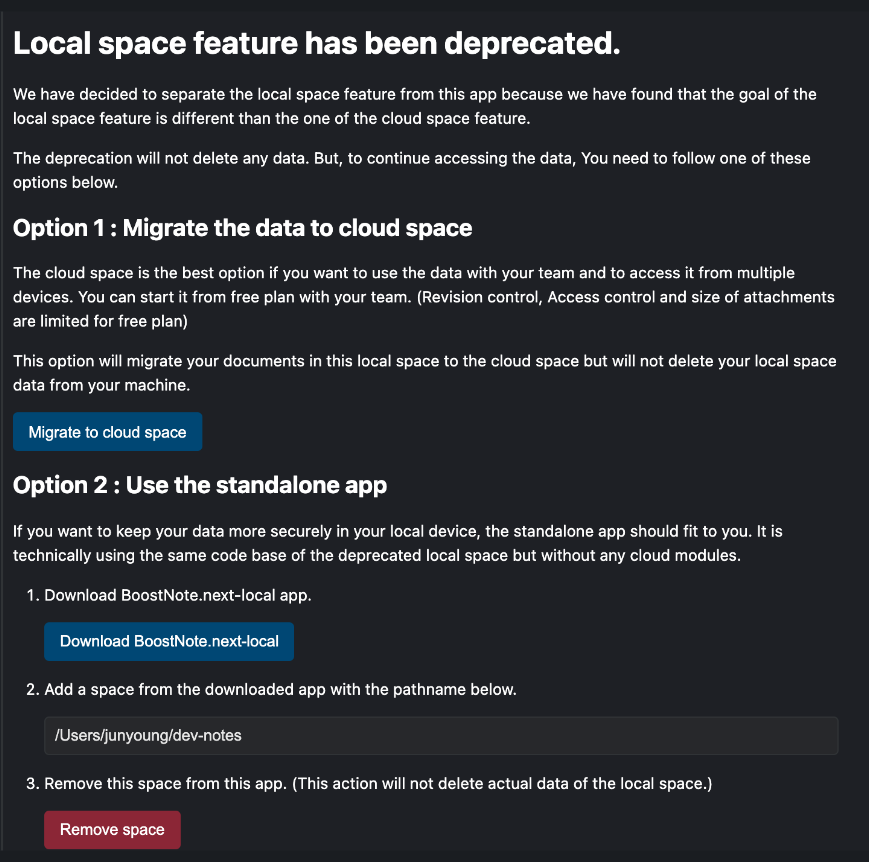
If you want to continue using file system based storage, you have your notes on disk where you chose the location of the storage.
The structure is something like this:
You can look this somewhere on your disk if you had file system storage, if you had local storage (or legacy cloud) then the data is directly in browser not on your disk, any you can still transfer the storage to file system (but you would need previous boost note desktop app release - not the latest which deprecated it completely) or directly transfer to cloud spaces (from legacy cloud or file system).
If you have any more questions, please don't hesitate to ask.
@benediktdertinger commented on GitHub (Sep 15, 2021):
@Komediruzecki I installed the new version, was asked to create an account, did so and found that all my local data was lost. I tried to install various older versions and obviously I was using a pretty old version but did not find the exact same UI. I then restored from my Time Machine Backup (it was v0.13.2) and the only thing I can see is some setup page (attached). How can I restore my data (where is the data located usually or how can it be identified)? I have no idea whether I used "File System" or "Local".
Any help is appreciated! Thank you
@Komediruzecki commented on GitHub (Sep 15, 2021):
Hi,
For faster resolving of this issue please join our slack and contact me directly,
Otherwise, to know which type you used (probably local storage if you cannot find boostnote.json anywhere on your file system - disk), you can just open the developer console and try looking for indexed DBs:
Also, you can look at local storage key-value pairs and look for
note.boostio.co:storageDataListkey and value to see which storage(s) is(are) currently loaded.On our slack look at this procedure to restore your data from local storage (indexed DBs): https://boostnote-group.slack.com/archives/C02CY1Z1E4R/p1631296645016900?thread_ts=1631268858.005600&cid=C02CY1Z1E4R
@benediktdertinger commented on GitHub (Oct 23, 2021):
@Komediruzecki thank you! Your workaround helped. I opened the Dev Tab via
option + cmd + i(Mac), created a new key in local storage fornote.boostio.co:storageDataListand placed a JSON array inside with my Index DB IDs. This way I could restore the old state (App Version 0.13.2 (0.13.2)). For details follow the provided link.