[GH-ISSUE #472] Weird text selection on Android app #228

Closed
opened 2026-03-03 00:19:28 +03:00 by kerem · 5 comments
Owner

Originally created by @limjh16 on GitHub (May 12, 2020).
Original GitHub issue: https://github.com/BoostIO/BoostNote-App/issues/472

Current behavior

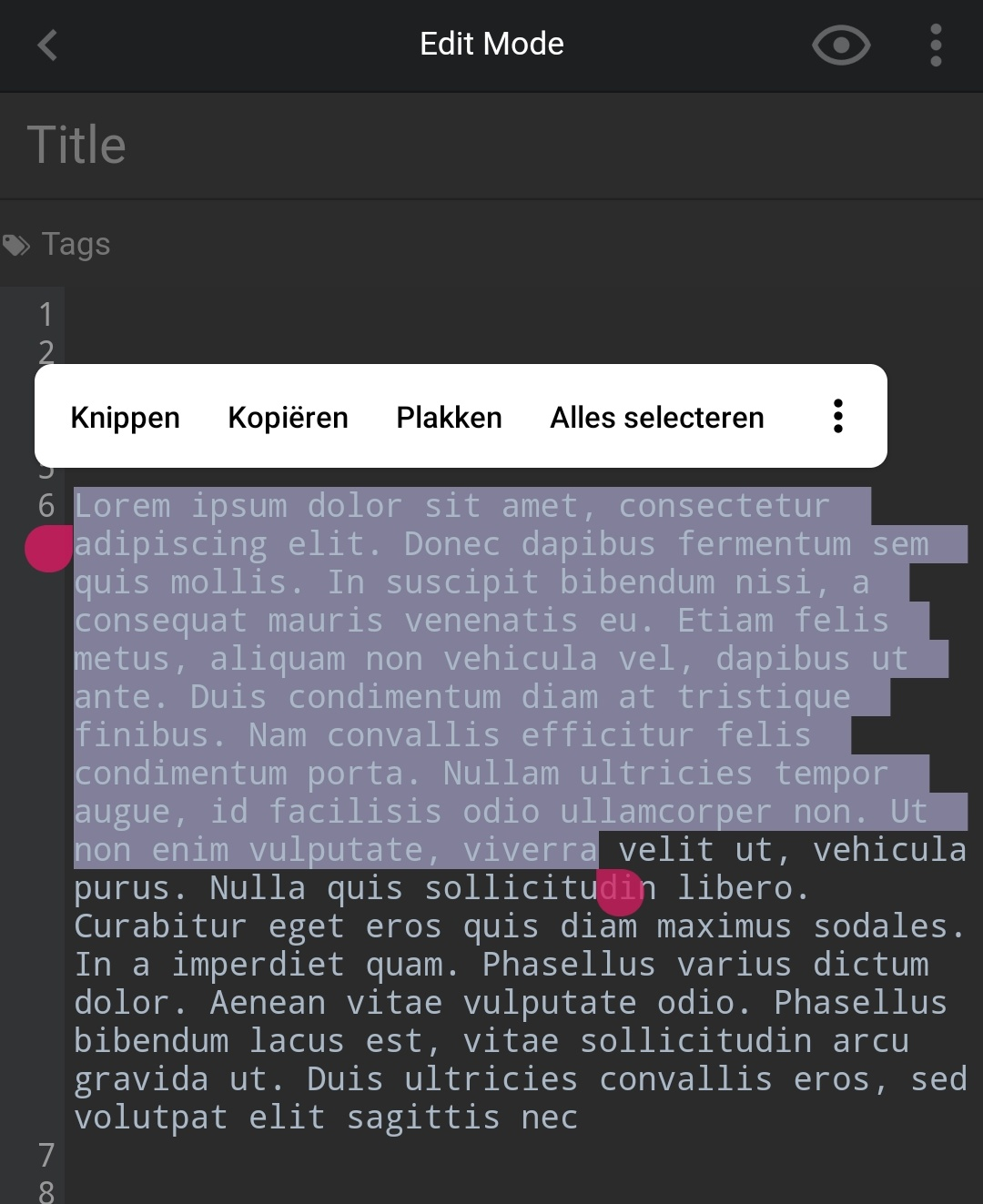
When trying to select a chunk of text, the popup which allows you to copy text either disappears instantly, or it doesn't allow you to copy text at all, as shown in the screenshot:

screenshot

Screenshot_20200512-161948

I didn't have a screen recorder set up on phone, but if a screen record of the pop up disappearing is needed I can set it up.

Expected behavior

The prompt which appears should show "copy" and when it does, not disappear immediately

Steps to reproduce

  1. write some text
  2. try to highlight a word, or select "select all" in the prompt

Environment

Mobile

  • Boost Note app version: 0.4.1
  • OS version and name: Android 10
Originally created by @limjh16 on GitHub (May 12, 2020). Original GitHub issue: https://github.com/BoostIO/BoostNote-App/issues/472 # Current behavior When trying to select a chunk of text, the popup which allows you to copy text either disappears instantly, or it doesn't allow you to copy text at all, as shown in the screenshot: <details><summary>screenshot</summary> ![Screenshot_20200512-161948](https://user-images.githubusercontent.com/15180396/81659987-d2aaa900-946c-11ea-848d-80e0a51e2729.png) </details> I didn't have a screen recorder set up on phone, but if a screen record of the pop up disappearing is needed I can set it up. # Expected behavior The prompt which appears should show "copy" and when it does, not disappear immediately # Steps to reproduce 1. write some text 2. try to highlight a word, or select "select all" in the prompt # Environment ## Mobile - Boost Note app version: 0.4.1 - OS version and name: Android 10
kerem 2026-03-03 00:19:28 +03:00
Author
Owner

@Flexo013 commented on GitHub (May 18, 2020):

I can indeed reproduce the inability to select text within a normal text line. The text is selected very briefly and then the cursor is placed where you were holding down.

Workaround: You can select symbols within a line normally and then drag the selection around to actually copy what you want.

I haven't been able to reproduce the pop-up not giving the copy option. From what I can see in the screenshot it seems as if you don't have anything select; there aren't two cursors marking the start and end. Which could explain why the option is missing.

<!-- gh-comment-id:630335246 --> @Flexo013 commented on GitHub (May 18, 2020): I can indeed reproduce the inability to select text within a normal text line. The text is selected very briefly and then the cursor is placed where you were holding down. Workaround: You can select symbols within a line normally and then drag the selection around to actually copy what you want. I haven't been able to reproduce the pop-up not giving the copy option. From what I can see in the screenshot it seems as if you don't have anything select; there aren't two cursors marking the start and end. Which could explain why the option is missing.
Author
Owner

@limjh16 commented on GitHub (May 19, 2020):

I haven't been able to reproduce the pop-up not giving the copy option. From what I can see in the screenshot it seems as if you don't have anything select; there aren't two cursors marking the start and end. Which could explain why the option is missing.

Hey, you can see the cursor marking the end, and also the text has a green background suggesting it is highlighted.

<!-- gh-comment-id:630548659 --> @limjh16 commented on GitHub (May 19, 2020): > I haven't been able to reproduce the pop-up not giving the copy option. From what I can see in the screenshot it seems as if you don't have anything select; there aren't two cursors marking the start and end. Which could explain why the option is missing. Hey, you can see the cursor marking the end, and also the text has a green background suggesting it is highlighted.
Author
Owner

@Flexo013 commented on GitHub (May 22, 2020):

Hmmm, somehow your Android is convinced you don't have anything selected.

This is what I got when trying to reproduce it:

screenshot ![image](https://user-images.githubusercontent.com/4507015/82697409-2c7b5200-9c69-11ea-9098-bdac408b8f19.png)

I hope that when these other selection bugs are fixed that this one will magically be fixed as well.

<!-- gh-comment-id:632838289 --> @Flexo013 commented on GitHub (May 22, 2020): Hmmm, somehow your Android is convinced you don't have anything selected. This is what I got when trying to reproduce it: <details> <summary>screenshot</summary> ![image](https://user-images.githubusercontent.com/4507015/82697409-2c7b5200-9c69-11ea-9098-bdac408b8f19.png) </details> I hope that when these other selection bugs are fixed that this one will magically be fixed as well.
Author
Owner

@limjh16 commented on GitHub (May 23, 2020):

screen recordings

record1
recording_20200523_091754~2

<!-- gh-comment-id:632964640 --> @limjh16 commented on GitHub (May 23, 2020): <details><summary>screen recordings </summary> ![record1](https://user-images.githubusercontent.com/15180396/82718993-14431b80-9cd9-11ea-95eb-c7f4ebf2dc70.gif) ![recording_20200523_091754~2](https://user-images.githubusercontent.com/15180396/82718997-1ad19300-9cd9-11ea-99c8-bb718f461211.gif) </details>
Author
Owner

@Rokt33r commented on GitHub (Aug 24, 2021):

It's been fixed in the new mobile app.

<!-- gh-comment-id:904232636 --> @Rokt33r commented on GitHub (Aug 24, 2021): It's been fixed in the new mobile app.
Sign in to join this conversation.
No milestone
No project
No assignees
1 participant
Notifications
Due date
The due date is invalid or out of range. Please use the format "yyyy-mm-dd".

No due date set.

Dependencies

No dependencies set.

Reference
starred/BoostNote-App#228
No description provided.