mirror of
https://github.com/BoostIO/BoostNote-App.git
synced 2026-04-27 13:25:49 +03:00
[GH-ISSUE #449] Design overhaul of the shortcut suggestion on the landing page #216
Labels
No labels
android 🤖
assigned to core 🦹
bug 🐛
documentation 📚
documentation 📚
duplicate 🚫
external issue 🔼
external issue 🔼
feature request 🌟
funded on issuehunt 💵
help wanted 🆘
improvement request 🔨
improvement request 🔨
ios 🍎
mobile 📱
needs investigation 🔬
needs more info ℹ️
needs specs 📐
plugin idea 🔌
plugin idea 🔌
poll 🗳️
pull-request
question ❓
rewarded on issuehunt 🎁
security issue 🔑
won’t fix ❌
No milestone
No project
No assignees
1 participant

Notifications
Due date
No due date set.
Dependencies
No dependencies set.
Reference
starred/BoostNote-App#216
Loading…
Add table
Add a link
Reference in a new issue
No description provided.
Delete branch "%!s()"
Deleting a branch is permanent. Although the deleted branch may continue to exist for a short time before it actually gets removed, it CANNOT be undone in most cases. Continue?
Originally created by @tim-kt on GitHub (Apr 28, 2020).
Original GitHub issue: https://github.com/BoostIO/BoostNote-App/issues/449
Current design
The current landing page doesn't look that visually pleasing to me, compared to other editors like Visual Studio Code. In particular, I mean this section:
My idea
Visual Studio Code has this sleek design:
I created a sketch in Figma that I would suggest as a replacement for the current design, which is meant to be an improvement of the design, not necessarily the functionality. This is the current version:
You can check out my Figma project and leave comments here.
I wasn't able to find this particular section of code in repository, but if someone could point me to it, I'd also be willing to do the changes myself and create a pull request.
Environment
Desktop
@jhdcruz commented on GitHub (Apr 28, 2020):
If I'm not wrong, it is located in:
src/pages/NotePage.tsxinline 310-316.The styling for the component is located in
line 27:The text/strings are located in:
src/locales/enUS.tsI guess that's it. I really like your landing page though. I'll root for it. 👍
@tim-kt commented on GitHub (Apr 28, 2020):
All right, so I adjusted the colors to match the application and now I can't decide between dark and light buttons... I asked a few friends and they said that the light ones are better but I really like the dark ones, so I'll let the people here decide.
Here are the designs side by side:
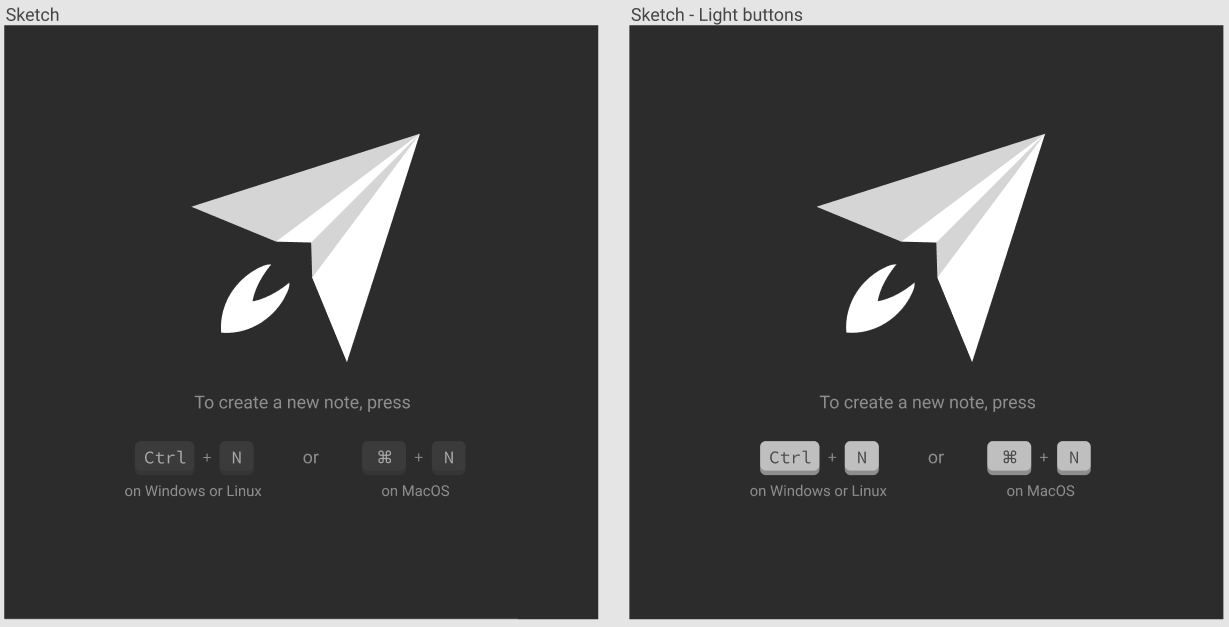
I guess you can react with 🚀 for the dark buttons and with 🎉 for the light buttons.
Also, thanks @jhdcruz! I'll look into it.
@tim-kt commented on GitHub (Apr 28, 2020):
Okay, I thought about my goal for the buttons and I think the user's focus should be on them rather than on the logo and since everything else in the application is pretty dark without white contrasts, I think I'll go with this version:
@Flexo013 commented on GitHub (May 1, 2020):
Loving this suggestion!
@tim-kt commented on GitHub (May 1, 2020):
I moved this to the old app, so I'm closing this issue here.
@jhdcruz commented on GitHub (May 5, 2020):
I've been quite interested in this particular improvement since this was closed. So I decided to continue this myself, if it's ok with the original author/idea @tim-kt.
I'm very eager to see this implemented.
@tim-kt commented on GitHub (May 5, 2020):
Sure thing, that's great to hear @jhdcruz!
I did a mockup in CSS and ended up with the following code for the different buttons:
And to display the buttons:
I also adjusted the color of the buttons' sides and they are now darker than the background (which is how it looks like in real life, if you look down at your keyboard).
@Rokt33r commented on GitHub (May 10, 2020):
Resolved in #458. I might add more modification but I like the suggestion! Thanks for contributing!