mirror of
https://github.com/BoostIO/BoostNote-App.git
synced 2026-04-26 21:05:55 +03:00
[GH-ISSUE #300] Questions about this application #108
Labels
No labels
android 🤖
assigned to core 🦹
bug 🐛
documentation 📚
documentation 📚
duplicate 🚫
external issue 🔼
external issue 🔼
feature request 🌟
funded on issuehunt 💵
help wanted 🆘
improvement request 🔨
improvement request 🔨
ios 🍎
mobile 📱
needs investigation 🔬
needs more info ℹ️
needs specs 📐
plugin idea 🔌
plugin idea 🔌
poll 🗳️
pull-request
question ❓
rewarded on issuehunt 🎁
security issue 🔑
won’t fix ❌
No milestone
No project
No assignees
1 participant

Notifications
Due date
No due date set.
Dependencies
No dependencies set.
Reference
starred/BoostNote-App#108
Loading…
Add table
Add a link
Reference in a new issue
No description provided.
Delete branch "%!s()"
Deleting a branch is permanent. Although the deleted branch may continue to exist for a short time before it actually gets removed, it CANNOT be undone in most cases. Continue?
Originally created by @Ahmed-E-86 on GitHub (Jan 16, 2020).
Original GitHub issue: https://github.com/BoostIO/BoostNote-App/issues/300
I did extensive research, and I found that this application is what suitable for my needs, because it supports offline storage, and Supports Linux at the same time, but I am little confused about this application, so I will ask some question, and I hope people here can help me figuring things out.
First: I don't know where the application saves the local storage, I tried to search my computer by the name of the storage, and I found nothing!
Second: The file menu only contains the command: Quit, so I am confused about: how can I import external notes?! and how can export my local storage?!
Third: The cloud storage has two options, GitHub, and entering an email to register a new account for this application, but I heard that this application supports OneDrive, and Google Drive. Did that change?
Fourth: the help menu contains the command: Learn more which redirects me the official website, and not a help guide!
Fifth: the help menu doesn't contain About which can be found in every application to give a little details about this application like the current version, the company name/developer name, the copyrights, and the license.
Sorry for asking a lot of questions, and I hope that my questions are reasonable.
@arcturus140 commented on GitHub (Jan 16, 2020):
Yes, Boostnote meets all requirements
notes are stored in plain text as cson files in your storage location. Add a storage location in your preferences.
the file menu contains commands for note manipulation, import, export, print and preferences
the application does not directly support google drive, dropbox, etc but you can use them to synchronize your notes. Be aware that conflicts may occur.
You are correct, the help menu is indeed not helpful at all. You can find the Wiki for Boostnote here. Adding it to the help menu is a very good idea, I'll make a feature request for it: BoostIO/Boostnote#3435
A fresh install has the Getting Started Note which is an excellent resource to check out what Boostnote has to offer.
@Ahmed-E-86 commented on GitHub (Jan 16, 2020):
I can't find any option inside Preferences to add a storage, or any option to change the location of local storage, but I found Import inside Preference which gives me the option to import .cson file a storage that I created before.
Here is a screenshot that previews the file menu:
It contains only Quit, and nothing more!
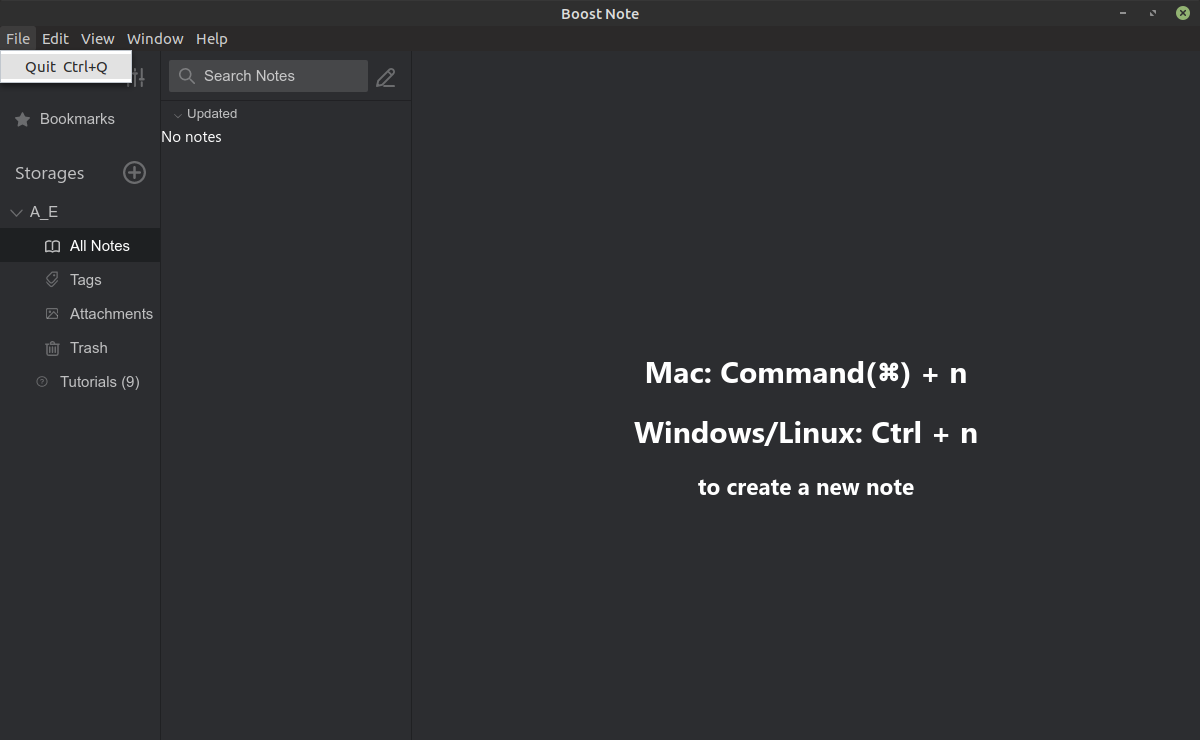
I found About inside Preferences, and that is the last place I thought it could be there!
@arcturus140 commented on GitHub (Jan 16, 2020):
I am not familiar with Boost Note. To my knowledge, local storage is not supported yet, but I am not up to date with development.
I recommend you to use Boostnote, instead. I think it better fits your requirements, at least for the time being.
@Ahmed-E-86 commented on GitHub (Jan 16, 2020):
That one is better, and it has .deb files instead of .AppImage files which integrates nicely with my OS. Thanks for you help.
@RyanGreenup commented on GitHub (Jan 17, 2020):
Also worth mentioning with Boostnote v14 (as opposed to Boost-Note), the files are saved inside a
.cson, you can edit that with vim/emacs/VScode just as if it were markdown if you’re careful and escape characters as necessary, (e.g.\LaTeXwould be\\LaTeX).There’s also a
pyscript here that will export it the.csontomdIf you really want raw MD files what I’d recommend is using Notable, it’s no longer OSS, but older versions are and the developer has expressed intent to keep it free from vender lock in.
You can combine this with vim, a search plugin and a preview plugin (or you could use a browser extension) and you’re basically set; for exporting, I’d recommend MkDocs because it’s so simple and to access the files on mobile you could use iawriter and a
gitappBoostnote is simpler and more aesthetically pleasing, but not having access to the actual
MDcan be a pain, so it’s really a matter of what features you need.@arcturus140 commented on GitHub (Jan 29, 2020):
I just gave Boost Note a try and it looks great! Local storage is supported, too. You can store your notes offline on your computer.