[GH-ISSUE #964] Bug: Error response from daemon: i/o timeout #598

Closed
opened 2026-03-01 14:44:53 +03:00 by kerem · 3 comments
Owner

Originally created by @github-account1111 on GitHub (Apr 17, 2022).
Original GitHub issue: https://github.com/ArchiveBox/ArchiveBox/issues/964

Describe the bug

Getting the following error:

> docker-compose up
Attaching to ab-archivebox-1
Error response from daemon: i/o timeout

ArchiveBox version

archivebox version won't run:

> archivebox version
archivebox: The term 'archivebox' is not recognized as a name of a cmdlet, function, script file, or executable program.
Check the spelling of the name, or if a path was included, verify that the path is correct and try again.

.. but I'm pretty sure it's v0.6.2

This is on Windows 11.

Originally created by @github-account1111 on GitHub (Apr 17, 2022). Original GitHub issue: https://github.com/ArchiveBox/ArchiveBox/issues/964 <!-- Please fill out the following information, feel free to delete sections if they're not applicable or if long issue templates annoy you. (the only required section is the version information) --> #### Describe the bug <!-- A description of what the bug is, what you expected to happen, and any relevant context about issue. --> Getting the following error: ``` > docker-compose up Attaching to ab-archivebox-1 Error response from daemon: i/o timeout ``` #### ArchiveBox version `archivebox version` won't run: ``` > archivebox version archivebox: The term 'archivebox' is not recognized as a name of a cmdlet, function, script file, or executable program. Check the spelling of the name, or if a path was included, verify that the path is correct and try again. ``` .. but I'm pretty sure it's v0.6.2 <!-- Tickets without full version info will closed until it is provided, we need the full output here to help you solve your issue --> This is on Windows 11.
kerem closed this issue 2026-03-01 14:44:54 +03:00
Author
Owner

@pirate commented on GitHub (Apr 17, 2022):

This is some issue with docker on your machine. Are you able to run any other docker commands?

<!-- gh-comment-id:1100792329 --> @pirate commented on GitHub (Apr 17, 2022): This is some issue with docker on your machine. Are you able to run any other docker commands?
Author
Owner

@github-account1111 commented on GitHub (Apr 17, 2022):

Yes this is what I get when I run this:

> docker-compose run archivebox
[i] [2022-04-16 11:49:53] ArchiveBox v0.6.2: archivebox server --quick-init 0.0.0.0:8000
    > /data

[^] Verifying and updating existing ArchiveBox collection to v0.6.2...
----------------------------------------------------------------------

[*] Verifying archive folder structure...
    + ./archive, ./sources, ./logs...
    + ./ArchiveBox.conf...

[*] Verifying main SQL index and running any migrations needed...
    Operations to perform:
      Apply all migrations: admin, auth, contenttypes, core, sessions
    Running migrations:
    No migrations to apply.

    √ ./index.sqlite3

[*] Checking links from indexes and archive folders (safe to Ctrl+C)...
    √ Loaded 0 links from existing main index.
    > Skipping full snapshot directory check (quick mode)

----------------------------------------------------------------------
[√] Done. Verified and updated the existing ArchiveBox collection.

    Hint: To view your archive index, run:
        archivebox server  # then visit http://127.0.0.1:8000

    To add new links, you can run:
        archivebox add ~/some/path/or/url/to/list_of_links.txt

    For more usage and examples, run:
        archivebox help

[+] Starting ArchiveBox webserver...
    > Logging errors to ./logs/errors.log
Performing system checks...

System check identified no issues (0 silenced).
April 17, 2022 - 11:49:56
Django version 3.1.10, using settings 'core.settings'
Starting development server at http://0.0.0.0:8000/
Quit the server with CONTROL-C.
"GET /admin/login/ HTTP/1.1" 200 11144
^C

It's a completely clean Windows 11 install running the latest Docker Desktop, so I'm really not sure what could be wrong.

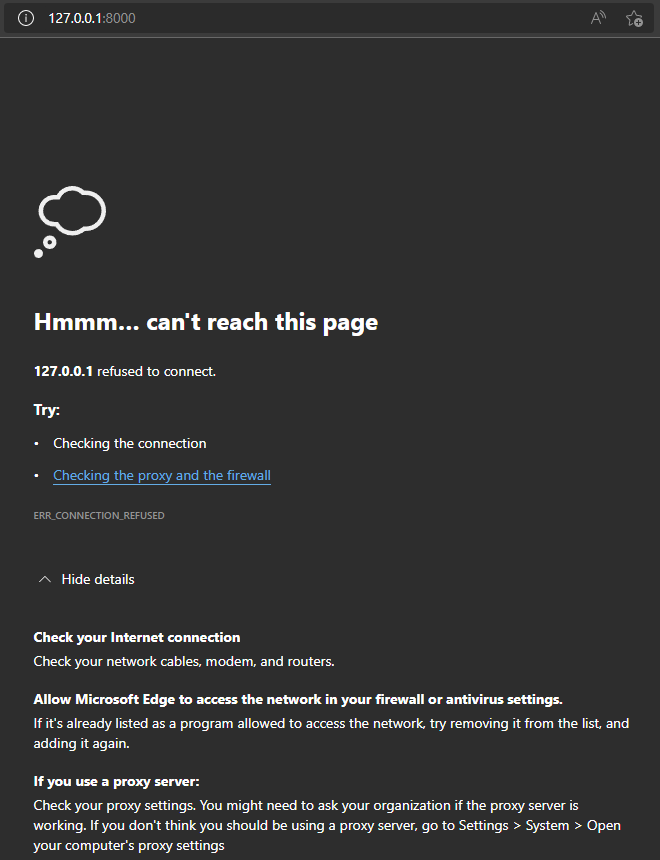
Edit: oh an unfortunately it still won't load anything:
image
I was using Adguard DNS before, but I've turned it off and am still getting the same result.

<!-- gh-comment-id:1100793231 --> @github-account1111 commented on GitHub (Apr 17, 2022): Yes this is what I get when I run this: ``` > docker-compose run archivebox [i] [2022-04-16 11:49:53] ArchiveBox v0.6.2: archivebox server --quick-init 0.0.0.0:8000 > /data [^] Verifying and updating existing ArchiveBox collection to v0.6.2... ---------------------------------------------------------------------- [*] Verifying archive folder structure... + ./archive, ./sources, ./logs... + ./ArchiveBox.conf... [*] Verifying main SQL index and running any migrations needed... Operations to perform: Apply all migrations: admin, auth, contenttypes, core, sessions Running migrations: No migrations to apply. √ ./index.sqlite3 [*] Checking links from indexes and archive folders (safe to Ctrl+C)... √ Loaded 0 links from existing main index. > Skipping full snapshot directory check (quick mode) ---------------------------------------------------------------------- [√] Done. Verified and updated the existing ArchiveBox collection. Hint: To view your archive index, run: archivebox server # then visit http://127.0.0.1:8000 To add new links, you can run: archivebox add ~/some/path/or/url/to/list_of_links.txt For more usage and examples, run: archivebox help [+] Starting ArchiveBox webserver... > Logging errors to ./logs/errors.log Performing system checks... System check identified no issues (0 silenced). April 17, 2022 - 11:49:56 Django version 3.1.10, using settings 'core.settings' Starting development server at http://0.0.0.0:8000/ Quit the server with CONTROL-C. "GET /admin/login/ HTTP/1.1" 200 11144 "GET /admin/login/ HTTP/1.1" 200 11144 ^C ``` It's a completely clean Windows 11 install running the latest Docker Desktop, so I'm really not sure what could be wrong. Edit: oh an unfortunately it still won't load anything: ![image](https://user-images.githubusercontent.com/5728319/163698498-e0d48d43-34ef-43b3-af23-c5e2cedf813f.png) I was using Adguard DNS before, but I've turned it off and am still getting the same result.
Author
Owner

@github-account1111 commented on GitHub (Apr 17, 2022):

I have:

  • rebooted
  • installed:
    • Intel chipset driver
    • Intel ME driver
    • Intel I/O driver

One of those things has fixed the issue!

<!-- gh-comment-id:1100928324 --> @github-account1111 commented on GitHub (Apr 17, 2022): I have: - rebooted - installed: - Intel chipset driver - Intel ME driver - Intel I/O driver One of those things has fixed the issue!
Sign in to join this conversation.
No milestone
No project
No assignees
1 participant
Notifications
Due date
The due date is invalid or out of range. Please use the format "yyyy-mm-dd".

No due date set.

Dependencies

No dependencies set.

Reference
starred/ArchiveBox#598
No description provided.