mirror of
https://github.com/ArchiveBox/ArchiveBox.git
synced 2026-04-25 17:16:00 +03:00
[GH-ISSUE #759] Question: Probably a really dumb question, but I'm completely stumped on step 2 of the installation process. #479
Labels
No labels
expected: maybe someday
expected: next release
expected: release after next
expected: unlikely unless contributed
good first ticket
help wanted
pull-request
scope: all users
scope: windows users
size: easy
size: hard
size: medium
size: medium
status: backlog
status: blocked
status: done
status: idea-phase
status: needs followup
status: wip
status: wontfix
touches: API/CLI/Spec
touches: configuration
touches: data/schema/architecture
touches: dependencies/packaging
touches: docs
touches: js
touches: views/replayers/html/css
why: correctness
why: functionality
why: performance
why: security
No milestone
No project
No assignees
1 participant

Notifications
Due date
No due date set.
Dependencies
No dependencies set.
Reference
starred/ArchiveBox#479
Loading…
Add table
Add a link
Reference in a new issue
No description provided.
Delete branch "%!s()"
Deleting a branch is permanent. Although the deleted branch may continue to exist for a short time before it actually gets removed, it CANNOT be undone in most cases. Continue?
Originally created by @NylaTheWolf on GitHub (Jun 3, 2021).
Original GitHub issue: https://github.com/ArchiveBox/ArchiveBox/issues/759
I'm on Mac OS, and I downloaded Docker Desktop. (I'm following the recommended method, downloading and setting up archivebox through docker-compose) I went through the tutorial and all. I downloaded the zip file for ArchiveBox. But... now what? The instructions say to put the docker-composer.yml file into an empty directory. Do I do that with the code provided? Where do I put that code? I'd assume in Docker but I can't find any way to make a new container (if I'm even supposed to make a container) or edit the tutorial contain or the repo, which is what the dashboard shows. Do I move docker-composer.yml from the ArchiveBox-dev folder into a new, empty folder?
This is probably a really stupid question but I've literally never used Docker in my life before and I'm not familiar with this stuff.
@pirate commented on GitHub (Jun 3, 2021):
Just copy/paste and run these commands verbatim in Terminal.app, no need to download any zip or move things manually in finder:
Then open http://127.0.0.1:8000 in your browser.
@NylaTheWolf commented on GitHub (Jun 5, 2021):
@pirate sorry for the late response, I've been busy!
So I entered the commands into Terminal. I had to go to bed so I exited the terminal after doing a certain step (like the 2nd). I did docker-compose up
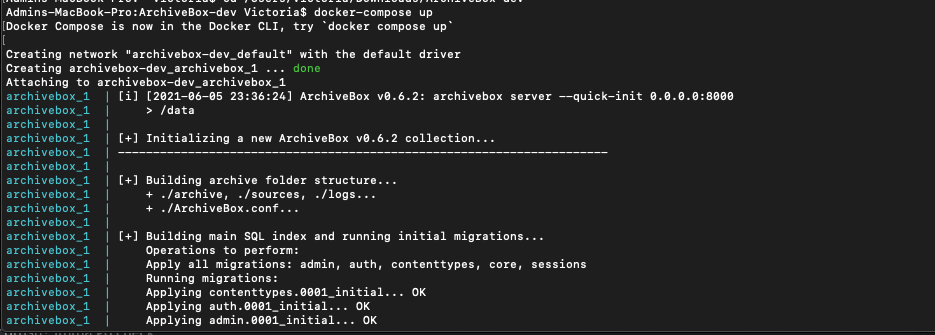
Then my dumb ass got worried that I did it wrong or something, so I did
docker-compose run archivebox init --setupAnd when I tried to create an admin superuser, I must've accidentally run the command again?
Now
archivebox_1 | "GET /admin/login/ HTTP/1.1" 200 11144keeps popping up.Did I screw something up?
Edit:
Also when I try signing in it doesn't work? I created a new superuser but I can't log into it through the web app?Nevermind, I figured it out!