[GH-ISSUE #642] Bug: Imports from older archives lead to ArchiveResult(output=None, status='skipped') entries polluting latest_outputs and showing 0 files in the UI #397

Closed
opened 2026-03-01 14:43:14 +03:00 by kerem · 2 comments
Owner

Originally created by @drpfenderson on GitHub (Feb 1, 2021).
Original GitHub issue: https://github.com/ArchiveBox/ArchiveBox/issues/642

Describe the bug

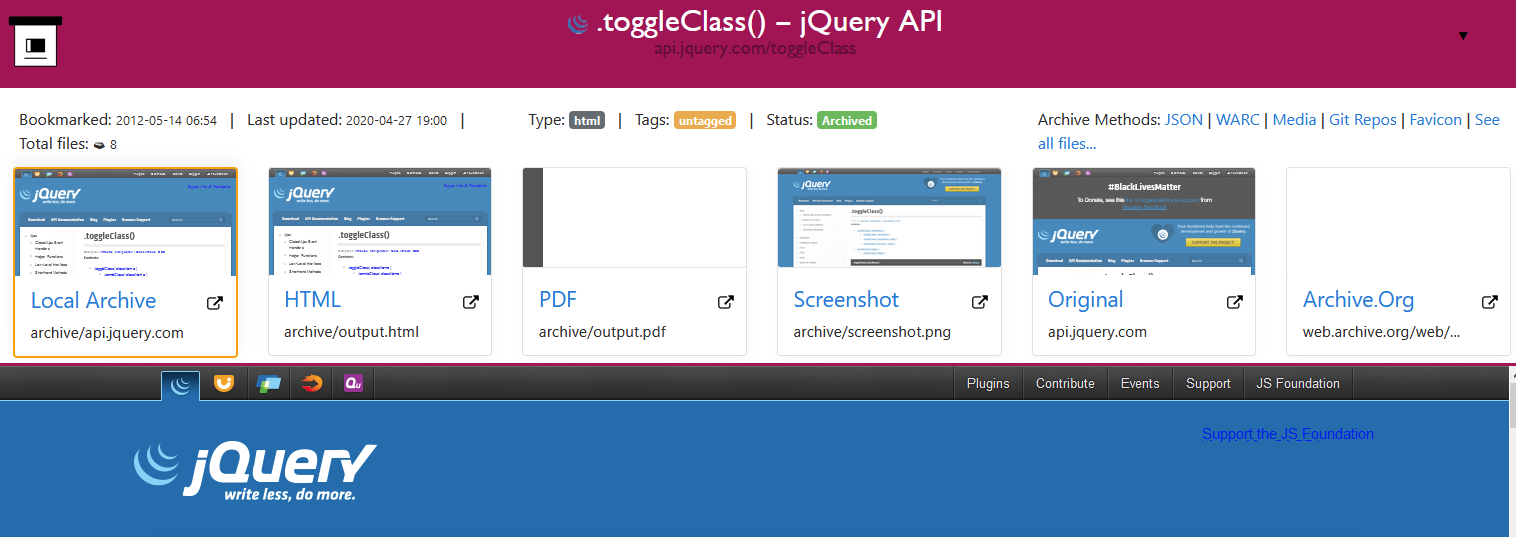
When viewing the webserver index of my archive, using docker-compose up -d, certain entries show that they have 0 sources available for viewing. However, clicking on the entries show that there are multiple, sometimes all, sources.

Steps to reproduce

  1. Upgraded my 0.4.2 archive to the 0.5.4 0aea5ed3e8 using docker-compose run archivebox init.
  2. Run docker-compose up -d.
  3. Load index in browser.
  4. Click link to see single link's index.

Screenshots or log output

Main index:
image

Single-item:
image

ArchiveBox version

$ archivebox --version
ArchiveBox v0.5.4
Cpython Linux Linux-5.4.0-45-generic-x86_64-with-glibc2.28 x86_64 (in Docker)

[i] Dependency versions:
 √  ARCHIVEBOX_BINARY     v0.5.4          valid     /usr/local/bin/archivebox
 √  PYTHON_BINARY         v3.9.1          valid     /usr/local/bin/python3.9
 √  DJANGO_BINARY         v3.1.3          valid     /usr/local/lib/python3.9/site-packages/django/bin/django-admin.py
 √  CURL_BINARY           v7.64.0         valid     /usr/bin/curl
 √  WGET_BINARY           v1.20.1         valid     /usr/bin/wget
 √  NODE_BINARY           v15.7.0         valid     /usr/bin/node
 √  SINGLEFILE_BINARY     v0.1.14         valid     /node/node_modules/single-file/cli/single-file
 √  READABILITY_BINARY    v0.1.0          valid     /node/node_modules/readability-extractor/readability-extractor
 √  MERCURY_BINARY        v1.0.0          valid     /node/node_modules/@postlight/mercury-parser/cli.js
 -  GIT_BINARY            -               disabled  /usr/bin/git
 -  YOUTUBEDL_BINARY      -               disabled  /usr/local/bin/youtube-dl
 √  CHROME_BINARY         v87.0.4280.141  valid     /usr/bin/chromium
 √  RIPGREP_BINARY        v0.10.0         valid     /usr/bin/rg

[i] Source-code locations:
 √  PACKAGE_DIR           24 files        valid     /app/archivebox
 √  TEMPLATES_DIR         4 files         valid     /app/archivebox/templates

[i] Secrets locations:
 -  CHROME_USER_DATA_DIR  -               disabled
 -  COOKIES_FILE          -               disabled

[i] Data locations:
 √  OUTPUT_DIR            14 files        valid     /data
 √  SOURCES_DIR           89 files        valid     ./sources
 √  LOGS_DIR              0 files         valid     ./logs
 √  ARCHIVE_DIR           1383 files      valid     ./archive
 √  CONFIG_FILE           81.0 Bytes      valid     ./ArchiveBox.conf
 √  SQL_INDEX             32.7 MB         valid     ./index.sqlite3
Originally created by @drpfenderson on GitHub (Feb 1, 2021). Original GitHub issue: https://github.com/ArchiveBox/ArchiveBox/issues/642 #### Describe the bug When viewing the webserver index of my archive, using `docker-compose up -d`, certain entries show that they have 0 sources available for viewing. However, clicking on the entries show that there are multiple, sometimes all, sources. #### Steps to reproduce 1. Upgraded my 0.4.2 archive to the 0.5.4 0aea5ed3e82294c0584a147eae14f40fefda45de using `docker-compose run archivebox init`. 2. Run `docker-compose up -d`. 3. Load index in browser. 4. Click link to see single link's index. #### Screenshots or log output Main index: ![image](https://user-images.githubusercontent.com/7515881/106530178-ac1c1a80-64a0-11eb-86f8-e7928912ab31.png) Single-item: ![image](https://user-images.githubusercontent.com/7515881/106530215-bd652700-64a0-11eb-8ce3-27c9e7935904.png) #### ArchiveBox version ``` $ archivebox --version ArchiveBox v0.5.4 Cpython Linux Linux-5.4.0-45-generic-x86_64-with-glibc2.28 x86_64 (in Docker) [i] Dependency versions: √ ARCHIVEBOX_BINARY v0.5.4 valid /usr/local/bin/archivebox √ PYTHON_BINARY v3.9.1 valid /usr/local/bin/python3.9 √ DJANGO_BINARY v3.1.3 valid /usr/local/lib/python3.9/site-packages/django/bin/django-admin.py √ CURL_BINARY v7.64.0 valid /usr/bin/curl √ WGET_BINARY v1.20.1 valid /usr/bin/wget √ NODE_BINARY v15.7.0 valid /usr/bin/node √ SINGLEFILE_BINARY v0.1.14 valid /node/node_modules/single-file/cli/single-file √ READABILITY_BINARY v0.1.0 valid /node/node_modules/readability-extractor/readability-extractor √ MERCURY_BINARY v1.0.0 valid /node/node_modules/@postlight/mercury-parser/cli.js - GIT_BINARY - disabled /usr/bin/git - YOUTUBEDL_BINARY - disabled /usr/local/bin/youtube-dl √ CHROME_BINARY v87.0.4280.141 valid /usr/bin/chromium √ RIPGREP_BINARY v0.10.0 valid /usr/bin/rg [i] Source-code locations: √ PACKAGE_DIR 24 files valid /app/archivebox √ TEMPLATES_DIR 4 files valid /app/archivebox/templates [i] Secrets locations: - CHROME_USER_DATA_DIR - disabled - COOKIES_FILE - disabled [i] Data locations: √ OUTPUT_DIR 14 files valid /data √ SOURCES_DIR 89 files valid ./sources √ LOGS_DIR 0 files valid ./logs √ ARCHIVE_DIR 1383 files valid ./archive √ CONFIG_FILE 81.0 Bytes valid ./ArchiveBox.conf √ SQL_INDEX 32.7 MB valid ./index.sqlite3 ```
kerem closed this issue 2026-03-01 14:43:14 +03:00
Author
Owner

@pirate commented on GitHub (Feb 2, 2021):

So in v0.5.3,4 we switched from using the filesystem as the single-source-of-truth on archive outputs, to using the sqlite3 database.

This means that in your import from your v0.4.2 archive, it read some link:history entries in the index.json into ArchiveResult DB rows to move the state from the filesystem into the DB.

Unfortunately we didn't backtest old versions enough when we released v0.5.3, and we forgot that older archives (<0.4.20 ish) store every skipped attempt as ArchiveResult(output=None, status=skipped) entries (we stopped doing that in later versions). This means that many links imported from older archives may show up with their latest_outputs[*]=null for example.

It's a harmless bug from a data-safety perspective, but it has the annoying result of showing 0 files in the UI because it thinks all the outputs are null. I think you can fix it by running archivebox update --extract=headers 'https://example.com/url/to/update.jpg' on each URL that's broken to re-parse all the outputs and refresh latest_outputs, though I'll have to take a closer look.

<!-- gh-comment-id:771321744 --> @pirate commented on GitHub (Feb 2, 2021): So in v0.5.3,4 we switched from using the filesystem as the single-source-of-truth on archive outputs, to using the sqlite3 database. This means that in your import from your v0.4.2 archive, it read some `link:history` entries in the `index.json` into `ArchiveResult` DB rows to move the state from the filesystem into the DB. Unfortunately we didn't backtest old versions enough when we released v0.5.3, and we forgot that older archives (<`0.4.20` ish) store every skipped attempt as `ArchiveResult(output=None, status=skipped)` entries (we stopped doing that in later versions). This means that many links imported from older archives may show up with their `latest_outputs[*]=null` for example. It's a harmless bug from a data-safety perspective, but it has the annoying result of showing 0 files in the UI because it thinks all the outputs are `null`. I think you can fix it by running `archivebox update --extract=headers 'https://example.com/url/to/update.jpg'` on each URL that's broken to re-parse all the outputs and refresh `latest_outputs`, though I'll have to take a closer look.
Author
Owner

@pirate commented on GitHub (Apr 10, 2021):

Ok so the final solution I recommend to this is basically just to trigger a re-archive on all these urls that are showing up as skipped. You don't have to re-archive them from scratch, just pull the favicon or title or headers, something innocuous like that to get it to re-save the ArchiveResults to the db and you should be good to go.

Easiest way is to select them all in the UI and hit "pull title".

Give that a go on v0.6 and let me know here if you're still struggling with missing files in the UI and I'll reopen the ticket.

<!-- gh-comment-id:817104662 --> @pirate commented on GitHub (Apr 10, 2021): Ok so the final solution I recommend to this is basically just to trigger a re-archive on all these urls that are showing up as skipped. You don't have to re-archive them from scratch, just pull the favicon or title or headers, something innocuous like that to get it to re-save the ArchiveResults to the db and you should be good to go. Easiest way is to select them all in the UI and hit "pull title". Give that a go on v0.6 and let me know here if you're still struggling with missing files in the UI and I'll reopen the ticket.
Sign in to join this conversation.
No milestone
No project
No assignees
1 participant
Notifications
Due date
The due date is invalid or out of range. Please use the format "yyyy-mm-dd".

No due date set.

Dependencies

No dependencies set.

Reference
starred/ArchiveBox#397
No description provided.