mirror of
https://github.com/ArchiveBox/ArchiveBox.git
synced 2026-04-25 09:06:02 +03:00
[GH-ISSUE #577] Feature Request: Browser extension to submit either all history or certain URLs to a given ArchiveBox instance #3382
Labels
No labels
expected: maybe someday
expected: next release
expected: release after next
expected: unlikely unless contributed
good first ticket
help wanted
pull-request
scope: all users
scope: windows users
size: easy
size: hard
size: medium
size: medium
status: backlog
status: blocked
status: done
status: idea-phase
status: needs followup
status: wip
status: wontfix
touches: API/CLI/Spec
touches: configuration
touches: data/schema/architecture
touches: dependencies/packaging
touches: docs
touches: js
touches: views/replayers/html/css
why: correctness
why: functionality
why: performance
why: security
No milestone
No project
No assignees
1 participant

Notifications
Due date
No due date set.
Dependencies
No dependencies set.
Reference
starred/ArchiveBox#3382
Loading…
Add table
Add a link
Reference in a new issue
No description provided.
Delete branch "%!s()"
Deleting a branch is permanent. Although the deleted branch may continue to exist for a short time before it actually gets removed, it CANNOT be undone in most cases. Continue?
Originally created by @adamwolf on GitHub (Dec 9, 2020).
Original GitHub issue: https://github.com/ArchiveBox/ArchiveBox/issues/577
Hi folks!
After adding the little bookmarklet, I'd like to add another extension. Once the API is closer, would you rather see an Android/iOS "share to" app extension, or a Chrome extension to quickly submit an URL to your ArchiveBox?
(Of course, if these are both things you don't like, just let me know! :)
@pirate commented on GitHub (Dec 9, 2020):
Yeah for sure, that would be great! We can easily expose an
/addendpoint for those. I don't have any Android/iOS app dev experience, so that's definitely something we could use help with.@pirate commented on GitHub (Jan 23, 2021):
Copying @CodingSpiderFox's message from duplicate ticket here:
@adamwolf commented on GitHub (Jan 23, 2021):
Hi! I haven't followed this project as closely as I have in the past, but I keep seeing it in headlines... good work!
Is there an /add or equivalent API endpoint? No worries if not... I'm a little overbooked with billable work at the moment but if there isn't one yet, is there a particular ticket that tracks that? I could subscribe to that so I know when to get started on this.
@pirate commented on GitHub (Jan 23, 2021):
There is an
/addendpoint now, but it's the one used by the UI so it requires a CSRF token which is a pain for API-style usage. No ticket for fixing that yet, but I'll be sure to post back here once I stabilize that endpoint more.I'm also a bit swamped with my day job right now, but I haven't forgotten about this.
@adamwolf commented on GitHub (Jan 23, 2021):
No problem! Do not rush to implement this for my sake! :) Thanks for all your work.
@pirate commented on GitHub (Mar 10, 2021):
Ideally a browser extension for ArchiveBox should be releasable cross-platform with minimal effort on the packaging side (ideally like something equivalent to FPM in the Debian packaging world).
Some of my research so far:
So far this seems like the best place to get started: https://www.emailthis.me/open-source/extension-boilerplate
Their sample extension is quite close to what the ArchiveBox extension UI would need.
If anyone wants to take a crack at this, PRs are welcome! In theory an extension that submits a POST to
http://<user configurable archivebox host>/add?could be accomplished in <200 LOC.@voarsh2 commented on GitHub (Mar 15, 2021):
This extension would be great.
Also, as well as submitting urls with a click, it might make it easy to have an automatic submission (if that's an option and turned on), to submit browser history.
@pirate commented on GitHub (Apr 1, 2021):
@layderv has written a sample extension for Firefox: https://github.com/layderv/archivefox
(x-posting this here)
@layderv commented on GitHub (Apr 1, 2021):
Would it be useful to add it to the repo's readme? Is there any useful, missing feature?
@LennyPenny commented on GitHub (Apr 1, 2021):
I think it would be cool to have an optional mode in this extension that will just queue every page you visit to be archived
edit: oh nvm https://github.com/ArchiveBox/ArchiveBox/issues/577#issuecomment-799622464 already mentions that
@voarsh2 commented on GitHub (Apr 2, 2021):
Cool, except I'm on Chrome.
@rastacalavera commented on GitHub (May 13, 2021):
So i installed the addon but my instance is on a raspberry pi not my host computer. It looks like the addon and the instance need to be on the same machine? Is the correct? Or, can I put in the url with port number and
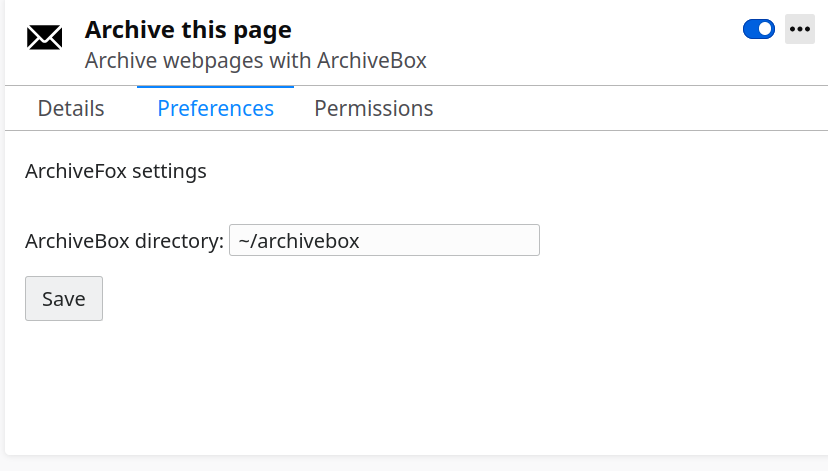
/addat the end?@layderv commented on GitHub (May 19, 2021):
@rastacalavera the addon's repository is probably best to ask this. I didn't add that feature, but if you show me how you use it manually, I can see how to add it
@tjhorner commented on GitHub (Jun 29, 2021):
Hey @pirate, I can work on this if you'd like. I'm not well-versed in Python/Django, so I'd appreciate if you could add the API endpoint for adding URLs to archive. (Else, I can totally try it myself, doesn't seem too difficult!) How would authentication work? I think for now a simple shared secret that's defined in the config would be fine.
I'll work on the browser extension for now. Since archiving all your history would probably take up way too much space and not be very useful (for e.g. Gmail, Google Photos, other auth'd services), I think the best way to determine which sites to archive would be:
So as to not accidentally DoS your ArchiveBox instance, matched URLs would be buffered and submitted in batches, every 10 minutes or so. But if the user closes their browser while there are buffered URLs, it would submit them immediately before closing.
What do you think?
@tjhorner commented on GitHub (Jun 30, 2021):
I've got something working pretty well! Here are some screenshots:
And here is the repo: https://github.com/tjhorner/archivebox-exporter
All that's left is to implement the actual API call to ArchiveBox (and some config fields for pointing to the right domain). Let me know if you want to take care of implementing that server-side or if you're fine with me handling it.
@tjhorner commented on GitHub (Jul 1, 2021):
Just an update: I forked ArchiveBox and added a temporary API endpoint just for the extension. You can see that branch here: https://github.com/tjhorner/archivebox/tree/temporary-add-api (More info on how to set it up here: https://github.com/tjhorner/archivebox-exporter/wiki/Setup)
I submitted the extension to both the Chrome and Firefox web stores, and I'll post another comment here when they both pass review. Once ArchiveBox gets a more official API, I'll be glad to update the extension to support that instead of this weird hacky solution I've come up with, hah. But for now I think this is a decent solution.
@voarsh2 commented on GitHub (Jul 2, 2021):
Awesome, really pumped to try this!
Hopefully I'll have some time in the next few days.
@pirate commented on GitHub (Jul 2, 2021):
@tjhorner have you tried using the existing
POST /core/snapshot/add/(archivebox/core/admin.py:382) endpoint to add new URLs? I believe the only potential blocker is the CSRF token requirement, which we can probably remove with a@csrf_exemptdecorator on that view handler function.Either way, I should have time to take a closer look in the upcoming weeks and help put whatever you need into ArchiveBox
masterto get this working.As a side note, I pass on a subset of the donations that archivebox gets to dependencies we use and other crucial projects in the ecosystem. If one or more user-contributed extensions get reliable and feature-complete enough that we can make direct people to them in the README, I'd be happy to pass on some of our $ support to those projects! It's small amounts right now (<$100/mo) but hopefully as the project grows it will become more significant.
@tjhorner commented on GitHub (Jul 2, 2021):
Yep, I ran into that when trying to use that endpoint in my testing. I was thinking of how the extension would authenticate with ArchiveBox, and I decided on an API key would be the best solution. But I just did another test and it turns out since the extension has permission to access user data on their ArchiveBox instance, it will send the
sessionidcookie along with the request, so as long the user is signed in and the session remains active (and sinceSESSION_SAVE_EVERY_REQUESTis set, it should automatically renew), then the extension should be authorized.So, TL;DR: yep, it seems all that's needed is to exempt that view from CSRF, since authentication is shared with the browser session.
I decorated the API view in my branch with
@method_decorator(csrf_exempt, name='dispatch')and it worked just fine. I'll decorate the existing/addpath with that and see if the extension can successfully make requests to that.@pirate commented on GitHub (Jul 2, 2021):
Ok, in the future we will likely have to build some infrastructure to authenticate the extension with ArchiveBox and issue it a dedicated bearer token key with CSRF-free endpoints (likely with a broader push towards building a real REST API). For now that should be ok though.
If you want to PR that decorator change you made against
devI can review and merge it into the 0.6.3 release candidate, though I cant promise that release will go out in the next couple weeks (I have a lot of travel and non-tech projects coming up). If it takes me any longer than 2 weeks then I can probably roll a micro-release with only your change and some other small bugfixes and save the other things on the 0.6.3 TODO list for later, as having this extension would be a huge usability win for many ArchiveBox users.For anyone who wants to use this early, see instructions here on how run the ArchiveBox pre-release
devversion on your machine:https://github.com/ArchiveBox/ArchiveBox#install-and-run-a-specific-github-branch
@tjhorner commented on GitHub (Jul 2, 2021):
Just added the CSRF exempt decorator to
AddViewin this branch. I modified the extension to use that route and it works like a charm! I'll submit a PR with that change againstdev. In the meantime I'll update the extension setup instructions and push an update to the Chrome/FF stores with this change.@tjhorner commented on GitHub (Jul 2, 2021):
The extension's now published on the Chrome and FF webstores! Give it a try and let me know what you think. Make sure you're running the
devbranch of ArchiveBox (instructions here).Bug reports and feature requests welcome, just make a new issue on the repo: https://github.com/tjhorner/archivebox-exporter/issues
@voarsh2 commented on GitHub (Jul 2, 2021):
Quick question, when I use docker to build from "dev" branch, am I actually building from this branch: https://github.com/tjhorner/archivebox/tree/temporary-add-api?
E.G: docker build -t archivebox:dev https://github.com/tjhorner/ArchiveBox.git#temporary-add-api
@tjhorner commented on GitHub (Jul 2, 2021):
@voarsh2 No, you should be building from
ArchiveBox/ArchiveBox#dev. I updated the instructions on the wiki to reflect that. If there are other places it needs to be updated let me know :)Edit: also make sure you have the latest version of the extension. It should be 1.2.0
@voarsh2 commented on GitHub (Jul 2, 2021):
Ah okay, I also thought my way above made sense since it's not in the ArchiveBox project yet....
so: docker build -t archivebox:dev https://github.com/ArchiveBox/ArchiveBox.git#dev ?
If I am pulling from the official repo, how are your changes from your repo applied exactly? I assume I'm missing something....
@tjhorner commented on GitHub (Jul 2, 2021):
I ended up going a different route by utilizing the existing
/add/endpoint, just disabling CSRF checks there. I submitted a PR earlier (#777) and it's now indevhere. It's a short term solution but it works for now. Once there's a fully fleshed out REST API with proper authorization and stuff, the extension will move to that.In the very earliest version of the extension you would have needed to build from my fork, yes, but no longer.
edit: if you have any further questions please ask them in the discussions section of the repo; I don't want to clutter this issue too much 😅
@pirate commented on GitHub (Jul 17, 2021):
One thing I'd like to do is push extension users away from "archive every page I visit" by default. Archives rapidly lose value that way, and people will end up just disabling the tool or deleting large swaths of their archive if thats the default for long periods of time. One-click archiving using a button in the navbar is always better than saving all browser history by default, curation is really important and the archives will hold both more value on a decades and centuries timescale if they are limited to pages deemed worthy of saving.
I'm not proposing removing the "all history" feature, just not making it the default, because despite what people think initially, it's really not a great idea long-term to save everything you visit.
https://youtu.be/7eoz_EU6-wQ?t=1387
@voarsh2 commented on GitHub (Jul 17, 2021):
I think, it's clear archive all is not on unless you make it so......
I will tag browsing history as an inbox to sort later....
@pirate commented on GitHub (Jul 17, 2021):
Yes, that is the case for @tjhorner's extension right now, but there are comments on reddit asking to make it the default, so I'm linking those people here for an explanation. I also want to stress it here for the other people developing extensions, there are 3 in the works right now last I counted.
@mAAdhaTTah commented on GitHub (Jul 18, 2021):
@pirate If there are extensions in the works, would it be worth picking on the REST API? Is that ready to start or
should we wait until the worker rearch w/ Huey is done?
@pirate commented on GitHub (Jul 19, 2021):
I think a minimal API can be worked on before the Huey refactor, as the user-facing API is going to be relatively stable even with the change to the internals. Maybe just these things to start:
/api/core/snapshot/GET, POST, PUT/api/core/snapshot/<id>GET, PATCH, DELETE/api/core/archiveresult/GET, POST/api/core/archiveresult/<id>GET, PATCH, DELETE/api/core/tag/GET, POST, PUT/api/core/tag/<id>GET, PATCH, DELETEand this bonus escape hatch endpoint to do everything else not possible with the above ^:
/api/cli/<command>POST (simulate running any archivebox CLI command with a given dict of args and kwargs to populate the CLI flags and args)e.g.
/api/cli/addPOST{urls: 'https://example.com', depth: 1, extractors: ['wget', 'media', 'screenshot'], ...}or
/api/cli/schedulePOST{urls: 'https://example.com', depth: 1, every: 'day', ...}I'm leaning towards using FastAPI for the API instead of DRF. I like the pydantic type-based API definitions better than DRF's serializers but I could be convinced either way.
@adamwolf commented on GitHub (Jul 19, 2021):
I haven't been in the Archivebox codebase for a while, but Django Ninja
does a pretty good job of doing type hint driven APIs in Django!
On Sun, Jul 18, 2021, 9:28 PM Nick Sweeting @.***>
wrote:
@mAAdhaTTah commented on GitHub (Jul 19, 2021):
I am using FastAPI on a side project and like it a lot but I think the integration with the way Archivebox loads Django will be complicated. Django Ninja appears to have a lot of the same trappings as FastAPI, so I'd be inclined to go with that rather than try to shoehorn FastAPI into the current Django integration.
I would be willing to work on this too–I'm trying to consume ArchiveBox for displaying my reading on my site and pulling it from the SQLite file directly is turning out to be a bit annoying.
@brunocek commented on GitHub (Jan 5, 2024):
I face this challenge (ios and firefox user), and as of now, I am actively working on a solution, please contribute:
( https://codeberg.org/brunoschroeder/archivebox-proxy )
I have a different architectural approach that has simplification as a pro. The solution is an archivebox proxy, to be deployed on the same server as the archivebox instance. For now, the proxy will call the CLI.
The proxy will be configured with a regex list of what to archive (or configured to archive all except what's on a regex list).
The proxy will provide a url to be used as prefix to meet requirement b (submits the current open URL in the current tab (only the current tab) to my archivebox and archivebox saves it right away) - I don't care about buttons and I am mainly focused on ios (ios does not allow firefox extensions).
The config list will carry for each regex:
I invite all interested to help me on codeberg opening issues for opinion contribution. I will be documenting the architectural decisions there.
current workflow:
Currently on ios, for each tab:
When I have the proxy, I can forget about this pain.
On the desktop I am using BrowseLatter plugin (https://addons.mozilla.org/en-US/firefox/addon/browselater/), which has the convenience of closing the tab for me and a button for copy all. From there I paste on vi.
@brunocek commented on GitHub (Jan 20, 2024):
Folks, this is done now. The repository has a working proxy for ArchiveBox.
May we please mention it on the documentation? How should we proceed?
@pirate commented on GitHub (Jan 23, 2024):
Great work @brunocek, thanks for building this! I added it to our README here: https://github.com/ArchiveBox/ArchiveBox/blob/main/README.md#input-formats (
github.com/ArchiveBox/ArchiveBox@5bdcbaeebd)If you're interested, I'd also be willing to move this repository under the official ArchiveBox github org
github.com/ArchiveBox. You'd have admin control over it still and be able to make any changes you want, but I can also help respond to support requests and integrate it more as an official ArchiveBox solution when proxy archiving is needed.If not, no worries, happy to keep it separate and just link to it from our docs/README/tickets/etc.
@brunocek commented on GitHub (Jan 23, 2024):
Hello.
Thank you. Yes you may move the code to your repo. I will help with anything there as well as in ArchiveBox. Honoured to be a maintainer of good Python free software.
Kind regards,
Bruno
@pirate commented on GitHub (Jan 23, 2024):
@brunocek I've imported it to https://github.com/ArchiveBox/archivebox-proxy and added you as a maintainer/owner of that repo on Github. Thanks again!