[GH-ISSUE #491] Question: wget problems #3340

Closed
opened 2026-03-14 22:14:05 +03:00 by kerem · 9 comments
Owner

Originally created by @poblabs on GitHub (Sep 26, 2020).
Original GitHub issue: https://github.com/ArchiveBox/ArchiveBox/issues/491

I'm getting this error below on a lot of sites. The archive is failing with the wget command:

failed: Connection refused.
failed: Cannot assign requested address.

If I remove --span-hosts from the wget command, it seems to work somewhat - some stuff is still missing.

Any tips on how to get past this?

Originally created by @poblabs on GitHub (Sep 26, 2020). Original GitHub issue: https://github.com/ArchiveBox/ArchiveBox/issues/491 I'm getting this error below on a lot of sites. The archive is failing with the wget command: ``` failed: Connection refused. failed: Cannot assign requested address. ``` If I remove `--span-hosts` from the wget command, it seems to work somewhat - some stuff is still missing. Any tips on how to get past this?
kerem closed this issue 2026-03-14 22:14:10 +03:00
Author
Owner

@poblabs commented on GitHub (Sep 26, 2020):

Maybe this is an ipv4 / ipv6 issue? Using -4 seems to work somewhat too but not entirely.

<!-- gh-comment-id:699531515 --> @poblabs commented on GitHub (Sep 26, 2020): Maybe this is an ipv4 / ipv6 issue? Using `-4` seems to work somewhat too but not entirely.
Author
Owner

@poblabs commented on GitHub (Sep 27, 2020):

On the same sites which wget fails, the chromium singlepage, pdf, etc. also fails. I'm a bit lost on why these normall working sites are failing in these 2 tools

<!-- gh-comment-id:699639814 --> @poblabs commented on GitHub (Sep 27, 2020): On the same sites which wget fails, the chromium singlepage, pdf, etc. also fails. I'm a bit lost on why these normall working sites are failing in these 2 tools
Author
Owner

@cdvv7788 commented on GitHub (Sep 27, 2020):

Can you try changing the user agent? Those sites may be blocking the requests based on that.

<!-- gh-comment-id:699640505 --> @cdvv7788 commented on GitHub (Sep 27, 2020): Can you try changing the user agent? Those sites may be blocking the requests based on that.
Author
Owner

@poblabs commented on GitHub (Sep 27, 2020):

Nope - no change when I set the chrome user agent, or the wget user agent. Can you try adding https://belchertownweather.com and see if it works for you? I have about 6 sites that fail and that is one of them.

<!-- gh-comment-id:699642527 --> @poblabs commented on GitHub (Sep 27, 2020): Nope - no change when I set the chrome user agent, or the wget user agent. Can you try adding https://belchertownweather.com and see if it works for you? I have about 6 sites that fail and that is one of them.
Author
Owner

@cdvv7788 commented on GitHub (Oct 20, 2020):

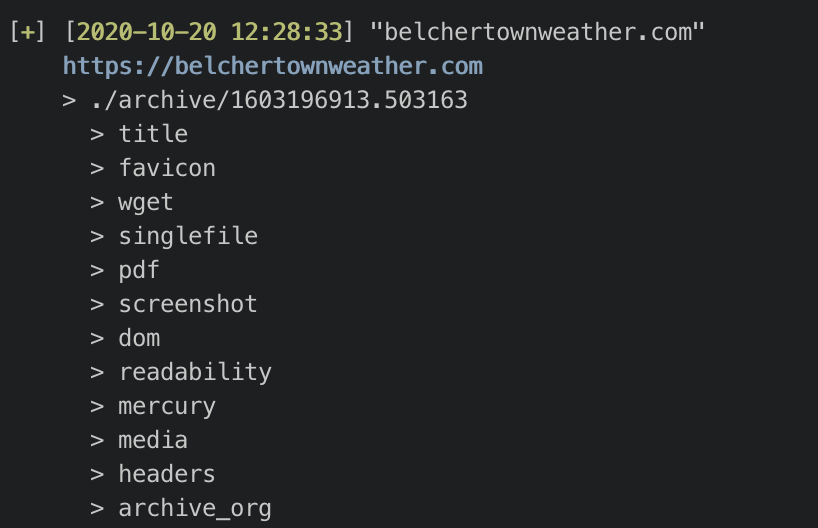
@poblabs I was able to add it without any issues:
image

This seems to be a network issue. Can you try running it on a VPN?

<!-- gh-comment-id:712815345 --> @cdvv7788 commented on GitHub (Oct 20, 2020): @poblabs I was able to add it without any issues: ![image](https://user-images.githubusercontent.com/5531776/96586083-14eed680-12a6-11eb-8bf7-6fa704bf60e2.png) This seems to be a network issue. Can you try running it on a VPN?
Author
Owner

@poblabs commented on GitHub (Oct 20, 2020):

Strange. When trying it on localhost to the website (I own the website), it still gives me an error but this time with chromium.

I am running this in docker.

wget appears to work but it's not downloading everything. Some JS files are 404'ing.

Not sure what to make of it.

[+] [2020-10-20 09:21:00] "belchertownweather.com"
    https://belchertownweather.com
    > ./archive/1603200060.693373
      > title
      > favicon
      > wget
      > singlefile
        Extractor failed:
            TimeoutExpired Command '['/node/node_modules/single-file/cli/single-file', '--browser-executable-path=chromium', '--browser-args=[\\"--headless\\", \\"--no-sandbox\\", \\"--disable-gpu\\", \\"--disable-dev-shm-usage\\", \\"--disable-software-rasterizer\\", \\"--user-agent=Mozilla/5.0 (Windows NT 10.0; Win64; x64) AppleWebKit/537.36 (KHTML, like Gecko) Chrome/73.0.3683.75 Safari/537.36\\", \\"--window-size=1440,2000\\"]', 'https://belchertownweather.com', '/data/archive/1603200060.693373/singlefile.html']' timed out after 60 seconds
        Run to see full output:
            cd /data/archive/1603200060.693373;
            /node/node_modules/single-file/cli/single-file --browser-executable-path=chromium "--browser-args=[\"--headless\", \"--no-sandbox\", \"--disable-gpu\", \"--disable-dev-shm-usage\", \"--disable-software-rasterizer\", \"--user-agent=Mozilla/5.0 (Windows NT 10.0; Win64; x64) AppleWebKit/537.36 (KHTML, like Gecko) Chrome/73.0.3683.75 Safari/537.36\", \"--window-size=1440,2000\"]" https://belchertownweather.com /data/archive/1603200060.693373/singlefile.html

      > pdf
        Extractor failed:
            TimeoutExpired Command '['chromium', '--headless', '--no-sandbox', '--disable-gpu', '--disable-dev-shm-usage', '--disable-software-rasterizer', '--user-agent=Mozilla/5.0 (Windows NT 10.0; Win64; x64) AppleWebKit/537.36 (KHTML, like Gecko) Chrome/73.0.3683.75 Safari/537.36', '--window-size=1440,2000', '--timeout=60000', '--print-to-pdf', 'https://belchertownweather.com']' timed out after 60 seconds
        Run to see full output:
            cd /data/archive/1603200060.693373;
            chromium --headless --no-sandbox --disable-gpu --disable-dev-shm-usage --disable-software-rasterizer "--user-agent=Mozilla/5.0 (Windows NT 10.0; Win64; x64) AppleWebKit/537.36 (KHTML, like Gecko) Chrome/73.0.3683.75 Safari/537.36" --window-size=1440,2000 --timeout=60000 --print-to-pdf https://belchertownweather.com

      > screenshot
        Extractor failed:
            TimeoutExpired Command '['chromium', '--headless', '--no-sandbox', '--disable-gpu', '--disable-dev-shm-usage', '--disable-software-rasterizer', '--user-agent=Mozilla/5.0 (Windows NT 10.0; Win64; x64) AppleWebKit/537.36 (KHTML, like Gecko) Chrome/73.0.3683.75 Safari/537.36', '--window-size=1440,2000', '--timeout=60000', '--screenshot', 'https://belchertownweather.com']' timed out after 60 seconds
        Run to see full output:
            cd /data/archive/1603200060.693373;
            chromium --headless --no-sandbox --disable-gpu --disable-dev-shm-usage --disable-software-rasterizer "--user-agent=Mozilla/5.0 (Windows NT 10.0; Win64; x64) AppleWebKit/537.36 (KHTML, like Gecko) Chrome/73.0.3683.75 Safari/537.36" --window-size=1440,2000 --timeout=60000 --screenshot https://belchertownweather.com

      > dom
        Extractor failed:
            TimeoutExpired Command '['chromium', '--headless', '--no-sandbox', '--disable-gpu', '--disable-dev-shm-usage', '--disable-software-rasterizer', '--user-agent=Mozilla/5.0 (Windows NT 10.0; Win64; x64) AppleWebKit/537.36 (KHTML, like Gecko) Chrome/73.0.3683.75 Safari/537.36', '--window-size=1440,2000', '--timeout=60000', '--dump-dom', 'https://belchertownweather.com']' timed out after 60 seconds
        Run to see full output:
            cd /data/archive/1603200060.693373;
            chromium --headless --no-sandbox --disable-gpu --disable-dev-shm-usage --disable-software-rasterizer "--user-agent=Mozilla/5.0 (Windows NT 10.0; Win64; x64) AppleWebKit/537.36 (KHTML, like Gecko) Chrome/73.0.3683.75 Safari/537.36" --window-size=1440,2000 --timeout=60000 --dump-dom https://belchertownweather.com

      > readability
      > mercury
      > media
      > headers

[√] [2020-10-20 09:25:08] Update of 1 pages complete (4.14 min)
    - 0 links skipped
    - 1 links updated
    - 1 links had errors
<!-- gh-comment-id:712849321 --> @poblabs commented on GitHub (Oct 20, 2020): Strange. When trying it on localhost to the website (I own the website), it still gives me an error but this time with chromium. I am running this in docker. wget appears to work but it's not downloading everything. Some JS files are 404'ing. Not sure what to make of it. ``` [+] [2020-10-20 09:21:00] "belchertownweather.com" https://belchertownweather.com > ./archive/1603200060.693373 > title > favicon > wget > singlefile Extractor failed: TimeoutExpired Command '['/node/node_modules/single-file/cli/single-file', '--browser-executable-path=chromium', '--browser-args=[\\"--headless\\", \\"--no-sandbox\\", \\"--disable-gpu\\", \\"--disable-dev-shm-usage\\", \\"--disable-software-rasterizer\\", \\"--user-agent=Mozilla/5.0 (Windows NT 10.0; Win64; x64) AppleWebKit/537.36 (KHTML, like Gecko) Chrome/73.0.3683.75 Safari/537.36\\", \\"--window-size=1440,2000\\"]', 'https://belchertownweather.com', '/data/archive/1603200060.693373/singlefile.html']' timed out after 60 seconds Run to see full output: cd /data/archive/1603200060.693373; /node/node_modules/single-file/cli/single-file --browser-executable-path=chromium "--browser-args=[\"--headless\", \"--no-sandbox\", \"--disable-gpu\", \"--disable-dev-shm-usage\", \"--disable-software-rasterizer\", \"--user-agent=Mozilla/5.0 (Windows NT 10.0; Win64; x64) AppleWebKit/537.36 (KHTML, like Gecko) Chrome/73.0.3683.75 Safari/537.36\", \"--window-size=1440,2000\"]" https://belchertownweather.com /data/archive/1603200060.693373/singlefile.html > pdf Extractor failed: TimeoutExpired Command '['chromium', '--headless', '--no-sandbox', '--disable-gpu', '--disable-dev-shm-usage', '--disable-software-rasterizer', '--user-agent=Mozilla/5.0 (Windows NT 10.0; Win64; x64) AppleWebKit/537.36 (KHTML, like Gecko) Chrome/73.0.3683.75 Safari/537.36', '--window-size=1440,2000', '--timeout=60000', '--print-to-pdf', 'https://belchertownweather.com']' timed out after 60 seconds Run to see full output: cd /data/archive/1603200060.693373; chromium --headless --no-sandbox --disable-gpu --disable-dev-shm-usage --disable-software-rasterizer "--user-agent=Mozilla/5.0 (Windows NT 10.0; Win64; x64) AppleWebKit/537.36 (KHTML, like Gecko) Chrome/73.0.3683.75 Safari/537.36" --window-size=1440,2000 --timeout=60000 --print-to-pdf https://belchertownweather.com > screenshot Extractor failed: TimeoutExpired Command '['chromium', '--headless', '--no-sandbox', '--disable-gpu', '--disable-dev-shm-usage', '--disable-software-rasterizer', '--user-agent=Mozilla/5.0 (Windows NT 10.0; Win64; x64) AppleWebKit/537.36 (KHTML, like Gecko) Chrome/73.0.3683.75 Safari/537.36', '--window-size=1440,2000', '--timeout=60000', '--screenshot', 'https://belchertownweather.com']' timed out after 60 seconds Run to see full output: cd /data/archive/1603200060.693373; chromium --headless --no-sandbox --disable-gpu --disable-dev-shm-usage --disable-software-rasterizer "--user-agent=Mozilla/5.0 (Windows NT 10.0; Win64; x64) AppleWebKit/537.36 (KHTML, like Gecko) Chrome/73.0.3683.75 Safari/537.36" --window-size=1440,2000 --timeout=60000 --screenshot https://belchertownweather.com > dom Extractor failed: TimeoutExpired Command '['chromium', '--headless', '--no-sandbox', '--disable-gpu', '--disable-dev-shm-usage', '--disable-software-rasterizer', '--user-agent=Mozilla/5.0 (Windows NT 10.0; Win64; x64) AppleWebKit/537.36 (KHTML, like Gecko) Chrome/73.0.3683.75 Safari/537.36', '--window-size=1440,2000', '--timeout=60000', '--dump-dom', 'https://belchertownweather.com']' timed out after 60 seconds Run to see full output: cd /data/archive/1603200060.693373; chromium --headless --no-sandbox --disable-gpu --disable-dev-shm-usage --disable-software-rasterizer "--user-agent=Mozilla/5.0 (Windows NT 10.0; Win64; x64) AppleWebKit/537.36 (KHTML, like Gecko) Chrome/73.0.3683.75 Safari/537.36" --window-size=1440,2000 --timeout=60000 --dump-dom https://belchertownweather.com > readability > mercury > media > headers [√] [2020-10-20 09:25:08] Update of 1 pages complete (4.14 min) - 0 links skipped - 1 links updated - 1 links had errors ```
Author
Owner

@cdvv7788 commented on GitHub (Oct 20, 2020):

What docker image are you using? Can you try building an image with the version on master and try again? (docker build -t archivebox --no-cache).
You can also try the individual commands, to see how they are failing. That may give us more information.

<!-- gh-comment-id:712851346 --> @cdvv7788 commented on GitHub (Oct 20, 2020): What docker image are you using? Can you try building an image with the version on `master` and try again? (`docker build -t archivebox --no-cache`). You can also try the individual commands, to see how they are failing. That may give us more information.
Author
Owner

@poblabs commented on GitHub (Oct 20, 2020):

Same result with master built docker. It seems to be the 1 website of mine giving me problems. I just tried a bunch more and they seem ok. Not sure why mine is special but I don't think this is an archivebox problem. 🤷🏻‍♂️

<!-- gh-comment-id:712860653 --> @poblabs commented on GitHub (Oct 20, 2020): Same result with master built docker. It seems to be the 1 website of mine giving me problems. I just tried a bunch more and they seem ok. Not sure why mine is special but I don't think this is an archivebox problem. 🤷🏻‍♂️
Author
Owner

@cdvv7788 commented on GitHub (Oct 20, 2020):

@poblabs feel free to re-open the issue if you find something that we can help with.

<!-- gh-comment-id:712863446 --> @cdvv7788 commented on GitHub (Oct 20, 2020): @poblabs feel free to re-open the issue if you find something that we can help with.
Sign in to join this conversation.
No milestone
No project
No assignees
1 participant
Notifications
Due date
The due date is invalid or out of range. Please use the format "yyyy-mm-dd".

No due date set.

Dependencies

No dependencies set.

Reference
starred/ArchiveBox#3340
No description provided.