[GH-ISSUE #347] Support Request: When running echo example.com no verbose in terminal or output file #3272

Closed
opened 2026-03-14 21:52:15 +03:00 by kerem · 5 comments
Owner

Originally created by @jtmlis on GitHub (Jun 15, 2020).
Original GitHub issue: https://github.com/ArchiveBox/ArchiveBox/issues/347

When I execute Step 3

  1. Add your first links to your archive
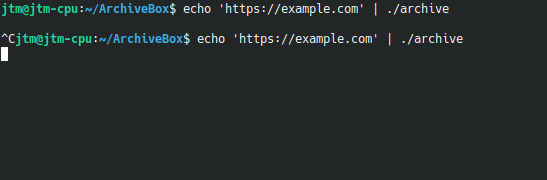
    echo 'https://example.com' | ./archive

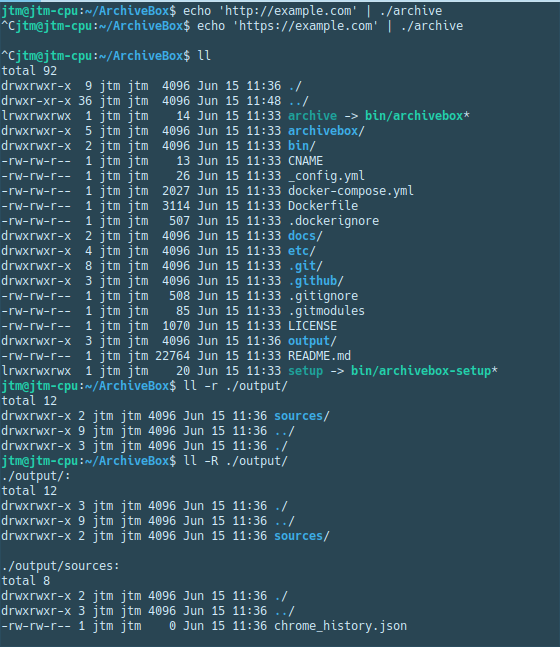
My terminal hangs and I get no verbose or output file.
See
image
no_output_index html

What I am running
LAMP stack for local phpBB3 forum
Running Kubuntu 20.04 KDE Plasma Version: 5.18.5
Python 3.8

What I tried:

  • I followed the manual instructions and made sure my packages are up to date. I then removed everything and tried again with the install script.

  • I followed trouble shooting page and verified my chromium-browser variable is on the path and that it is higher than the required version.

  • Searched for similar issues.

Originally created by @jtmlis on GitHub (Jun 15, 2020). Original GitHub issue: https://github.com/ArchiveBox/ArchiveBox/issues/347 When I execute Step 3 3. Add your first links to your archive echo 'https://example.com' | ./archive My terminal hangs and I get no verbose or output file. See ![image](https://user-images.githubusercontent.com/66714119/84680681-0d3ab200-af01-11ea-8705-9c36b9ad1703.png) ![no_output_index html](https://user-images.githubusercontent.com/66714119/84680698-13c92980-af01-11ea-87f4-ebba58367ed5.png) What I am running LAMP stack for local phpBB3 forum Running Kubuntu 20.04 KDE Plasma Version: 5.18.5 Python 3.8 What I tried: - I followed the manual instructions and made sure my packages are up to date. I then removed everything and tried again with the install script. - I followed trouble shooting page and verified my chromium-browser variable is on the path and that it is higher than the required version. - Searched for similar issues.
Author
Owner

@pirate commented on GitHub (Jun 15, 2020):

Can you verify that DNS resolves dig example.com and curl https://example.com produces the expected HTML output? The only time I've seen this before was on a machine with a broken/intermittent internet connection causing DNS resolution to hang in systemd-resolved.

<!-- gh-comment-id:644235343 --> @pirate commented on GitHub (Jun 15, 2020): Can you verify that DNS resolves `dig example.com` and `curl https://example.com` produces the expected HTML output? The only time I've seen this before was on a machine with a broken/intermittent internet connection causing DNS resolution to hang in `systemd-resolved`.
Author
Owner

@jtmlis commented on GitHub (Jun 15, 2020):

Output is as expected.

image

ps I am a huge fan of yours and also follow you on twitter.

<!-- gh-comment-id:644237916 --> @jtmlis commented on GitHub (Jun 15, 2020): Output is as expected. ![image](https://user-images.githubusercontent.com/66714119/84682360-876c3600-af03-11ea-9ece-facf558d08f0.png) ps I am a huge fan of yours and also follow you on twitter.
Author
Owner

@jtmlis commented on GitHub (Jun 15, 2020):

jtm@jtm-cpu:~/ArchiveBox$ systemd-resolve --status
Global
       LLMNR setting: no                  
MulticastDNS setting: no                  
  DNSOverTLS setting: no                  
      DNSSEC setting: no                  
    DNSSEC supported: no                  
          DNSSEC NTA: 10.in-addr.arpa     
                      16.172.in-addr.arpa 
                      168.192.in-addr.arpa
                      17.172.in-addr.arpa 
                      18.172.in-addr.arpa 
                      19.172.in-addr.arpa 
                      20.172.in-addr.arpa 
                      21.172.in-addr.arpa 
Global
Global
       LLMNR setting: no                  
MulticastDNS setting: no                  
  DNSOverTLS setting: no                  
      DNSSEC setting: no                  
    DNSSEC supported: no                  
          DNSSEC NTA: 10.in-addr.arpa     
                      16.172.in-addr.arpa 
                      168.192.in-addr.arpa
                      17.172.in-addr.arpa 
                      18.172.in-addr.arpa 
                      19.172.in-addr.arpa 
                      20.172.in-addr.arpa 
                      21.172.in-addr.arpa 
Global
       LLMNR setting: no                  
MulticastDNS setting: no                  
  DNSOverTLS setting: no                  
      DNSSEC setting: no                  
    DNSSEC supported: no                  
          DNSSEC NTA: 10.in-addr.arpa     
                      16.172.in-addr.arpa 
                      168.192.in-addr.arpa
                      17.172.in-addr.arpa 
                      18.172.in-addr.arpa 
                      19.172.in-addr.arpa 
                      20.172.in-addr.arpa 
                      21.172.in-addr.arpa 
                      22.172.in-addr.arpa 
                      23.172.in-addr.arpa 
                      24.172.in-addr.arpa 
                      25.172.in-addr.arpa 
                      26.172.in-addr.arpa 
                      27.172.in-addr.arpa 
                      28.172.in-addr.arpa 
                      29.172.in-addr.arpa 
                      30.172.in-addr.arpa 
                      31.172.in-addr.arpa 
                      corp                
                      d.f.ip6.arpa        
                      home                
                      internal            
                      intranet            
                      lan                 
                      local               
                      private             
                      test                

Link 3 (wlp2s0)
      Current Scopes: DNS           
DefaultRoute setting: yes           
       LLMNR setting: yes           
MulticastDNS setting: no            
  DNSOverTLS setting: no            
      DNSSEC setting: no            
    DNSSEC supported: no            
  Current DNS Server: 192.168.0.1   
         DNS Servers: 192.168.0.1   
          DNS Domain: ~.            
                      hitronhub.home

Link 2 (eno1)
      Current Scopes: none
DefaultRoute setting: no  
       LLMNR setting: yes 
MulticastDNS setting: no  
  DNSOverTLS setting: no  
      DNSSEC setting: no  
    DNSSEC supported: no 
<!-- gh-comment-id:644238991 --> @jtmlis commented on GitHub (Jun 15, 2020): ``` jtm@jtm-cpu:~/ArchiveBox$ systemd-resolve --status Global LLMNR setting: no MulticastDNS setting: no DNSOverTLS setting: no DNSSEC setting: no DNSSEC supported: no DNSSEC NTA: 10.in-addr.arpa 16.172.in-addr.arpa 168.192.in-addr.arpa 17.172.in-addr.arpa 18.172.in-addr.arpa 19.172.in-addr.arpa 20.172.in-addr.arpa 21.172.in-addr.arpa Global Global LLMNR setting: no MulticastDNS setting: no DNSOverTLS setting: no DNSSEC setting: no DNSSEC supported: no DNSSEC NTA: 10.in-addr.arpa 16.172.in-addr.arpa 168.192.in-addr.arpa 17.172.in-addr.arpa 18.172.in-addr.arpa 19.172.in-addr.arpa 20.172.in-addr.arpa 21.172.in-addr.arpa Global LLMNR setting: no MulticastDNS setting: no DNSOverTLS setting: no DNSSEC setting: no DNSSEC supported: no DNSSEC NTA: 10.in-addr.arpa 16.172.in-addr.arpa 168.192.in-addr.arpa 17.172.in-addr.arpa 18.172.in-addr.arpa 19.172.in-addr.arpa 20.172.in-addr.arpa 21.172.in-addr.arpa 22.172.in-addr.arpa 23.172.in-addr.arpa 24.172.in-addr.arpa 25.172.in-addr.arpa 26.172.in-addr.arpa 27.172.in-addr.arpa 28.172.in-addr.arpa 29.172.in-addr.arpa 30.172.in-addr.arpa 31.172.in-addr.arpa corp d.f.ip6.arpa home internal intranet lan local private test Link 3 (wlp2s0) Current Scopes: DNS DefaultRoute setting: yes LLMNR setting: yes MulticastDNS setting: no DNSOverTLS setting: no DNSSEC setting: no DNSSEC supported: no Current DNS Server: 192.168.0.1 DNS Servers: 192.168.0.1 DNS Domain: ~. hitronhub.home Link 2 (eno1) Current Scopes: none DefaultRoute setting: no LLMNR setting: yes MulticastDNS setting: no DNSOverTLS setting: no DNSSEC setting: no DNSSEC supported: no ```
Author
Owner

@pirate commented on GitHub (Jun 15, 2020):

Thanks! Looks like your DNS and internet are fine, would you be willing to try checking out the django branch and using that version instead?

cd path/to/archivebox/git/folder
git checkout django
pip install -e .
mkdir data && cd data
archivebox init
archivebox add 'https://example.com'
<!-- gh-comment-id:644301509 --> @pirate commented on GitHub (Jun 15, 2020): Thanks! Looks like your DNS and internet are fine, would you be willing to try checking out the `django` branch and using that version instead? ```bash cd path/to/archivebox/git/folder git checkout django pip install -e . mkdir data && cd data archivebox init archivebox add 'https://example.com' ```
Author
Owner

@jtmlis commented on GitHub (Jun 15, 2020):

Working like a charm thank you so much !!!!!!!

Just for anyone else reading this for KDE plasma be sure to add ~/.local/bin to export path after pip install.

export PATH="$HOME/.local/bin:$PATH"

cd path/to/archivebox/git/folder
git checkout django
pip install -e .
export PATH="$HOME/.local/bin:$PATH"
mkdir data && cd data
archivebox init
archivebox add 'https://example.com'
xdg-open index.html 
<!-- gh-comment-id:644314187 --> @jtmlis commented on GitHub (Jun 15, 2020): Working like a charm thank you so much !!!!!!! Just for anyone else reading this for KDE plasma be sure to add ~/.local/bin to export path after pip install. ```export PATH="$HOME/.local/bin:$PATH"``` ``` cd path/to/archivebox/git/folder git checkout django pip install -e . export PATH="$HOME/.local/bin:$PATH" mkdir data && cd data archivebox init archivebox add 'https://example.com' xdg-open index.html ```
Sign in to join this conversation.
No milestone
No project
No assignees
1 participant
Notifications
Due date
The due date is invalid or out of range. Please use the format "yyyy-mm-dd".

No due date set.

Dependencies

No dependencies set.

Reference
starred/ArchiveBox#3272
No description provided.