[GH-ISSUE #214] Archive Method: Chrome headless is not outputting expected files #3166

Closed
opened 2026-03-14 21:24:22 +03:00 by kerem · 8 comments
Owner

Originally created by @fr0der1c on GitHub (Apr 10, 2019).
Original GitHub issue: https://github.com/ArchiveBox/ArchiveBox/issues/214

This is a really wired problem. I'm using ArchiveBox to archive a membership-based news website. Here is the result:

image

  • The "local archive" gives a correctly rendered page, but I can only see part of the article because I'm not logged in. I installed the cookies.txt extension (https://chrome.google.com/webstore/detail/cookiestxt/njabckikapfpffapmjgojcnbfjonfjfg), exported the cookies.txt and added COOKIES_FILE=~/Downloads/cookies.txt. However, the result is still incomplete.
  • The "HTML" section gives a 404 page. I have no idea why it's happening. I set CHROME_HEADLESS=False and from what I can see it's totally working fine. (using my profile and opening the page correctly 3 times)
  • The PDF and screenshot are captured too early so there is only a loading page. I've opened another issue regarding this problem.
  • The "original" section, is because of X-Frame-Options: SAMEORIGIN on the original site. So I think it's not a problem that ArchiveBox can solve.
  • The "Archive.org" section gives a 404 page. Just like Chrome does.

It's pretty bad that none of the section is working.

update:
I tried a few times (delete output folder and re-run ArchiveBox). In the last few trials, the result becomes different.
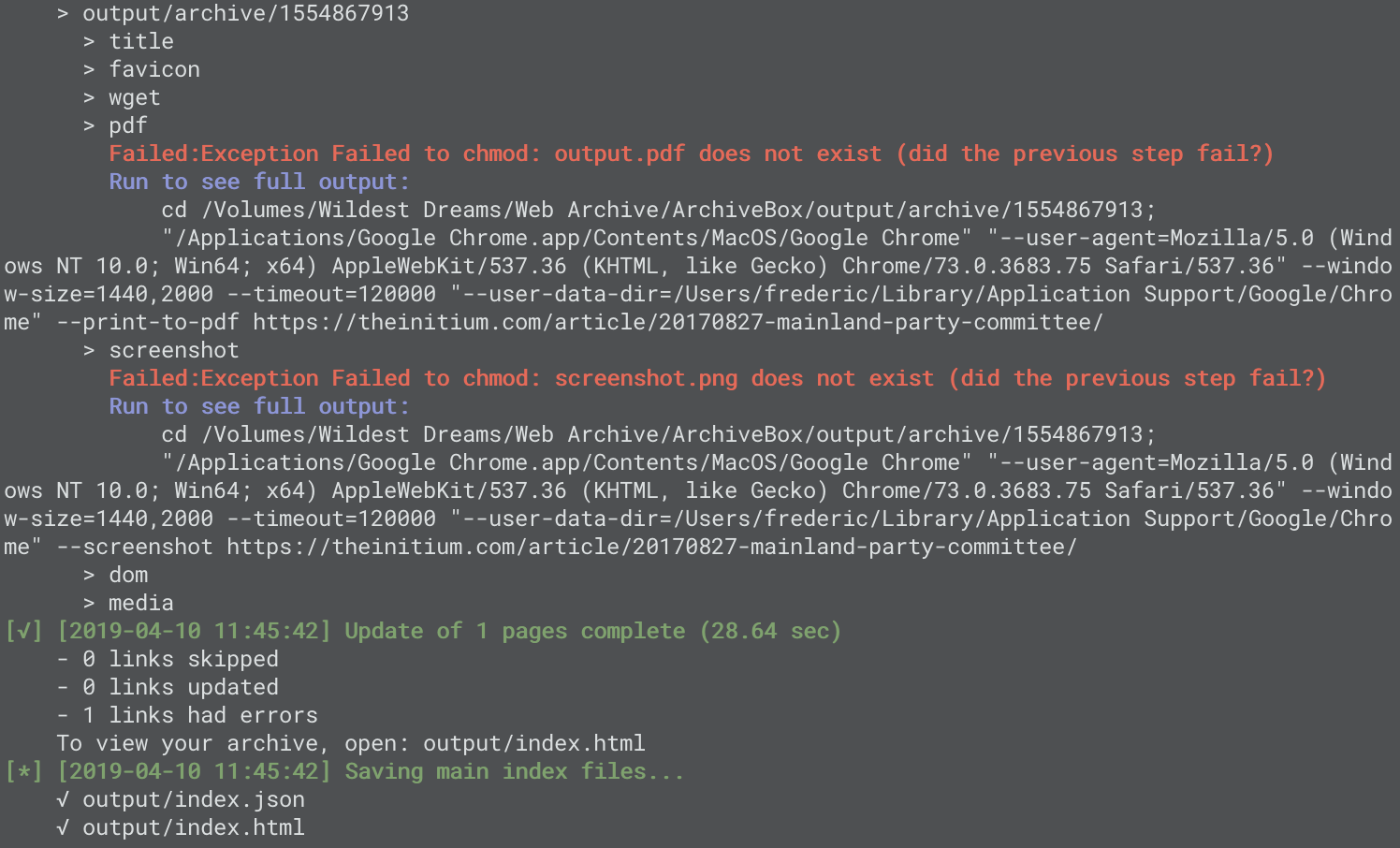
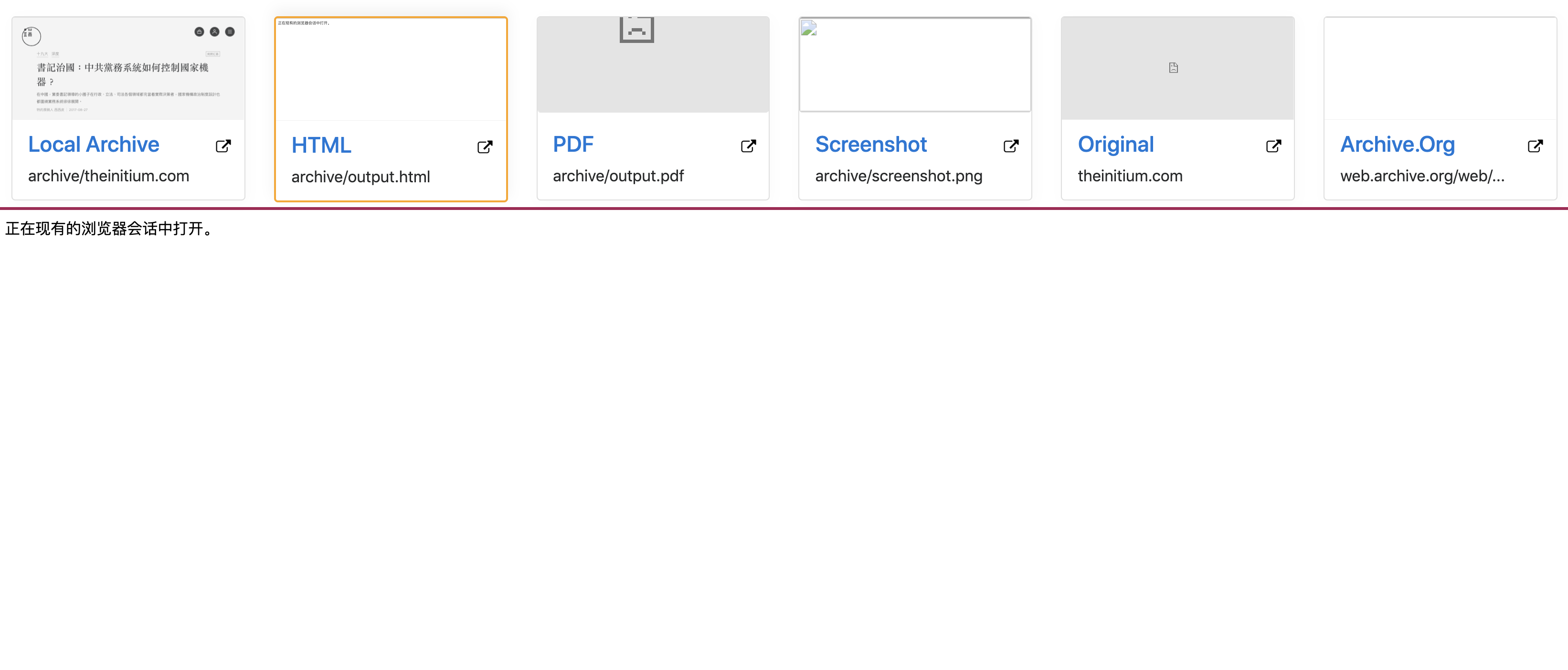
There are some errors (Exception Failed to chmod: screenshot.png does not exist) in the terminal even before the tab is opened and loaded in Chrome. As for the result, the PDF and screenshot become totally lost. And the "HTML" section becomes a blank page with an "opening in the current browser session" notice. This is really weird.
image
image

update:
After some debugging, I found the cause:

  • When using a browser, the site's content is dynamically requested by AJAX and loaded by Javascript. This is possibly due to content protection. If the page is not fully and successfully loaded, there will be a 404 page. This explains why the "HTML" section is a 404 page at the beginning.
  • When using wget default user agent, the server treats this situation specially and response with part of the content even if there are session indicating you are a member. If you manually set the user agent to simulate a browser, you will get a 404 because Access to fetch at 'https://api.theinitium.com/api/v1/channel/list/?language=zh-hant&section=primary' from origin 'null' has been blocked by CORS policy: Response to preflight request doesn't pass access control check: No 'Access-Control-Allow-Origin' header is present on the requested resource. If an opaque response serves your needs, set the request's mode to 'no-cors' to fetch the resource with CORS disabled.

As for wget local archive, I guess there isn't much ArchiveBox can do. But I think ArchiveBox is able to fix the problem on HTML, PDF and screenshot and this is enough.

Originally created by @fr0der1c on GitHub (Apr 10, 2019). Original GitHub issue: https://github.com/ArchiveBox/ArchiveBox/issues/214 This is a really wired problem. I'm using ArchiveBox to archive a membership-based news website. Here is the result: ![image](https://user-images.githubusercontent.com/16500161/55849758-5fa57380-5b84-11e9-9df1-336bb4a4bee3.png) - The "local archive" gives a correctly rendered page, but I can only see part of the article because I'm not logged in. I installed the cookies.txt extension (https://chrome.google.com/webstore/detail/cookiestxt/njabckikapfpffapmjgojcnbfjonfjfg), exported the `cookies.txt` and added `COOKIES_FILE=~/Downloads/cookies.txt`. However, the result is still incomplete. - The "HTML" section gives a 404 page. I have no idea why it's happening. I set `CHROME_HEADLESS=False` and from what I can see it's totally working fine. (using my profile and opening the page correctly 3 times) - The PDF and screenshot are captured too early so there is only a loading page. I've opened another issue regarding this problem. - The "original" section, is because of `X-Frame-Options: SAMEORIGIN` on the original site. So I think it's not a problem that ArchiveBox can solve. - The "Archive.org" section gives a 404 page. Just like Chrome does. It's pretty bad that none of the section is working. update: I tried a few times (delete output folder and re-run ArchiveBox). In the last few trials, the result becomes different. There are some errors (`Exception Failed to chmod: screenshot.png does not exist`) in the terminal even before the tab is opened and loaded in Chrome. As for the result, the PDF and screenshot become totally lost. And the "HTML" section becomes a blank page with an "opening in the current browser session" notice. This is really weird. ![image](https://user-images.githubusercontent.com/16500161/55850301-5c12ec00-5b86-11e9-88d9-c82895e2585e.png) ![image](https://user-images.githubusercontent.com/16500161/55850964-46eb8c80-5b89-11e9-80b2-1f0d3918c28d.png) update: After some debugging, I found the cause: - When using a browser, the site's content is dynamically requested by AJAX and loaded by Javascript. This is possibly due to content protection. If the page is not fully and successfully loaded, there will be a 404 page. This explains why the "HTML" section is a 404 page at the beginning. - When using `wget` default user agent, the server treats this situation specially and response with part of the content even if there are session indicating you are a member. If you manually set the user agent to simulate a browser, you will get a 404 because `Access to fetch at 'https://api.theinitium.com/api/v1/channel/list/?language=zh-hant&section=primary' from origin 'null' has been blocked by CORS policy: Response to preflight request doesn't pass access control check: No 'Access-Control-Allow-Origin' header is present on the requested resource. If an opaque response serves your needs, set the request's mode to 'no-cors' to fetch the resource with CORS disabled.` As for `wget` local archive, I guess there isn't much ArchiveBox can do. But I think ArchiveBox is able to fix the problem on HTML, PDF and screenshot and this is enough.
kerem 2026-03-14 21:24:22 +03:00
Author
Owner

@pirate commented on GitHub (Apr 10, 2019):

I'm going to close this since as you mentioned, wget will never be able to execute JS, and the HTML/PDF/Screenshot archive will be fixed by adding a delay option #213.

In the future we should be able to seamlessly archive sites like this since archiving will be done primarily via pywb + headless chrome instead of wget: #177.

<!-- gh-comment-id:481846208 --> @pirate commented on GitHub (Apr 10, 2019): I'm going to close this since as you mentioned, wget will never be able to execute JS, and the HTML/PDF/Screenshot archive will be fixed by adding a delay option #213. In the future we should be able to seamlessly archive sites like this since archiving will be done primarily via pywb + headless chrome instead of wget: #177.
Author
Owner

@fr0der1c commented on GitHub (Apr 11, 2019):

Hi Nick,
There is another problem I mentioned: Exception Failed to chmod: screenshot.png does not exist. From what I can see, this indicates that Chrome returned a 0 return code but the file is not generated. Do you have any idea why this is happening?

On my computer, setting CHROME_HEADLESS=False will trigger this problem. I'm using Chrome 73.0.3683.86 on Mac.

github.com/pirate/ArchiveBox@403025a73b/archivebox/archive_methods.py (L307-L320)

<!-- gh-comment-id:481942182 --> @fr0der1c commented on GitHub (Apr 11, 2019): Hi Nick, There is another problem I mentioned: `Exception Failed to chmod: screenshot.png does not exist`. From what I can see, this indicates that Chrome returned a 0 return code but the file is not generated. Do you have any idea why this is happening? On my computer, setting `CHROME_HEADLESS=False` will trigger this problem. I'm using Chrome 73.0.3683.86 on Mac. https://github.com/pirate/ArchiveBox/blob/403025a73b1d96ebcd2dba8c681c63529a5a4980/archivebox/archive_methods.py#L307-L320
Author
Owner

@pirate commented on GitHub (Apr 16, 2019):

Does a chrome window open when you set CHROME_HEADLESS=False? If so, do you notice any errors issues while it's attempting to screenshot?

That error you're seeing means it failed to generate an output screenshot.png, which means the subsequent chmod fails due to the missing file.

<!-- gh-comment-id:483790279 --> @pirate commented on GitHub (Apr 16, 2019): Does a chrome window open when you set `CHROME_HEADLESS=False`? If so, do you notice any errors issues while it's attempting to screenshot? That error you're seeing means it failed to generate an output screenshot.png, which means the subsequent chmod fails due to the missing file.
Author
Owner

@fr0der1c commented on GitHub (Apr 17, 2019):

Yes, a few Chrome tabs open when I set CHROME_HEADLESS=False. Errors appear in the terminal when the page is loading.

<!-- gh-comment-id:484094575 --> @fr0der1c commented on GitHub (Apr 17, 2019): Yes, a few Chrome tabs open when I set `CHROME_HEADLESS=False`. Errors appear in the terminal when the page is loading.
Author
Owner

@pirate commented on GitHub (Apr 17, 2019):

What are the errors?

<!-- gh-comment-id:484232700 --> @pirate commented on GitHub (Apr 17, 2019): What are the errors?
Author
Owner

@fr0der1c commented on GitHub (Apr 18, 2019):

image

I run into Failed:Exception Failed to chmod: output.pdf does not exist (did the previous step fail?) before the page is loaded. If I manually run to see full output, I get:
image

<!-- gh-comment-id:484339978 --> @fr0der1c commented on GitHub (Apr 18, 2019): ![image](https://user-images.githubusercontent.com/16500161/56334455-e08aed80-61ca-11e9-9f77-a3ca474d7271.png) I run into `Failed:Exception Failed to chmod: output.pdf does not exist (did the previous step fail?)` before the page is loaded. If I manually run to see full output, I get: ![image](https://user-images.githubusercontent.com/16500161/56334483-0ca66e80-61cb-11e9-86a2-f4f034c68056.png)
Author
Owner

@pirate commented on GitHub (Apr 23, 2019):

And when you ran that last screenshot command manually, was the screenshot.png file produced? If not it's likely an issue with your chrome setup, if so then it's a bug with ArchiveBox and I'll investigate.

<!-- gh-comment-id:485945987 --> @pirate commented on GitHub (Apr 23, 2019): And when you ran that last screenshot command manually, was the `screenshot.png` file produced? If not it's likely an issue with your chrome setup, if so then it's a bug with ArchiveBox and I'll investigate.
Author
Owner

@pirate commented on GitHub (Jul 24, 2020):

If you're still having this issue on the latest django branch comment back and I'll reopen the ticket.

git checkout django
git pull
docker build . -t archivebox
docker run -v $PWD/output:/data archivebox init
docker run -v $PWD/output:/data archivebox add 'https://example.com'
<!-- gh-comment-id:663631751 --> @pirate commented on GitHub (Jul 24, 2020): If you're still having this issue on the latest `django` branch comment back and I'll reopen the ticket. ```bash git checkout django git pull docker build . -t archivebox docker run -v $PWD/output:/data archivebox init docker run -v $PWD/output:/data archivebox add 'https://example.com' ```
Sign in to join this conversation.
No milestone
No project
No assignees
1 participant
Notifications
Due date
The due date is invalid or out of range. Please use the format "yyyy-mm-dd".

No due date set.

Dependencies

No dependencies set.

Reference
starred/ArchiveBox#3166
No description provided.