[GH-ISSUE #408] Bookmarklet support #271

Closed
opened 2026-03-01 14:42:01 +03:00 by kerem · 2 comments
Owner

Originally created by @jkonrath on GitHub (Jul 30, 2020).
Original GitHub issue: https://github.com/ArchiveBox/ArchiveBox/issues/408

I'm not sure if this fits your general architecture/use-case or how you do this, but would it be possible to make a bookmarklet that when clicked would add the current page in the browser to the archive?

I think Pocket does this, and I remember using it a lot in the del.icio.us days. I'm not sure how exactly you'd do this - maybe add a .js in the server and when it's running, have the bookmarklet call it and submit the URL?

Type

  • General question or discussion
  • [x ] Propose a brand new feature
  • Request modification of existing behavior or design

What is the problem that your feature request solves

Describe the ideal specific solution you'd want, and whether it fits into any broader scope of changes

What hacks or alternative solutions have you tried to solve the problem?

How badly do you want this new feature?

  • It's an urgent deal-breaker, I can't live without it
  • It's important to add it in the near-mid term future
  • [ x] It would be nice to have eventually

  • I'm willing to contribute dev time / money to fix this issue
  • [ x] I like ArchiveBox so far / would recommend it to a friend
  • I've had a lot of difficulty getting ArchiveBox set up
Originally created by @jkonrath on GitHub (Jul 30, 2020). Original GitHub issue: https://github.com/ArchiveBox/ArchiveBox/issues/408 I'm not sure if this fits your general architecture/use-case or how you do this, but would it be possible to make a bookmarklet that when clicked would add the current page in the browser to the archive? I think Pocket does this, and I remember using it a lot in the del.icio.us days. I'm not sure how exactly you'd do this - maybe add a .js in the server and when it's running, have the bookmarklet call it and submit the URL? ## Type - [ ] General question or discussion - [x ] Propose a brand new feature - [ ] Request modification of existing behavior or design ## What is the problem that your feature request solves <!-- e.g. I need to be able to archive spanish and french subtitle files from a particular <example.com> movie site that's going down soon. --> ## Describe the ideal specific solution you'd want, and whether it fits into any broader scope of changes <!-- e.g. I specifically need a new archive method to look for multilingual subtitle files related to pages. The bigger picture solution is the ability for custom user scripts to be run in a puppeteer context during archiving. --> ## What hacks or alternative solutions have you tried to solve the problem? <!-- A clear and concise description of any alternative solutions, workarounds, or other software you've considered using to fix the problem. --> ## How badly do you want this new feature? - [ ] It's an urgent deal-breaker, I can't live without it - [ ] It's important to add it in the near-mid term future - [ x] It would be nice to have eventually --- - [ ] I'm willing to contribute dev time / money to fix this issue - [ x] I like ArchiveBox so far / would recommend it to a friend - [ ] I've had a lot of difficulty getting ArchiveBox set up
kerem closed this issue 2026-03-01 14:42:01 +03:00
Author
Owner

@pirate commented on GitHub (Jul 30, 2020):

This is how I run ArchiveBox on my own archivebox right now:

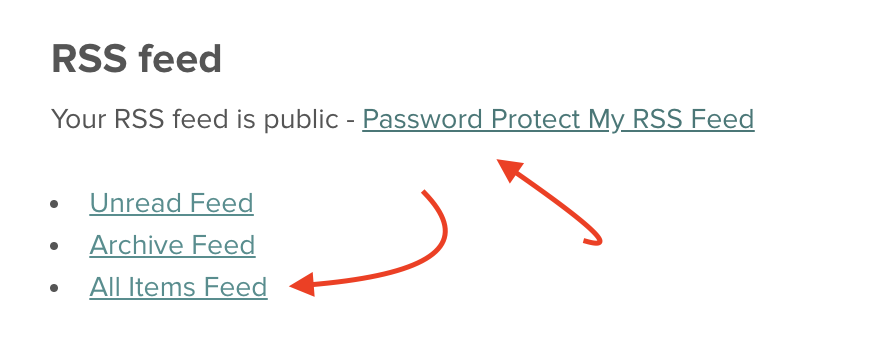
  1. Set your Pocket RSS feed to "public" under getpocket.com/privacy_controls
    Screen Shot 2020-07-30 at 7 17 40 PM

  2. Setup archivebox to import it on a schedule

archivebox schedule --add --every day 'https://getpocket.com/users/USERNAME/feed/all'
archivebox schedule --show

You can also just use normal browser bookmarks and use the browser history import feature:

https://github.com/pirate/ArchiveBox/blob/master/bin/archivebox-export-browser-history

<!-- gh-comment-id:666769253 --> @pirate commented on GitHub (Jul 30, 2020): This is how I run ArchiveBox on my own archivebox right now: 1. Set your Pocket RSS feed to "public" under getpocket.com/privacy_controls <img width="438" alt="Screen Shot 2020-07-30 at 7 17 40 PM" src="https://user-images.githubusercontent.com/511499/88983587-6d12cf80-d299-11ea-8580-185bc207a407.png"> 2. Setup archivebox to import it on a schedule ```bash archivebox schedule --add --every day 'https://getpocket.com/users/USERNAME/feed/all' archivebox schedule --show ``` You can also just use normal browser bookmarks and use the browser history import feature: https://github.com/pirate/ArchiveBox/blob/master/bin/archivebox-export-browser-history
Author
Owner

@jkonrath commented on GitHub (Jul 30, 2020):

I don't use Pocket anymore, and want to avoid add a daily reading log to my mostly-static bookmark file. But the second part of your answer made me thought of another way to do this: I could add articles to my reading list in Safari, and then scrape that daily. (Something like https://gist.github.com/andphe/3232343 would work.) Added bonus: anything I add to my reading list on an iCloud-synced iOS device would also end up getting archived.

<!-- gh-comment-id:666772733 --> @jkonrath commented on GitHub (Jul 30, 2020): I don't use Pocket anymore, and want to avoid add a daily reading log to my mostly-static bookmark file. But the second part of your answer made me thought of another way to do this: I could add articles to my reading list in Safari, and then scrape that daily. (Something like https://gist.github.com/andphe/3232343 would work.) Added bonus: anything I add to my reading list on an iCloud-synced iOS device would also end up getting archived.
Sign in to join this conversation.
No milestone
No project
No assignees
1 participant
Notifications
Due date
The due date is invalid or out of range. Please use the format "yyyy-mm-dd".

No due date set.

Dependencies

No dependencies set.

Reference
starred/ArchiveBox#271
No description provided.