[GH-ISSUE #405] Docker webserver binds to 127.0.0.1 by default sometimes #269

Closed
opened 2026-03-01 14:41:59 +03:00 by kerem · 2 comments
Owner

Originally created by @DeStilleGast on GitHub (Jul 30, 2020).
Original GitHub issue: https://github.com/ArchiveBox/ArchiveBox/issues/405

Describe the bug

build in webserver does not work for me from the docker image:
direct connection with ip: ERR_CONNECTION_REFUSED)
with via cloudflare and ssl I get a 502 bad gateway

Steps to reproduce

pull image
setup enviorment variables
setup mount for /data
publishing port 8098 on random port for now and placed it behind a reverse proxy (caddy 2)
command is set to init
after first run I changed to command to server
while it was running a ran archivebox manage changesuperuser and restarted the container

Screenshots or log output

No error in the logs:

[i] [2020-07-30 20:03:02] ArchiveBox v0.4.9: archivebox server
,    > /data
,[i] The admin username is: <snip>
,[+] Starting ArchiveBox webserver...
,Performing system checks...
,System check identified no issues (0 silenced).
,July 30, 2020 - 20:03:03
,Django version 3.0.8, using settings 'core.settings'
,Starting development server at http://127.0.0.1:8000/
,Quit the server with CONTROL-C.

Software versions

  • OS: Linux server 20.04 LTS
  • ArchiveBox version: while using the docker image (v0.4.9)
  • Python version: docker image reports 3.8.5
  • Chrome version: command not found in docker image
Originally created by @DeStilleGast on GitHub (Jul 30, 2020). Original GitHub issue: https://github.com/ArchiveBox/ArchiveBox/issues/405 #### Describe the bug build in webserver does not work for me from the docker image: direct connection with ip: ERR_CONNECTION_REFUSED) with via cloudflare and ssl I get a 502 bad gateway #### Steps to reproduce pull image setup enviorment variables setup mount for /data publishing port 8098 on random port for now and placed it behind a reverse proxy (caddy 2) command is set to `init` after first run I changed to command to `server` while it was running a ran `archivebox manage changesuperuser` and restarted the container #### Screenshots or log output No error in the logs: ``` [i] [2020-07-30 20:03:02] ArchiveBox v0.4.9: archivebox server , > /data ,[i] The admin username is: <snip> ,[+] Starting ArchiveBox webserver... ,Performing system checks... ,System check identified no issues (0 silenced). ,July 30, 2020 - 20:03:03 ,Django version 3.0.8, using settings 'core.settings' ,Starting development server at http://127.0.0.1:8000/ ,Quit the server with CONTROL-C. ``` #### Software versions - OS: Linux server 20.04 LTS - ArchiveBox version: while using the docker image (v0.4.9) - Python version: docker image reports 3.8.5 - Chrome version: command not found in docker image
kerem 2026-03-01 14:41:59 +03:00
Author
Owner

@pirate commented on GitHub (Jul 30, 2020):

ooh can you share your caddy config? I'd love to add that to the docs.

I think the issue is here Starting development server at http://127.0.0.1:8000/
I'm not sure why it's starting on 127.0.0.1 by default, but that needs to be 0.0.0.0 inside docker.
You can fix it by running:

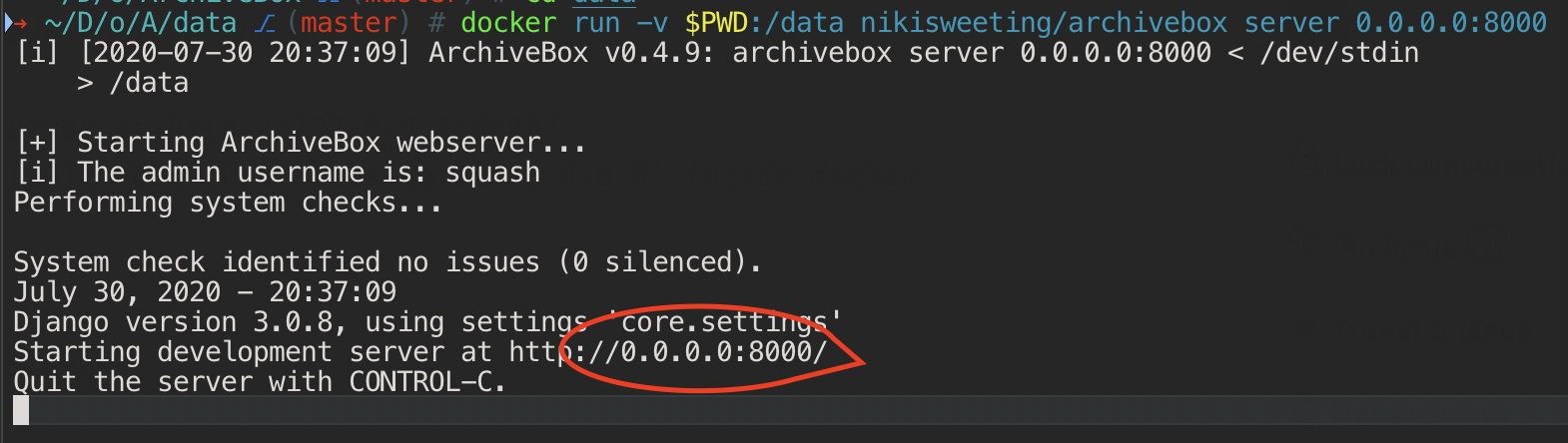
docker run -v $PWD:/data archivebox server 0.0.0.0:8000

Where did you see this? Chrome version: command not found in docker image

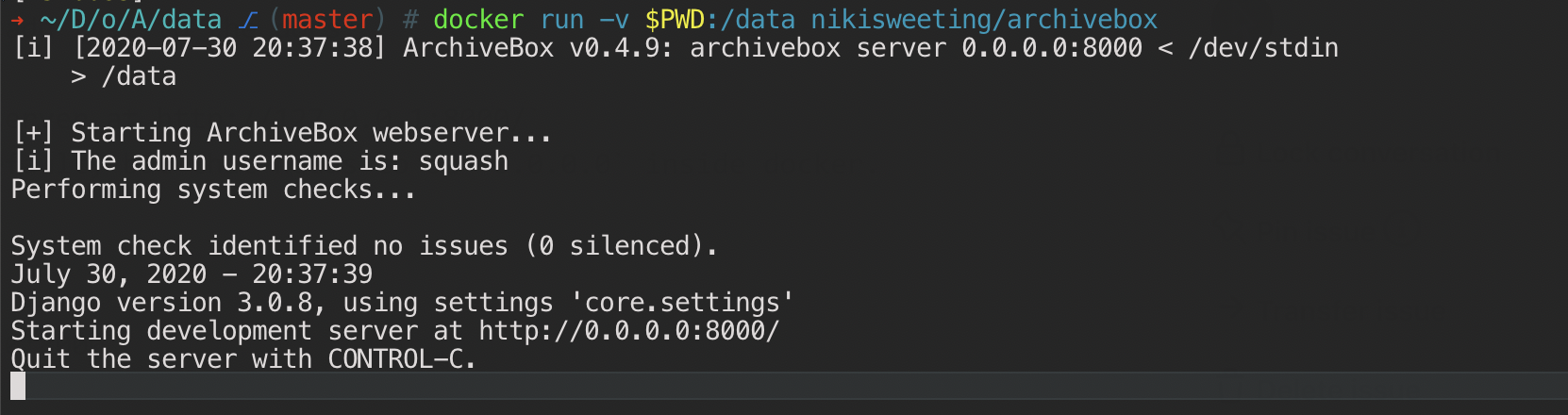
image

When no args are passed, it should correctly default to 0.0.0.0:8000 inside docker.
image

But if you want to, you can also pass the arg to force it.
Screen Shot 2020-07-30 at 4 37 17 PM

<!-- gh-comment-id:666680897 --> @pirate commented on GitHub (Jul 30, 2020): ooh can you share your caddy config? I'd love to add that to the docs. I think the issue is here `Starting development server at http://127.0.0.1:8000/` I'm not sure why it's starting on 127.0.0.1 by default, but that needs to be `0.0.0.0` inside docker. You can fix it by running: ```bash docker run -v $PWD:/data archivebox server 0.0.0.0:8000 ``` Where did you see this? `Chrome version: command not found in docker image` ![image](https://user-images.githubusercontent.com/511499/88971959-d4715500-d282-11ea-87c2-9bd24015e49e.png) When no args are passed, it should correctly default to 0.0.0.0:8000 inside docker. ![image](https://user-images.githubusercontent.com/511499/88972074-01256c80-d283-11ea-87a6-c19655738d2f.png) But if you want to, you can also pass the arg to force it. <img width="785" alt="Screen Shot 2020-07-30 at 4 37 17 PM" src="https://user-images.githubusercontent.com/511499/88972094-071b4d80-d283-11ea-9bcc-4d3dc211bda2.png">
Author
Owner

@DeStilleGast commented on GitHub (Jul 31, 2020):

forcing the ip seems to work, I'm now able to access the server 🥳

the command not found was when I tried to follow the instructions in the bug report template:
image
but using your archivebox version command works and it told me I got v84.0.4147.105

caddy2 itself is a magic box, my current config for archivebox and seems to work fine:

archive.example.com {
    reverse_proxy 127.0.0.1:<published port>
}

I'm using portainer as interface and that might have screwed over the settings (?), but other then that it works

<!-- gh-comment-id:667003418 --> @DeStilleGast commented on GitHub (Jul 31, 2020): forcing the ip seems to work, I'm now able to access the server 🥳 the command not found was when I tried to follow the instructions in the bug report template: ![image](https://user-images.githubusercontent.com/3677706/89015441-527f3b80-d317-11ea-8b82-96918b4833cc.png) but using your `archivebox version` command works and it told me I got `v84.0.4147.105` caddy2 itself is a magic box, my current config for archivebox and seems to work fine: ``` archive.example.com { reverse_proxy 127.0.0.1:<published port> } ``` I'm using portainer as interface and that might have screwed over the settings (?), but other then that it works
Sign in to join this conversation.
No milestone
No project
No assignees
1 participant
Notifications
Due date
The due date is invalid or out of range. Please use the format "yyyy-mm-dd".

No due date set.

Dependencies

No dependencies set.

Reference
starred/ArchiveBox#269
No description provided.