mirror of
https://github.com/ArchiveBox/ArchiveBox.git
synced 2026-04-25 09:06:02 +03:00
[GH-ISSUE #468] Switch to rich logging package for CLI logs, progress bars, etc. #1819
Labels
No labels
expected: maybe someday
expected: next release
expected: release after next
expected: unlikely unless contributed
good first ticket
help wanted
pull-request
scope: all users
scope: windows users
size: easy
size: hard
size: medium
size: medium
status: backlog
status: blocked
status: done
status: idea-phase
status: needs followup
status: wip
status: wontfix
touches: API/CLI/Spec
touches: configuration
touches: data/schema/architecture
touches: dependencies/packaging
touches: docs
touches: js
touches: views/replayers/html/css
why: correctness
why: functionality
why: performance
why: security
No milestone
No project
No assignees
1 participant

Notifications
Due date
No due date set.
Dependencies
No dependencies set.
Reference
starred/ArchiveBox#1819
Loading…
Add table
Add a link
Reference in a new issue
No description provided.
Delete branch "%!s()"
Deleting a branch is permanent. Although the deleted branch may continue to exist for a short time before it actually gets removed, it CANNOT be undone in most cases. Continue?
Originally created by @MartinThoma on GitHub (Sep 6, 2020).
Original GitHub issue: https://github.com/ArchiveBox/ArchiveBox/issues/468
I'm currently writing an article about logging in Python. As a part of that, I look at other projects and how logging is done there. I've seen
logging_util.pyand was wondering why this project does not use the built-in logging module.Could somebody share some thoughts around logging? Why is it done like that in this project? Do you consider this a best practice?
@pirate commented on GitHub (Sep 7, 2020):
It's not a best practice, I just tend to write my own logging utils because I like very fine-grained control over how colored log output appears and I find the
loggingbuiltin library to be somewhat clunky.@MartinThoma commented on GitHub (Sep 7, 2020):
Thank you for answering!
If it's not a best practice, what would you consider a best practice for logging?
Have you given 3rd party logging libraries a try (structlog, loguru, pysnooper, or something else)? If so, what do you think of them?
@MartinThoma commented on GitHub (Sep 7, 2020):
Could you explain that a bit more? What exactly is it that you don't like?
I think I have heard about loguru at Python bytes and they mentioned that it deals pretty well with colored output (e.g. over various consoles / terminals / within PyCharm)
@pirate commented on GitHub (Sep 7, 2020):
Those libraries would all be great for a long-running background daemon that writes to a logfile, e.g.
archivebox server, but the output is far too verbose/hard-to-tune for a one-shot cli command likearchivebox add,archivebox version, etc.Because I sometimes want timestamps, I sometimes want color, I sometimes want structured output sections, but not always, I it's easier for me to just hand code it than use a logger that imposes those things all the time or never.
Take for example this output from
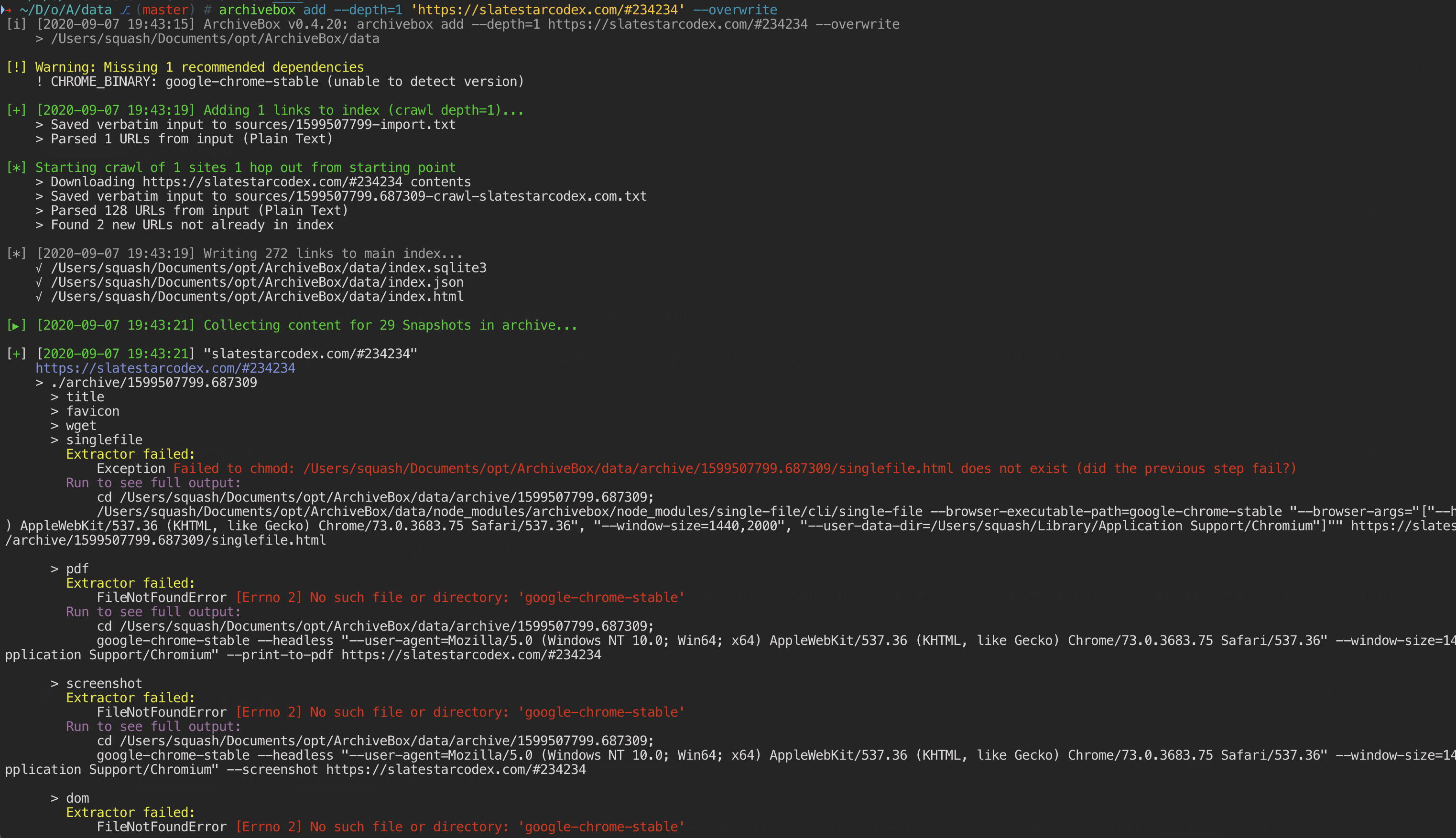
archivebox add:There are multiple tiers of indentation that are context-dependent, multiple colors for different types of notifications that are tuned for UX, not for strict internal consistency with any particular "log level" e.g. DEBUG/INFO/etc. (which a library would enforce). I also have multiple colors on a single line to highlight important parts of the line, something not any of the tools let you do easily.
I also dislike having to import/declare a logger at the top of every file, something that neither matches with my mental model of logging, nor is enforced by any linter, so it's easy to forget and cause subtle logging errors in certain environments.
At the end of the day, why use a dependency for something that I can code in half a day by hand, and matches my needs exactly. In general in my Python projects, I try to only use dependencies for big internal features that cannot easily be written by hand. I dislike the NPM-style of dependency management that encourages hundreds of 10-line dependencies for small conveniences.
Not to mention, it's much more straightforward when debugging to read something like this, than to have to read the docs on a 3rd party dependency and understand how it works:
In a new project I would consider using either normal
printstatements, or if absolutely necessary, theloggingpython built-in library as a best practice. Unless you have a massive project or a project thats core UX centers around its logfiles, I would not add additional dependencies to manage logging. (archivebox is <6k lines of python)@pirate commented on GitHub (Feb 22, 2024):
I've decided to re-open this because A. ArchiveBox has gotten bigger and does a lot of logging now, and B. I found
rich: https://github.com/Textualize/richIt's an amazing package and it provides everything we need out-of-the-box and more! including:
loggingsystem: https://rich.readthedocs.io/en/stable/logging.htmlarchivebox shell: https://rich.readthedocs.io/en/stable/pretty.htmlarchivebox list: https://rich.readthedocs.io/en/stable/tables.htmlUse textual-web to generate live web views of commands & output:
Autogenerate TUI from existing management commands
Other TUI Browsers