[GH-ISSUE #154] Archive Method: wget fails some acid tests as a standalone archive method #108

Closed
opened 2026-03-01 14:40:41 +03:00 by kerem · 3 comments
Owner

Originally created by @machawk1 on GitHub (Feb 28, 2019).
Original GitHub issue: https://github.com/ArchiveBox/ArchiveBox/issues/154

Describe the bug
ArchiveBox produces an inaccurate representation when using an archival crawler basis.

As a very quick background, I created a "tool" a few years back to evaluate archival crawlers. See https://ieeexplore.ieee.org/document/6970146 and the free PDF for more information. This "Archival Acid Test" consisted of an exhibition of some basic and advanced features of the Web that were problematic for archival crawlers. This was sort-of in the spirit of the Web Standards Acid Tests for early browsers.

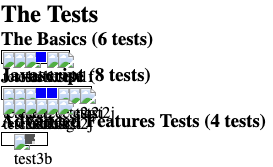
I tested ArchiveBox 552734241b by running echo "http://acid.matkelly.com" | ./archive once installed and received a sub-par result when accessing the files on my local file system. To give it the benefit of the doubt, I ran a local server via php -S localhost:8090 and accessed the capture. The result looked something like:

screen shot 2019-02-28 at 1 41 02 pm

Examining the console, I can see that there are some requests for live Web resource representations outside of the archive, which is one such test on evaluating archival tools as performed in the 2014 study.

Steps to reproduce
Steps to reproduce the behavior:

  1. git clone https://github.com/pirate/ArchiveBox.git
  2. cd ArchiveBox
  3. ./setup
  4. echo "http://acid.matkelly.com" | ./archive
  5. cd output
  6. php -S localhost:8090
  7. Open browser to http://localhost:8090/
  8. Click the icon in the HTML column for the lone capture.
  9. Disconnect the Internet and fire up localhost again to note many broken images, a further indication that the captured page is looking to the live Web for resources -- screenshot below.

Screenshots or log output
Viewing capture w/ disconnected Internet
screen shot 2019-02-28 at 1 47 04 pm

Software versions

  • ArchiveBox version: 552734241b
  • Python version: Python 3.7.2
  • OS: macOS 10.14.3
  • Chrome version: Google Chrome 72.0.3626.119

Other
Note that I am not using this ticket to promote my tool but I hope it can be used to improve the capture quality. The source for the AAT is available at https://github.com/machawk1/archivalAcidTest .

Originally created by @machawk1 on GitHub (Feb 28, 2019). Original GitHub issue: https://github.com/ArchiveBox/ArchiveBox/issues/154 **Describe the bug** ArchiveBox produces an inaccurate representation when using an archival crawler basis. As a very quick background, I created a "tool" a few years back to evaluate archival crawlers. See https://ieeexplore.ieee.org/document/6970146 and the [free PDF](https://www.cs.odu.edu/~mkelly/papers/2014_dl_acid.pdf) for more information. This "Archival Acid Test" consisted of an exhibition of some basic and advanced features of the Web that were problematic for archival crawlers. This was sort-of in the spirit of the Web Standards Acid Tests for early browsers. I tested ArchiveBox 552734241bacc8e75ccf6a81292e15166af58140 by running `echo "http://acid.matkelly.com" | ./archive` once installed and received a sub-par result when accessing the files on my local file system. To give it the benefit of the doubt, I ran a local server via `php -S localhost:8090` and accessed the capture. The result looked something like: ![screen shot 2019-02-28 at 1 41 02 pm](https://user-images.githubusercontent.com/2514780/53589953-b15ae700-3b5e-11e9-941a-83608d811df5.png) Examining the console, I can see that there are some requests for live Web resource representations outside of the archive, which is one such test on evaluating archival tools as performed in the 2014 study. **Steps to reproduce** Steps to reproduce the behavior: 1. `git clone https://github.com/pirate/ArchiveBox.git` 2. `cd ArchiveBox` 3. `./setup` 4. `echo "http://acid.matkelly.com" | ./archive` 5. `cd output` 6. `php -S localhost:8090` 7. Open browser to `http://localhost:8090/` 8. Click the icon in the HTML column for the lone capture. 9. Disconnect the Internet and fire up localhost again to note many broken images, a further indication that the captured page is looking to the live Web for resources -- screenshot below. **Screenshots or log output** Viewing capture w/ disconnected Internet ![screen shot 2019-02-28 at 1 47 04 pm](https://user-images.githubusercontent.com/2514780/53590377-9b99f180-3b5f-11e9-8bf6-d27c4446b5e1.png) **Software versions** - ArchiveBox version: 552734241bacc8e75ccf6a81292e15166af58140 - Python version: Python 3.7.2 - OS: macOS 10.14.3 - Chrome version: Google Chrome 72.0.3626.119 **Other** Note that I am not using this ticket to promote my tool but I hope it can be used to improve the capture quality. The source for the AAT is available at https://github.com/machawk1/archivalAcidTest .
Author
Owner

@pirate commented on GitHub (Mar 1, 2019):

ArchiveBox is composed of 9 archive methods, wget is only one of the 9 used. This test is indeed an effective way to test an archive method, but you should check out the other outputs, as the screenshot and PDF versions will likely have all blue squares given they're rendered with a headless browser.

You're effectively just running the test on the effectiveness of this wget command, and not the entire ArchiveBox output:

wget --server-response
     --no-verbose
     --adjust-extension
     --convert-links
     --force-directories
     --backup-converted
     --span-hosts
     --no-parent
     -e robots=off
     --restrict-file-names=unix
     --timeout=60
     --warc-file=warc.gz
     --page-requisites
     --no-check-certificate
     --no-hsts
     http://acid.matkelly.com

Future versions will save all archive method requests & responses (including wget & headless browser) together in a single WARC using pywb. Once that's released, running the acid test against the WARC proxy should return 100% success, as it'll be capturing a perfect replica of Chromium's experience when rendering the original page.

<!-- gh-comment-id:468764024 --> @pirate commented on GitHub (Mar 1, 2019): ArchiveBox is composed of 9 archive methods, wget is only one of the 9 used. This test is indeed an effective way to test an archive method, but you should check out the other outputs, as the screenshot and PDF versions will likely have all blue squares given they're rendered with a headless browser. You're effectively just running the test on the effectiveness of this `wget` command, and not the entire ArchiveBox output: ```bash wget --server-response --no-verbose --adjust-extension --convert-links --force-directories --backup-converted --span-hosts --no-parent -e robots=off --restrict-file-names=unix --timeout=60 --warc-file=warc.gz --page-requisites --no-check-certificate --no-hsts http://acid.matkelly.com ``` Future versions will save all archive method requests & responses (including wget & headless browser) together in a single WARC using pywb. Once that's released, running the acid test against the WARC proxy should return 100% success, as it'll be capturing a perfect replica of Chromium's experience when rendering the original page.
Author
Owner

@machawk1 commented on GitHub (Mar 1, 2019):

Thanks for the info, @pirate. I did not realize that the default capture method used wget. The PDF and screenshots are not nearly as useful to me as having an interactive web page.

I am looking forward to the future integration with pywb for capture. With the current version, how would I go about using 1 of the other 8 archive methods to generate a capture with a little more fidelity than wget?

I attempted to work through the wiki instructions but things start to get convoluted with the Docker and ArchiveBox configuration example.

<!-- gh-comment-id:468772676 --> @machawk1 commented on GitHub (Mar 1, 2019): Thanks for the info, @pirate. I did not realize that the default capture method used wget. The PDF and screenshots are not nearly as useful to me as having an interactive web page. I am looking forward to the future integration with pywb for capture. With the current version, how would I go about using 1 of the other 8 archive methods to generate a capture with a little more fidelity than wget? I attempted to work through the [wiki instructions](https://github.com/pirate/ArchiveBox/wiki/Docker#configuration) but things start to get convoluted with the Docker and ArchiveBox configuration example.
Author
Owner

@pirate commented on GitHub (Mar 1, 2019):

It does all methods by default, just click the favicon next to the title on the left to see the link index page. https://github.com/pirate/ArchiveBox/wiki/Usage#ui-usage

screen shot 2019-03-01 at 2 02 58 pm screen shot 2019-03-01 at 2 03 20 pm
<!-- gh-comment-id:468774892 --> @pirate commented on GitHub (Mar 1, 2019): It does all methods by default, just click the favicon next to the title on the left to see the link index page. https://github.com/pirate/ArchiveBox/wiki/Usage#ui-usage <img width="968" alt="screen shot 2019-03-01 at 2 02 58 pm" src="https://user-images.githubusercontent.com/511499/53659958-d3ba3680-3c2a-11e9-8b8b-bece3b22a9dd.png"> <img width="1920" alt="screen shot 2019-03-01 at 2 03 20 pm" src="https://user-images.githubusercontent.com/511499/53659959-d3ba3680-3c2a-11e9-94d1-07c921e09dcc.png">
Sign in to join this conversation.
No milestone
No project
No assignees
1 participant
Notifications
Due date
The due date is invalid or out of range. Please use the format "yyyy-mm-dd".

No due date set.

Dependencies

No dependencies set.

Reference
starred/ArchiveBox#108
No description provided.