
The APP protocol allows you to start an external EXE program using PRemoteM.
English
Setup NoMachine
Getting started with NoMachine
We assume that you have configured NoMachine and you can use NoMachine's own programs to start a remote session. Or please follow the official document above.
Integrate into PRemoteM
Since the latest version of NoMachine no longer provides a session starting method of the command line by password, in PRemoteM we define the App protocol to indirectly implement the NoMachine session.
- Make suere the configurations are completed in NoMachine and the target machine can be connected. Now right click and save the
.nxsfile to the location where it is easy to find.
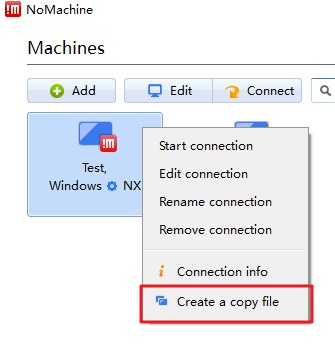
- In PRemoteM, add a new configuration of
APPprotocol type.- Fill the path of NXPlayer.exe into the EXE path field
- Fill the path of
.nxsfile into the parameter field - Save
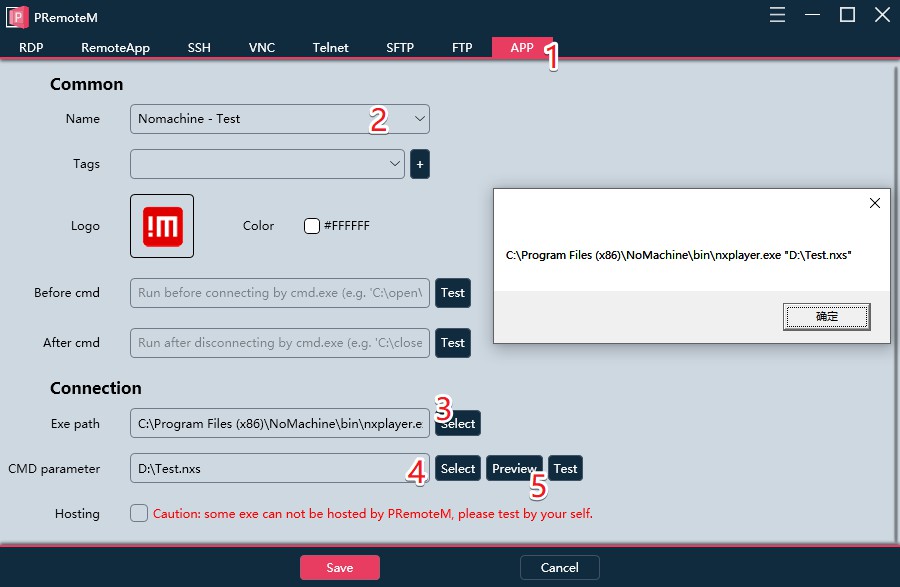
- Then you can quickly start your NoMachine session from PRemoteM.
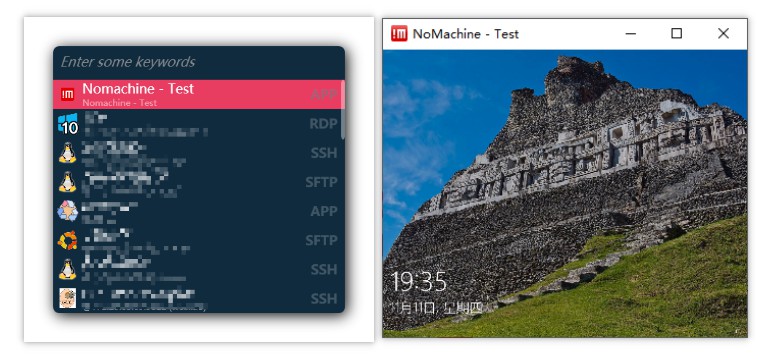
This method is also applicable to other command parameters supported session launcher, such as PUTTY, WINSCP, etc.
Even you can use this method to add one other programs (such as Word, NotePad, etc.) to PRemoteM for quick start.
简体中文
配置 NoMachine
Getting started with NoMachine
此处假设你已经配置好了 NoMachine 并且可以使用 NoMachine 自己的程序开启远程控制。如果你没有配置好 NoMachine,请参考上方的官方文档进行操作。
使用 PRemoteM 启动
由于 NoMachine 的最新版本不再提供命令行传递账号密码的会话启动方式,因此在 0.6.0 以上版本的 PRemoteM 中,我们定义了 App 协议来间接实现 NoMachine 会话的启动。
- 首先在 NoMachine 中完成所有配置,并且确保目标机器能够被连接。右键将
.nxs配置文件保存到便于找到的位置。
- 在 PRemoteM 中新建一个配置,选择
APP类型。- 在 exe 路径栏中填入 nxplayer.exe 的路径
- 在 parameter 栏中填入刚才保存的
.nxs文件路径 - 保存即可
- 之后便可以从 PRemoteM 快速启动你的 NoMachine 会话。
该方法同样适用于配置其他支持命令参数的启动器,如 PuTTY、WinSCP 等。
甚至你可以使用该方法将一个其他程序(如 Word、Notepad 等)添加到 PRemoteM 中用于快速启动。