mirror of
https://github.com/1Remote/1Remote.git
synced 2026-04-25 13:36:03 +03:00
[GH-ISSUE #98] Wrong program signature! The program is irremediably altered. Download a new version from official web site." #81
Labels
No labels
area-configuration
area-ct-app
area-ct-rdp
area-ct-remoteapp
area-ct-ssh
area-ct-vnc
area-launcher
area-list
area-tags
area-teamwork
bug
chore
dependencies
general-build/ci
general-performance
general-refactor
general-security
general-supportive
general-ux
meta-documentation
meta-enhancement
meta-enhancement
meta-feature
meta-help-wanted
meta-unknown-error
priority-hi
priority-low
pull-request
question
resolution-duplicate
resolution-invalid
resolution-wontfix
stale
task-put-off
task-still-considering
task-working-in-progress
No milestone
No project
No assignees
1 participant

Notifications
Due date
No due date set.
Dependencies
No dependencies set.
Reference
starred/1Remote#81
Loading…
Add table
Add a link
Reference in a new issue
No description provided.
Delete branch "%!s()"
Deleting a branch is permanent. Although the deleted branch may continue to exist for a short time before it actually gets removed, it CANNOT be undone in most cases. Continue?
Originally created by @Josephkready on GitHub (Mar 24, 2021).
Original GitHub issue: https://github.com/1Remote/1Remote/issues/98
Originally assigned to: @VShawn on GitHub.
Describe the bug
When I add an ssh connection, and try to get connect I get the following popup:
"Wrong program signature! The program is irremediably altered. Download a new version from official web site."
If I press okay, it just closes the window. I have confirmed the ssh sessions work through powershell.
I installed the app from the windows store. The RDP connections work fine. I havne't tried the others yet.
To Reproduce
Steps to reproduce the behavior:
Expected behavior
Successful connection to the computer through ssh
Screenshots
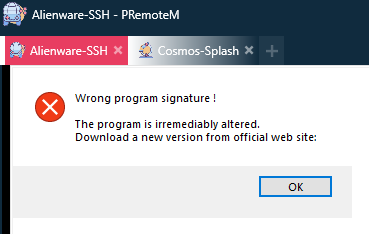
If applicable, add screenshots to help explain your problem.
Desktop (please complete the following information):
Additional context
bwt I love what you have built! Having an RDP manager that works with multiple monitors has been a huge pain to find. I tried them all! Your sweet project does it and I am very thankful!! I'll be sending some coffee your way 😉
@VShawn commented on GitHub (Mar 25, 2021):
Thanks for report. This alert is reported by the KiTTY,
I don't know what happen so far.
C:\Users\YOUR NAME\AppData\Roaming\PRemoteM\Kitty\kitty_portable_PRemoteM.exe?kitty_portable_PRemoteM.exeby click its icon?kitty_portable_PRemoteM.exeand try SSH via PRemoteM again, a new Kitty.exe will be generated.error reference
https://www.hybrid-analysis.com/sample/320f1dea116e50e7a8cc2a8825b922970b218894f3a3bb6a136ef90cedc671a1/5b2a8ec07ca3e13aaa2ac0b4
@Josephkready commented on GitHub (Mar 25, 2021):
My folder at C:\Users{user}\AppData\Roaming\PRemoteM is empty. Maybe that has something to do with it?
@VShawn commented on GitHub (Mar 25, 2021):
No, if
kitty_portable_PRemoteM.exeis not existed, the alert would not appear and PRM should alert you that it can't create the folder. Sokitty_portable_PRemoteM.exemust be somewhere in your PC. maybe you can search it out:@Josephkready commented on GitHub (Mar 25, 2021):
I installed the new 0.5.10 version by downloading the zip and running the exe file inside. If I create a ssh connection using ssh V2 I get this screen but can't type or anything.

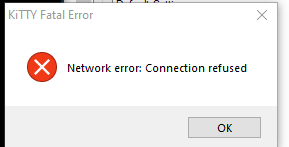
Eventually it will show this error:
If I choose v1, I get this error:
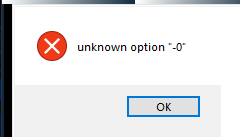
After installing the new version, I now have the kitty_portable file in my Appdata. I am able to manually open kitty and successfully connect to my ssh target. I did try deleting the kitty file, but I get the same 'Network error' as above when reconnecting through PRemoteM.
@VShawn commented on GitHub (Mar 25, 2021):
@Josephkready
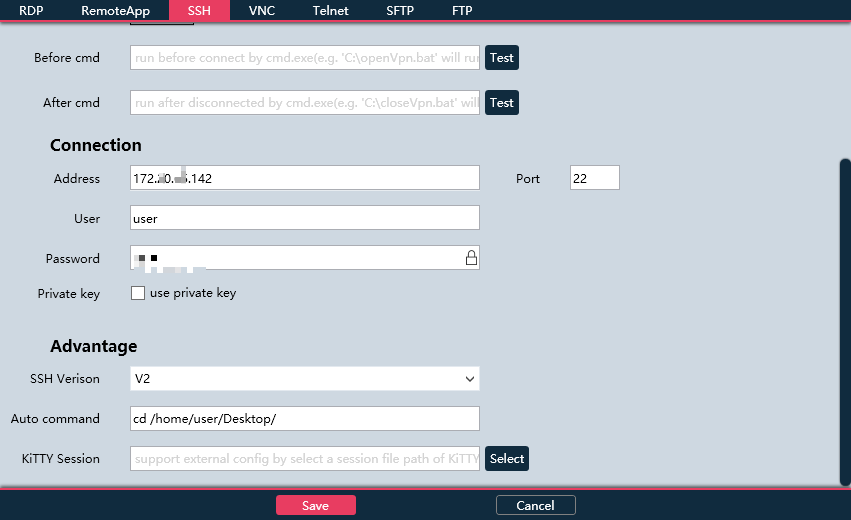
can you send a screenshot of your ssh config page(to my email)?
BTW, This works for me
@VShawn commented on GitHub (Mar 25, 2021):
change prot from 3389 to 22, issue fix
@cjdxhjj commented on GitHub (Jun 29, 2021):
i'm install via windows store, the folder C:\Users{user}\AppData\Roaming\PRemoteM is not exist