mirror of
https://github.com/1Remote/1Remote.git
synced 2026-04-25 13:36:03 +03:00
[GH-ISSUE #389] Submenu "Sorting" disappears when leaving settings area #335
Labels
No labels
area-configuration
area-ct-app
area-ct-rdp
area-ct-remoteapp
area-ct-ssh
area-ct-vnc
area-launcher
area-list
area-tags
area-teamwork
bug
chore
dependencies
general-build/ci
general-performance
general-refactor
general-security
general-supportive
general-ux
meta-documentation
meta-enhancement
meta-enhancement
meta-feature
meta-help-wanted
meta-unknown-error
priority-hi
priority-low
pull-request
question
resolution-duplicate
resolution-invalid
resolution-wontfix
stale
task-put-off
task-still-considering
task-working-in-progress
No milestone
No project
No assignees
1 participant

Notifications
Due date
No due date set.
Dependencies
No dependencies set.
Reference
starred/1Remote#335
Loading…
Add table
Add a link
Reference in a new issue
No description provided.
Delete branch "%!s()"
Deleting a branch is permanent. Although the deleted branch may continue to exist for a short time before it actually gets removed, it CANNOT be undone in most cases. Continue?
Originally created by @Nefti-sama on GitHub (Apr 3, 2023).
Original GitHub issue: https://github.com/1Remote/1Remote/issues/389
Originally assigned to: @VShawn on GitHub.
Describe the bug
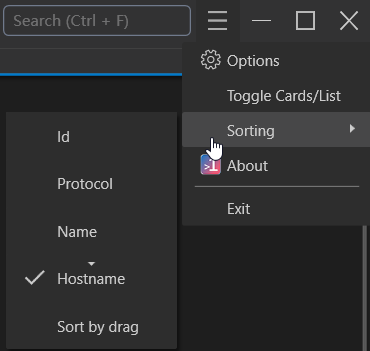
Not every, but most of the time the Sorting submenu does disappear when mousepointer is leaving the area of the settings (?) menu (the one with the 3 lines)
To Reproduce
Steps to reproduce the behavior:
Expected behavior
Sorting submenu stays there for at least 500ms to allow the mouse to move over the gap
Screenshots
Desktop (please complete the following information):
Additional context
@VShawn commented on GitHub (Apr 4, 2023):
thx for your report
This bug is caused by a gap between two menus. When the mouse moves over the gap, it leaves the menu area causing the menu to hide.
I have always used windowed mode, where there is no gap between menus, so I never noticed this issue.