mirror of
https://github.com/1Remote/1Remote.git
synced 2026-04-25 13:36:03 +03:00
[GH-ISSUE #343] Display connections on systray icon context menu #3181
Labels
No labels
area-configuration
area-ct-app
area-ct-rdp
area-ct-remoteapp
area-ct-ssh
area-ct-vnc
area-launcher
area-list
area-tags
area-teamwork
bug
chore
dependencies
general-build/ci
general-performance
general-refactor
general-security
general-supportive
general-ux
meta-documentation
meta-enhancement
meta-enhancement
meta-feature
meta-help-wanted
meta-unknown-error
priority-hi
priority-low
pull-request
question
resolution-duplicate
resolution-invalid
resolution-wontfix
stale
task-put-off
task-still-considering
task-working-in-progress
No milestone
No project
No assignees
1 participant

Notifications
Due date
No due date set.
Dependencies
No dependencies set.
Reference
starred/1Remote#3181
Loading…
Add table
Add a link
Reference in a new issue
No description provided.
Delete branch "%!s()"
Deleting a branch is permanent. Although the deleted branch may continue to exist for a short time before it actually gets removed, it CANNOT be undone in most cases. Continue?
Originally created by @MWinhard on GitHub (Jan 19, 2023).
Original GitHub issue: https://github.com/1Remote/1Remote/issues/343
Originally assigned to: @VShawn on GitHub.
Is your feature request related to a problem? Please describe.
Each time I want to start a RDP connection I have to double click the PRemoteM systray icon (opens the PRemoteM main window), double click the RDP connection I want to start, then close the PRemoteM main window.
I don't like to use the Alt+M launcher.
Describe the solution you'd like
Add the last recently used 20 connections to the right-click menu of the systray icon.
Describe alternatives you've considered
If you don't like the idea of a LRU (last recently used) list, provide a new checkbox in connection settings "Add this connection to systray icon context menu".
Additional context
Microsoft's default RDP client on Windows 10 offers something similar. Here's a picture from the microsoft forums:
https://filestore.community.support.microsoft.com/api/images/cb76bec1-39ac-4adb-95df-86121242e373
@VShawn commented on GitHub (Jan 19, 2023):
Hi thanks for you advice.
A LRU on right-click menu of the systray icon is a good idae for me and it is easy to achieve. I will make this feature in next generation of PRemoteM (named 1Remote).
AND in retrospect, the design of double-clicking to open the main interface was pointless for now since some feature is removed. I will make it single click to open main page.
@majkinetor commented on GitHub (Jan 19, 2023):
I don't think this deserves implementation time. Mini-launcher is the main mechanism of launching connections, its much much better then having another half baked launcher which will also unpromte current one as a feature.
@MWinhard , use ALT M to open launcher and your connections are already ordered the way you want. You can also filter them there really nice.
@VShawn commented on GitHub (Jan 20, 2023):
@majkinetor But the guy dont use the launcer :(
@majkinetor commented on GitHub (Jan 20, 2023):
Ah, I didn't see that. Still, the fact that he doesn't use it while its UX is more superb then that of tray menu doesn't change anything.
@MWinhard commented on GitHub (Jan 22, 2023):
The launcher is a convenient feature. But to be honest, I can't use the launcher.
I'm working from home most of the time. I'm using PRemoteM to RDP to a virtual Win11 machine running in the company office. This virtual machine is the only one I can access from home. PRemoteM is running in a window (NOT full screen).
Inside the virtual Win11 machine I have another instance of PRemoteM running in another (smaller) window. I'm using it to RDP to several other virtual machines in the company office.
Now, when I'm working in the Win11 vm window and I press the launcher hotkey Alt+M, guess which instance of PRemoteM is responding? Yes. The one from the host machine. Not what I need.
So each time I want to connect to another vm, I have to double click the systray icon inside the Win11 vm window, then double click the vm I want to run, then close the PRemoteM main window.
I have to repeat this many times each day. Right click on the systray icon, then left click one of the shown connections would by way easier.
In former times I was using mstsc.exe (Windows RDP connection) on my Win10 machine and in a virtual Win81 machine running in a RDP window. It had this "show me last recently used connections on right click" feature.
Unfortunately since Server 2022 and Win11 you can't use a windows zoom factor other than 100% in RDP windows. That's the main reason why I came to using PRemoteM.
I hope you see now, that this "show me last recently used connections on right click" feature would be of real help.
@majkinetor commented on GitHub (Jan 22, 2023):
This is not happening! I am not sure how you got that, but people even ask for such feature, host hotkey redirection and we didn't find a way to do it :) Maybe its Win11 thingy, I dont use one...
Also, I am using PRM in exatcly the same scenario (Win10 on host), and alt m brings launcher on guest. In any case this is easy to fix if it happens. Change the shortcut in options on one of your machines in Launcher settings. Probably on host as you have only 1 connection there as it seems, and use "standard" shortcut on the host where you have more.
Sometimes you need to adjust a little bit your behavior. Its cool, believe me, you might find that some things work better for you and get out of comfort zone :) Imagine everybody wants to change the software to acomodate their habits... that would quickly become a mess.
@majkinetor commented on GitHub (Jan 22, 2023):
BTW, @MWinhard, I suggest you to use Discussions first. Then we can move fruitfull discussions to issues.
@MWinhard commented on GitHub (Jan 31, 2023):
I have reconfigured to Ctrl+H (on host) and Ctrl+G (in guest rdp window). Now it works as you described, Ctrl+G opens the launcher in guest window as long as the guest window is selected. Thank you very much.
You're right. Your launcher is a great feature from a technical point of view. And it's also a really great feature for people who like to do as much as possible using the keyboard.
Unfortunately the majority of people out there are "mouse first" users (like me). For them your launcher means constantly switching between mouse and keyboard for something they were able to do with the mouse alone (when using mstsc.exe). That's inconvenient at least. Some people would use less polite words to describe it.
I'm a software programmer myself. I had to learn that it's no good idea to force people to do things the way I like most. It's better to give people a choice.
@VShawn commented on GitHub (Jan 31, 2023):
don't worry man, I just added the 'Recently Connected items' to the system tray menu today.
BTW. I set
alt+mas the default hot key because I can prees these two button with my left hand and keep my right hand on the mouse.@MWinhard commented on GitHub (Jan 31, 2023):
I'm looking forward to the new version. :-) :-) :-)
Just saw this enhancement is part of the 1Remote-Next milestone. Does this mean a new EXE is released only after all steps of this milestone are done?
@VShawn commented on GitHub (Feb 1, 2023):
Yes I won't publish it until 1Remote is done.
But you can still get a latest package from github action artifacts
https://github.com/1Remote/PRemoteM/actions/runs/4061883923
@MWinhard commented on GitHub (Feb 1, 2023):
Great. :-)
May I suggest an improvement? Please show just the connection name. Everything else makes reading harder.
In the main window you don't see all the additional information, too. Therefore the connection name had to be self explanatory from the beginning.
@VShawn commented on GitHub (Feb 2, 2023):
You means in the launcher?
@MWinhard commented on GitHub (Feb 2, 2023):
No, this is not about the launcher. I try to explain it again.
The main window shows just the connection name. That's OK.
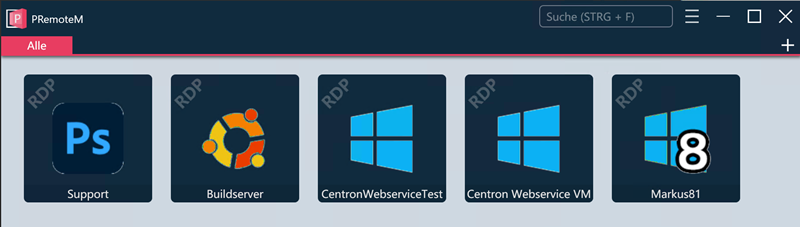
The new tray icon context menu shows way more information. This additional information doesn't help in finding the right connection. It makes it harder. Same goes for the numbering.
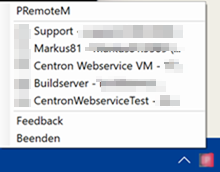
As the main window shows just the connection name, the connection name has to be self explanatory. So IMHO it doesn't make sense to show all the additional information in the context menu.
@VShawn commented on GitHub (Feb 2, 2023):
humm, sounds reasonable. you can get update from latest action artifacts.
@MWinhard commented on GitHub (Feb 2, 2023):
Tray icon context menu is looking good now. :-)
We can close this issue. Thank you very much.
@MWinhard commented on GitHub (Feb 5, 2023):
May I suggest one more change?
Please move the "PRemoteM" menu item to the Feedback and Close section. It's just a link to the github page. Most users will use it quite rarely.
@VShawn commented on GitHub (Feb 7, 2023):
it's done now, also i add a toggle for it
@MWinhard commented on GitHub (Feb 7, 2023):
I did a view tests. Up to now everything still works. :-)
@MWinhard commented on GitHub (Feb 7, 2023):
Sorry, but I have a few more suggestions for improvement... ;-)
How about removing the menu separator lines before and after "About 1Remote"?
So the only remaining separator line is between the LRU list and the rest of the menu. This makes it easier to keep focus on the relevant menu entries.
As the default color of the 1Remote main window is black, how about a black context menu, too? 😎
Please use a bigger font and more space between the lines. Just like the taskbar icons' right click menus do. This makes it easier to recognize the menu item I'm looking for.
@VShawn commented on GitHub (Feb 8, 2023):
Oh... I hear that you are using 1Remote branch... Please note that 1Remote branch is still unstable, I recommend to use PRemoteM in dev_net6 branch at this time.
Custom style like color and font for tray has already under consideration, This work will be done after other major tasks are completed.