mirror of
https://github.com/1Remote/1Remote.git
synced 2026-04-25 05:26:04 +03:00
[GH-ISSUE #273] Enable quick connect Existing instance for clipboard IP. Quick ec2 instance connect #3121
Labels
No labels
area-configuration
area-ct-app
area-ct-rdp
area-ct-remoteapp
area-ct-ssh
area-ct-vnc
area-launcher
area-list
area-tags
area-teamwork
bug
chore
dependencies
general-build/ci
general-performance
general-refactor
general-security
general-supportive
general-ux
meta-documentation
meta-enhancement
meta-enhancement
meta-feature
meta-help-wanted
meta-unknown-error
priority-hi
priority-low
pull-request
question
resolution-duplicate
resolution-invalid
resolution-wontfix
stale
task-put-off
task-still-considering
task-working-in-progress
No milestone
No project
No assignees
1 participant

Notifications
Due date
No due date set.
Dependencies
No dependencies set.
Reference
starred/1Remote#3121
Loading…
Add table
Add a link
Reference in a new issue
No description provided.
Delete branch "%!s()"
Deleting a branch is permanent. Although the deleted branch may continue to exist for a short time before it actually gets removed, it CANNOT be undone in most cases. Continue?
Originally created by @loverzpark on GitHub (Jul 28, 2022).
Original GitHub issue: https://github.com/1Remote/1Remote/issues/273
Originally assigned to: @VShawn on GitHub.
Is your feature request related to a problem? Please describe.
So Basically if we have an existing machine saved with an IP, we can connect it anytime because we already have the password saved.
Now, In my case what happens is that I use EC2 instances and it gets shut down after my work is done.
The next day When I come and get a new IP address for the same credentials, I need to edit before login everytime with new IP and this became so frustrating because we have shortcuts like
ctrl + Mand have an habit of quick connect.Describe the solution you'd like
Need a way so whenever we are trying to quick connect, give a way to user connect with IP in clipboard without going edit config+save+againreconnect flow.
Describe alternatives you've considered
Well, I am not a developer in your technology so can't give a pull request but a high level solution,
If we are quick connecting, if IP in clipboard, show additional hint or link/button in dropdown to connect using clipboard.
Whenever we disconnect, we can ask user if he/she wants to save new IP configuration.
U can have this flow as your way. just a suggestion if this makes sense, but I think this is a needed feature because its common to have new IP now.
Additional context
Aaah, Can't repeate again... but please have a look and make changes ASAP. thanks in advance guys you are awesome as always !!
@VShawn commented on GitHub (Jul 28, 2022):
Thx for the advice.
Actually I have a plan like the picture above for a long time. What stopping me is that I've not found a snappy approach to enter username & password for the
quick connect.OTOH, It will break the sessions control logic based on database id if we import
quick connect.@loverzpark commented on GitHub (Jul 29, 2022):
I believe we can give an option
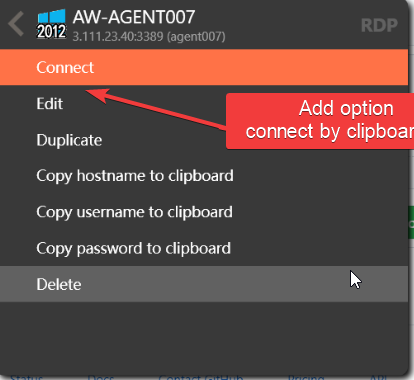
Enable this option only in case the clipboard has a valid IP address. After clicking on the menu, connect the user.
At least it will stop a few frustrating clicks.
OR
You can provide another shortcut that will open an IP/server address input, next could be user Combobox with searching, select existing config and boom, u can connect to new IP without bothering existing one
@majkinetor commented on GitHub (Jul 29, 2022):
Sounds awful IMO.
Perhaps better way would be for PRM to popup for missing information. So if you enter password and leave hostname empty you can just ctrl v when you start that connection. This is IMO better as one can also use it for changing username and password.
@loverzpark commented on GitHub (Aug 3, 2022):
Any update on this Guys? What is finalized?
@VShawn commented on GitHub (Aug 6, 2022):
I haven't made my decision yet.
For now I have to concentrate on turning PRemoteM to 1Remote, new features would not be added.
@VShawn commented on GitHub (Nov 5, 2022):
@loverzpark
quick connectis basically implemented, see #313