mirror of
https://github.com/1Remote/1Remote.git
synced 2026-04-25 13:36:03 +03:00
[GH-ISSUE #284] Options for hiding and awaiting termination of the app started before a RDP connection #249
Labels
No labels
area-configuration
area-ct-app
area-ct-rdp
area-ct-remoteapp
area-ct-ssh
area-ct-vnc
area-launcher
area-list
area-tags
area-teamwork
bug
chore
dependencies
general-build/ci
general-performance
general-refactor
general-security
general-supportive
general-ux
meta-documentation
meta-enhancement
meta-enhancement
meta-feature
meta-help-wanted
meta-unknown-error
priority-hi
priority-low
pull-request
question
resolution-duplicate
resolution-invalid
resolution-wontfix
stale
task-put-off
task-still-considering
task-working-in-progress
No milestone
No project
No assignees
1 participant

Notifications
Due date
No due date set.
Dependencies
No dependencies set.
Reference
starred/1Remote#249
Loading…
Add table
Add a link
Reference in a new issue
No description provided.
Delete branch "%!s()"
Deleting a branch is permanent. Although the deleted branch may continue to exist for a short time before it actually gets removed, it CANNOT be undone in most cases. Continue?
Originally created by @bug-ware on GitHub (Sep 6, 2022).
Original GitHub issue: https://github.com/1Remote/1Remote/issues/284
Originally assigned to: @VShawn on GitHub.
Is your feature request related to a problem? Please describe.
I use the start App before (German App vorher starten) connecting to a RDP session. Two things are annoying:
Describe the solution you'd like
Regarding 1) Could you please add an option to start the App in hidden mode? See SW_HIDE, e.g., in ShowWindow function of Windows API.
Regarding 2) Please add an option to wait for the App process to end or alternatively add an option for a delay to be entered and that is waited for before starting the RDP connection.
Hope this make sense. Thanks a lot for developing this App!
goal:
@VShawn commented on GitHub (Sep 8, 2022):
Definitely a BUG it is, I did not design any
cmd window pops up.@VShawn commented on GitHub (Sep 8, 2022):
Ohhhh...
Do you make use of
Before cmdfeature? It may bring us a cmd pop window.@bug-ware commented on GitHub (Sep 9, 2022):
Yes, exactly; I have the German translation. ;o)
The window doesn't show anything. It is just black. So one could optionally hide it in those cases.
I use this feature to run a script that initiates a ssh connection with tunneling of the rdp port. The "After cmd" script kill this connection afterwards.
This connection is why I would like the RDP connection to wait until the cmd returns. Otherwise the tunnel is not yet ready. Maybe there is a more elegant solution. Unfortunately, there is no VPN available.
@VShawn commented on GitHub (Sep 10, 2022):
Ok, it make sense, I will firstly try to add a feature to wait script end before it start a RDP session. Then find out how to hide the cmd window.
@VShawn commented on GitHub (Sep 10, 2022):
https://github.com/VShawn/Shawn.Utils/blob/master/Shawn.Utils.Wpf/WinCmdRunner.cs#L44-L63
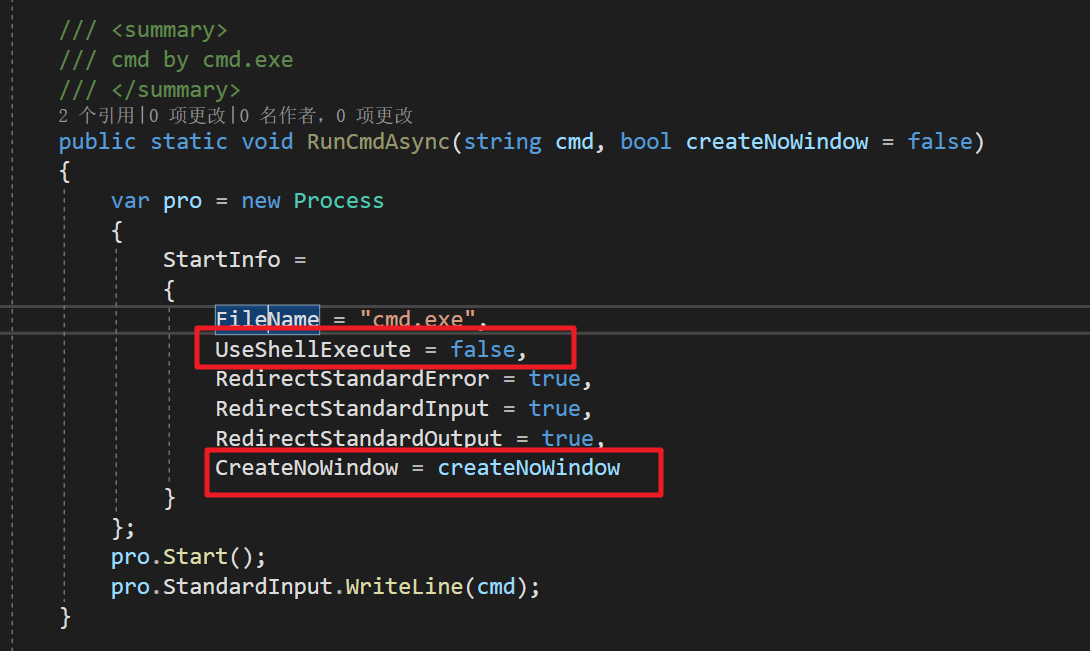
I found that it has already hide the cmd window in the PRemoteM.
It works on my PC. Maybe some policy on your PC makes it malfunction
@VShawn commented on GitHub (Sep 10, 2022):
PRemoteM.0.7.1.6.Alpha2-x86-Net6.zip
I made this early preview version which will:
Can you help me test this function?
I will make the feature a better UX if this above achieve our goal :)
@VShawn commented on GitHub (Sep 11, 2022):
PRemoteM.0.7.1.6.Alpha3-x86-Net6.zip
now an option for hide the script window has been added, and the stuck of the main window has been fixed.
I think this ticket is done :)
@bug-ware commented on GitHub (Sep 12, 2022):
Hello.
My script uses some arguments. This was fine before but now gives an error that the file cannot be found.
I also noticed that one cannot search for ".cmd" files which are almost equivalent with ".bat"
@VShawn commented on GitHub (Sep 13, 2022):
Yes, in the old approach, I run a scrip by open cmd.exe then run script in the cmd.exe.
In this approach I can not track the scrip processing procedure, that is to say I don't know when the script process to end. Besides I found that the cmd process sometimes would not be kill after the script run to end in the old approach。
So in this new one, I run the script file directly to achieve the script process tracking.
Then I usually write arguments in the script files, so I don't consider of the parameters pass...
@VShawn commented on GitHub (Sep 13, 2022):
I make some improvement to make app recognize the parameters.
PRemoteM.0.7.1.6.Alpha4-x86-Net6.zip
@bug-ware commented on GitHub (Sep 13, 2022):
Thanks. The parameters are recognized now. If I click on "Prüfen" (I guess test or check in English) everything works fine. The script is run and the GUI seems to know if it is finished or not.
However when I start the RDP connection nothing happens. I.e., it seems that no script is startet. Such, the connection times out with an error. I checked with netstat and found the tunnel port is not opened. Also ssh is not in the task list.
Could you transfer the test routine to the actual connection routine? (Without the MsgBox of course ;o)
@majkinetor commented on GitHub (Sep 13, 2022):
D:\test - 2.bat -t abclooks totally funky.You probably shouldnt' do that but work with quotes with spaces in names. This is how Explorer handles it with long names:
@VShawn commented on GitHub (Sep 14, 2022):
@majkinetor
Ahaha, I knew it. This should be "D:\test - 2.bat" in Windows.
But this place can be edit by user, I concerned that someone write something without quotes.
So I add this test case and cheek if the quotes can be add by my code.
Works too:
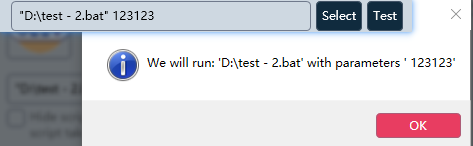
@bug-ware
sure thing :)
PRemoteM.0.7.1.6.Alpha5-x86-Net6.zip
@bug-ware commented on GitHub (Sep 14, 2022):
Works like a charm so far!
Thanks a lot! This makes my RDP really remote when working from home ;o)