mirror of
https://github.com/1Remote/1Remote.git
synced 2026-04-25 13:36:03 +03:00
[GH-ISSUE #280] RDP do not auto resizing after login & Remember Position and Size of RDP Window #246
Labels
No labels
area-configuration
area-ct-app
area-ct-rdp
area-ct-remoteapp
area-ct-ssh
area-ct-vnc
area-launcher
area-list
area-tags
area-teamwork
bug
chore
dependencies
general-build/ci
general-performance
general-refactor
general-security
general-supportive
general-ux
meta-documentation
meta-enhancement
meta-enhancement
meta-feature
meta-help-wanted
meta-unknown-error
priority-hi
priority-low
pull-request
question
resolution-duplicate
resolution-invalid
resolution-wontfix
stale
task-put-off
task-still-considering
task-working-in-progress
No milestone
No project
No assignees
1 participant

Notifications
Due date
No due date set.
Dependencies
No dependencies set.
Reference
starred/1Remote#246
Loading…
Add table
Add a link
Reference in a new issue
No description provided.
Delete branch "%!s()"
Deleting a branch is permanent. Although the deleted branch may continue to exist for a short time before it actually gets removed, it CANNOT be undone in most cases. Continue?
Originally created by @MWinhard on GitHub (Aug 20, 2022).
Original GitHub issue: https://github.com/1Remote/1Remote/issues/280
Originally assigned to: @VShawn on GitHub.
When I open the first RDP session, the new window always comes up in the middle of the screen. Each time I have to use the mouse, drag the window to the upper left corner, then make it high enough to get rid of the scrollbars.
Wouldn't it be nice if this window came up at the position and size where I closed it last time?
@VShawn commented on GitHub (Aug 23, 2022):
Is this for maximize the window?
I do record the window size of the last tab window.
So if you
But in your case, you said you have to drag window every time? This mean the saved window size isn't work for you. Please check the
Locality.jsonfile and see if the window size be changed each time you adjust the window.@MWinhard commented on GitHub (Aug 25, 2022):
Hi Shawn,
sorry for the late reply. I had to find a free (and working) screen
recording software first. ;-)
1. My tab window isn't maximized:
I've made a little video that shows what I do.
[url removed]
2. Some of my Windows 10 settings may be unusual:
3. Locality.json:
TabWindowHeight changes when I change the tab window's height. If you
multiply TabWindowWidth and TabWindowHeight with 2.25 (my desktop zoom
factor) this looks more or less correct. This is the recorded size after
positioning, resizing and closing the tab window;
{
"MainWindowWidth": 970.2222222222222,
"MainWindowHeight": 616.8888888888888,
"TabWindowWidth": 1157.7777777777776,
"TabWindowHeight": 929.7777777777777,
"TabWindowState": 0,
"ServerOrderBy": -1,
"RdpLocalitys": {
"1": {
"LastUpdateTime": "2022-08-11T15:28:55.6218361+02:00",
"FullScreenLastSessionIsFullScreen": false,
"FullScreenLastSessionScreenIndex": -1
}
}
}
4. RDP connection settings:
5. Additional thoughts:
a) Locality.json has no TabWindowLeft and TabWindowTop settings. How can
you decide where to show the tab window next time?
b) Do you calculate the available desktop height and width? What happens
when you decide that the tab window is bigger than desktop size?
c) Windows 10 tends to dock a window at top and bottom when you resize
window height to it's fullest, like I do. Maybe WPF doesn't report the
window's correct height in this special scenario?
Thank you very much in advance!
Markus Winhard
-------- Original Message --------
Subject: Re: [1Remote/PRemoteM] Remember Position and Size of RDP Window
(Issue #280)
From: VShawn @.>
To: 1Remote/PRemoteM @.>
Cc: Markus Winhard @.>, Author @.>
Date: Dienstag, 23.08.2022 03:42:23
@VShawn commented on GitHub (Aug 25, 2022):
Thanks for your screen record (BTW, I recommend you the ScreenToGif:
https://github.com/NickeManarin/ScreenToGif)
From your record, The auto resizing does not work after login completes.
That's the reason why you got a scroll bar. And
Remember Position and Sizewould not help you solve the problem.Here is how the auto resizing work on me:
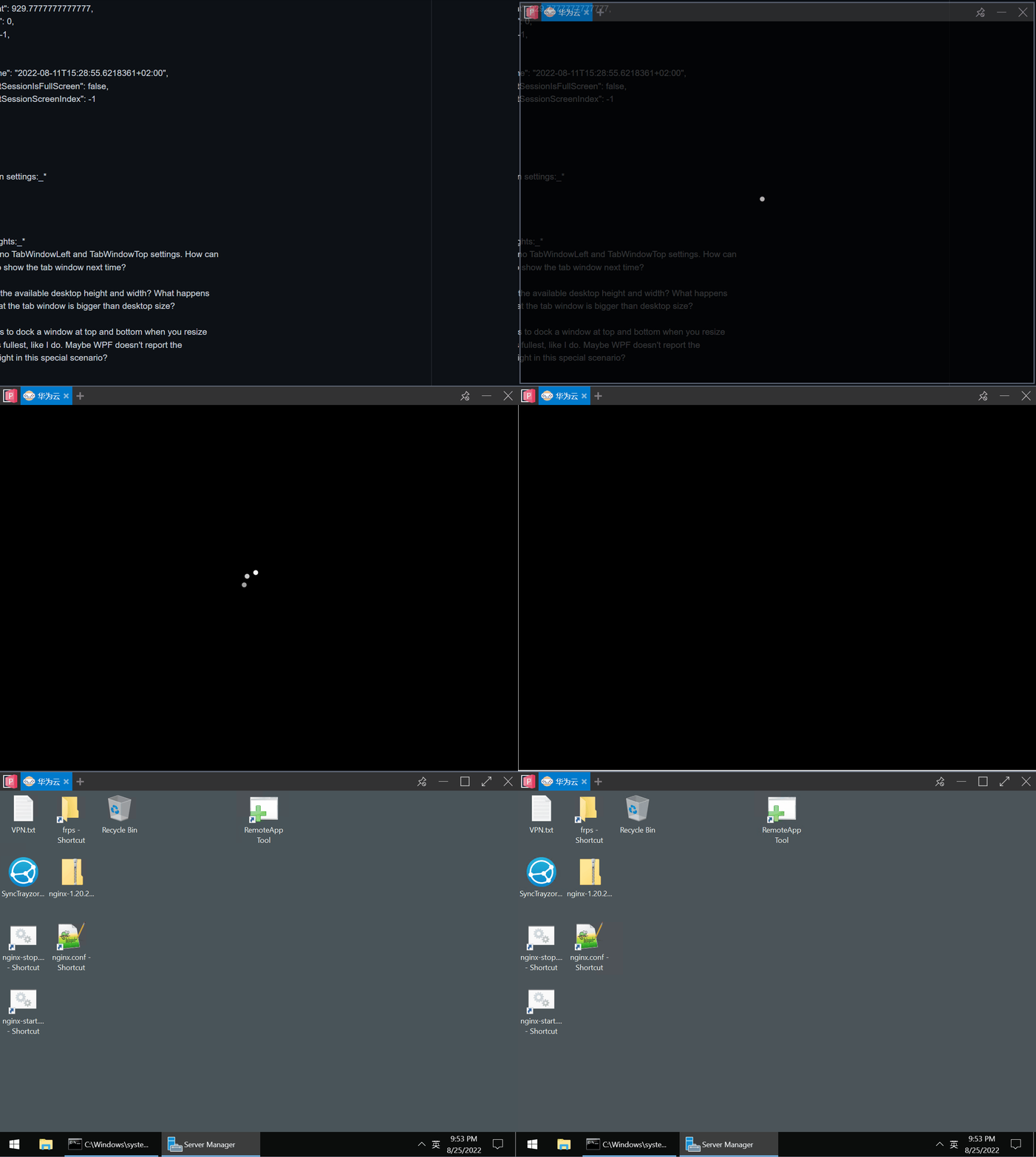
See? None of the scroll bars exist.
I try to set the 225% desktop zoom factor, but unfortunately I can not
reproduce the problem still.
Then I wanna you to help check the resize info in your log (Especially the
highlighted content), to see if the zooming factor is correct.
My log looks like this:
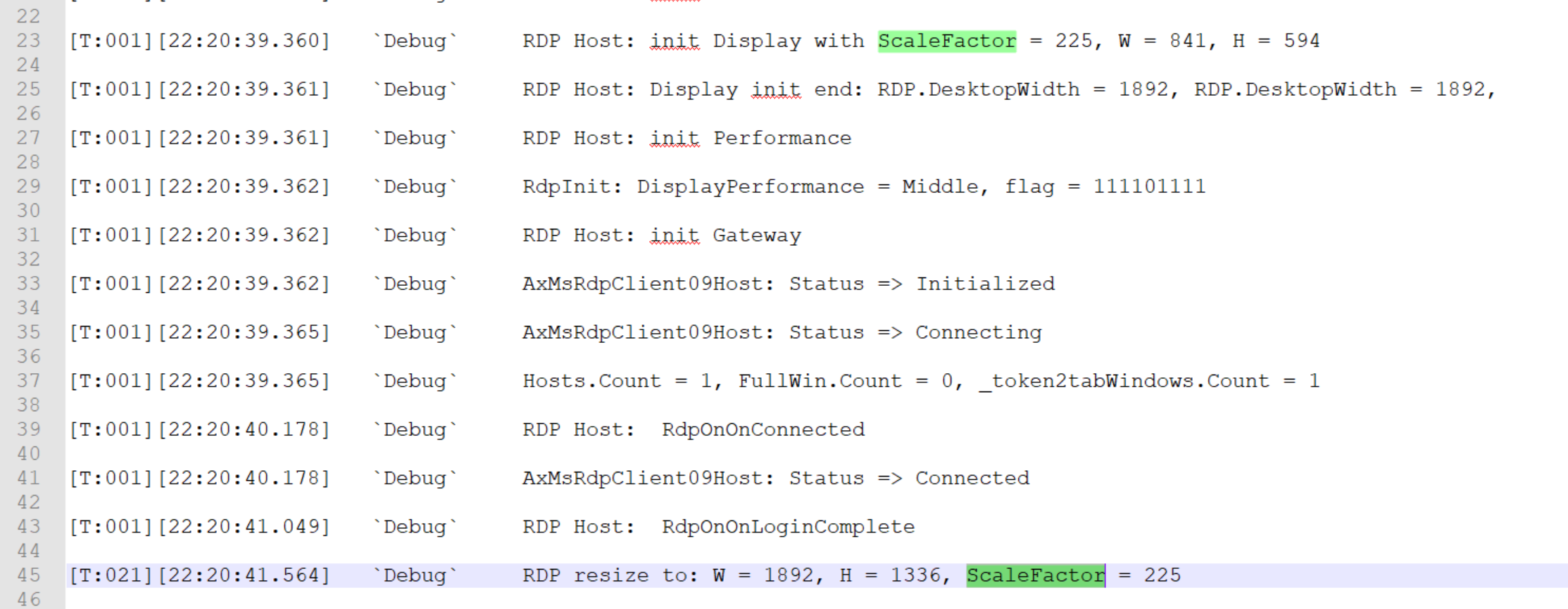
@VShawn commented on GitHub (Aug 25, 2022):
That's my fault, I misremember, PRemoteM did not remember the left and top properties. I will catch up on this latter.
Yes I calculated it, and it works fine with my 4k + 225% + top taskbar environment. For now, I can't tell why it not work on your desk. That's why I asked you for more log information to help :)
@MWinhard commented on GitHub (Aug 25, 2022):
Unfortunately the images are missing. Can you send them as attachments?
Markus
-------- Original Message --------
Subject: Re: [1Remote/PRemoteM] Remember Position and Size of RDP Window
(Issue #280)
From: VShawn @.>
To: 1Remote/PRemoteM @.>
Cc: Markus Winhard @.>, Author @.>
Date: Donnerstag, 25.08.2022 16:29:56
@VShawn commented on GitHub (Aug 25, 2022):
Hi, You can get them on GitHub issues page https://github.com/1Remote/PRemoteM/issues/280 , it seems the GitHub mail proxy blocking the pictures.
BTW, I dont know your email address, I reply to the notifications@github.com
@MWinhard commented on GitHub (Aug 25, 2022):
Hi Shawn,
please see the attached log. It's recorded from double-click till the
tab window is shown.
Looks like your screen size is not 4k and your tab window size is
smaller than mine:
Yours:
RDP Host: init Display with ScaleFactor = 225, W = 841, H = 594
RDP Host: Display init end: RDP.DesktopWidth = 1892, RDP.DesktopWidth =
1892,
Mine:
RDP Host: init Display with ScaleFactor = 225, W = 1153, H = 709
RDP Host: Display init end: RDP.DesktopWidth = 2592, RDP.DesktopWidth =
2592,
This line is comlete missing in my log:
RDP resize to: W = 1892, H = 1336, ScaleFactor = 225
I have a warning in my log:
[ProtocolRunnerHostHelper.cs(GetRunner:32)] we don't have a protocol
named: RDP
Do you intentionally log RDP.DesktopWidth twice in one line?
HTH,
Markus
[T:001][19:36:34.903]
DebugSetSelfStartingHelper.SetSelfStartByRegistryKey(True, "PRemoteM")[T:001][19:36:34.912]
Warning[ProtocolRunnerHostHelper.cs(GetRunner:32)] we don't have a protocol named: RDP[T:001][19:36:34.913]
DebugCloseEmptyWindows: closing tab(57223682)[T:001][19:36:34.913]
InfoCloseEmptyWindows: Current: Host = 0, Full = 0, Tab = 0, HostToBeDispose = 1, WindowToBeDispose = 1[T:001][19:36:34.914]
Warning[SessionControlService.cs(ConnectWithTab:208)] CloseEmptyWindows: 1 Empty Host closed[T:001][19:36:34.914]
DebugClosing: 1 Empty Host.[T:001][19:36:34.918]
InfoCloseMarkedProtocolHost: Current: Host = 0, Full = 0, Tab = 0, HostToBeDispose = 0, WindowToBeDispose = 0[T:001][19:36:34.919]
DebugDisposing AxMsRdpClient09Host(32772220)[T:001][19:36:34.957]
DebugRDP Host: _rdpClient.Dispose()[T:001][19:36:34.958]
DebugDispose done AxMsRdpClient09Host(32772220)[T:001][19:36:35.039]
DebugAxMsRdpClient09Host: Status => Initializing[T:001][19:36:35.040]
DebugRDP Host: _rdpClient.Dispose()[T:001][19:36:35.041]
DebugRDP Host: init new AxMsRdpClient9NotSafeForScriptingEx()[T:001][19:36:35.042]
DebugRDP Host: init CreateControl();[T:001][19:36:35.058]
DebugRDP Host: init Static[T:001][19:36:35.059]
DebugRDP Host: init conn bar[T:001][19:36:35.060]
DebugRDP Host: init Redirect[T:001][19:36:35.062]
DebugRDP Host: init Display with ScaleFactor = 225, W = 1153, H = 709[T:001][19:36:35.063]
DebugRDP Host: Display init end: RDP.DesktopWidth = 2592, RDP.DesktopWidth = 2592,[T:001][19:36:35.064]
DebugRDP Host: init Performance[T:001][19:36:35.065]
DebugRdpInit: DisplayPerformance = Auto, flag = 0[T:001][19:36:35.065]
DebugRDP Host: init Gateway[T:001][19:36:35.066]
DebugAxMsRdpClient09Host: Status => Initialized[T:001][19:36:35.070]
DebugAxMsRdpClient09Host: Status => Connecting[T:001][19:36:35.152]
InfoShowRemoteHost: Current: Host = 1, Full = 0, Tab = 1, HostToBeDispose = 0, WindowToBeDispose = 0[T:001][19:36:35.919]
DebugRDP Host: RdpOnOnConnected[T:001][19:36:35.920]
DebugAxMsRdpClient09Host: Status => Connected[T:001][19:36:36.583]
DebugRDP Host: RdpOnOnLoginComplete@MWinhard commented on GitHub (Aug 25, 2022):
Hi Shawn,
Thank you for fixing the left/top problem. Can I test the new version
without compiling the source code myself?
I think I've found the reason for the "height not restored" problem. :-)
Tab window restore works with any combination of "Taskbar location on
screen" = Top/Bottom and "Use small taskbar buttons" = Off/On. - As long
as you leave one oder more pixels space between tab window and taskbar,
and between tab window and upper/lower screen border.
It doesn't work any more as soon as you "dock" the window at top and bottom.
So i think with non-maximized tab windows you should also remember if
the tab window was docked at top and bottom. Or, if there's no way to
query if the tab window is docked, allow a few pixels more height than
"screen height minus taskbar height" before you decide the tab window's
height is too big to restore.
TIA,
Markus
@VShawn commented on GitHub (Aug 26, 2022):
my screen is 4k as yours.
Don't worry, it doesn't matter :)
Is't a mistake, it should be DesktopWidth and DesktopHeight. Don't worry, it won’t be a obstacle to our observation.
Weird, It should have be at least one resizing after
RDP Host: RdpOnOnLoginCompleteOther part works fine according to your log.
Can you
check if the
Display initsize equal your tab window size?drag tab window 1 pix bigger to tigger RDP resize and see how it log. And compare the new size with the size
Display init.mine is:
Here is the new package, I guess it may not help with the scrool bar you met.
PRemoteM.0.7.1.6.Alpha-x86-Net6.zip
@MWinhard commented on GitHub (Aug 26, 2022):
I tried again using version 0.7.1.6 alpha that you gave me. I will also try the timer version if you send me the url.
150% zoom makes no difference with my current problem, but it's a great addition to scale the RDP session independent from my desktop zoom factor!
Ths only thing is that typing 15 writes 300 to the textbox. I had to paste the 150 into the textbox.
Back to the original problem.
Restoring the previous left/top/width/height works as expected as long as I leave a few pixels space around the tab window. This is my Locality.json afterwards:
{
"MainWindowWidth": 970.2222222222222,
"MainWindowHeight": 616.8888888888888,
"TabWindowTop": 31.555555555555554,
"TabWindowLeft": 1.3333333333333333,
"TabWindowWidth": 1157.7777777777776,
"TabWindowHeight": 926.6666666666666,
"TabWindowState": 0,
"ServerOrderBy": -1,
"RdpLocalitys": {
"1": {
"LastUpdateTime": "2022-08-11T15:28:55.6218361+02:00",
"FullScreenLastSessionIsFullScreen": false,
"FullScreenLastSessionScreenIndex": -1
}
}
}
As soon as I move the tab window any nearer to the left/top/bottom, or the tab window is even docked to the top/left/bottom (as I like to do), the height and/or left/top isn't restored.
I took a look at your code. Perhaps the root of the problem is in TabWindowBase.Init(TabablzControl tabablzControl). What if we simply add a few "tolerance" pixels to screenEx.VirtualWorkingArea before we decide the window is outside of the available screen area?
Same numer of "tolerance" pixels for left/top/width.
What do you think?
@VShawn commented on GitHub (Aug 26, 2022):
sounds reasonable, so I make an improvement.
https://github.com/1Remote/PRemoteM/blob/dev_net6/Ui/View/Host/TabWindowBase.cs#L209-L232
PRemoteM.0.7.1.6.AlphaB2-x86-Net6.zip.zip
@MWinhard commented on GitHub (Aug 26, 2022):
Using the attached 0.7.1.6 alphaB2 it works as advertised. I think we have a winner. :-) :-) :-)
@VShawn commented on GitHub (Aug 27, 2022):
and thanks for your support :)