[GH-ISSUE #223] PremoteM user profile #2114

Closed
opened 2026-03-01 17:17:49 +03:00 by kerem · 15 comments
Owner

Originally created by @n0home on GitHub (Mar 24, 2022).
Original GitHub issue: https://github.com/1Remote/1Remote/issues/223

Originally assigned to: @VShawn on GitHub.

Hi,
first of all i really love your project! Thanks a lot for your excellent work.

former we tried using PRemoteM "0.5.10.2" in our enterprise environment.
It worked pretty well. We installed the software to "c:\Program Files" and the
user profile automatically was created at the userspace: "AppData\roaming\premotem"

Now in the actual version "0.6.2.2" the user profile seems broken.
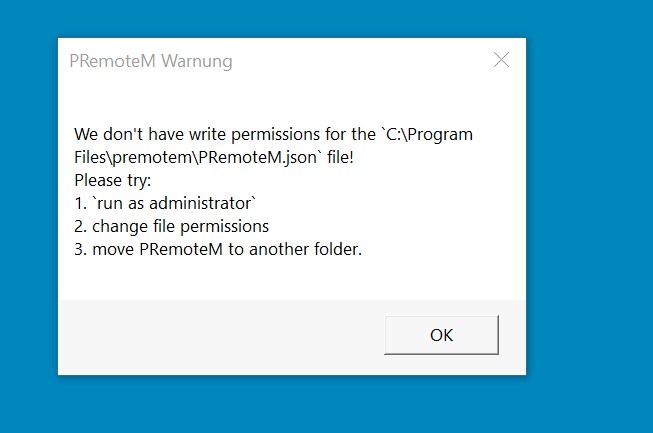
When we try to open PRemoteM now it says "We don't have write permissions for the
C:\Program Files\premotem\PRemoteM.json file!"
PRemotem-error

Also PRemoteM couldn't find the premotem.db at: "AppData\roaming\premotem" automatically.
Instead it tried to build a new one at: "C:\Program Files\premotem".

Our client users never have write permission on "C:\Program Files".

Is it intended to give write permissions to the whole "C:\Program Files\premotem" directory?
it would be nice to have the functionality back, to store user content to the userspace again.
Would that be possible?

Originally created by @n0home on GitHub (Mar 24, 2022). Original GitHub issue: https://github.com/1Remote/1Remote/issues/223 Originally assigned to: @VShawn on GitHub. Hi, first of all i really love your project! Thanks a lot for your excellent work. former we tried using PRemoteM "0.5.10.2" in our enterprise environment. It worked pretty well. We installed the software to "c:\Program Files" and the user profile automatically was created at the userspace: "AppData\roaming\premotem\" Now in the actual version "0.6.2.2" the user profile seems broken. When we try to open PRemoteM now it says "We don't have write permissions for the C:\Program Files\premotem\PRemoteM.json file!" ![PRemotem-error](https://user-images.githubusercontent.com/67950721/159896594-79ed94a9-d9f8-4845-81d4-625c3cb1a8d6.jpg) Also PRemoteM couldn't find the premotem.db at: "AppData\roaming\premotem\" automatically. Instead it tried to build a new one at: "C:\Program Files\premotem". Our client users never have write permission on "C:\Program Files". Is it intended to give write permissions to the whole "C:\Program Files\premotem" directory? it would be nice to have the functionality back, to store user content to the userspace again. Would that be possible?
Author
Owner

@VShawn commented on GitHub (Mar 25, 2022):

In 0.6.X, I set the default path of the configuration file to the folder path of the exe. So that our user can put PRemoteM in their portable device and take it to anywhere.

Our client users never have write permission on "C:\Program Files".

Since your client have no write permission on "C:\Program Files". You can put PRemoteM to an writable folder.

Also PRemoteM couldn't find the premotem.db at: "AppData\roaming\premotem" automatically. Instead it tried to build a new one at: "C:\Program Files\premotem".

I did have some code to trun the 0.5 ini to 0.6 json, 0.6 will find old database automatically if everythins is good: https://github.com/VShawn/PRemoteM/blob/0.6.1.1_fix/PRM.Core/Service/ConfigurationService.cs#L172-L186

Maybe your permission broken the procedure.
I'm not sure about that, I never thought about the low-privileged user in the enterprise environment, so I've never trested your situation. Sorry about that.

But You can rest assured that your data will not be lost.
Do it manually by to find your data back:

  1. move old db file to the path in the PRemoteM.json
  2. or you can modify the PRemoteM.json, set the field SqliteDatabasePath to your old path.
  3. or re-install 0.5.10.2 and export all data to json, and import them into 0.6.2
<!-- gh-comment-id:1078784623 --> @VShawn commented on GitHub (Mar 25, 2022): In 0.6.X, I set the default path of the configuration file to the folder path of the exe. So that our user can put PRemoteM in their portable device and take it to anywhere. > Our client users never have write permission on "C:\Program Files". Since your client have no write permission on "C:\Program Files". You can put PRemoteM to an writable folder. > Also PRemoteM couldn't find the premotem.db at: "AppData\roaming\premotem" automatically. Instead it tried to build a new one at: "C:\Program Files\premotem". I did have some code to trun the 0.5 ini to 0.6 json, 0.6 will find old database automatically if everythins is good: https://github.com/VShawn/PRemoteM/blob/0.6.1.1_fix/PRM.Core/Service/ConfigurationService.cs#L172-L186 Maybe your permission broken the procedure. I'm not sure about that, I never thought about the low-privileged user in the enterprise environment, so I've never trested your situation. Sorry about that. But You can rest assured that your data will not be lost. Do it manually by to find your data back: 1. move old db file to the path in the `PRemoteM.json` 2. or you can modify the `PRemoteM.json`, set the field `SqliteDatabasePath` to your old path. 3. or re-install `0.5.10.2` and export all data to json, and import them into `0.6.2`
Author
Owner

@majkinetor commented on GitHub (Mar 25, 2022):

This is not correct behavior of PRM if it is desired to work in multiuser environment. The point is to have system install, and that each user has its own db & config file.

For that too work, installation must take into account this - by default it should work in non-portable mode, which means that app is installed in standard location, and user data is in their AppData folder and in portable mode, app uses config and db from local directory. Some tools do this via registry setting, some via command line parameter, and some via special file in app folder (mere existence marks the portable mode, FooBar2000 works like this for example).

I think PRM should go the last variant, if file is there, it should work in portable mode, if file is not there (default) it should work in multiuser mode. During installation there could be question for portable mode or multiuser mode, or to keep things simple this could only be documented and users can create file themselves if they want portable installation.

<!-- gh-comment-id:1079064148 --> @majkinetor commented on GitHub (Mar 25, 2022): This is not correct behavior of PRM if it is desired to work in multiuser environment. The point is to have system install, and that each user has its own db & config file. For that too work, installation must take into account this - by default it should work in non-portable mode, which means that app is installed in standard location, and user data is in their AppData folder and in portable mode, app uses config and db from local directory. Some tools do this via registry setting, some via command line parameter, and some via special file in app folder (mere existence marks the portable mode, FooBar2000 works like this for example). I think PRM should go the last variant, if file is there, it should work in portable mode, if file is not there (default) it should work in multiuser mode. During installation there could be question for portable mode or multiuser mode, or to keep things simple this could only be documented and users can create file themselves if they want portable installation.
Author
Owner

@VShawn commented on GitHub (Mar 26, 2022):

sounds reasonable

I can add a "portable version" option to guidance, which automatically creates a flag file if the user checks it.

<!-- gh-comment-id:1079557169 --> @VShawn commented on GitHub (Mar 26, 2022): sounds reasonable I can add a "portable version" option to `guidance`, which automatically creates a flag file if the user checks it.
Author
Owner

@majkinetor commented on GitHub (May 10, 2022):

I should also add portable mode param to choco package when this is finished and released.

<!-- gh-comment-id:1122029910 --> @majkinetor commented on GitHub (May 10, 2022): I should also add portable mode param to choco package when this is finished and released.
Author
Owner

@VShawn commented on GitHub (May 10, 2022):

@majkinetor

I didn't make a special file to target the app run on portable mode

instead, if the profile existed in the exe folder PRM will run on portable mode.

image

this option will decide will the profile would be created when a user open PRM for first time.

Will these changes affect you add portable mode param to choco package?

<!-- gh-comment-id:1122257181 --> @VShawn commented on GitHub (May 10, 2022): @majkinetor I didn't make a special file to target the app run on portable mode instead, if the profile existed in the exe folder PRM will run on portable mode. ![image](https://user-images.githubusercontent.com/10143738/167617253-a4e0cd94-1e1e-4576-8bc8-d1b39ad52083.png) this option will decide will the profile would be created when a user open PRM for first time. Will these changes affect you ` add portable mode param to choco package `?
Author
Owner

@VShawn commented on GitHub (May 10, 2022):

image

A butter ui

<!-- gh-comment-id:1122319961 --> @VShawn commented on GitHub (May 10, 2022): ![image](https://user-images.githubusercontent.com/10143738/167627183-dfb3c15e-3ae4-4b79-bdbb-2401cc7a9002.png) A butter ui
Author
Owner

@majkinetor commented on GitHub (May 11, 2022):

This means that you can't install it in portable mode, but can only later switch to it. I don't think this is going to work very well without option that can be passed during installation. You should either provide some install parameter for this, or have some other mechanism.

if the profile existed in the exe folder PRM will run on portable mode

What counts as profile? Database location only? In that case, installer could create dummy SQLite file just like I suggested, its just different file. This file probably can't be empty, so package installer must include empty db generated by PRM which is not great as it is subject to change in the future - when you add new stuff to db, unless PRM can automigrate it during first run, it may crash. If completely empty db file works, we can use that instead some other file.

<!-- gh-comment-id:1123330952 --> @majkinetor commented on GitHub (May 11, 2022): This means that you can't install it in portable mode, but can only later switch to it. I don't think this is going to work very well without option that can be passed during installation. You should either provide some install parameter for this, or have some other mechanism. > if the profile existed in the exe folder PRM will run on portable mode What counts as profile? Database location only? In that case, installer could create dummy SQLite file just like I suggested, its just different file. This file probably can't be empty, so package installer must include empty db generated by PRM which is not great as it is subject to change in the future - when you add new stuff to db, unless PRM can automigrate it during first run, it may crash. If completely empty db file works, we can use that instead some other file.
Author
Owner

@majkinetor commented on GitHub (May 11, 2022):

Ah, I see now that you first show this popup on first use, so this might actually work. To me this also seem unfriendly to automated installers because basically part of the installation procedure is manual and hence it is error prone - imagine I install this corporate wise, and want for all users to behave the same. Some users will then on the first run choose one option and some other. Yes, they can change it later anyway, but they might not bother, while now you force this on users.

Not sure.

Maybe give it a go, and we can revise it later depending on the feedback.

<!-- gh-comment-id:1123336715 --> @majkinetor commented on GitHub (May 11, 2022): Ah, I see now that you first show this popup on first use, so this might actually work. To me this also seem unfriendly to automated installers because basically part of the installation procedure is manual and hence it is error prone - imagine I install this corporate wise, and want for all users to behave the same. Some users will then on the first run choose one option and some other. Yes, they can change it later anyway, but they might not bother, while now you force this on users. Not sure. Maybe give it a go, and we can revise it later depending on the feedback.
Author
Owner

@VShawn commented on GitHub (May 11, 2022):

Maybe I can make a trick for you and those enterprise installation. I can make PRM force into portable mode when there is a file named FORCE_INTO_PORTABLE_MODE, and force into AppData mode when the file FORCE_INTO_APPDATA_MODE existed.

What counts as profile? Database location only?

I mean all the files that generated after PRM run, including db\settings\logs etc.

<!-- gh-comment-id:1123518850 --> @VShawn commented on GitHub (May 11, 2022): Maybe I can make a trick for you and those enterprise installation. I can make PRM force into portable mode when there is a file named `FORCE_INTO_PORTABLE_MODE`, and force into AppData mode when the file `FORCE_INTO_APPDATA_MODE` existed. > What counts as profile? Database location only? I mean all the files that generated after PRM run, including db\settings\logs etc.
Author
Owner

@n0home commented on GitHub (May 11, 2022):

Most installers in the wild have the ability to deliver parameter with them by execution. For example we can install google chrome by CMD command: chrome_installer.exe /silent /install so the installer will not ask anything to the user. It could also be possible to add a parameter /portable or /enterprice or so, to enable an easy automated installation in enterprice environments. Would that be possible?

<!-- gh-comment-id:1123541951 --> @n0home commented on GitHub (May 11, 2022): Most installers in the wild have the ability to deliver parameter with them by execution. For example we can install google chrome by CMD command: ```chrome_installer.exe /silent /install``` so the installer will not ask anything to the user. It could also be possible to add a parameter ```/portable``` or ```/enterprice``` or so, to enable an easy automated installation in enterprice environments. Would that be possible?
Author
Owner

@majkinetor commented on GitHub (May 11, 2022):

We don't need 2 files, just one :) Its either portable or not :)

<!-- gh-comment-id:1123634959 --> @majkinetor commented on GitHub (May 11, 2022): We don't need 2 files, just one :) Its either portable or not :)
Author
Owner

@VShawn commented on GitHub (May 11, 2022):

We don't need 2 files, just one :) Its either portable or not :)

I wish to keep the portable option for first time use, that's why I think there are two flag files.

  • Personal user who download from GitHub release can choose portable or not when first time use.
  • A choco user with portable parameter will get a PRM package with flag file FORCE_INTO_PORTABLE_MODE then the portable option for first time use will be disabled, PRM have no other choise but run in portable mode.
  • A choco user without portable parameter will get PRM without any flag file.
  • A sysadmin may deploy PRM with file FORCE_INTO_APPDATA_MODE to his office computers

@1d01t

I think command arguments are not intuitive(or forgettable), so I choise a flag file.

In my approach what sysadmin need to do is deploy PRM with file FORCE_INTO_APPDATA_MODE to client machines, then PRM will write profile into APPDATA. I think this can meet your demand.

image

As the opposite, with CMD command, sysadmin have to disallow client machine double-click exe to start the PRM and make a clear shutcut c:/blabal/premotem.exe -enterprice on every client's desk. Higher aintenance costs.

<!-- gh-comment-id:1123918163 --> @VShawn commented on GitHub (May 11, 2022): > We don't need 2 files, just one :) Its either portable or not :) I wish to keep the portable option for first time use, that's why I think there are two flag files. - Personal user who download from GitHub release can choose portable or not when first time use. - A choco user with portable parameter will get a PRM package with flag file `FORCE_INTO_PORTABLE_MODE` then the `portable option for first time use` will be disabled, PRM have no other choise but run in portable mode. - A choco user without portable parameter will get PRM without any flag file. - A sysadmin may deploy PRM with file `FORCE_INTO_APPDATA_MODE` to his office computers @1d01t I think command arguments are not intuitive(or forgettable), so I choise a flag file. In my approach what sysadmin need to do is deploy PRM with file `FORCE_INTO_APPDATA_MODE ` to client machines, then PRM will write profile into APPDATA. I think this can meet your demand. ![image](https://user-images.githubusercontent.com/10143738/167885914-ef72bc34-ea30-4993-a294-4cf82dba2972.png) As the opposite, with CMD command, sysadmin have to disallow client machine `double-click exe to start the PRM` and make a clear shutcut `c:/blabal/premotem.exe -enterprice` on every client's desk. Higher aintenance costs.
Author
Owner

@n0home commented on GitHub (May 11, 2022):

Ok, i can live with that :)
thank you for your effort to make PRM enterprice friendly
👍

<!-- gh-comment-id:1123975892 --> @n0home commented on GitHub (May 11, 2022): > Ok, i can live with that :) thank you for your effort to make PRM enterprice friendly :+1:
Author
Owner

@VShawn commented on GitHub (May 13, 2022):

image

like this

<!-- gh-comment-id:1125856212 --> @VShawn commented on GitHub (May 13, 2022): ![image](https://user-images.githubusercontent.com/10143738/168257172-73d21041-b394-44eb-b462-c0fa8a4fff34.png) like this
Author
Owner

@majkinetor commented on GitHub (May 14, 2022):

Its not obvious from the app if it runs in portable mode or not. Its probably good to make this info available in About box or something.

<!-- gh-comment-id:1126721068 --> @majkinetor commented on GitHub (May 14, 2022): Its not obvious from the app if it runs in portable mode or not. Its probably good to make this info available in About box or something.
Sign in to join this conversation.
No milestone
No project
No assignees
1 participant
Notifications
Due date
The due date is invalid or out of range. Please use the format "yyyy-mm-dd".

No due date set.

Dependencies

No dependencies set.

Reference
starred/1Remote#2114
No description provided.