mirror of
https://github.com/1Remote/1Remote.git
synced 2026-04-25 13:36:03 +03:00
[GH-ISSUE #209] Protocol runner for WinScp is not ebedded #2101
Labels
No labels
area-configuration
area-ct-app
area-ct-rdp
area-ct-remoteapp
area-ct-ssh
area-ct-vnc
area-launcher
area-list
area-tags
area-teamwork
bug
chore
dependencies
general-build/ci
general-performance
general-refactor
general-security
general-supportive
general-ux
meta-documentation
meta-enhancement
meta-enhancement
meta-feature
meta-help-wanted
meta-unknown-error
priority-hi
priority-low
pull-request
question
resolution-duplicate
resolution-invalid
resolution-wontfix
stale
task-put-off
task-still-considering
task-working-in-progress
No milestone
No project
No assignees
1 participant

Notifications
Due date
No due date set.
Dependencies
No dependencies set.
Reference
starred/1Remote#2101
Loading…
Add table
Add a link
Reference in a new issue
No description provided.
Delete branch "%!s()"
Deleting a branch is permanent. Although the deleted branch may continue to exist for a short time before it actually gets removed, it CANNOT be undone in most cases. Continue?
Originally created by @majkinetor on GitHub (Feb 26, 2022).
Original GitHub issue: https://github.com/1Remote/1Remote/issues/209
Originally assigned to: @VShawn on GitHub.
Describe the bug
When I start WinSCP custom connection added as SFTP protocol runner, its shown in its own window. This is not a big deal but it is inconsistent and some features do not apply like background color of the frame.
Expected behavior
To be shown among other connection tabs.
Screenshot
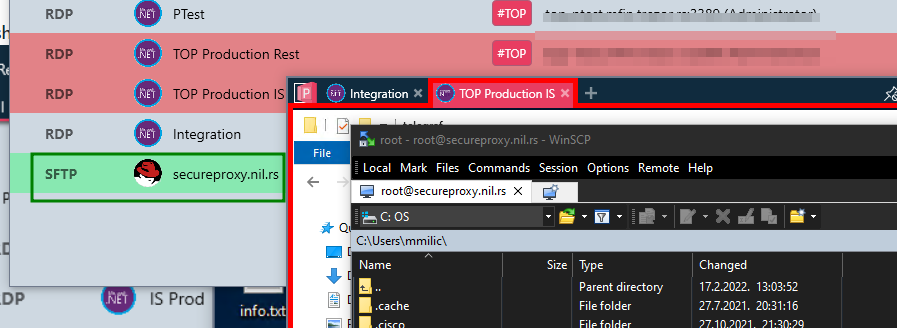
@VShawn commented on GitHub (Feb 27, 2022):
hum....sometime I just can not capture the handle of the external app window, and I can't move it into my tab window without that handle.
Even with the same external app, it is possible that it works on one machine but not works on another machine.
I did not find a solution now, that's why I provide this:
@majkinetor commented on GitHub (Feb 28, 2022):
This was disabled. When I enabled it, it was still outside but tab appeared.
OK, when I find time I will inspect more about this...
@VShawn commented on GitHub (Mar 1, 2022):
Yes sometimes it works, sometimes it fault when enabled
Hosting.Here is my two consecutive sessions:
@VShawn commented on GitHub (Mar 2, 2022):
After some inspect.
In ticke #192, I remove the loop detect for the external app's WindowHandle to reduce cpu usage.
After this change, PRM can not get the real WindowHandle of WinSCP (because WindowHandle of WinSCP will change after it connected).