mirror of
https://github.com/1Remote/1Remote.git
synced 2026-04-25 13:36:03 +03:00
[GH-ISSUE #113] USB redirection #2012
Labels
No labels
area-configuration
area-ct-app
area-ct-rdp
area-ct-remoteapp
area-ct-ssh
area-ct-vnc
area-launcher
area-list
area-tags
area-teamwork
bug
chore
dependencies
general-build/ci
general-performance
general-refactor
general-security
general-supportive
general-ux
meta-documentation
meta-enhancement
meta-enhancement
meta-feature
meta-help-wanted
meta-unknown-error
priority-hi
priority-low
pull-request
question
resolution-duplicate
resolution-invalid
resolution-wontfix
stale
task-put-off
task-still-considering
task-working-in-progress
No milestone
No project
No assignees
1 participant

Notifications
Due date
No due date set.
Dependencies
No dependencies set.
Reference
starred/1Remote#2012
Loading…
Add table
Add a link
Reference in a new issue
No description provided.
Delete branch "%!s()"
Deleting a branch is permanent. Although the deleted branch may continue to exist for a short time before it actually gets removed, it CANNOT be undone in most cases. Continue?
Originally created by @imsonica on GitHub (Apr 22, 2021).
Original GitHub issue: https://github.com/1Remote/1Remote/issues/113
Originally assigned to: @VShawn on GitHub.
Hello,
is it possible to add the feature to redirect the USB devices to the remote host?
I've selected the "port" flag on the options tab of the connection but I'm not able to see the "Select device to use" button as in Microsoft RD client
Thank you so much, your software is working very well :)
A
@VShawn commented on GitHub (Apr 23, 2021):
wooah sorry I didn't realize it doesn't support usb redirection, I will find out the solution.
it seems that the mstsc librariy offering by Microsoft, did not offer a special option for usb redirection, it must be hiding somewhere.
@imsonica commented on GitHub (Apr 23, 2021):
for your info it is called "RemoteFX USB Device Redirection" and has to be enabled in client and host via gpedit
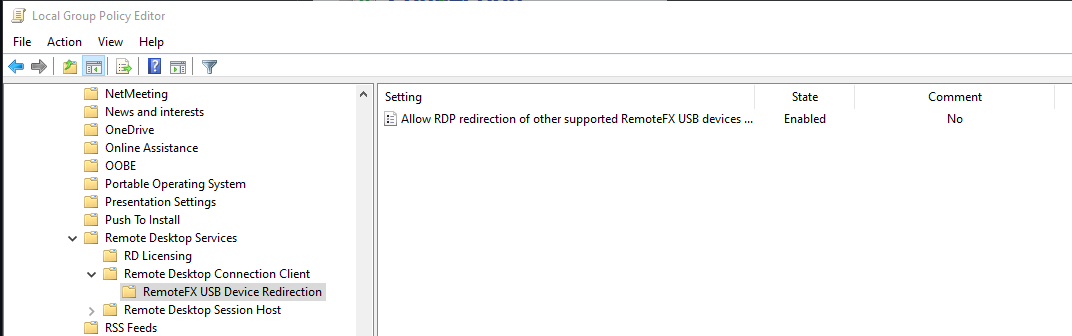
@VShawn commented on GitHub (Apr 23, 2021):
I developed a beta version and can redirect my USB flash drive. Now it only need to check the "Disk Drives" then the USB flash drive will be redirected. Since I only have a USB flash drive on hand now, I cannot test whether other USB devices(like a camera https://github.com/mRemoteNG/mRemoteNG/issues/1951) are working properly.
If you have other USB devices, please help me to test.
PRemoteM 0.5.10.3-beta.zip
And I am still looking for how to show this “devices button” on the connection bar : (, I cannot find anything about how to show this button.
https://docs.microsoft.com/en-us/windows/win32/termserv/imstscaxevents-ondevicesbuttonpressed
@nicobo01 commented on GitHub (Apr 23, 2021):
Hello @VShawn ,
Your application is detected as ransomware.
@VShawn commented on GitHub (Apr 23, 2021):
@nicobo01
err,sorry but I don't understand why your anti-virus software misreported.My package was compiled directly through msbuild, and it shouldn't be misreported(IMO). I don't know the knowledge of anti-virus, so I can't analyze the reason.
BTW, I use windows defender only, and it gets along well with my application.
@VShawn commented on GitHub (Apr 23, 2021):
@nicobo01 Are all the packages(https://github.com/VShawn/PRemoteM/releases) are detected as ransomware,
or only this version(PRemoteM 0.5.10.3-beta.zip) is reported as a virus?
in this version I added a subscription to the USB device unplugging event, it may be that this place caused the virus misreported.
@nicobo01 commented on GitHub (Apr 23, 2021):
Hello @VShawn
My antivirus is Trend Micro Apex-One. This detects PRemoteM.exe as a potential ransomware.
I did not test with another version of the software.
The offending one is the PRemoteM.0.5.10.3-beta version.
,
@VShawn commented on GitHub (Apr 25, 2021):
@nicobo01 thank you, I will download it for a free trial latter.
@imsonica commented on GitHub (Apr 25, 2021):
The actual beta doesnt do the job, usb devices are not redirected.
I've seen the mremoteng is showing the icon but doesnt work (click on it doesnt show the selection panel)
Ciao
@VShawn commented on GitHub (Apr 25, 2021):
@imsonica
usb devices redirect only in tab view, rdp with full screen will not work, it is a bug i fixed 11 hours ago
github.com/VShawn/PRemoteM@771b0f6051. do you test in full-screen mode? and Is your USB device a USB flash drive?@imsonica commented on GitHub (Apr 25, 2021):
I'll try another test, I'm not sure I can redirect usb since my company policies. I tested and I would like to redirect usb HID devices like spacemouce.
I did the test in full screen, I'll try again as you said.
@VShawn commented on GitHub (Apr 26, 2021):
Thank you for your help, but according to your description, I feel that my previous work cannot fit your needs. And what's more regrettable is that when I don't have a spacemouce, I can't debug this function at all.
@imsonica commented on GitHub (Apr 26, 2021):
In the list of RemoteFX also webcams or usb headsets appear, you could debug using these kind of devices.
@majkinetor commented on GitHub (Apr 26, 2021):
I can't see a difference - v0.5.10.2 already shows USB drive as remote drive. I can't see any new local drive in both versions.
@VShawn commented on GitHub (Apr 26, 2021):
@majkinetor
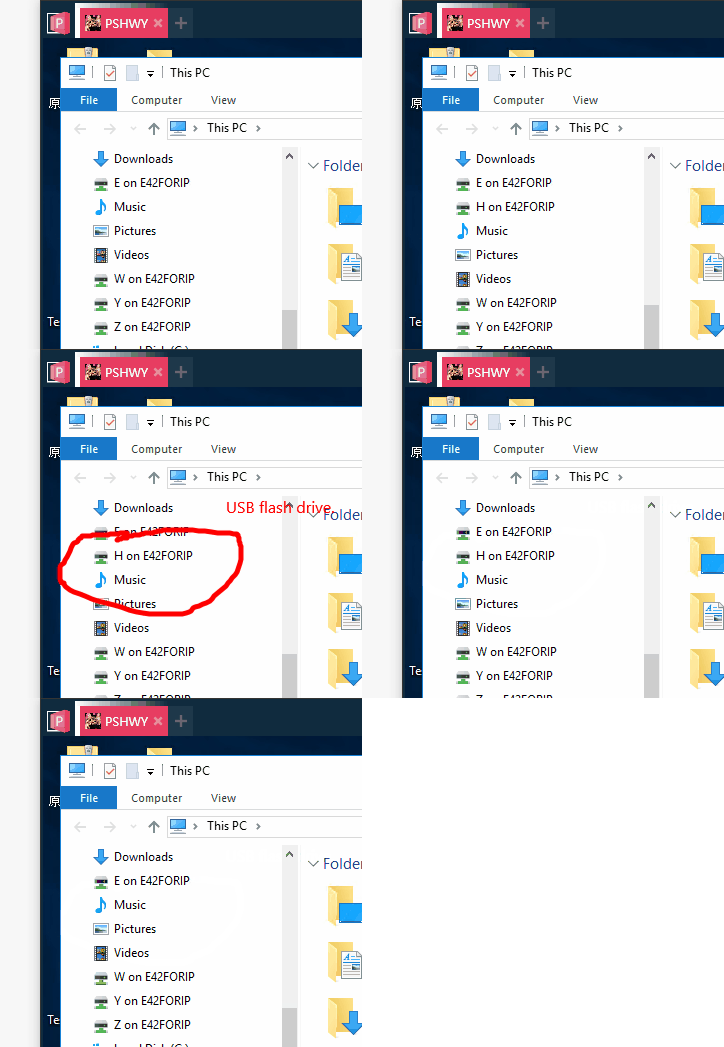
The older version cannot update the device redirection when you insert or remove the USB flash drive.
see:
@majkinetor commented on GitHub (Apr 26, 2021):
No, it doesn't work for me. It shows under 'Redirected drives', but that worked on old version. Tried 2 different USB drives and 2 different Windows remote OS.
@itagagaki commented on GitHub (May 11, 2021):
Hi,
I saw this comment and gave it a try.
Feature Request: Using local devices in Remote session · Issue #1951 · mRemoteNG/mRemoteNG
Downloaded
PRemoteM 0.5.10.3-beta.zip
Extracted it to C:\usr\pRemoteM
And launched PRemoteM.exe
...Nothing happened. No window was opened, no error message was given.
My system is: x64 Windows 10 Pro 20H2; no security software except Windows security.
Microsoft Defender reported no current threats.
@VShawn commented on GitHub (May 11, 2021):
@itagagaki
こんにちは 板垣さん
I dont konw what happen on you, but you can try this to help me.
C:\Users\ * YOUR USER NAME * \AppData\Roaming\PRemoteMand see if there are any log files.@itagagaki commented on GitHub (May 11, 2021):
@VShawn
This is the log. The message is in Japanese, but it may help you.
PRemoteM.log.md.zip
The store version 0.5.10.2 worked fine.
@VShawn commented on GitHub (May 11, 2021):
@itagagaki Thanks for your log. It looks like a error caused by character encoding or reflection from the log message. so I delete some plugin dll for you, it may works:
PRemoteM.0.5.10.3-beta2.zip
@itagagaki commented on GitHub (May 11, 2021):
Beta2 didn't work either but I found out that one of the reasons it didn't work was because of the zone identifiers, so I unblocked them and tried to run it, and got a Chinese error dialog. I do not understand what it says..
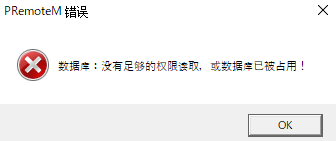
And here's the log.
2021-05-11T21:00:45.3654588+09:00[ThreadId:0000000001] Debug Call HideMe()
2021-05-11T21:00:48.6565077+09:00[ThreadId:0000000001] Debug Call HideMe()
2021-05-11T21:00:50.0570413+09:00[ThreadId:0000000001] Debug Call HideMe()
2021-05-11T21:00:58.4890007+09:00[ThreadId:0000000004] Debug Check update.
@VShawn commented on GitHub (May 11, 2021):
@itagagaki it said It does not have permission to read the database, or the database is already occupied.
The error message was decided to be Chinese by environment judgement, It seems that my program is still not able to adapt to the Japanese system environment. 😞
BTW database path can be modified in the
PRemoteM.ini@itagagaki commented on GitHub (May 11, 2021):
Okay, I was able to launch 0.5.10.3 beta.
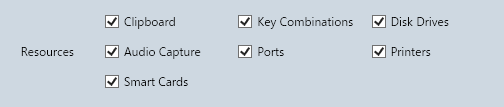
I'll finally get to the point. How can I test the redirection of cameras and other USB devices?
I checked all of the "Resources" for now, but unfortunately the remote PC doesn't find the camera.
@VShawn commented on GitHub (May 12, 2021):
@itagagaki this means usb redirection not works for usb cameras. It seems that I have to buy a usb camera📷 to debug this.
BTW did you test usb flash drive? did it works?
@majkinetor commented on GitHub (May 12, 2021):
I believe modern smart phones are the same with their camera mode of usb transfer.
@itagagaki commented on GitHub (May 12, 2021):
@VShawn usb flash drive works but it works also on 0.5.10.2
@majkinetor commented on GitHub (May 12, 2021):
No, that is not it, previously it showed as remote drive (from the host) while it should show as local drive.
@itagagaki commented on GitHub (May 12, 2021):
Ah, I see. Yes, it showed up as a remote drive, but not as a local drive.
@Xp96 commented on GitHub (Dec 3, 2021):
I found this one in pt
https://www.ti-enxame.com/pt/window/como-habilitar-o-redirecionamento-usb-no-windows-10/1056392685/
these others who can also help
https://stackoverflow.com/questions/33719489/how-to-enable-usb-redirection-in-windows-10
https://social.technet.microsoft.com/Forums/en-US/dd35353f-6056-4249-aaeb-57c6ab2588ae/usb-redirectionremotefx-windows-10-enterprise?forum=win10itprogeneral
@brendan-pike commented on GitHub (Oct 31, 2022):
I have been trying to get a USB footpedal to work over RDP with no luck. It will work to the same server when I use a Linux client (Remmina) but not on my Windows 10. I have enabled all of the Advantage / Resources but the foot pedal does not show up. Is there anything I can do it get this working?
@VShawn commented on GitHub (Oct 31, 2022):
@brendan-pike We lost usb redirection when port to .NET6 after 0.7.X.
Still dont know how to bring it back.
You can try https://github.com/1Remote/PRemoteM/releases/tag/0.6.2.1, Usb disk redirection works on this version.
@brendan-pike commented on GitHub (Oct 31, 2022):
Thanks, no joy with that version either sadly. I should of mentioned that the official windows RDP client doesn't work with my footpedal either. So it may not be specific to this app, was just hoping to find a windows one that worked like Llinux can.
@VShawn commented on GitHub (Dec 18, 2022):
Hi guys, I still working on this ticke.
The
Redirection of Plug and Play Devicesfunctional failure because ofpointer size in 64 bithas been successfully repaired today. It will be merged into PRemoteM after I've been testing it for a while.FYI
Different between RDP redirection and RemoteFX one:
USB Redirection method for different devices:
@itagagaki commented on GitHub (Dec 19, 2022):
It's been a while. I saw your new comment and tried again 0.7.1.7 and the Microsoft Store version. The local webcam and headset were not recognized by the remote; the USB drive is recognized. I also tried changing the group policy but no luck.
@VShawn commented on GitHub (Dec 19, 2022):
Hey I've not make a releass for this yet. Besides the new commit fix the usb disk plug in event redirect. usb camera redirect is still WIP.
BTW if you wannt try usb disk redirect you can get nightly build form https://github.com/1Remote/PRemoteM/actions/runs/3728969726. Note you might need enable the option:
@itagagaki commented on GitHub (Dec 23, 2022):
I found that by setting mstsc.exe mode to enabled, a USB devices connected to the client PC (e.g. webcam) can be used on the remote PC !
However, that does not allow the remote's display size to be the client's window size. Nor can the tab function be used. Then it is the same as Microsoft's RDP client, so there is no point in using 1Remote.
Is this unavoidable?
@VShawn commented on GitHub (Dec 30, 2022):
@itagagaki
Nope, technically I have made camera available via tab mode. I testing it all the time when I stay home with a covid19 fever last week and finally it works.
@majkinetor commented on GitHub (Dec 30, 2022):
@brendan-pike maybe you can use Remmina for such connections via custom protocol, if it can be controled via CLI?
Does it work in FreeRDP ? It works with PRM now.
@VShawn commented on GitHub (Dec 30, 2022):
I haven't tested the gamepad yet, I'll next step buy a Xbox controller to see if it can be redirected:)
@itagagaki commented on GitHub (Dec 30, 2022):
Hi,
I built and ran the latest code, but on my end, when mstsc.exe mode is disabled, the webcam did not appear on the remote side.
This may be unrelated, but on my client PC (Windows 10 Pro 21H2), the camera was in Device Manager under "Imaging Devices", not "Cameras".
While trying to try further, an exception was thrown.
'attr' was null at LauncherWindowView.xaml.cs Line 387.
@VShawn commented on GitHub (Dec 30, 2022):
@imsonica sorry I haven't committed this part of the code yet😂
On my 22H2 there's no session named "Imaging Devices". But I think it's roughly the same thing
@majkinetor commented on GitHub (May 7, 2023):
What is the status of this @VShawn , can it be closed or not ?
@VShawn commented on GitHub (May 8, 2023):
@majkinetor
the tasks:
Since I have no idear for RemoteFX now. We can close this ticket and create a new Limbo ticket for
USB gamepad based on RemoteFX.@itagagaki commented on GitHub (Jun 5, 2023):
@VShawn Is this not reflected in the release binary yet?
I tried 0.7.2.8 but could not redirect the USB webcam.
@VShawn commented on GitHub (Jun 5, 2023):
@itagagaki
no, camera no working on 0.7.2.8
you can find it on 1Remote version.
@itagagaki commented on GitHub (Jun 5, 2023):
@VShawn Where is the 1Remote version?
I downloaded from below, but I can only find PRemoteM.exe but 1Remote in it.
https://github.com/1Remote/1Remote/releases/tag/0.7.2.8
@VShawn commented on GitHub (Jun 5, 2023):
@itagagaki
here: https://1remote.org/download/
it still in public beta test now.
@itagagaki commented on GitHub (Jun 5, 2023):
@VShawn
So you mean here?
https://github.com/1Remote/1Remote/releases/tag/Nightly
I'll wait for stable release.
Thank you.