[GH-ISSUE #11] Add option to open windows grouped by "Group" tag in configuration. #1927

Closed
opened 2026-03-01 17:15:58 +03:00 by kerem · 7 comments
Owner

Originally created by @BrommD on GitHub (Jul 21, 2020).
Original GitHub issue: https://github.com/1Remote/1Remote/issues/11

Originally assigned to: @VShawn on GitHub.

Hi

I would like to have the option to have opening profiles for a remote system being grouped by "Group" tag. So if I have several groups, each with several remote systems, on opening they are grouped in their own "Group" windows, not instead opening all in same window.

thanks

Regards, Dejan

Originally created by @BrommD on GitHub (Jul 21, 2020). Original GitHub issue: https://github.com/1Remote/1Remote/issues/11 Originally assigned to: @VShawn on GitHub. Hi I would like to have the option to have opening profiles for a remote system being grouped by "Group" tag. So if I have several groups, each with several remote systems, on opening they are grouped in their own "Group" windows, not instead opening all in same window. thanks Regards, Dejan
kerem 2026-03-01 17:15:58 +03:00
Author
Owner

@VShawn commented on GitHub (Jul 22, 2020):

I see what you mean.

if I have servers S1 S2 S3 in group G1, S4 S5 S6 in group G2
then when i conn S1 S2 they go to Tab1 while S3 S4 goes to Tab2.

these was pointed in my prototype develop plans, but there was some logic chaotic

what if  the user drag S1 to a new window Tab3? Which Tab would S3 go? Tab1 or Tab3?

These was confused me and it's why i not implement the feature.

Hope you give me some advice.😄

<!-- gh-comment-id:662401619 --> @VShawn commented on GitHub (Jul 22, 2020): I see what you mean. ``` if I have servers S1 S2 S3 in group G1, S4 S5 S6 in group G2 then when i conn S1 S2 they go to Tab1 while S3 S4 goes to Tab2. ``` these was pointed in my prototype develop plans, but there was some logic chaotic ``` what if the user drag S1 to a new window Tab3? Which Tab would S3 go? Tab1 or Tab3? ``` These was confused me and it's why i not implement the feature. Hope you give me some advice.:smile:
Author
Owner

@BrommD commented on GitHub (Jul 22, 2020):

Hi, fair statement. For me, the TABs (as bag of profiles) are the "Group" names, so we would have here TAB-G1:S1,S2,S3 and Tab-G2:S4,S5,S6. On moving Tab-G1:S1 to a new TAB, it loses the parent Tab-G1 tag, instead it creates its own new TAB (without a visual name), internally maybe as TAB-<UID>. You might provide the option to name the new fresh TAB...just an idea. Tab-G1:S2,S3 stay as it is. If you continue to move S2 and S3 to this new TAB-<UID>, the question is, what happened to last S3 on moving, when you drop it to TAB-<UID>, as S3 is the last TAB-G1 tagged profile?

Well, in my opinion, it loses (runtime) the TAB-G1 tag and gets TAB-<UID> instead. Means, the group G1 is gone until you open a new G1:Sx connection. Me personally don't move a S1 from G1 to G2 regularly, as it is grouped correctly on setup the remote profiles. Anyway. So the first opening creates a Gx-tag TAB, but on moving all its member away, it might get removed (runtime), if last member is gone.

My thought is, on moving something away, the user is aware, that it moves sth away from a defined configuration (TAB-Gx) to sth new, which cannot be predicted by the tool without support of that user itself. You may implement a feature, that i.e. on moving G1:S1 and pressing a key (CTRL) at same time, the new Tab-<UID> requests a name for it, otherwise (simple muse-move, no CTRL pressed) it gets a TAB-<UID> (for handling), but Windows-titel/TAB maybe inherits sth like TAB-S1 (the first member of the new TAB).

BTW, naming the Windows (Title) using the group name, instead of the active profile in that TAB, makes it easier to find the TAB in Windows task list...

And at the end, not having a group defined for a remote profile requires you to name the TAB somehow. TAB-Default? :)

Thanks for your time

<!-- gh-comment-id:662532219 --> @BrommD commented on GitHub (Jul 22, 2020): Hi, fair statement. For me, the TABs (as bag of profiles) are the "Group" names, so we would have here `TAB-G1:S1,S2,S3` and `Tab-G2:S4,S5,S6`. On moving `Tab-G1:S1` to a new TAB, it loses the parent `Tab-G1` tag, instead it creates its own new TAB (without a visual name), internally maybe as `TAB-<UID>`. You might provide the option to name the new fresh TAB...just an idea. `Tab-G1:S2,S3` stay as it is. If you continue to move `S2` and `S3` to this new `TAB-<UID>`, the question is, what happened to last` S3` on moving, when you drop it to `TAB-<UID>`, as `S3` is the last `TAB-G1` tagged profile? Well, in my opinion, it loses (runtime) the `TAB-G1` tag and gets `TAB-<UID>` instead. Means, the group `G1` is gone until you open a new `G1:Sx` connection. Me personally don't move a `S1` from `G1` to` G2` regularly, as it is grouped correctly on setup the remote profiles. Anyway. So the first opening creates a `Gx-tag TAB`, but on moving all its member away, it might get removed (runtime), if last member is gone. My thought is, on moving something away, the user is aware, that it moves sth away from a defined configuration (`TAB-Gx`) to sth new, which cannot be predicted by the tool without support of that user itself. You may implement a feature, that i.e. on moving `G1:S1` and pressing a key (CTRL) at same time, the new `Tab-<UID>` requests a `name` for it, otherwise (simple muse-move, no CTRL pressed) it gets a `TAB-<UID>` (for handling), but Windows-titel/TAB maybe inherits sth like `TAB-S1` (the first member of the new TAB). BTW, naming the Windows (Title) using the group name, instead of the active profile in that TAB, makes it easier to find the TAB in Windows task list... And at the end, not having a `group` defined for a remote profile requires you to name the TAB somehow. `TAB-Default`? :) Thanks for your time
Author
Owner

@VShawn commented on GitHub (Jul 24, 2020):

thanx for your suggestion, I get some idea now.

  1. Ctrl drog may not be implemented because the tab control would be hard to add a feature since I cite it from an opensource project.
  2. Other features would be planed in further development project.
  3. I need to design the set-up page for Tab toggle between "normal mode" and so call "group first mode" 😆.
    AND design the new behavior flow of the Tab. OOPS it may takes time to make some code refactoring😲.

Let me know if your have any further advice❤️.

<!-- gh-comment-id:663551708 --> @VShawn commented on GitHub (Jul 24, 2020): thanx for your suggestion, I get some idea now. 1. Ctrl drog may not be implemented because the tab control would be hard to add a feature since I cite it from an opensource project. 1. Other features would be planed in further [development project](https://github.com/VShawn/PRemoteM/projects/2). 1. I need to design the set-up page for Tab toggle between "normal mode" and so call "group first mode" :laughing:. AND design the new behavior flow of the Tab. OOPS it may takes time to make some code refactoring:astonished:. Let me know if your have any further advice:heart:.
Author
Owner

@BrommD commented on GitHub (Jul 30, 2020):

Hi

for 1) I can also live with a message box, requesting a new name (like mentioned above), if left emopty (so one hits "return" simply), it continues like before... should also work.

so far, I'm good with features...will let you know, if having sth new. Thanks.

<!-- gh-comment-id:666220238 --> @BrommD commented on GitHub (Jul 30, 2020): Hi for 1) I can also live with a message box, requesting a new name (like mentioned above), if left emopty (so one hits "return" simply), it continues like before... should also work. so far, I'm good with features...will let you know, if having sth new. Thanks.
Author
Owner

@VShawn commented on GitHub (Aug 5, 2020):

@BrommD

Hi you could try this pre-release version to enjoy the grouped tab : ).
I knew it's not prefect as i thought that 'requesting a new name by message box' is not that beautiful AND i have no idea how to make it a better interaction.

Download

PRemoteM 0.4.8.2008052011.zip

e.g.

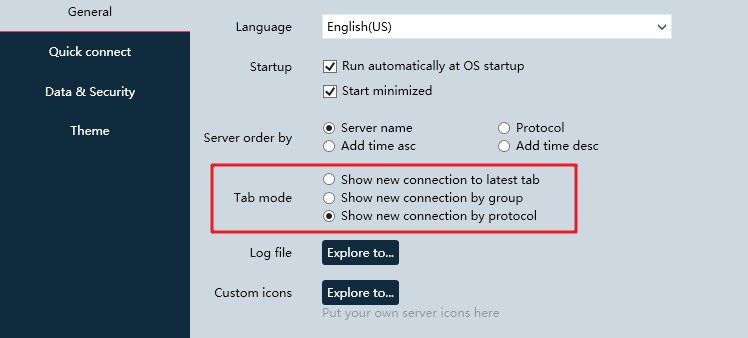
the new option is here, i wish you could enjoy it.
Snipaste_2020-08-05_20-14-56

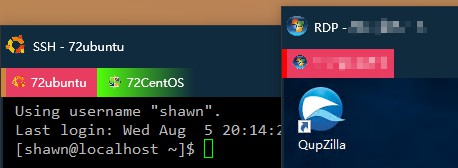
here is two tab: SSH tab & RDP tab
Snipaste_2020-08-05_20-27-56

<!-- gh-comment-id:669164416 --> @VShawn commented on GitHub (Aug 5, 2020): @BrommD Hi you could try this pre-release version to enjoy the grouped tab : ). I knew it's not prefect as i thought that 'requesting a new name by message box' is not that beautiful AND i have no idea how to make it a better interaction. ## Download [PRemoteM 0.4.8.2008052011.zip](https://github.com/VShawn/PRemoteM/files/5028355/PRemoteM.0.4.8.2008052011.zip) ## e.g. the new option is here, i wish you could enjoy it. ![Snipaste_2020-08-05_20-14-56](https://user-images.githubusercontent.com/10143738/89411637-587e7d80-d758-11ea-9169-ebc923f1bbec.jpg) here is two tab: SSH tab & RDP tab ![Snipaste_2020-08-05_20-27-56](https://user-images.githubusercontent.com/10143738/89412747-2cfc9280-d75a-11ea-8b78-0db330e21783.jpg)
Author
Owner

@BrommD commented on GitHub (Aug 5, 2020):

👍 it works so far.....
BTW, is it possible to have the grouped windows title being displayed as the "group name" by default, not as the active tab.

thanks very much

Dejan

<!-- gh-comment-id:669170316 --> @BrommD commented on GitHub (Aug 5, 2020): 👍 it works so far..... BTW, is it possible to have the grouped windows title being displayed as the "group name" by default, not as the active tab. thanks very much Dejan
Author
Owner

@VShawn commented on GitHub (Aug 5, 2020):

sure thing, the 'Tab title naming style' option would be added in future It just easy but takes time.

<!-- gh-comment-id:669246568 --> @VShawn commented on GitHub (Aug 5, 2020): sure thing, the 'Tab title naming style' option would be added in future It just easy but takes time.
Sign in to join this conversation.
No milestone
No project
No assignees
1 participant
Notifications
Due date
The due date is invalid or out of range. Please use the format "yyyy-mm-dd".

No due date set.

Dependencies

No dependencies set.

Reference
starred/1Remote#1927
No description provided.