[GH-ISSUE #183] Wrong program signature! The program is irremediably altered. Download a new version from official web site. #156

Closed
opened 2026-02-26 11:56:57 +03:00 by kerem · 17 comments
Owner

Originally created by @SofiaStar on GitHub (Jan 20, 2022).
Original GitHub issue: https://github.com/1Remote/1Remote/issues/183

Originally assigned to: @VShawn on GitHub.

image
image
image

Originally created by @SofiaStar on GitHub (Jan 20, 2022). Original GitHub issue: https://github.com/1Remote/1Remote/issues/183 Originally assigned to: @VShawn on GitHub. ![image](https://user-images.githubusercontent.com/52817349/150274258-cf6bb221-ed33-47fd-a77d-27a11c27f7bb.png) ![image](https://user-images.githubusercontent.com/52817349/150274291-483bc67e-7b28-4424-be69-3e0eec08889e.png) ![image](https://user-images.githubusercontent.com/52817349/150274525-916c7ea0-0598-403b-965c-ce1058090b7a.png)
kerem 2026-02-26 11:56:57 +03:00
Author
Owner

@VShawn commented on GitHub (Jan 20, 2022):

It appened again! #98 #117

KiTTY said it has "Wrong program signature!"

Since the KiTTY is the offical version form http://www.9bis.net/, I don't know the cause of the failure.

As a template solution, you can download the latest KiTTY from http://www.9bis.net/, and add it as the default ssh runner.

image

<!-- gh-comment-id:1017159064 --> @VShawn commented on GitHub (Jan 20, 2022): It appened again! #98 #117 KiTTY said it has "Wrong program signature!" Since the KiTTY is the offical version form http://www.9bis.net/, I don't know the cause of the failure. As a template solution, you can download the latest KiTTY from http://www.9bis.net/, and add it as the default ssh runner. ![image](https://user-images.githubusercontent.com/10143738/150284695-9ea557ac-2d61-4295-a375-928af08d57a1.png)
Author
Owner

@SofiaStar commented on GitHub (Jan 20, 2022):

got it , thanks !

<!-- gh-comment-id:1017169314 --> @SofiaStar commented on GitHub (Jan 20, 2022): got it , thanks !
Author
Owner

@VShawn commented on GitHub (Jan 20, 2022):

@SofiaStar 对了,您可以协助测试一下,直接双击启动软件自带的 KiTTY 连接SSH时,是否会弹出这个更新提示么?

软件自带 KiTTY 位于:
C:\Users\你的用户名\AppData\Roaming\PRemoteM\Kitty\kitty_portable_PRemoteM.exe

我刚才去搜索了 KiTTY 的源码,没找到 Wrong program signature 这句话,因此现在在怀疑是否是通过 PRemoteM 调用 KiTTY 才会弹出这个提示。

另外最令人疑惑的是,这个提示在大部分人的电脑上似乎都不会弹出,这个问题应该还和 Windows 的某些系统设置有关。

<!-- gh-comment-id:1017170523 --> @VShawn commented on GitHub (Jan 20, 2022): @SofiaStar 对了,您可以协助测试一下,直接双击启动软件自带的 KiTTY 连接SSH时,是否会弹出这个更新提示么? 软件自带 KiTTY 位于: C:\Users\你的用户名\AppData\Roaming\PRemoteM\Kitty\kitty_portable_PRemoteM.exe 我刚才去搜索了 KiTTY 的源码,没找到 `Wrong program signature` 这句话,因此现在在怀疑是否是通过 PRemoteM 调用 KiTTY 才会弹出这个提示。 另外最令人疑惑的是,这个提示在大部分人的电脑上似乎都不会弹出,这个问题应该还和 Windows 的某些系统设置有关。
Author
Owner

@SofiaStar commented on GitHub (Jan 20, 2022):

image

测试了一下,依然是这个报错,不知道问题出在哪里,官网下载的kitty是OK的

<!-- gh-comment-id:1017172688 --> @SofiaStar commented on GitHub (Jan 20, 2022): ![image](https://user-images.githubusercontent.com/52817349/150288668-3527d9a9-f39c-4c33-891f-d117a36c4ae6.png) 测试了一下,依然是这个报错,不知道问题出在哪里,官网下载的kitty是OK的
Author
Owner

@VShawn commented on GitHub (Jan 20, 2022):

@SofiaStar 我的意思是,尝试直接进入目录 C:\Users\你的用户名\AppData\Roaming\PRemoteM\Kitty\ 双击启动 Kitty,看还会不会有这个提示。

<!-- gh-comment-id:1017174154 --> @VShawn commented on GitHub (Jan 20, 2022): @SofiaStar 我的意思是,尝试直接进入目录 `C:\Users\你的用户名\AppData\Roaming\PRemoteM\Kitty\` 双击启动 Kitty,看还会不会有这个提示。
Author
Owner

@VShawn commented on GitHub (Jan 20, 2022):

I checked the MD5 of kitty_portable_PRemoteM.exe and kitty_portable.exe v0.74.4.13.

got a same value

image

<!-- gh-comment-id:1017176327 --> @VShawn commented on GitHub (Jan 20, 2022): I checked the MD5 of [kitty_portable_PRemoteM.exe](https://github.com/VShawn/PRemoteM/blob/dev/PRM.Core/External/KiTTY/kitty_portable.exe) and [kitty_portable.exe v0.74.4.13](https://github.com/cyd01/KiTTY/releases/download/v0.74.4.13/kitty_portable.exe). got a same value ![image](https://user-images.githubusercontent.com/10143738/150289557-0db3de19-998c-4874-8b2c-47ba69e8c340.png)
Author
Owner

@SofiaStar commented on GitHub (Jan 20, 2022):

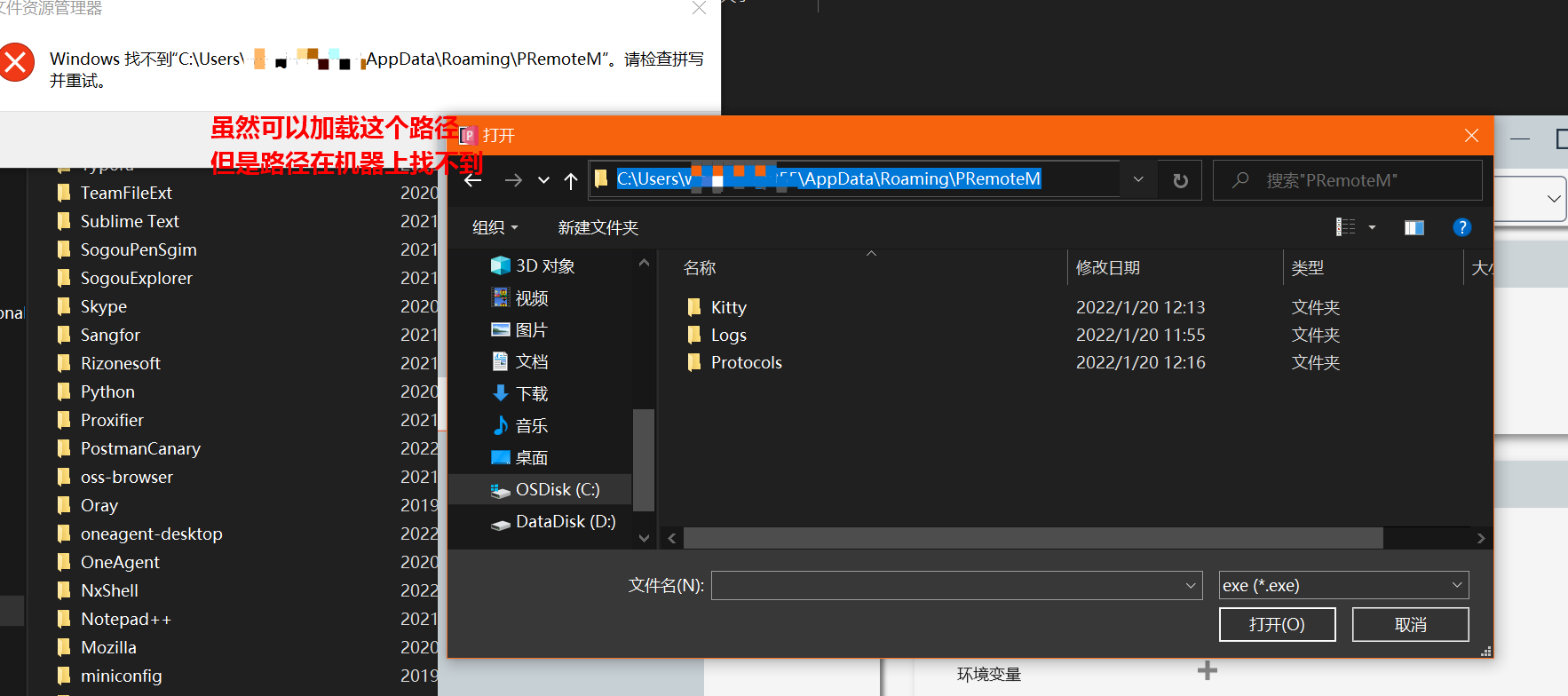
我想我大概找到本机的kitty不生效的原因了
image
kan看着像是某些资源在下载的时候没能进入实际的目录

<!-- gh-comment-id:1017196637 --> @SofiaStar commented on GitHub (Jan 20, 2022): 我想我大概找到本机的kitty不生效的原因了 ![image](https://user-images.githubusercontent.com/52817349/150294151-057c40d4-a1c2-4e68-be0e-477b993ccca7.png) kan看着像是某些资源在下载的时候没能进入实际的目录
Author
Owner

@VShawn commented on GitHub (Jan 20, 2022):

@SofiaStar 不对,explorer 内找不到 PRemoteM 的目录原因是 Microsoft Store 版本的软件会被系统在沙盒中运行,软件内访问到的目录是被映射出来的虚拟目录,并非是用户的真实文件目录。然而这些文件实际上是真实存在于某个沙盒中的,理论上不会导致Wrong program signature! 这个故障。

我得找台完全没有开发环境的新电脑测试一下。

<!-- gh-comment-id:1017233932 --> @VShawn commented on GitHub (Jan 20, 2022): @SofiaStar 不对,explorer 内找不到 PRemoteM 的目录原因是 Microsoft Store 版本的软件会被系统在沙盒中运行,软件内访问到的目录是被映射出来的虚拟目录,并非是用户的真实文件目录。然而这些文件实际上是真实存在于某个沙盒中的,理论上不会导致`Wrong program signature! `这个故障。 我得找台完全没有开发环境的新电脑测试一下。
Author
Owner

@stetze commented on GitHub (Jan 20, 2022):

Screenshot 2022-01-20 113529

150322562-dae2d1a1-271f-43a3-b5f0-fe151b9f6830

I have the same problem, how can i help?

<!-- gh-comment-id:1017419541 --> @stetze commented on GitHub (Jan 20, 2022): ![Screenshot 2022-01-20 113529](https://user-images.githubusercontent.com/73733823/150322569-0a005474-0183-43ff-9dd4-f3437470148e.png) ![150322562-dae2d1a1-271f-43a3-b5f0-fe151b9f6830](https://user-images.githubusercontent.com/73733823/150333856-ae6505fa-3ca0-4894-b1ab-a3b67c9edf2f.png) I have the same problem, how can i help?
Author
Owner

@majkinetor commented on GitHub (Jan 20, 2022):

I can't help while people speak here language I don't understand. I am not sure why you promote this @VShawn? Don't u have mirror on gettee?

<!-- gh-comment-id:1017423649 --> @majkinetor commented on GitHub (Jan 20, 2022): I can't help while people speak here language I don't understand. I am not sure why you promote this @VShawn? Don't u have mirror on gettee?
Author
Owner

@VShawn commented on GitHub (Jan 20, 2022):

@majkinetor

I am not sure why you promote this.

I am not intend to impede people from using their native language here. If I dont understand I will try google translate or ask the guy to describe it again in English. I don't think it's a problem.

Don't u have mirror on gettee?

I dont maintain the gitee mirror, I never sign in gitee after I set it sync from GitHub.


@stetze88

I have the same problem, how can i help?

Thx, I have no idea to solve this problem at the moment, I will ask you for help if needed.

<!-- gh-comment-id:1017507683 --> @VShawn commented on GitHub (Jan 20, 2022): @majkinetor > I am not sure why you promote this. I am not intend to impede people from using their native language here. If I dont understand I will try google translate or ask the guy to describe it again in English. I don't think it's a problem. > Don't u have mirror on gettee? I dont maintain the gitee mirror, I never sign in gitee after I set it sync from GitHub. --- @stetze88 > I have the same problem, how can i help? Thx, I have no idea to solve this problem at the moment, I will ask you for help if needed.
Author
Owner

@stetze commented on GitHub (Jan 20, 2022):

image
I switched to the OpenSSH client from Windows. It works. :)

<!-- gh-comment-id:1017881115 --> @stetze commented on GitHub (Jan 20, 2022): ![image](https://user-images.githubusercontent.com/73733823/150414468-6b952ae6-e76e-4652-8402-4659825cddbd.png) I switched to the OpenSSH client from Windows. It works. :)
Author
Owner

@VShawn commented on GitHub (Jan 21, 2022):

Finally, I found why.

As a MS Store APP, if C:\Users\Shawn\AppData\Roaming\PRemoteM was not existed before APP run. APP will get a virtualization of this locations. And exe run from virtualization should be signed by my signature.

All newly created files and folders in the user's AppData folder (e.g., C:\Users\user_name\AppData) are written to a private per-user, per-app location but merged at runtime to appear in the real AppData location. This allows some degree of state separation for artifacts that are only used by the application itself, and this enables the system to clean up those files when the application is uninstalled. Modifications to existing files under the user's AppData folder is allowed to provide a higher degree of compatibility and interactivity between applications and the OS. This reduces filesystem “rot” because the OS is aware of every file or directory change made by an application. State separation also allows packaged desktop applications to pick up where a non-packaged version of the same application left off. Note that the OS does not support a virtual file system (VFS) folder for the user's AppData folder.

here is how to disable virtualization on Win10 21H1 and later, https://docs.microsoft.com/en-us/windows/msix/desktop/flexible-virtualization

    <!-- If you don't want virtualization of file system writes to the user's AppData folder, then include the property, and set it to disabled. -->
    <desktop6:FileSystemWriteVirtualization>disabled</desktop6:FileSystemWriteVirtualization>
    

Maybe I should change a location to store Kitty

<!-- gh-comment-id:1018057000 --> @VShawn commented on GitHub (Jan 21, 2022): Finally, I found why. As a MS Store APP, if `C:\Users\Shawn\AppData\Roaming\PRemoteM` was not existed before APP run. APP will get a virtualization of this locations. And exe run from virtualization should be signed by my signature. > All newly created files and folders in the user's AppData folder (e.g., C:\Users\user_name\AppData) are written to a private per-user, per-app location but merged at runtime to appear in the real AppData location. This allows some degree of state separation for artifacts that are only used by the application itself, and this enables the system to clean up those files when the application is uninstalled. Modifications to existing files under the user's AppData folder is allowed to provide a higher degree of compatibility and interactivity between applications and the OS. This reduces filesystem “rot” because the OS is aware of every file or directory change made by an application. State separation also allows packaged desktop applications to pick up where a non-packaged version of the same application left off. Note that the OS does not support a virtual file system (VFS) folder for the user's AppData folder. here is how to disable virtualization on Win10 21H1 and later, https://docs.microsoft.com/en-us/windows/msix/desktop/flexible-virtualization ``` <!-- If you don't want virtualization of file system writes to the user's AppData folder, then include the property, and set it to disabled. --> <desktop6:FileSystemWriteVirtualization>disabled</desktop6:FileSystemWriteVirtualization> ``` Maybe I should change a location to store Kitty
Author
Owner

@majkinetor commented on GitHub (Jan 21, 2022):

Great find. Amazing.

Its probably good idea BTW to provide version without external tools included so we can have those benefits:

  1. independent update of tools
  2. smaller download for users and upload for you
  3. No more virus warnings because of external tools

In choco I can simply cinst premotem kitty openssh whatever to have them all up, running and interconnected (PRM could watch if there is kitty on PATH for example and use it if it finds it).

Ofc, it can be done anytime.

<!-- gh-comment-id:1018776992 --> @majkinetor commented on GitHub (Jan 21, 2022): Great find. Amazing. Its probably good idea BTW to provide version without external tools included so we can have those benefits: 1. independent update of tools 2. smaller download for users and upload for you 3. No more virus warnings because of external tools In choco I can simply `cinst premotem kitty openssh whatever` to have them all up, running and interconnected (PRM could watch if there is kitty on PATH for example and use it if it finds it). Ofc, it can be done anytime.
Author
Owner

@VShawn commented on GitHub (Jan 23, 2022):

@majkinetor
I considered two approaches: 1. Apply to disable the virtualization of AppData of MS Store; 2, no longer built-in Kitty. Currently in the assessment 1. If the it failed, I will turn to the 2.

<!-- gh-comment-id:1019399386 --> @VShawn commented on GitHub (Jan 23, 2022): @majkinetor I considered two approaches: 1. Apply to disable the virtualization of AppData of MS Store; 2, no longer built-in Kitty. Currently in the assessment 1. If the it failed, I will turn to the 2.
Author
Owner

@majkinetor commented on GitHub (Jan 23, 2022):

The point is that you can have both, and it could just be a CI setting once there is some better CI :)

<!-- gh-comment-id:1019442449 --> @majkinetor commented on GitHub (Jan 23, 2022): The point is that you can have both, and it could just be a CI setting once there is some better CI :)
Author
Owner

@VShawn commented on GitHub (Jan 26, 2022):

Apply to disable the virtualization of AppData of MS Store;

Apply passed, MS Store version has been upgraded.

image

We need a real C:\Users\Shawn\AppData\Roaming\PRemoteM not a virtualization one to avoid the Wrong program signature! alert.
more detail: https://github.com/VShawn/PRemoteM/issues/183

<!-- gh-comment-id:1021941911 --> @VShawn commented on GitHub (Jan 26, 2022): > Apply to disable the virtualization of AppData of MS Store; Apply passed, MS Store version has been upgraded. ![image](https://user-images.githubusercontent.com/10143738/151122015-a3d30227-21f4-430e-a1e4-3a99543e00d5.png) > We need a real `C:\Users\Shawn\AppData\Roaming\PRemoteM` not a virtualization one to avoid the `Wrong program signature!` alert. > more detail: https://github.com/VShawn/PRemoteM/issues/183
Sign in to join this conversation.
No milestone
No project
No assignees
1 participant
Notifications
Due date
The due date is invalid or out of range. Please use the format "yyyy-mm-dd".

No due date set.

Dependencies

No dependencies set.

Reference
starred/1Remote#156
No description provided.